
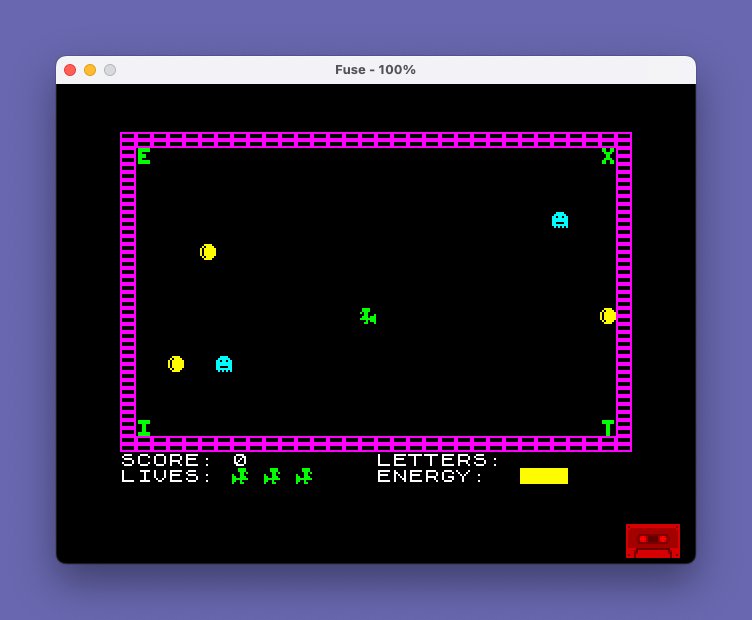
This program is a top-down maze-chase game in which the player controls a witch on a broomstick through seven stages of a Halloween castle, collecting letters from the four corners of each room to spell “EXIT” while avoiding ghosts, gravestones, and their own poisonous trail. Control is handled via the TS2068 left joystick port using the STICK keyword (|(1,1)), with the return value mapped to directional movement. Eleven user-defined graphics (UDGs 144–154) are loaded from DATA statements to represent the witch, castle walls, letters, ghosts, pumpkins, and gravestones. The game uses ATTR cell attribute reading for collision detection, distinguishing objects by their combined paper, ink, and bright values rather than tracking sprite positions in arrays. Skill level adjusts a delay loop length (sk), and energy is displayed using its numeric value as the INK color index, giving a visual depletion effect from white down to black.
Program Analysis
Program Structure
The program is organized into clearly labeled subroutines and sections, with REM comments marking each major block. The main flow is:
- Lines 10–30: Setup, UDG loading, title display
- Lines 110–160: UDG definition via DATA and POKE USR
- Lines 170–180: Instructions prompt and dispatch
- Lines 200–299: Variable initialization and castle drawing
- Lines 300–390: Object placement (letters, ghosts, pumpkins, gravestones)
- Lines 400–415: Status bar display subroutine
- Lines 420–560: Main movement loop
- Lines 600–900: Directional movement handlers
- Lines 1000–1110: Collision resolution
- Lines 1200–1210: Letter collection handler
- Lines 1500–1600: Death and game-over routines
- Lines 2000–2030: Stage completion and congratulations
- Lines 8000–8120: Multi-page instructions subroutine
- Lines 9000–9070: Castle layout drawing for each of 7 stages
- Line 9999: SAVE with auto-run
User-Defined Graphics
Eleven UDGs (characters 144–154, accessed as \a through \k) are defined by the loop at lines 110–160, which reads 8 bytes per character from DATA statements and POKEs them via USR CHR$ f+g. The characters serve the following roles:
| Escape | Char | Role |
|---|---|---|
\a | 144 | Castle wall block |
\b | 145 | Witch facing right (life icon) |
\c | 146 | Witch facing left |
\d | 147 | Pumpkin |
\e | 148 | Trail/fumes marker |
\f | 149 | Gravestone |
\g | 150 | Ghost |
\h | 151 | Letter H (EXIT corner) |
\i | 152 | Letter I (EXIT corner) |
\j | 153 | Letter J (EXIT corner) |
\k | 154 | Letter K (EXIT corner) |
Collision Detection via ATTR
Rather than maintaining an array of sprite or object positions, the game reads the screen attribute of the cell at the witch’s current position using ATTR (y,x) at line 505 and 1000–1040. Each type of object has a unique attribute value (combining paper, ink, and bright bits), and these constants are hardcoded into the IF tests:
88— own trail (self-collision)69— ghost (INK 5, BRIGHT 1)66— gravestone (INK 2, BRIGHT 1, loses all lives)67— wall (INK 3, BRIGHT 1)70— pumpkin (energy pickup)3— empty floor (INK 3, no BRIGHT) used as placement guard in lines 320 and 350
This technique avoids memory overhead but makes the game sensitive to any unintended attribute combinations on screen.
Joystick Input
Movement is read at line 518 using LET T=|(1,1), which is the TS2068 STICK keyword with parameters for the left joystick port. The returned value is tested against the Kempston-style directional constants: 4 (left), 8 (right), 2 (down), 1 (up). The variable d records the last direction so that if no joystick input is detected at line 560, the witch continues in the previous direction via GO TO d*100+500, an arithmetic jump that maps d values 1–4 to lines 600, 700, 800, and 900 respectively.
Skill Level and Speed Control
At line 238, the chosen skill digit (1–9) is stored in sk1, and a delay value is computed as sk=26-(sk1*3-2), ranging from 25 (slowest) down to 1 (fastest). Line 517 implements the delay as an empty FOR loop: FOR f=1 TO sk: NEXT f. Skill level also multiplies the per-letter score at line 1210: sc+10*s*sk1.
Energy Display Technique
Energy is stored as a floating-point value in e, ranging from roughly 0 to 9.99. The INK color for the energy display at line 515 is set using INK INT e, so as energy decreases from ~8 to 0, the display color transitions through white (7), yellow (6), cyan (5), green (4), magenta (3), red (2), blue (1), and black (0), giving an intuitive visual warning without any additional conditional logic.
Castle Stage Drawing
The subroutine at lines 9000–9070 draws a different internal wall layout for each of the seven stages using nested FOR loops that PRINT \a wall blocks at calculated positions. Each stage’s section ends with IF s=N THEN RETURN, allowing the routine to fall through and add progressively more wall complexity for higher stages. The outer border of walls (top, bottom, left, right edges) is always drawn first at line 9010.
Instructions Screen
The instructions subroutine (lines 8000–8120) spans multiple screens. It uses a pre-dimensioned blank string a$ of 480 characters (line 170, covering 15 full rows of 32 characters) to clear the instruction area between pages with PRINT AT 6,0;a$, avoiding a full CLS. Each page ends with PAUSE 0 to wait for a keypress before continuing.
Bugs and Anomalies
- Lines 171–180 contain a logic error in the instruction prompt. Line 171 loops while
INKEY$="Y", which means it only exits when the key is not Y; line 173 then checksINKEY$="Y"again — this double-check with no PAUSE between them makes the Y branch nearly impossible to trigger reliably. The intended pattern should usePAUSE 0before reading the key. - Line 1515 prints “YOU LOSE A LIVE” (grammatically incorrect; should be “LIFE”), and line 1516 attempts to correct the display to “LIFE LEFT” for the last life but only partially compensates.
RESTORE 220at line 220 attempts to restore DATA to line 220’s inline DATA, but the DATA statement for corner positions is on the same line 230 as the DIM and FOR statements. TheRESTORE 220points to line 220 which contains no DATA, so the subsequentREADat line 230 will read from the next DATA statement found — in this case line 230 itself — which happens to be the correct data, making it work by coincidence of program order.- Line 290 is referenced by lines 1518 and 2010 as a re-entry point after death or stage completion, but line 290 does not exist; the interpreter will jump to the next line after 290, which is line 298. This is intentional use of a non-existent line target.
- The DATA at line 160 defines bytes for UDGs 152–154 (letters \i through \k) plus additional bytes, but only 11 UDGs × 8 bytes = 88 bytes are read; the loop at line 110 correctly handles this count.
Image Gallery
Source Code
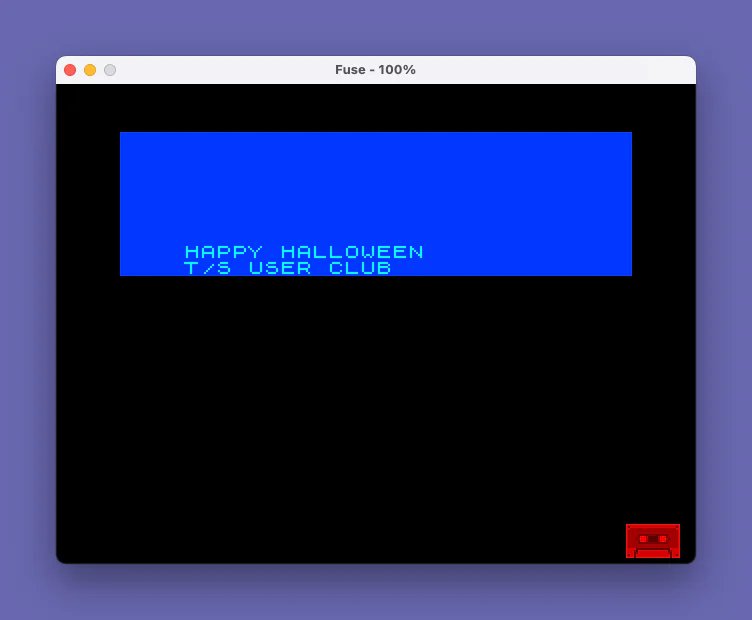
   10 REM "HALLOWEEN" (SPECTRUM) REVISED BY KENNETH FRACCHIA TO THE 2068 USING JOYSTICK (LEFT PORT) PROPERTY OF SUG LIBRARY 1/7/87.
   11 REM SEPTEMBER 6, 1986
   12 RESTORE
   15 POKE 23658,8
   20 PAPER 0: BORDER 0: INK 3: FLASH 0: BRIGHT 0: OVER 0: INVERSE 0: CLS : BRIGHT 1
   30 PRINT AT 0,0; PAPER 1; INK 5;"                                                                                                                                                                                                                                    HAPPY HALLOWEEN                 T/S USER CLUB               "
  110 FOR f=144 TO 154: FOR g=0 TO 7: READ a: POKE USR CHR$ f+g,a: NEXT g: NEXT f
  120 DATA 255,129,129,255,255,129,129,255
  130 DATA 30,30,13,140,206,255,200,140,120,120,176,49,119,255,23,49
  140 DATA 60,94,191,191,191,191,94,60,136,34,136,32,0,26,138,32
  150 DATA 24,24,126,126,24,24,24,24,60,126,219,255,255,195,255,85
  160 DATA 126,126,96,120,120,96,126,126,102,102,60,24,24,60,102,102,126,126,24,24,24,24,126,126,126,126,24,24,24,24,24,24
  170 DIM a$(480): PRINT AT 11,0; INK 6;"DO YOU WANT INSTRUCTIONS (Y/N) ?"
  171 IF INKEY$="Y" THEN GO TO 171
  173 IF INKEY$="Y" THEN GO SUB 8000: PRINT AT 6,0;a$,,: GO TO 170
  176 IF INKEY$="N" THEN GO TO 190
  180 GO TO 173
  200 REM INITIALISE VARIABLES
  205 LET hs=0: LET h$=""
  210 LET s=1
  220 RESTORE 220: DIM i(2): LET i(1)=6: LET i(2)=5: LET o$="\d\g"
  230 DIM x(9): DIM y(9): FOR f=1 TO 9: READ y(f),x(f): NEXT f: DATA 1,2,1,29,2,1,2,30,17,1,17,30,18,2,18,29,11,15
  232 PRINT AT 11,0; INK 6;"PRESS SKILL LEVEL 1 TO 9",''"(1-SNAIL PACE","9-IMPOSSIBLE)"
  235 LET r$=INKEY$: IF r$<"1" OR r$>"9" THEN GO TO 235
  238 LET sk1=VAL r$: LET sk=26-(sk1*3-2)
  239 PRINT AT 11,0,,,,,,
  240 LET e=6.99: LET l=3: LET sc=0: LET c=0: DIM c(4)
  298 LET d=1: LET w$="\c"
  299 GO SUB 9000
  300 REM PRINT OBJECTS
  302 PRINT AT 11,15; INK 4;w$
  303 LET l$="\h\i\j\k": FOR f=1 TO 4: IF c(f)=1 THEN PRINT AT 20,f+24; INK 4;l$(f)
  304 NEXT f
  305 IF c(1)=0 THEN PRINT AT 1,1; INK 4;"\h"
  306 IF c(2)=0 THEN PRINT AT 1,30; INK 4;"\i"
  307 IF c(3)=0 THEN PRINT AT 18,1; INK 4;"\j"
  308 IF c(4)=0 THEN PRINT AT 18,30; INK 4;"\k"
  315 FOR f=1 TO 10: FOR g=1 TO 2
  320 LET x=INT (RND*30)+1: LET y=INT (RND*18)+1: IF ATTR (y,x)<>3 THEN GO TO 320
  325 FOR h=1 TO 9: IF x=x(h) AND y=y(h) THEN GO TO 320
  326 NEXT h
  330 PRINT AT y,x; INK i(g);o$(g): NEXT g: NEXT f
  340 FOR f=1 TO 4
  350 LET x=INT (RND*30)+1: LET y=INT (RND*18)+1: IF ATTR (y,x)<>3 THEN GO TO 350
  355 FOR h=1 TO 8: IF x=x(h) AND y=y(h) THEN GO TO 350
  356 NEXT h
  360 PRINT AT y,x; INK 2;"\f": NEXT f
  390 GO SUB 400: GO TO 420
  400 REM STATUS DISPLAY
  410 PRINT AT 20,0; INK 7;"SCORE: ";sc,"LETTERS:"'"LIVES:": FOR f=1 TO L: PRINT AT 21,f*2+5; INK 4;"\b": NEXT f: PRINT AT 21,16; INK 7;"ENERGY: "; INK INT e;"    "
  415 RETURN
  420 LET x=15: LET y=11
  490 PRINT AT y,x; BRIGHT 0;" "
  500 REM WITCH MOVEMENT
  505 IF ATTR (y,x)<>3 THEN GO TO 1000
  510 PRINT AT y,x; INK 4;w$: LET e=e-.04: IF e<=0 THEN LET r=4: GO TO 1500
  515 PRINT AT 21,25; INK INT e;"   "
  517 FOR f=1 TO sk: NEXT f
  518 LET T=|(1,1)
  520 PRINT AT Y,X; INVERSE 1; PAPER 3; INK 0;"\e": IF T=4 THEN GO TO 600
  530 IF T=2 THEN GO TO 700
  540 IF T=1 THEN GO TO 800
  550 IF T=8 THEN GO TO 900
  560 GO TO d*100+500
  600 LET w$="\c": LET x=x-1: LET d=1: GO TO 505
  700 LET y=y+1: LET d=2: GO TO 505
  800 LET y=y-1: LET d=3: GO TO 505
  900 LET w$="\b": LET x=x+1: LET d=4: GO TO 505
 1000 REM INTO OBJECT
 1005 IF ATTR (y,x)=88 THEN LET r=1: GO TO 1500
 1010 IF ATTR (y,x)=69 THEN LET r=2: GO TO 1500
 1020 IF ATTR (y,x)=66 THEN BRIGHT 0: CLS : BRIGHT 1: PRINT AT 6,1; INK 6;"YOU COLLIDED WITH A GRAVESTONE";AT 12,4;"YOU LOSE ALL YOUR LIVES": PAUSE 100: GO TO 1520
 1030 IF ATTR (y,x)=67 THEN LET r=3: GO TO 1500
 1040 IF ATTR (y,x)=70 THEN LET e=e+.5: BEEP .5,20: PRINT AT y,x; BRIGHT 0;" ": IF e>9.99 THEN LET e=9.99
 1060 IF y=1 AND x=1 THEN LET c(1)=1: PRINT AT 20,25; INK 4;"\h": GO SUB 1200
 1070 IF y=1 AND x=30 THEN LET c(2)=1: PRINT AT 20,26; INK 4;"\i": GO SUB 1200
 1080 IF y=18 AND x=1 THEN LET c(3)=1: PRINT AT 20,27; INK 4;"\j": GO SUB 1200
 1090 IF y=18 AND x=30 THEN LET c(4)=1: PRINT AT 20,28; INK 4;"\k": GO SUB 1200
 1100 IF c=4 THEN GO TO 2000
 1110 GO TO 506
 1200 REM LETTER COLLECTED
 1210 LET c=c+1: LET sc=sc+10*s*sk1: PRINT AT 20,7;sc: PRINT AT y,x; INK 4;w$: FOR f=20 TO 30: BEEP .1,f: NEXT f: RETURN
 1500 REM DEATH ROUTINE
 1510 LET l=l-1: FOR f=10 TO 0 STEP -1:: BEEP .1,f: NEXT f: CLS
 1511 IF r=1 THEN PRINT AT 7,0; INK 6;"YOU COLLIDED WITH YOUR OWN TRAIL."
 1512 IF r=2 THEN PRINT AT 7,3; INK 6;"YOU COLLIDED WITH A GHOST"
 1513 IF r=3 THEN PRINT AT 7,3; INK 6;"YOU COLLIDED WITH THE WALL"
 1514 IF r=4 THEN PRINT AT 7,5; INK 6;"YOU RAN OUT OF ENERGY"
 1515 PRINT AT 14,0; INK 6;"YOU LOSE A LIVE-";l;" LIVES LEFT"
 1516 IF l=1 THEN PRINT AT 14,20; INK 6;"LIFE LEFT"
 1517 LET e=7.99-s
 1518 PAUSE 100: PRINT AT 11,0,,: IF l>0 THEN GO TO 290
 1520 CLS : PRINT AT 0,11; INK 6;"GAME OVER";AT 4,0;"YOU WERE ON SKILL LEVEL ";sk1;AT 8,0;"YOU REACHED STAGE ";s;AT 12,0;"YOU HAD A SCORE OF ";sc
 1530 IF sc>hs THEN PRINT AT 16,0; INK 6;"YOU HAVE BEATEN THE HIGH SCORE. PLEASE TYPE IN YOUR NAME.": INPUT LINE h$: LET hs=sc
 1540 PRINT AT 16,0; INK 6;"THE HIGH SCORE REMAINS ";hs,"BY ";h$: GO TO 1600
 1600 REM ANOTHER GAME
 1610 POKE 23658,8: PAUSE 200: CLS : PRINT AT 11,0; INK 6;"PRESS ANY KEY FOR ANOTHER GAME": PAUSE 0: GO TO 210
 2000 REM STAGE COMPLETED
 2010 CLS : PRINT AT 11,7; INK 6;"STAGE ";s;" COMPLETED": LET s=s+1: PAUSE 100: LET c=0: DIM c(4): IF s<8 THEN GO TO 290
 2020 CLS : PRINT AT 0,11; INK 6;"CONGRATULATIONS - GAME COMPLETED";AT 4,0;"YOU DID THIS ON SKILLLEVEL ";sk1;AT 8,0;"YOU HAD ";l;"LIVES LEFT";AT 12,0;"YOU HAD A SCORE OF ";sc
 2030 GO TO 1530
 8000 REM INSTRUCTIONS
 8010 PAUSE 1: PRINT AT 6,0; INK 6;"YOU PLAY THE PART OF A WITCH ON HER MOTORISED BROOMSTICK,       TRAPPED IN A SEVEN FLOOR CASTLE."''"YOU HAVE TO WORK YOUR WAY UP THE CASTLE TO THE TOP (LEVEL 7)     WHERE, ON ESCAPING YOU WILL BE ABLE TO FLY AWAY."''"TO ESCAPE FROM EACH LEVEL YOU   MUST COLLECT THE LETTER IN EACH"
 8020 PRINT INK 6;"CORNER OF THE ROOMS TO SPELL THE WORD-EXIT. YOU WILL THEN AUTOMAT-ICALLY BE TRANSPORTED TO THE    NEXT LEVEL."
 8030 PRINT AT 21,9; INK 5;"PRESS ANY KEY": PAUSE 0: PRINT AT 6,0;a$:
 8040 PRINT AT 6,0; INK 6;"HOWEVER,GHOSTS INHABIT EACH     LEVEL AND SHOULD YOU COLLIDE    WITH ONE OF THEM YOU LOSE A     LIFE. LIVES ARE ALSO LOST BY     FLYING INTO WALLS OR BACK ON YOUR OWN TRAIL OF POISENOUS        FUMES GIVEN OFF BY YOUR BROOM-  STICK."
 8050 PRINT ' INK 6;"THERE ARE ALSO GRAVESTONES ON   EACH LEVEL. THESE, ON COLLISION,WILL CAUSE LOSS OF ALL YOUR     REMAINING LIVES.": PAUSE 0: PRINT AT 6,0;a$;AT 6,0; INK 6;"YOUR ENERGY SUPPLY MUST ALSO BE WATCHED. THE LOWER THE VALUE"
 8060 PRINT INK 6;"THAT THE COLOR HAS ON THE       COMPUTER, THE LOWER YOUR ENERGY. THAT IS, BLACK IS MINIMUM AND  WHITE MAXIMUM  ENERGY. YOUR     ENERGY INCREASES SLIGHTLY WHEN YOU EAT ONE OF THE PUMPKINS."
 8065 PRINT ' INK 6;"WHEN YOU LOSE A LIFE, THE AMOUNT OF ENERGY YOU HAVE LEFT IS AUTO-MATICALLY ADJUSTED UP OR DOWN TO THE AMOUNT REQUIRED TO COMPLETE THE GAME."
 8070 PAUSE 0: PRINT AT 6,0;a$
 8080 PRINT AT 6,0; INK 4;"  \b   "; INK 6;"THE WITCH (YOU)."'' INK 4;"\h \i \j \k"; INK 6;"THE LETTERS TO COLLECT."'' INK 3;" \a\a\a   "; INK 6;"THE CASTLE WALLS."''      INK 3;"\e\e\e\e"; INK 6;"YOUR OWN TRAIL."
 8090 PRINT ' INK 2;"  \f "; INK 6;"THE GRAVESTONES."'' INK 5;"  \g  "; INK 6;"THE GHOSTS."''"   \d   THE PUMPKINS."
 8100 PAUSE 0: PRINT AT 6,0;a$;AT 6,0; INK 6;"YOU SCORE FOR EACH LETTER COLLECTED. THE AMOUNT PER LETTER IS 10x THE STAGE NUMBER x THE SKILL LEVEL."
 8110 PRINT INK 6;''"USE THE LEFT JOYSTICK TO MOVE   UP, DOWN, LEFT, OR RIGHT."
 8120 PAUSE 0: RETURN
 9000 REM PRINT CASTLE
 9005 BRIGHT 0: CLS : BRIGHT 1
 9007 PRINT AT 9,12; INK 6;"STAGE ";s: GO SUB 400: PAUSE 100: PRINT AT 9,0; BRIGHT 0,,
 9010 FOR f=0 TO 19 STEP 19: PRINT AT f,0;"\a\a\a\a\a\a\a\a\a\a\a\a\a\a\a\a\a\a\a\a\a\a\a\a\a\a\a\a\a\a\a": NEXT f: FOR f=0 TO 19: PRINT AT f,0;"\a";AT f,31;"\a": NEXT f: IF s=1 THEN RETURN
 9020 FOR g=1 TO 13 STEP 12: FOR f=g TO g+5: PRINT AT f,15;"\a\a": NEXT f: NEXT g: IF s=2 THEN RETURN
 9030 FOR h=7 TO 23 STEP 16: FOR f=7 TO 12: PRINT AT f,h;"\a\a": NEXT f: FOR g=1 TO 17 STEP 16: FOR f=0 TO 1: PRINT AT g+f,h;"\a\a": NEXT f: NEXT g: NEXT h: IF s=3 THEN RETURN
 9040 FOR g=9 TO 10: FOR f=1 TO 25 STEP 24: PRINT AT g,f;"\a\a";   BRIGHT 0;"\a\a"; BRIGHT 1;"\a\a":   NEXT f: NEXT g: IF s=4 THEN RETURN
 9050 FOR g=3 TO 15 STEP 12: FOR f=0 TO 1: PRINT AT g+f,11;"\a\a\a\a\a\a\a\a\a\a": NEXT f: NEXT g       : FOR h=5 TO 11 STEP 6:: FOR g=11 TO 19 STEP 8: FOR f=0 TO 3: PRINT AT f+h,g;"\a\a": NEXT f: NEXT g: NEXT h: IF s=5 THEN RETURN
 9060 FOR h=3 TO 13 STEP 10: FOR g=3 TO 27 STEP 24: FOR f=0 TO 3: PRINT AT h+f,g;"\a\a": NEXT f: NEXT g: NEXT h: IF s=6 THEN RETURN
 9070 FOR h=3 TO 13 STEP 10: FOR g=0 TO 3 STEP 3: FOR f=7 TO 23 STEP 16: PRINT AT h+g,f;"\a\a": NEXT f: NEXT g: NEXT h: FOR f=9 TO 10: PRINT AT f,15;"\a\a": NEXT f: RETURN
 9999 SAVE "HALLOWEEN" LINE 10
Note: Type-in program listings on this website use ZMAKEBAS notation for graphics characters.