
Windowing 1s a display technique for dividing a computer screen into separate, independently controlled areas for text, graphics or other forms of information. This article will explore techniques that make windowing possible.
For windowing displays, a number of problems must be dealt with. First, screen contents must be preserved when a window is opened (Not all windows do this). Screen preservation is called ‘Non-destructive windowing’.
One non-destructive technique, discussed in the January, 1988, S/T newsletter involves copying the entire screen into memory before opening a window. This method is inefficient if more than one window is involved or windows are more sophisticated than simple ‘pop-up’ messages. For real windowing, we must find sone other method.
Other problems a window driver must handle are: text from a window must be confined within its window (no ‘spillage’), text must be directed to its proper window or the main screen, overlap must be handled without distorting the screen or losing text, and it all must be done QUICKLY.
The idea proposed Involves storing data in what I call a ‘window file’. It only works with text, and it depends on the computer’s ability to identify a character printed on its own screen (og. SCREEN$(Y, X) for the TS 2008). The structure of a window file is basically string of display characters which constitute the text in that window, plus the text that the window is ‘shadowing’ or overlapping:
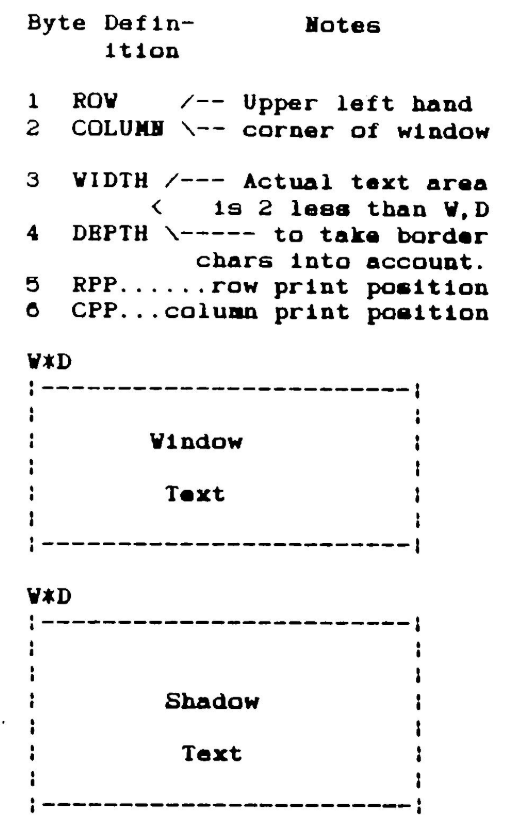
A window file is created internally whenever a window is opened and purged when the window is closed. To print to window, text is placed directly in the window file. A separate display routine handles the actual printing later by copying everything it finds in the window file onto the screen.
A window file’s header contains six bytes signifying window position, dimensions, and current print position within the window. Print position 1s updated by incrementing COL for each character until the right border 1s reached or a CHR$ (13) (ENTER) is encountered. In that case, COL = left margin and ROW = ROW + 1. Following the header is the information that the window holds. It is stored as strings of text in the order that they appear in the window: Row 1 (Top line), Row 2, Row 3 etc. (Note: NO Return characters are stored in the window file – only spaces and letters; the last character in row 3 is followed immedlately by the first character in row 4).
Immediately following the Window text file is another file, the Shadow text file. The shadow text file keeps track of the text that was underneath the window when the window was opened, in order to create windows without corrupting the main display. When a new window is opened, one of the first things it does is copy that part of the screen (including all text or even another window) into the new window’s shadow file. Thus, when the window is closed, it knows what to put back on the screen.
If you keep your window print routine separate fron your screen update routine, you can do some interesting tricks. One idea is to affect ‘hidden windows’ by reprinting the shadow file, causing the window to disappear while maintaining the window’s content. Hidden windows can be scrolled, printed to, or cleared without affecting the main screen this way. To get the window back it is only necessary to call the screen updating routine, and the window will reappear Instantly! This is useful for viewing an underlying screen display without closing the window. Just be sure to update the shadow file before reopening the window.
Scrolling a window is straight forward. Copy each row in the window file onto the one above (or below) it and insert a blank line in the last row. Afterwards, call the screen update routine to refresh the display. Just scroll the window one line at a time and It’s a snap. Bi-directional scrolling is possible this way. Scrolling a window does not affect the shadow file.
Occasionally the programmer may wish to scroll the display UNDERNEATH an open window. This is where life gets complicated and the shadow file gets put to real use. The trick is to handle the four areas around the window (above, left, right, below) separately, and to pay special attention to the part that scrolls behind the window. For that, the top row of the shadow file is copied onto the line above the window, the shadow file is scrolled internally and then the part of the line just below the window is copied into the bottom row of the shadow file. The sight of a statlonary window floating above a scrolling background is impressive and worth the effort.
Finally, to close a window just copy the shadow f1le back onto the screen and purge the window file.
Theoretically, the only limit to the number of windows in use at once is set by the amount of spare RAM. Since window files store text only, they are very memory efficient (A 10 by 30 character window uses only 606 bytes including the shadow. An equal portion of the display file requires 2400 bytes, not counting color attributes!). However, window handling becomes very slow if more than 2 or 3 windows are open at once.
I have not yet tried to implement my window files concept with actual code. This may change by the tine the next issue of the newsletter comes out. If it does, I will include a listing with my next article. I hope that this discussion inspires a few of you to try to write windowing routine along these lines. I suppose that a window file could be stored as array or long string variable in BASIC (note: an array takes SIX bytes for every element stored!) but I think a window driver would have to be compiled or written in machine code to be acceptable. Whatever your preference, good luck and Keep On Timexing…