
A system which allows transfer of data between ZX/TS and TS2068 computers and cassette tape operations in TS2068 format.
The PROBLEM
Have you ever needed to move memory contents from one type of machine to another? I have a 2764/27128 EPROM burner on my TS2068 system and there have been several occasions when I’ve wanted to use it on code which I wrote on and for my ZX81/TS1000 system. Having disk storage, an RS232 port, modem, or full-sized printer on only one system are some other motives.
The SOLUTIONS
My eventual solution to this will be a 32K block of NV-RAM which can be addressed by either machine. (Have you noticed the 32K X 8 bit static(!) 150 ns RAM chips advertised for less than $15? My, how times change!) This, however, being a hardware solution, requires time and money.
The next best solution is parallel transfer between machines. Ideally, you would use two bi-directional ports, such as Tom Woods’ Universal I/O. An existing printer port could be used for the transmitter but you still need one input port to receive, and would have to re-configure the system to change direction. To circumvent the lack of handshaking, the data could be sent in 4-bit nibbles using the other bits to signal start of data, upper/lower nibble, end of byte, end of data, etc. Once again, this is a hardware solution and requires money.
A third possibility is serial transfer. If you have an RS232 port or a modem on both systems, you’re in business. Again, hardware is usually not free.
ZX81/TS1000 and TS2068 computers have built-in serial ports and a software solution to data transfer is possible using Firstloadr or similar commercially available products. Put the code in REM in the ZX/TS system and save it directly into the tape input port on the TS2068 while executing the loader program. A more elegant method would be using HotZ II on the ZX/TS to feed the LD81 routine contained in early versions of HotZ 2068. These methods use the least hardware, (an amplifier on the ZX/TS output) and are the cheap. The compromise is in speed of transfer and accuracy.
The SYSTEM
I have always thought the programs which permitted the TS2068 to load ZX/TS tapes were examples of the tail wagging the dog! The TS2068 tape system is obviously superior, so why not implement it on the ZX81/TS1000? In keeping with the Sinclair tradition of using a minimum of hardware with ingenious software, this idea provides a more versatile tape storage facility on the ZX/TS and a cheap method of data transfer between different systems.
Unfortunately, the ZX81/TS1000 will not directly emulate the TS2068 cassette tape operations because of minor hardware problems. These are a direct result of the different software approaches to serial data transfer. The ZX/TS save routine generates a string of fixed frequency pulses to represent the serial data. The number of pulses between a blank period determines a space or a mark. The TS2068 transmits one frequency modulated cycle per data bit with the period of the cycle set by the logic level of the bit. The hardware incompatability results chiefly from the ZX/TS input/output conditioning. The RC voltage-dividers and filters pass the ZX/TS signal spikes but destroy a signal of the type required for the TS2068 software.
The HARDWARE
I had some goals in mind when I started to develop a hardware interface between machines. It could not require modification of both machines, a separate power supply, or interfer with the normal use of the tape ports. It had to use inexpensive, common components, and it had to work. After considerable tinkering, I arrived at a circuit which uses one N-channel enhancement mode MOSFET transistor, one CMOS hex inverter IC, and a dozen passive components. It cost should be less than $10.
My system shed its case some years ago, so component placement within the case is academic for me. I’d bet that most fellow-tinkerers have the same situation. However, if you are using a ZX/TS in the original case, you might be able to get the entire circuit under the hood on a piece of perfboard. Wire it with 28/30 gauge wrapping wire, and bring the input and output to subminiature (3/32 in) jacks mounted in the case.
An alternative method would be placing only the resistive voltage divider which is attached to the logic chip tv/tape output and the transistor with its gate resistor/capacitor inside the case. Connect the divider output and the transistor input to jacks. This provides isolation for the logic chip pins. I strongly urge that you do NOT bring the logic chip pins directly to the outside world!
The easiest place to pick up the tv/tape output is at the modulator. The tape input is pin 20 at the corner of the logic chip. Connect to it at the input series resistor (a 4.7K adjacent to pin 20 on my old ZX81 board).
The IC is a 74HC04. Although a 74C04 worked in my system, the ‘HC04 has “improved” characteristics. A 4069 CMOS hex inverter might work and the pinout is the same – I did not try any 4000 series devices. The transistor is a Radio Shack 276-2074. The caps are ceramic disks and the resistors can be 1/4 or 1/8 Watt carbon or molded composition types. Nothing is critical. However, the caps and some of the resistors are parts of time dependent networks and the values and/or ratios can not be changed too much.
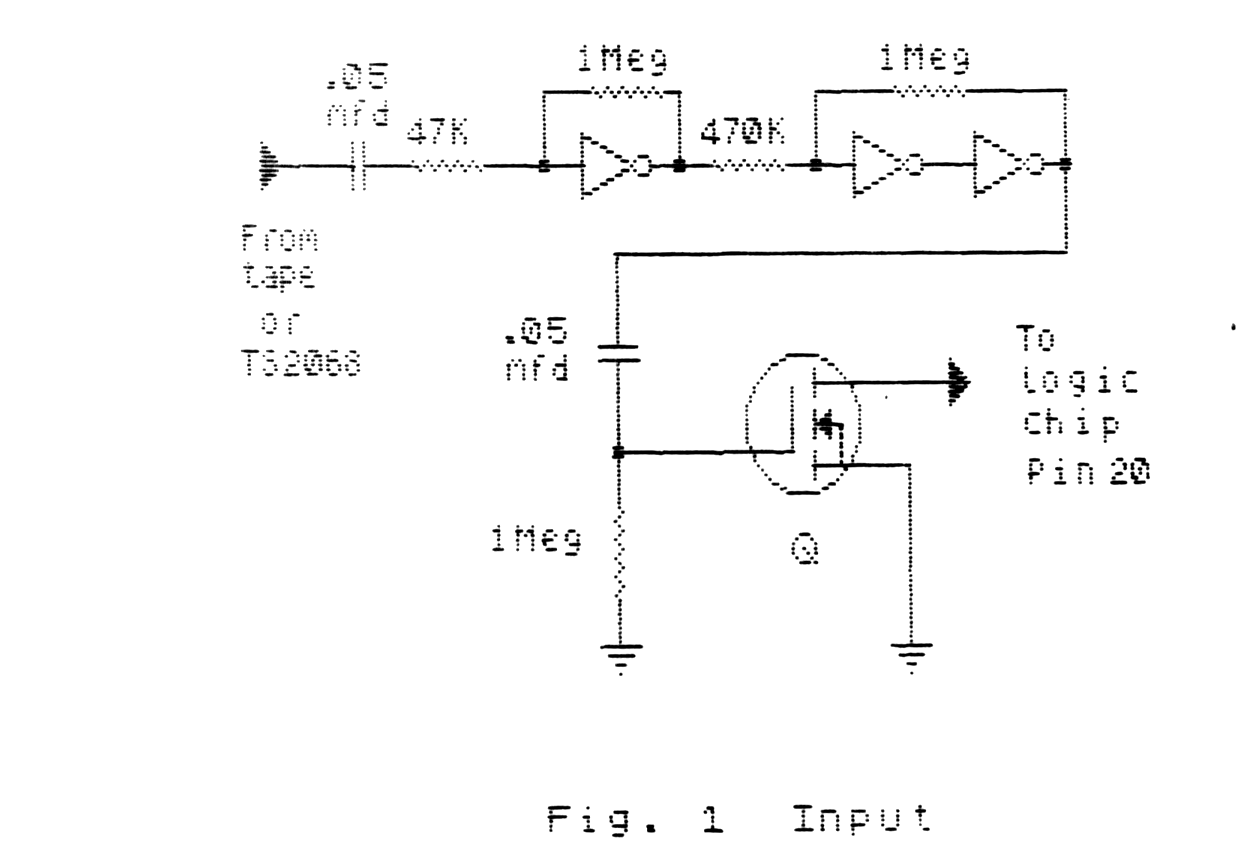
The input portion of the interface is depicted in Fig. 1. The signal from a TS2068 tape output (“mic”) port or a tape recorder earphone jack is AC coupled to an inverter biased into the linear region with negative feedback as an amplifier with a theoretical gain of approximately -20. On paper, a .25VAC PP signal will cause the output to swing the full 5V of the supply.
The first stage output is coupled to a pair of cascaded inverters connected with positive feedback as a Schmitt trigger circuit. The ratio of the input resistor and feedback resistor provides a hysteresis of 2.5V. This provides “snap action” and eliminates the garbage caused by the first inverter being biased at the trip point.
The output of the 3rd ‘HC04 is AC coupled to the N-channel switch. In the absence of an AC signal, the transistor drain floats, having no effect on the operation of the normal tape input to the logic chip.
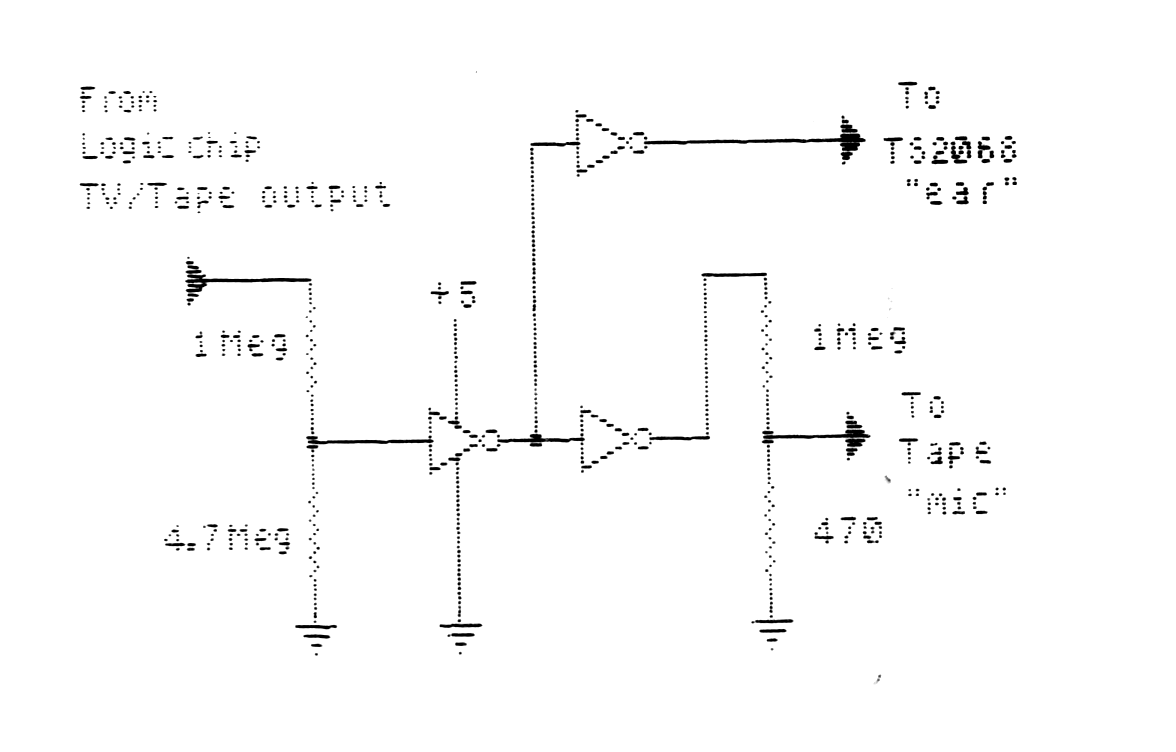
The output circuit, shown in Fig. 2, is even simpler.
The ZX/TS logic chip output has voltage excursions from 4V to 2.4V. This is reasonably close to the logic levels of a CMOS device operated from a 5V supply. In fact, I found that 74C04 and 74HC04 devices would recognise the logic chip tv/tape output pin levels directly. The low level is too close to the midpoint to be comfortable, so it is fed to a resistive voltage divider which reduces the excursions at the input of the ‘HC04 inverter to 3.2V and 2V. The output of the 1st inverter is connected to two others. One provides a 5V level output for the tape input (“ear”) port of a TS2068 for data transfer between machines. The other inverter has a divider to provide a signal for a tape recorder microphone input.
The input and output will interact as they do in a normal ZX/TS save/load. Disconnect the input when making a save. The high impedance of the input amplifer makes it sensitive to hum and tape hiss. Don’t start a “2K-SDP” load or verify until the leader tone is present.
You MIGHT get surprising results by using this port hardware with other cassette software. I use it with ZXLR-8 and it actually loaded an old intractable “Packrabbit” tape with the IPS “FASTLOAD” software.
Another benefit I realized was being able to use a HiFi cassette deck which did not have enough output at the earphone jack to drive the ZX/TS load routine.
The SOFTWARE
“2K-SDP” is 1.5K bytes long. This version is mapped at 7A00 Hex, assuming it will be used above RAMTOP. This results in a calling address of 31232 Decimal. The screen prompts require an “expanded” display file. The program requires 38 bytes in the E_LINE area of RAM for headers, flags, etc. It will report ERROR 4 if there is not enough space below ramtop.
The tape version of the program, available from me, moves RAMTOP, and provides a means of making a back-up copy. The best place for this (and any other utility or operating system) is EPROM. It fits a 2716 with half a “K” left over and could be used in a Hunter Board or similar EPROM reader.
The system has consistantly generated error-free tapes and data block transfers of more than 32K bytes. It is processor clock dependent, and will require modification to work with a system not running at the standard rate. Modification may be made by simply changing the values in the software timing loops based on the difference in system clock rates.
The routine is entered from BASIC with “RAND USR 31232”. The display prompts for SAVE, LOAD, or VERIFY. Hitting “Q” from this display returns to the caller. Although the code does the prompts and inputs in SLOW for flicker-free display and the save/load/verify in FAST, it returns to the caller in the mode which was in effect at the call. Hitting “STOP” (shifted-A) from any other prompt returns to this display.
The software then prompts for a tape name of 0 to 10 characters, accepting numbers and letters only; no punctuation, spaces, or tokens. Short names are terminated with “ENTER” and the “DELETE” key removes the last character entered. The name is translated to ASCII so it can be read by the TS2068 and restricting it made the code simpler. The save routine must have a name entered. Load and verify may be executed without a name by hitting “ENTER” and will then operate on the first data encountered. Entering a name for load and verify makes them selective, just as the ROM routines do.
The next prompt asks, “PROGRAM OR DATA BLOCK?”. All saves are in TS2068 CODE format. “PROGRAM” in this context means a data save from 4009 Hex to (E_LINE), the range of a ZX81/TS1000 program. Incidentally, the load and verify routines do not check the type of data save. You may load or verify TS2068 programs, data, and code with “2K-SDP”.
A data block save then prompts for starting address and block length. Both may be entered in hex or decimal. Hex entries must be prefixed with “H” and must be 5 characters including the prefix. (I.E., H0300, H7FFF, H0000, etc.). Decimal numbers may be 1 to 5 charcters. Decimal entry may be terminated for less that 5 characters with “ENTER”. The “DELETE” key works as it did in name entry. The saves may be made from any address and have any length except a block length of zero or an address and length which total more than 65535 Decimal. Incorrect parameters take you back to the address prompt.
The parameters are then displayed (in two lines) as they would appear on a TS2068; ie., SAVE “name” CODE mmmm,nnnn. The final save prompt may be answered with “Y” or “ENTER” to execute the save. A negative response leads back to the first screen.
There is a short blank period before and after the save to allow time to switch the recorder or start the TS2068 routine for transfers. The save may be stopped with “BREAK” which returns to the first screen. A completed save returns to the caller.
Load and verify operate in a manner similar to the TS2068 routines with a couple of exceptions and a couple of improvements.
A program load/verify specifies a starting address of 16393, the same as the ZX81/TS1000 routines. It also specifies a length of zero which may seem a bit odd. This is the signal for the loading routine to use the length found in reading the header.
Data load/verify prompts for one of the three TS2068 types of loading formats:
1 = CODE              Address and length from
                      incoming data
2 = CODE MMMM         Specified address
3 = CODE MMMM,NNNN    Specified address and
                      length
Selecting option “2” or “3” then prompts for data address or address and length. These are the same input routines used in the save and will reject out-of-range numbers.
The parameters and the final load/verify prompt are now displayed. A negative response returns to the first screen.
Because zero is used to denote an unspecified address (or length), data can not be loaded or verified starting at address 0, rarely a hardship for most systems. (Remember, data can be saved from 0 to copy ROM code to an EPROM burner driver, for instance, and will, therefore, reload to that address).
When the header is loaded, the specified parameters are compared with those in the header. Out-of-range parameters are rejected and both sets are displayed for examination. The program will reject a specified length greater than the length on the header, and will reject an address and length which total more than 65535.
A successful load or verify simply returns to the caller. Any load resulting in checksum failure terminates with a screen which displays “CHECKSUM ERROR”. A bad verify goes to a screen which displays the address at which the verification failed!!
“2K-SDP” will load and verify data blocks which are shorter than the original save. The checksum contained in the save is, therefore, not available and the load routine exits to the “CHECKSUM ERROR” screen.
“BREAK” was not implemented on the loading loop to make timing easier. To abort a load or verify just stop the input. To exit from the first part of the loading routine (which looks for a leader), stop the input and press “BREAK”.
To make the loading software less machine dependent, I wrote it to calculate its timing based on the leader frequency. The negative side of the coin is the software reacts to hum, tape noise, and tones which are not a leader. To avoid problems, don’t answer the final load/verify prompt until the leader signal is present at the input.
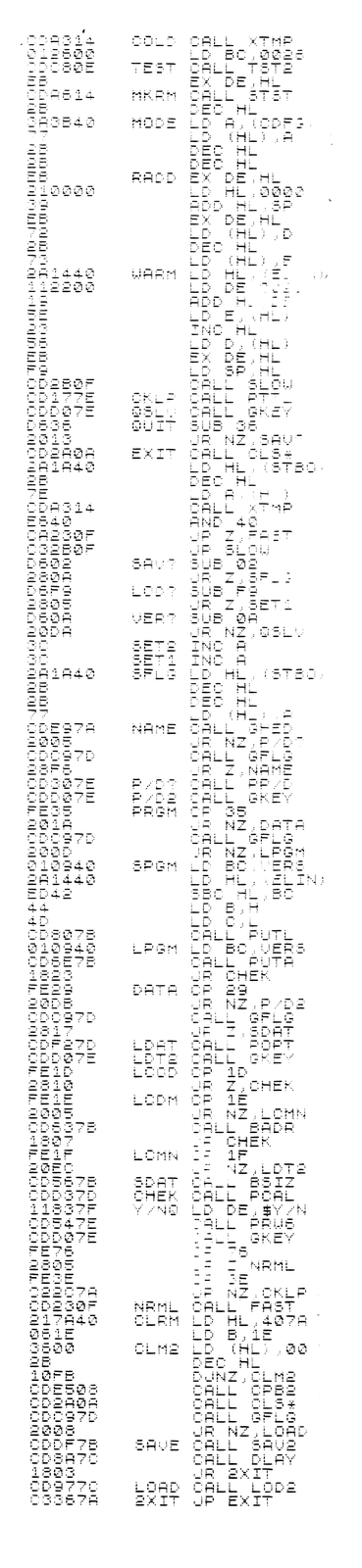
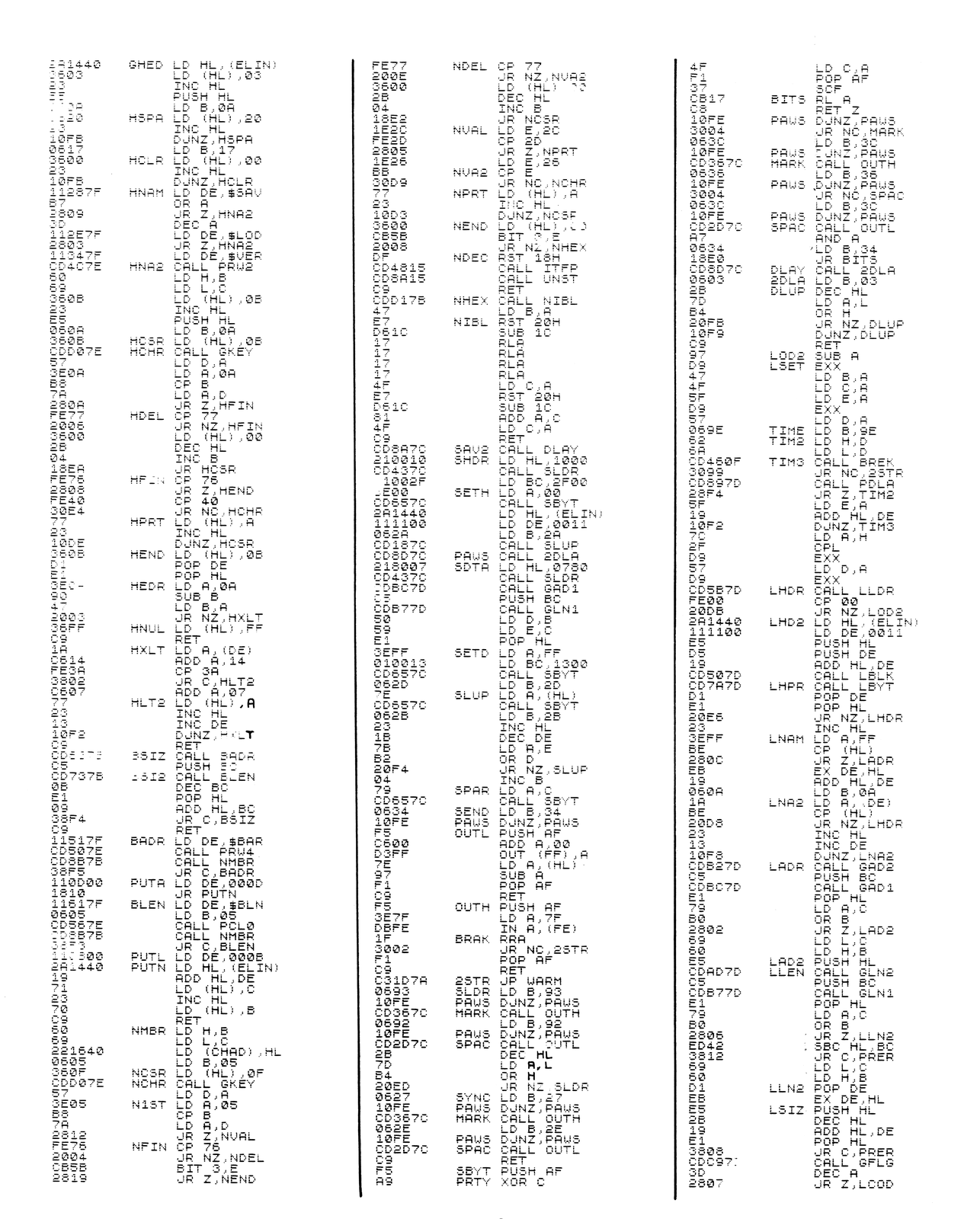
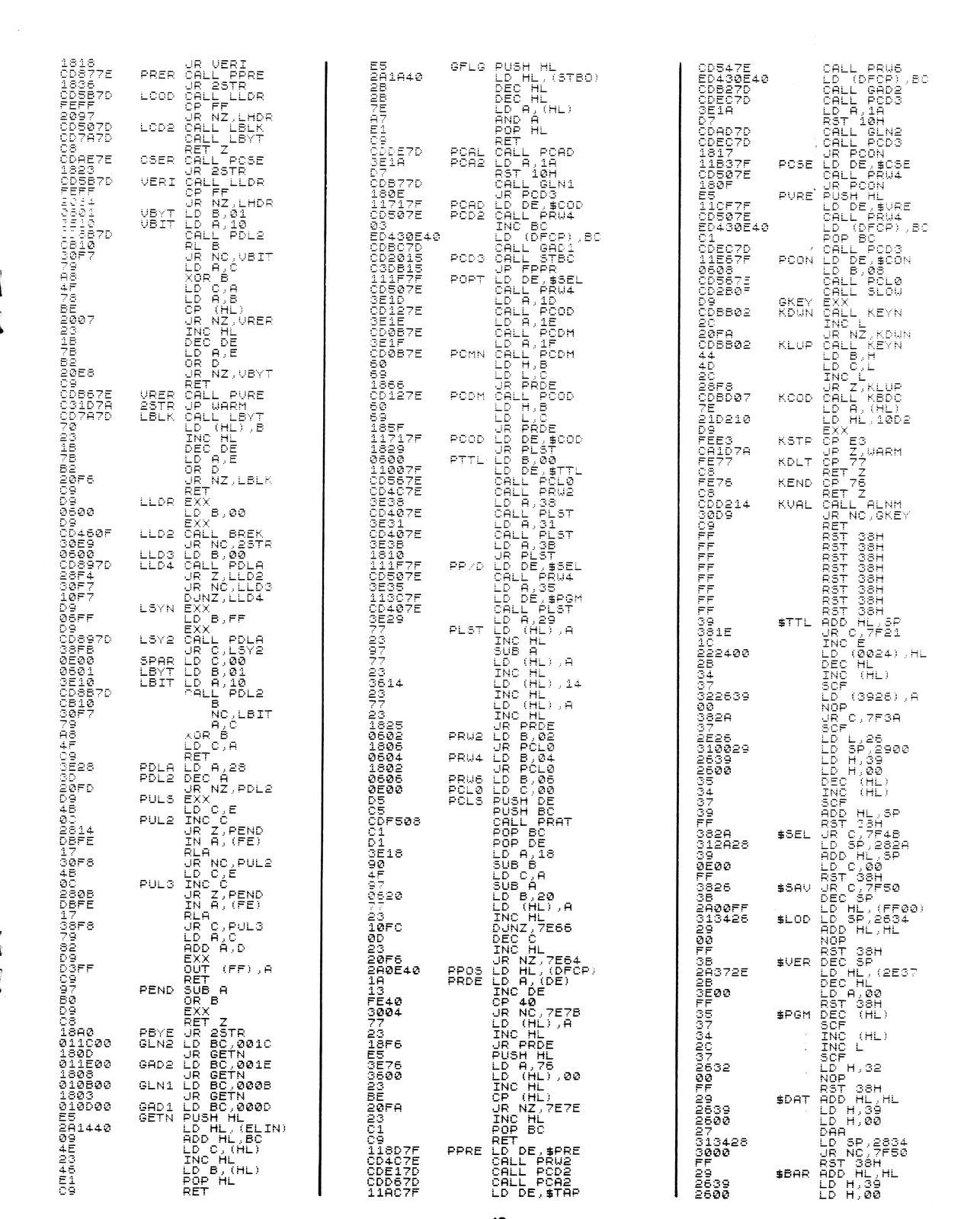
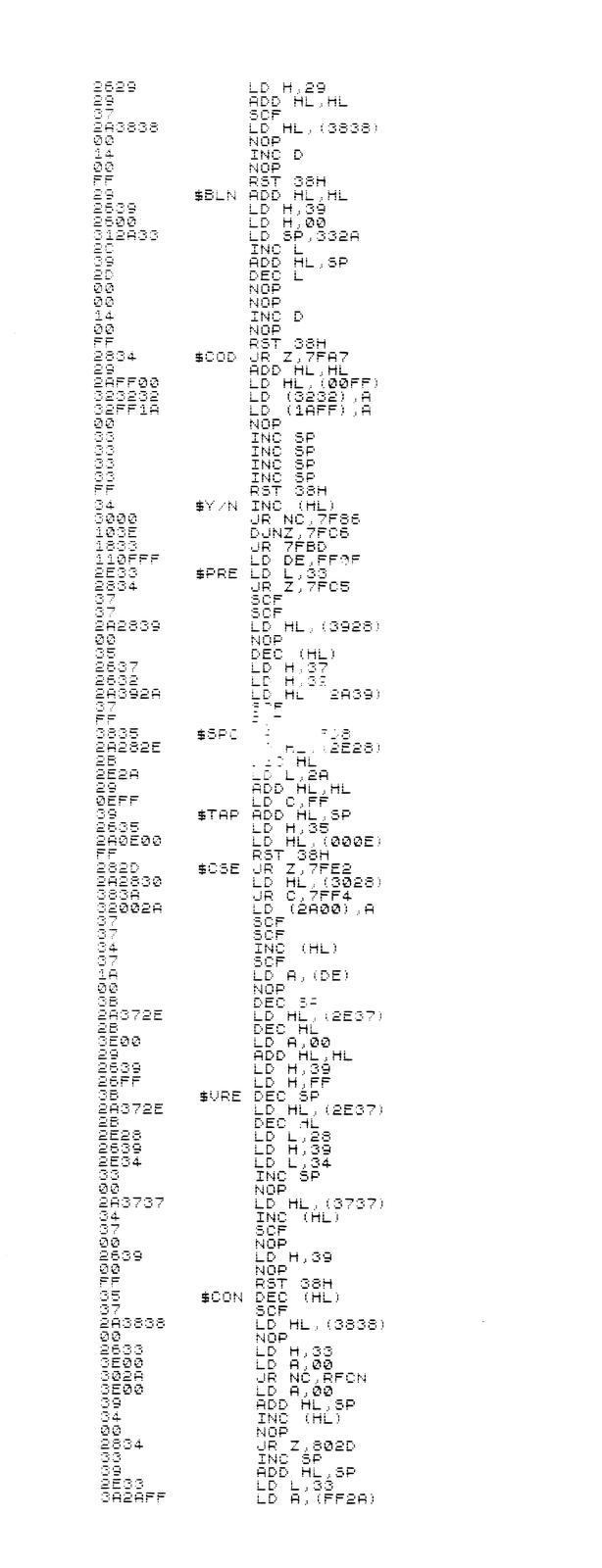
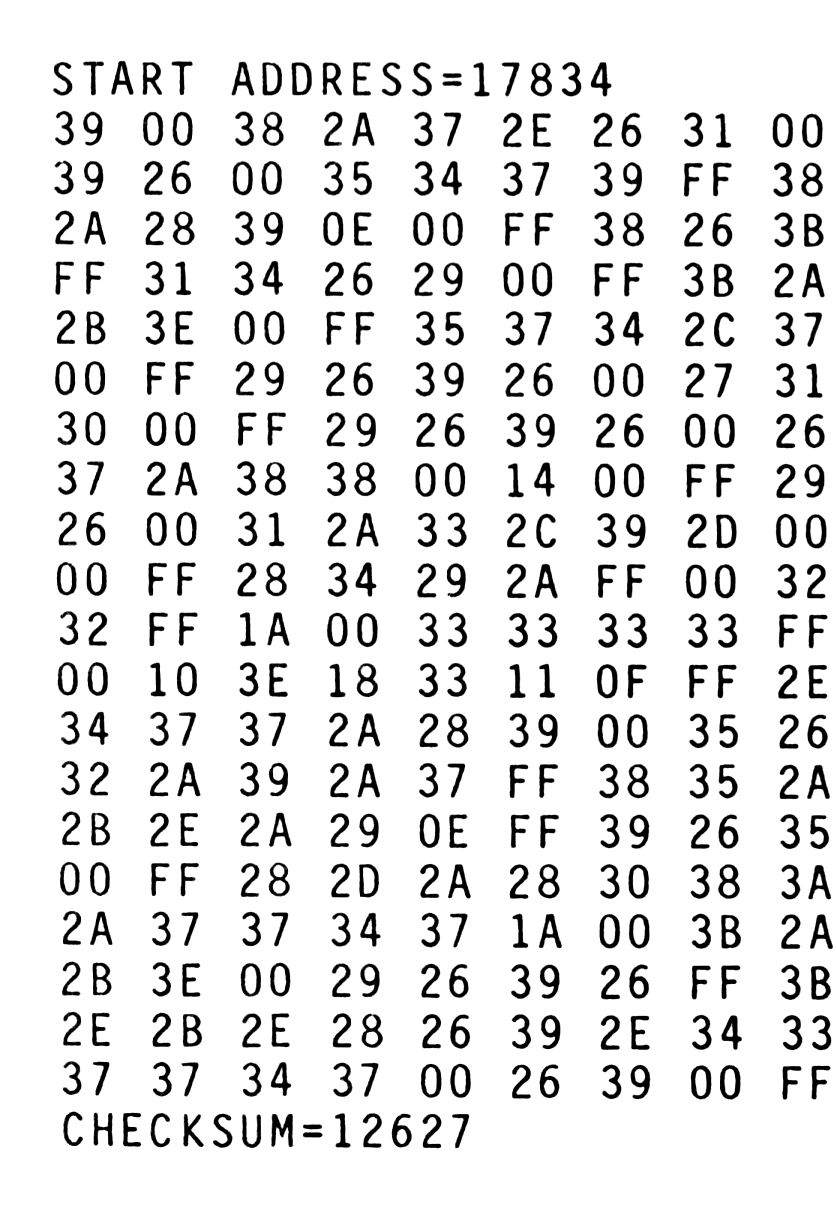
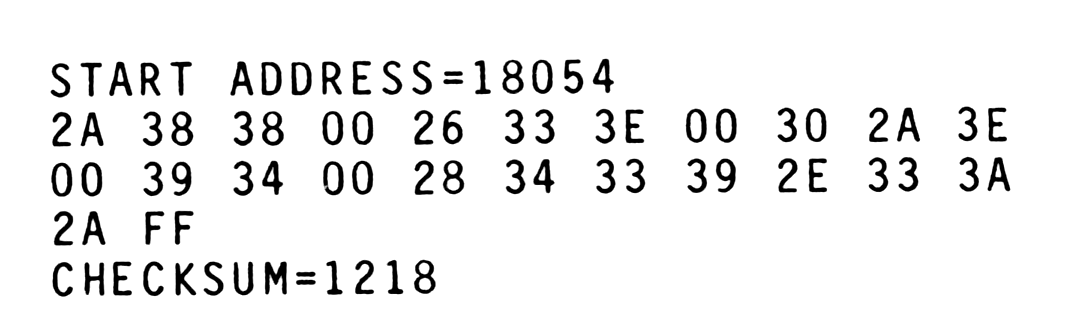
Loading this much code by hand can be a disaster. I’ve included a HOT-Z 2068 disassembly (Yes, 2068 – I don’t currently have a TS2040 on my ZX/TS system, so I moved the code and name file to my TS2068 with “2K-SDP”!) and a hexadecimal table. The last 256 bytes are print strings, not machine code. The table is in 220 byte blocks. It starts at 16514 and reads left to right in rows from top to bottom. Good luck!
Software Instructions
This is a long MC program to load by hand. Mr. Cook, the author, is offering to sell a tape of the software for $10. If you are a beginner, we would highly recommend purchasing the tape. Mr. Cook can be contacted at:
Mr. Kent E. Cook
P. O. Box 1031
Terre Haute, IN 47808-1031
If you should decide to do-it-yourself, please follow the procedure given below.
STEP 1:
Create a 0 REM line at least 1564 bytes long using either a REM Generator utility or the procedure shown in step #2.
STEP 2:
If you have used a REM Generator utility to create a 1564 byte long 0 REM line, proceed to Step #3.
A: Enter the following line exactly as shown:
1 PRINT 0+0+0+0+0+0+0+0+0+0+0+0B: Using the Shift-1 edit key, duplicate the line you just entered 16 times. The result should be lines 1 thru 17, all identical.
C: Without a line number, enter the command…
PRINT PEEK 18089,PEEK 18090a pair of 118’s should appear on the screen. If not go back to step A.
D: Enter the following line:
20 REM ***NEVER DELETE OR LIST LINES 1-17***E: Enter the following commands without line numbers:
POKE 16510,0
POKE 16511,41
POKE 16512,6
POKE 16513,234
What you have just done is to create a 1575 byte long 0 REM statement. For an explanation of how this works, see “VDAQ”, page 63, in Volume 1 of SyncWare News.
LISTING 1: HEX LOADER
100 CLS
110 PRINT "ADDRESS=";
120 INPUTT AD
130 CLS
140 PRINT "ADDRESS=";AD
150 LET SUM=0
160 LET A=AD
170 FOR L=1 TO 20
180 FOR C=1 TO 30 STEP 3
190 INPUT H$
200 IF H$="" THEN LET H$="00"
210 IF H$="S" THEN STOP
220 IF LEN H$<>2 THEN GOTO 190
230 LET N=16*CODE H$(1)+CODE H$(2)-476
240 IF N>255 OR N<0 THEN GOTO 190
250 PRINT AT L,C;H$
260 POKE A,N
270 LET SUM=SUM+N
280 LET A=A+1
290 IF A=18090 THEN GOTO 320
300 NEXT C
310 NEXT L
320 PRINT AT 21,0;"CHECKSUM=";SUM;"  OK? Y/N"
330 PAUSE 4E4
340 IF INKEY$="Y" THEN GOTO 370
350 IF INKEY$="N" THEN GOTO 130
360 GOTO 330
370 CLS
380 PRINT "SAVE? Y/N"
390 PAUSE 4E4
400 IF INKEY$="Y" THEN SAVE "2K-SDP"
410 IF INKEY$<>"N" THEN GOTO 370
420 GOTO 100
STEP 3:
Enter the BASIC program shown in LISTING 1 and run it. This takes data from the HEX TABLES (Table 1) and inputs it into the “mega-rem” you just created. Enter the hex code data from left to right and top to bottom. Data entry may be halted for the tables that are not a full 220 bytes long by simply entering the letter “S” at the data input prompt.
STEP 4:
Once all the data has been entered, delete all the program lines greater than 20. This will leave the 0 REM statement and line 20. Enter the BASIC program shown in LISTING 2. Save your program by typing RUN. This will create a program that will self start upon loading. The screen prompts and this article contain the rest of the information you need to run this program.
LISTING 2: 2K-SDP SOFTWARE
100 SAVE "2K-SDP"
110 RAND USR 16514
120 CLS
130 PRINT "2K-SDP NOW LOADED"
140 PRINT
150 PRINT "RAND USR 31232 TO RUN"
160 PRINT
170 PRINT "PRESS ""S"" TO SAVE 2K-SDP"
180 "ANY OTHER TO RETURN TO BASIC"
190 PAUSE 4E4
200 IF INKEY$="S" THEN RUN
210 NEW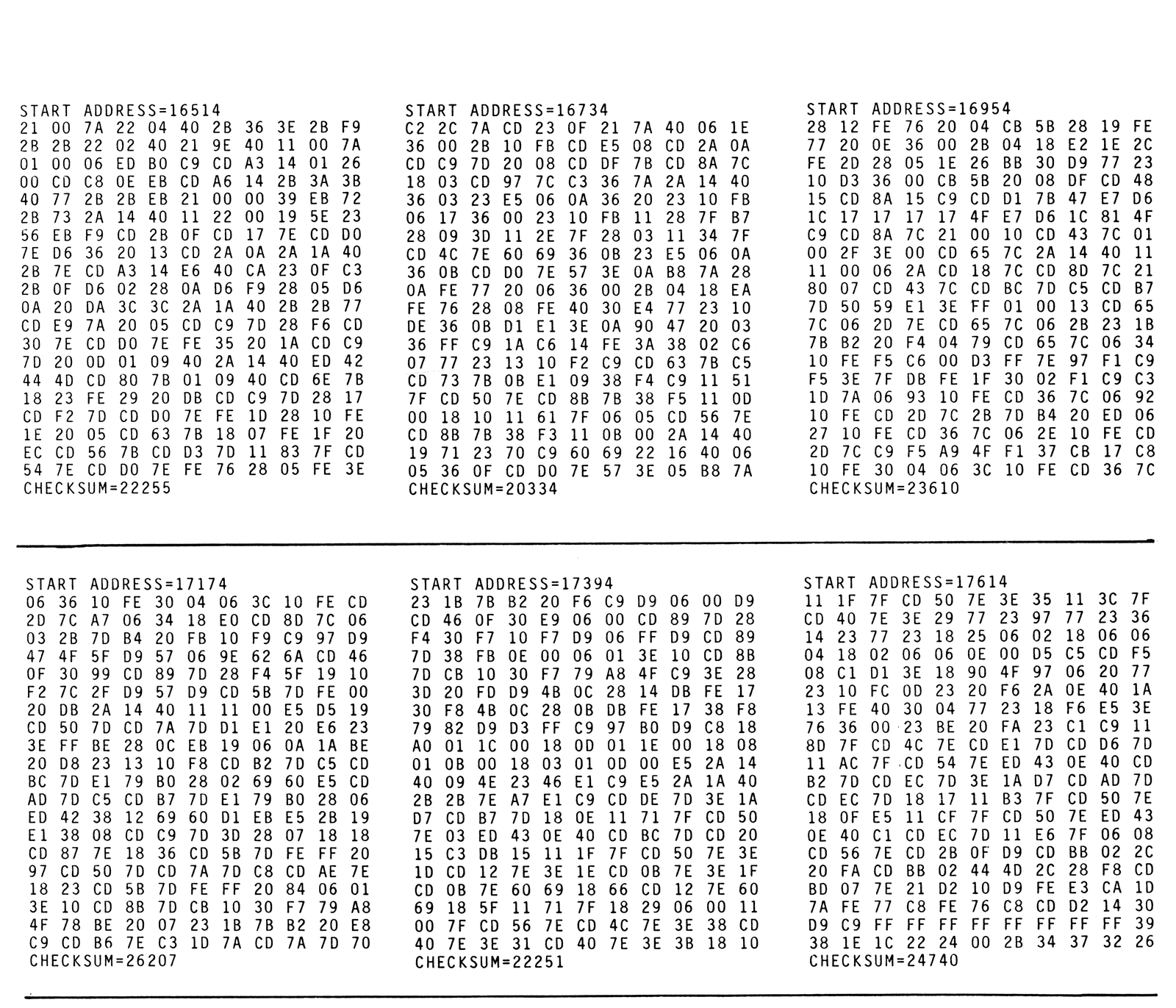
Note: Type-in program listings on this website use ZMAKEBAS notation for graphics characters.