The program listed below allows a person to define a 3-D object, draw it on the screen, and rotate it in three different planes.
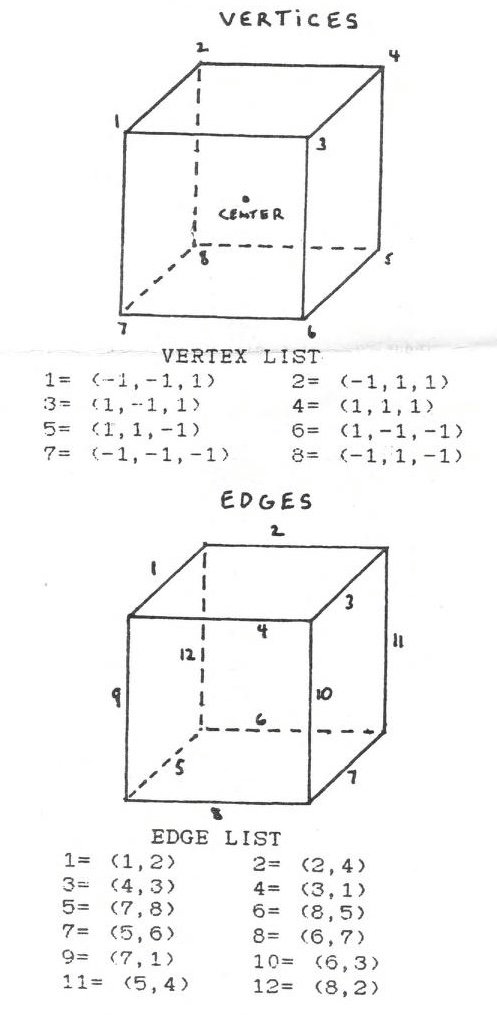
The heart of the program lies in how the object is represented. Two arrays hold the information for the object. An vertex array (list) holds all of the vertices. An edge array (list) holds the two endpoints of the edges. The edgel array refers back to the vertex list for the actual points. It only holds the number of the vertex.
Lines 100 to 1030 in the program holds the definition of a cube and some values for variables used by the program. Look at the diagrams and the the two lists to see how the cube is defined. More complex figures will take more information.
The center of the cube is (0,0,90). This can be changed by the user. The variables XX, YY, and ZZ define the center that the user chooses.
There are four procedures in the program. They are treated as keywords. To display the object the user can type in directly, or in a progran, DISPLAYS3D, ROTX, ROTY, and ROTZ rotate the object in radians held by the variable ROT. The program says that ROT is 20, its wrong. It should be in radians, like PI/10. Just to refresh your memory PI/2 is 90 degrees.
When a rotation procedure is called the object is spun in the axis defined. Since the Z axis is pointing out of the screen, rotating the object will make it appear to spin like it is ona turntable and you are looking down on it. I hope this is clear.
The variable D2 changes how large the object is on the screen. The larger the number the smaller the object.
When you run the program as it is, nothing appears to happen. All it has done is to load the array with the data and set up the variables. Type ROTX, ROTY, and then DISPLAY3D. You will now see the cube at an angle.
Have fun with the progran. If you have any questions feel free to contact me. Its hard to Summarize a lot of material ina short article.