
A neat way of selecting from a menu or a collection of items on the screen is to move the cursor to the desired item. There is nothing new about this idea: many games and commercial programs use this technique. On our keyboard, moving the cursor is somewhat awkward: hold the cap shift down while pressing 5 6 7 or B. Some of our more expensive cousins have special keys for moving the cursor.
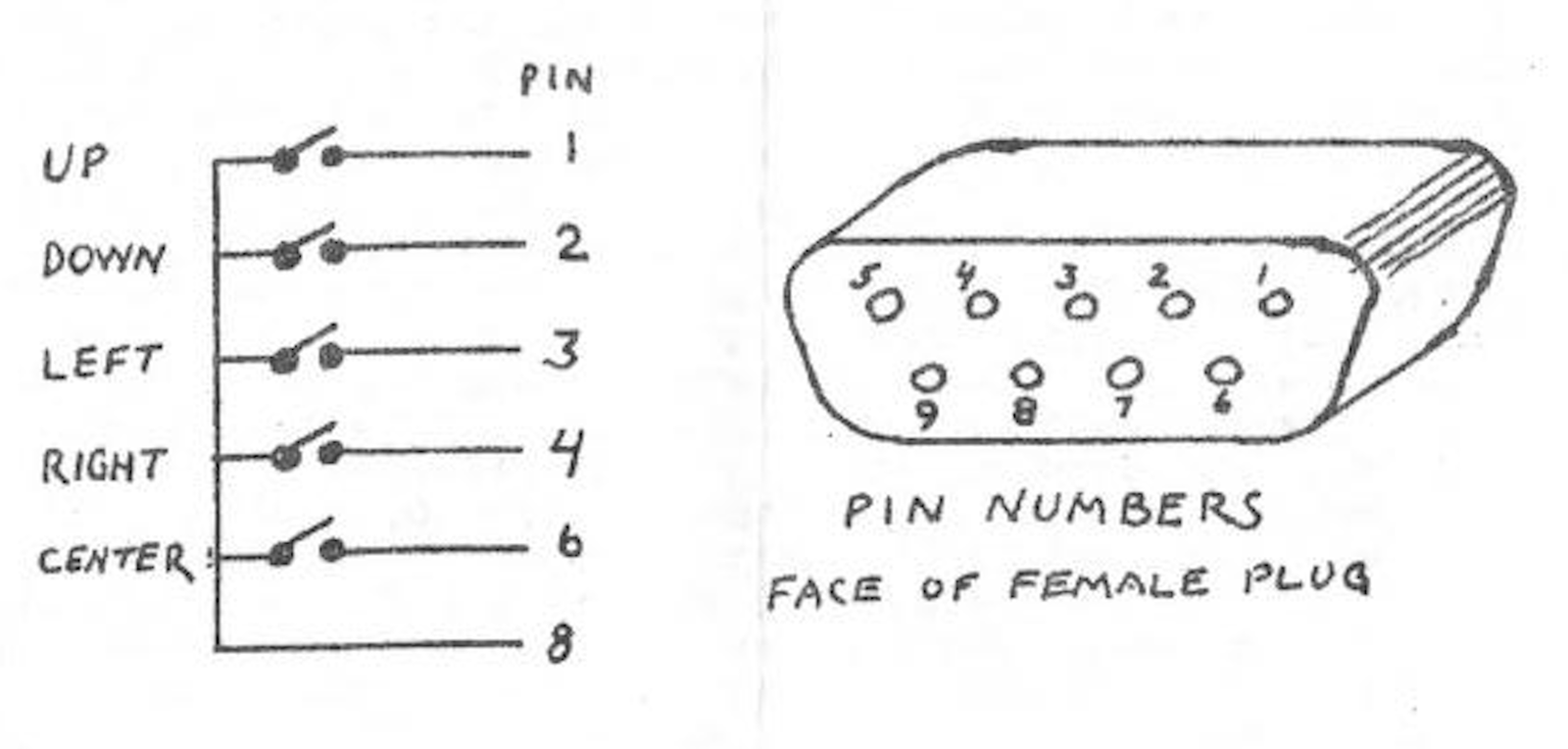
The cursor pad described here simulates these special keys. It plugs into a joystick port and, with appropriate software, moves the cursor around the screen. The gadget consists of a small plastic box (mine is 2″ by 3″ by 1″). Mounted in the top are 5 normally-open push button switches. Four are in a diamond pattern: up, down, left, right. The fifth is in the center and acts as the ENTER key. All these are available at Radio Shack.
For the plug that attaches this to the joystick port, I found an elegant solution at Toys’R’Us – an extension cord for Atari joysticks. I cut this in half, and used the female end far the cursor pad. Wes Brzozowski described an alternative plug in his Light Pen article in Sep/Oct 86 SINCUS NEWS.
In this example of the software I use, the cursor moves vertically only. Statements 400-500 simply create and display a list of items; your own program would obviously have a different list. The subprogram that controls the cursor is in statements 200-280. This routine requires values for K and L, which set bounds to the movement of the cursor, and which are supplied by statements 110 and 120. When the center key is pressed, the cursor pad subprogram returns in I the number of the selected item.
Try it, with your joystick in the right-hand port!
Image Gallery
Source Code
    1 REM ** CURSOR PAD DEMO **
    2
   50 GO SUB 400
   60
  100 REM SET CURSOR BOUNDS
  110 LET K=2: REM ROW # OF FIRST ITEM
  120 LET L=11: REM ROW # OF LAST ITEM
  130 GO SUB 200
  140
  180 REM USE SELECTION
  190 CLS : PRINT A$ (1): STOP
  199
  200 REM CURSOR PAD
  210 LET I=L: OVER 1
  220 GO SUB 280
  230 IF STICK (1,2)0>0 THEN GO SUB 280: GO TO 260
  240 IF STICK (2,2)=0 THEN GO TO 230
  250 GO SUB 280: OVER : LET I=I-K+1: RETURN
  260 LET I=I-(STICK (1,2)=1 AND I>K)+(STICK(1,2)=2 AND I<L)
  270 PAUSE 10: GO TO 220
  280 PRINT AT I,O; INVERSE 1;" ": RETURN
  299
  400 REM CREATE LIST
  405 DIM A$(10,7)
  410 FOR I=1 TO 10
  420 LET A$(I)="ITEM "+STR$ I
  430 NEXT I
  440
  500 REM DISPLAY LIST
  510 PRINT "SELECT ITEM": PRINT
  520 FOR I*1 TO 10
  530 PRINT A$(I)
  540 NEXT I