
New users of the Timex/Sinclair computers sometimes spend a long time hunting for a specific key. The keys that are not used frequently remain hard to find. Keygame is intended to help the user become familiar with the keyboard and to have some fun while learning.
Keygame classifies users into five skill levels: 1) beginner, 2) trainee, 3) pro, 4) expert, or 5) master. The character set is subdivided into seven subsets. The beginner is asked to find only the simple keys, i.e., those in the L-cursor mode requiring no shifting. The trainee must cope with the shifted keys. The pro has to find the keyword keys such as PRINT, IF, and SAVE. The function and graphics keys are added for the expert and master, respectively.
As the player’s skill level increases, his handicap increases in steps of 10. The beginner has no handicap; a trainee has a 10 point handicap, and so on for each skill level up to a 40 point handicap for the master. Furthermore, less time is allowed to find each key as the skill level increases.
The immediate goal of the game is to score 150 points to win a promotion to the next highest level. The object of the game is to score 150 points at the masters level. Promotions occur automatically when a score of 150 points is attained; demotions occur if one’s score falls below one. A player may start at any level desired because the promotion/demotion system is self-correcting. The points gained for each key equal the skill level associated with the key: 1 point for ordinary keys, up to 5 points for the graphics keys. The penalty for a missed key is double the point value of the key.
In responding, it is necessary to press the shift key for those keys that normally require it, i.e., shifted keys and graphics keys. It is not necessary to press the shifted 9 first to enter a graphics key response or to press the shifted ENTER key to enter a function key response. The program takes care of that automatically.
One’s skill level will increase with playing. If desired, the response time limits can be shortened (or lengthened) by decreasing (or increasing) the value of the first number in the parentheses in line 520.
We hope you enjoy playing Keygame, but, more important, we hope you will be able to master the keyboard in this rather painless way!
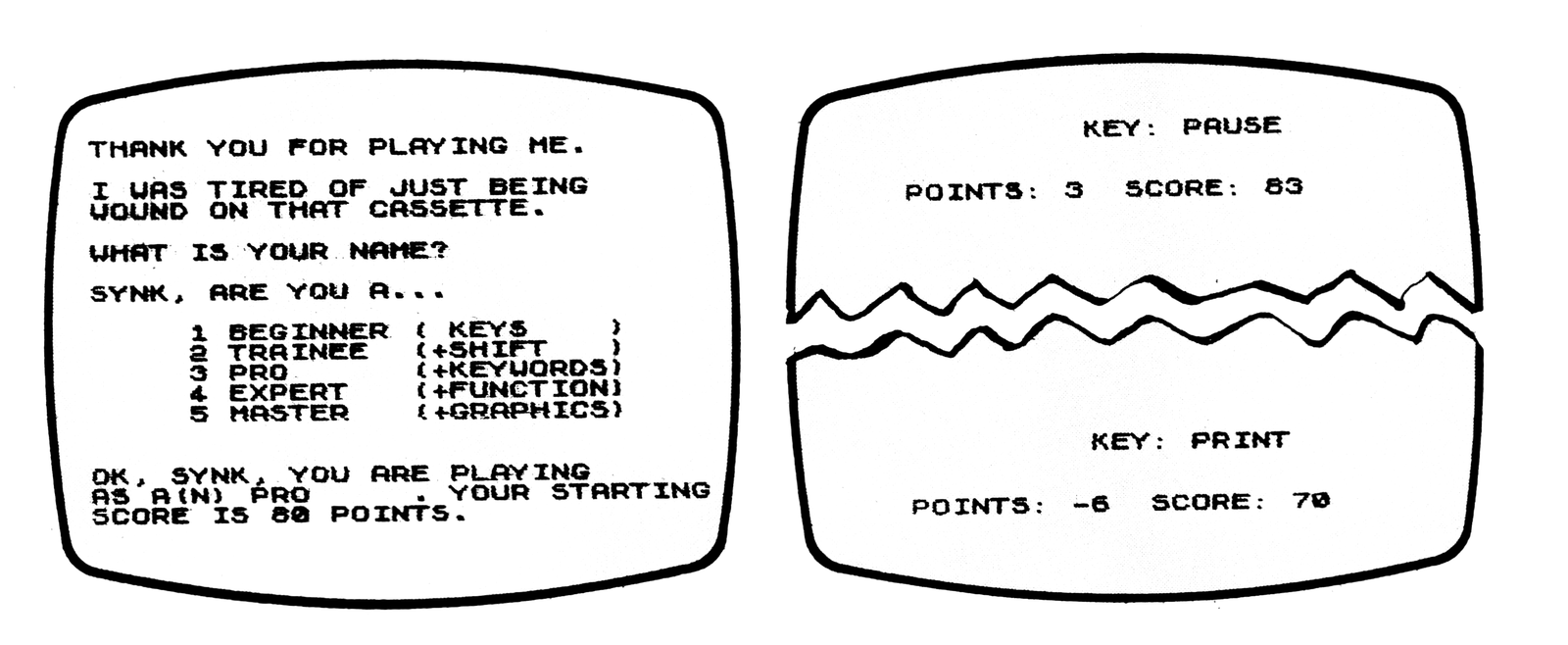
Listing 1. Keyboard Learning Game.
  10 REM KEYGAME
  20 REM WRITTEN BY JOSEPH J. CHARLES
  30 REM [address omitted] [phone number omitted]
  40 REM 11:45 PM  7/31/82
  50 DIM L$(5,8)
  60 DIM M$(5,9)
  70 SLOW
  80 LET Z$="CPPIJKQWEASDZXRHFGOLYUN"
  90 LET L$(1)="BEGINNER "
 100 LET L$(2)="TRAINEE "
 110 LET L$(3)="PRO "
 120 LET L$(4)="EXPERT "
 130 LET L$(5)="MASTER "
 140 LET M$(1)=" KEYS"
 150 LET M$(2)="+SHIFT"
 160 LET M$(3)="+KEYWORDS"
 170 LET M$(4)="+FUNCTIONS"
 180 LET M$(5)="+GRAPHICS"
 190 LET W$="12345678901234567890"
 200 GOSUB 1030
 210 LET Y$=""
 220 PRINT "THANK YOU FOR PLAYING ME. "
 230 PRINT
 240 PRINT "I WAS TIRED OF JUST BEING"
 250 PRINT "WOUND ON THAT CASSETTE."
 260 PRINT
 270 PRINT "WHAT IS YOUR NAME? "
 280 INPUT N$
 290 PRINT
 300 PRINT N$;", ARE YOU A..."
 310 PRINT
 320 FOR I=1 TO 5
 330 PRINT TAB (5);I;" ";L$(I);
 340 PRINT TAB (16);"(";M$(I);")"
 350 NEXT I
 360 PRINT
 370 INPUT L
 380 LET SC=100-10*(L-1)
 390 RAND
 400 PRINT
 410 PRINT "OK, ";N$;", YOU ARE PLAYING"
 420 PRINT "AS A(N) ";L$(L);". YOUR STARTING "
 430 PRINT "SCORE IS ";SC;" POINTS."
 440 PAUSE 300
 450 REM
 460 GOSUB 820
 470 CLS
 480 IF S=5 OR S=6 THEN LET L=-20
 490 IF S=5 OR S=6 THEN PRINT AT 1,9;"KEY: /";Y$;"/"
 500 IF S<>5 AND S<>6 THEN PRINT AT 1,9;"KEY: ",Y$
 510 LET X$=""
 520 FOR J=1 TO (30-2*L)
 530 IF INKEY$<>"" THEN LET X$=INKEY$
 540 IF X$<>"" THEN GOTO 560
 550 NEXT J
 560 REM
 570 IF S=3 THEN LET Y$=CHR$ ((CODE Y$)-192)
 580 IF Y$>=CHR$ 193 AND Y$<=CHR$ 215 THEN LET Y$=Z$(CODE Y$-192)
 590 IF S=5 OR S=6 THEN LET L=5
 600 IF S=5 THEN IF X$<>W$(CODE Y$) THEN LET P=-2*P
 610 IF S=6 THEN IF X$<>W$(CODE Y$-118) THEN LET P=-2*P
 620 IF S=5 OR S=6 THEN GOTO 640
 630 IF X$<>Y$ THEN LET P=-2*P
 640 LET SC=SC+P
 650 PRINT
 660 PRINT
 670 PRINT "POINTS: ";P;"  SCORE ";SC
 680 IF SC<1 THEN LET L=L-1
 690 IF L=0 THEN LET L=1
 700 IF SC>0 THEN GOTO 730
 710 PRINT N$;" YOU ARE NOW A(N) ";L$(L)
 720 GOTO 790
 730 IF SC<150 THEN GOTO 460
 740 IF L=5 THEN PRINT AT 10,0;"CONGRATULATIONS, ";N$;". YOU ARE  THE GREATEST."
 750 IF L=5 THEN STOP
 760 LET L=L+1
 770 PRINT "YOU ARE PROMOTED TO A(N) ";L$(L);"."
 780 PAUSE 150
 790 LET SC=100-10*(L-1)
 800 GOTO 460
 810 STOP
 820 LET S=INT (L*RND+1)
 830 REM SETS:   1:2 7:3:4:5 6:
 840 REM LEVELS:1: 2 :3:4: 5 :
 850 IF L=2 AND S=2 THEN LET S=5+5*INT (.5+RND)
 860 IF L=5 AND S=5 THEN LET S=5+INT (.5+RND)
 870 IF S=1 THEN LET Y$=CHR$ INT (27+37*RND)
 880 IF CODE Y$=64 THEN GOTO 870
 890 IF S=2 THEN LET Y$=CHR$ INT (11+16*RND)
 900 IF CODE Y$=12 THEN GOTO 890
 910 IF S=7 THEN LET Y$=CHR$ INT (216+14*RND)
 920 IF S=3 THEN LET Y$=CHR$ INT (230+26*RND)
 930 IF S=4 THEN LET Y$=CHR$ INT (193+23*RND)
 940 IF CODE Y$=195 THEN GOTO 930
 950 IF S=5 THEN LET Y$=CHR$ INT (1+10*RND)
 960 IF S=6 THEN LET Y$=CHR$ INT (129+10*RND)
 970 LET P=S
 980 IF S=7 THEN LET P=2
 990 IF S=6 THEN LET P=5
1000 RETURN
1010 REM GRAPHICS CODE CONVERSION
1020 REM TYPE SHIFTED KEYWORDS AS INDICATED BELOW
1030 LET W$(1)=CHR$ 117
1040 LET W$(2)=" AND "
1050 LET W$(3)=CHR$ 112
1060 LET W$(4)=" TO "
1070 LET W$(5)=CHR$ 114
1080 LET W$(6 TO 12)="<> STEP STOP SLOW LPRINT "" OR "
1090 LET W$(13)=CHR$ 113
1100 LET W$(14)="<="
1110 LET W$(15)=CHR$ 115
1120 LET W$(16)=">="
1130 LET W$(17 TO 20)=" THEN **LLIST FAST "
1140 RETURN
1150 REM SYNCSUM=000
Note: Type-in program listings on this website use ZMAKEBAS notation for graphics characters.