
Also Available For T/S2068
Albert F. Rodriguez
1605 Pennsylvania Ave.
No. 204
Miami Beach, FL 33139
(305) 531-6464
ZX81 Appointment Calendar
Copyright (c) 1983
Albert F. Rodriguez

          $19.95 : On Cassette
             For : Sinclair ZX81/TS1000
        Language : Sinclair BASIC
         ROM/RAM : 8K/32K
       Load Name : "APTCAL"
       Load Time : 7.30 Minutes
Program Listable : No
Program Listings : $6.50
          Extras : Printer & Recorder
   Syntactic Sum : 441,292
“A Personal Time Management Program”
The practical benefits and tutorial aspects of this program are evident by knowing what it does, what it can be used for and how it is written. The reader can begin to know all of these things by having nearby a listing of the program along with its declarations (see Listings 1 and 2). It is preferable if the program was loaded into the computer before reading any further.
The program is self-running. This prevents the user from erasing any data contained in the variable store by entering “RUN”. If this accident occurs, then, reloading the program is recommended. If the program is stopped from executing by pressing “BREAK” it can be restarted by entering “GOTO 20”.
The program is driven by a main-program that consists of lines 20-31. This feature of the program lets a programmer outline his entire work before he dedicates his efforts to writing the specific details of each section of the outline.
The use of variable names instead of line numbers within subroutine call-statements enhances the composition and readability of the program. It helps the programmer to quickly access a given section of the overall work for editing or debugging; it helps the user to keep better track of what the program does. Both the use of a main-program and assigning variable names to subroutines also simplifies the following explanation.
While writing this program it was assumed that it should be highly interactive, user-friendly and that it provide a good display. Together, these traits make the program fun and easy to use. To see how these traits are exhibited by the program it should be executed in “SLOW” mode until the user obtains familiarity with how the program works.
The first view the user will have of the program is a graphic FRAME which lists the name of the program and all of the options that a user can exercise while working with the program. This MENU informs a user that he has five options about what to do with an appointment: enter it, check it, change it, save it or clear and reset the storage area of the program from the beginning.
The user makes a CHOICE about what to do with an appointment by entering a designated number. If he accidently enters any data other than the numbers 1-5, inclusive, then a prompt message will appear informing him that a false entry has been made; it will later self-erase and allow another entry.
The option CLEAR should be executed immediately after the program is loaded from cassette for the first time. This will cause the storage area of the program to start accepting appointments from the beginning. To see what happens when the entire storage area is full, enter “LET I = 50” in the immediate mode and key in “GOTO 20”. Later be sure to exercise the option CLEAR again to reset the storage area from the start.
By exercising the option ENTER a user now has 50 possible appointments that he can create. Under these circumstances the program occupies 19.5K bytes of RAM. To increase the number of possible appointments all numerical and alphanumerical arrays would have to be changed to reflect the new total of appointments and line 204 would need to be changed accordingly.
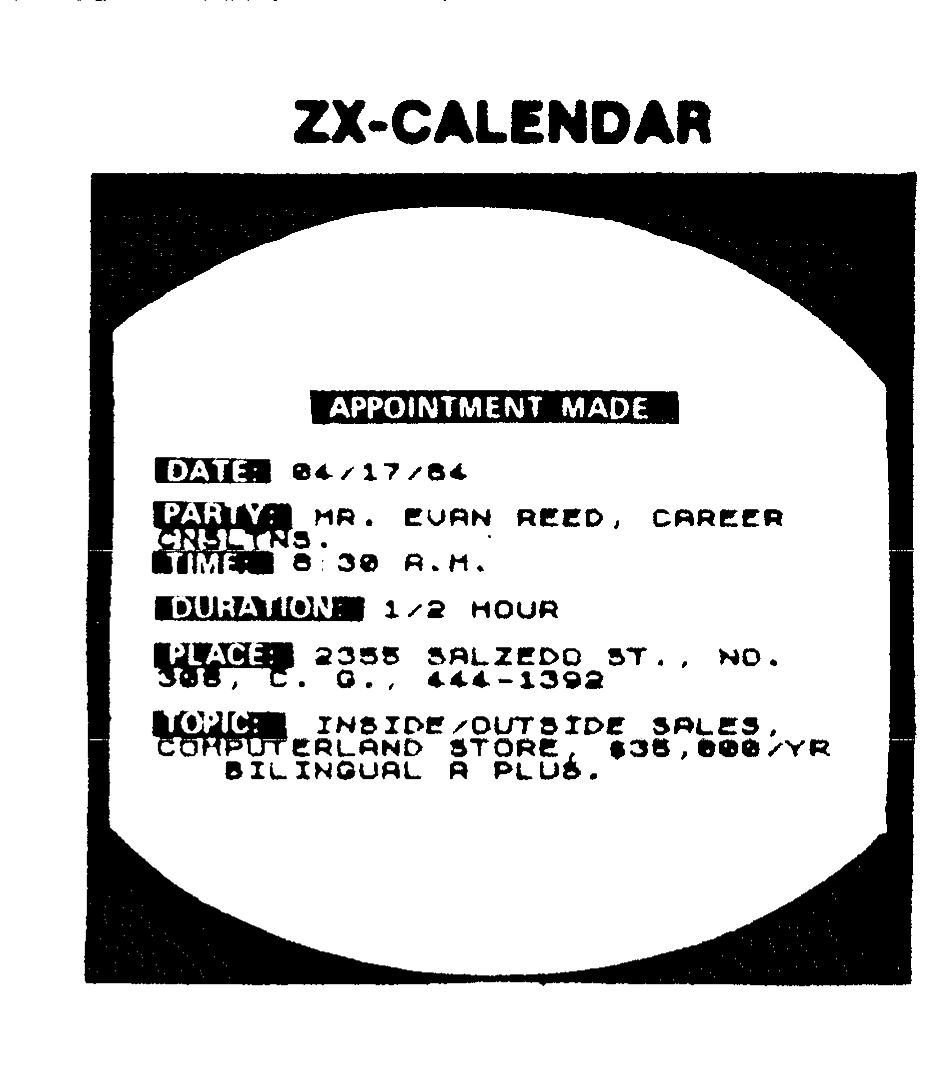
To enter an appointment the user supplies an answer to six questions. These questions are about: the date; the party with whom an appointment is being made; the time an appointment starts; the duration of time occupied by an appointment; the place where it will occur; and the topic of discussion.
It is the date and party with whom an appointment is made that establishes a permanent identification of a given appointment in the storage area. It is through them that any given appointment will later be recalled or adjusted by the options CHECK or CHANGE, respectively. Consequently, the standardization of the length and content of these two pieces of data must be fixed and adhered to so as to avoid what is referred to in computer jargon as GIGO (garbage in-garbage out).
Thus, any data that is entered must be left-justified (i.e., first column-first character). Spaces and punctuations must also be considered. Eight character locations are allowed for entering the date. The format for entering the date should always be: 00/00/00. The party name has 32 character locations available. Time and duration permit 10 locations each. Place provides 64 while the topic lets 96 character locations be used in recording input data.
After an appointment is entered the program presents a summary of it to the user via the routine DISPLAY (lines 600-608). This routine lets the user obtain a hard-copy of an appointment if he so desires. Whether or not the user elects to make a copy of an appointment the program, afterwards, returns to menu.
After an appointment has been made a user can verify that it is stored by the program by exercising the option CHECK. Checking an appointment can be done in either of four ways. First, the name of a party can be used to retrieve from storage and put on display any and all appointments made with that specific individual or entity, regardless in what order these appointments are made. Second, a user may determine any and all appointments he has on a given day by entering the entire date. Third, a user may find what appointment(s) he has for a given month and year (in chronological order) by entering the pair of digits that denote a given month and year. (If a user tries to check an appointment by any of these methods when in fact said appointment was never made, then, a prompt message will appear informing the user of this fact.) After displaying every appointment, by any of these methods, the program then returns to menu. Fourth, if a user wants to view (in sequential order) every appointment that was ever entered, he may do so by entering 1 or 2, while in the CHECK sub-menu, and afterwards keying “ENTER” until the program returns to the main menu.
After an appointment is entered a user may want to modify it in whole or in part. He may do so through the option CHANGE. (Yet, before a user tries to change an appointment he should always check it first. For it may have never been made.) This section of the program was designed with the assumption that a user can only make a single appointment on a single given date with the same party. If a user will be meeting with the same party more than once on the same date, he may reflect this by altering the time or duration part of the appointment that was made once with this same party. Hence, there is no need to make more than one appointment with the same party on the same date.
If an entire appointment is elected to be changed this can be done, but without using additional storage space. That is, the same storage space already occupied can be rewritten all over again. If an appointment is elected to be changed only in parts, the program will allow it until the user decides that all necessary changes in a given appointment have been made. Afterwards, the program returns to menu. (At this time a user may exercise the option CHECK to verify that the changes made in a given appointment have been properly recorded.)
After a user finishes using the program he can save it, in its updated form, by exercising the option SAVE. It is also this option that lets the program self-run after it is loaded again.
Listing 1. Declarations
1.  Character Arrays

L$(50,8)  :  Stores complete date of appointments
M$(50,32) :  Stores names of parties
N$(50,10) :  Stores time of appointment
O$(50,10) :  Stores length of time of an appointment
P$(50,64) :  Stores places where appointment will occur
Q$(50,96) :  Stores topic for discussions

2.  Number Array

K(50)  :  Stores cell numbers (1-50) of alphanumerical arrays

3.  Character Variables

A$  :  Holds numbers 1-5 for comparison
B$  :  Inputs dates
C$  :  Inputs menu options
D$  :  Inputs party names
E$  :  Inputs times
F$  :  Inputs durations
G$  :  Inputs places
H$  :  Inputs topics
I$  :  Inputs "yes" or "no" replies
J$  :  Logical operator "NSORT"
K$  :  Inputs 2-digit month
R$  :  Inputs 2-digit year
S$  :  Inputs "A" for all, "P" for part.  Also inputs new data
        during change.
T$  :  Inputs "yes" or "no" replies
U$  :  Holds load/save name "APTCAL"
V$  :  Inputs which part of an appointment to change
Z$  :  Inputs choice to check an appointment

4.  Number Variables

A  :  Holds code numbers for numbers 1-5
B  :  Control counter, searches for correct input in routine
       CHOICE
C  :  Control counter, flashes message that calendar is full
D  :  Control counter, searches for an appointment in routine
       CHECK
E  :  Temporary store of value for cell counter I in routine
       CHECK
F  :  Temporary store of value for cell counter D in routine
       CHANGE
G  :  Temporary store of value for cell counter I in routine
       CHANGE
H  :  Temporary store of value for array K(50) in sort routine
       lines 770-780
I  :  Control counter for number of appointments entered
J  :  Control counter for cell number of appointments being
       sorted
K  :  Temporary store of value for array K(50) in sort routine
N  :  Temporary store of value earliest appointment made in a
       given month
P  :  Temporary store of value of length of date to change an
       appointment
Q  :  Temporary store of value of length of party name to
       change . . . .
T  :  Control counter that acts as a flag to indicate if an
       appointment exists
X  :  Pixel position on a column
Y  :  Pixel position on a row
SAVE  :  = 900; routine to save program

* 5.  Subroutines

ENTER = 500; originates appointments
DISPLAY = 600; gives copy-ready report of an appointment
CHECK = 700; checks appointment by date, party, month/year
CHANGE = 800; changes appointment by date and party
FRAME = 100; draws graphic frame around screen
MENU = 200; displays menu options
CHOICE = 300; validates option-input
CLRS = 400; clears screen
CLEAR = 1000; resets storage area

*Note:  All Subroutines (including SAVE) are assigned their
        address in immediate mode.
Note:   Listing 2. Program (obtain print-out of the program
        from tape cassette).