
Basil Wentworth, [address omitted]
Here is a screen dump program that is fairly simple, and offers a bit of flexibility. It is configured for the Oliger 2068 interface, and the CITIZEN MSP-10 printer. I expect that other printers would work with the program, as I believe that the MSP point-graphic printing system is fairly standard.
To check whether your printer can use this program, RUN the printer compatibility test program shown. Again, line 100 is for the Oliger interface. For other interfaces, you should be able to make an adaptation. The two POKEs in line 100 tell the printer to interpret the (CHR$ 27) as an ESC command, rather than to print the corresponding character. Incidentally, if you want to LLIST the program, you’ll have to undo these POKEs by repeating LET/p=o/g, or you’ll get some interesting (and not very helpful) interpretations of the keywords.
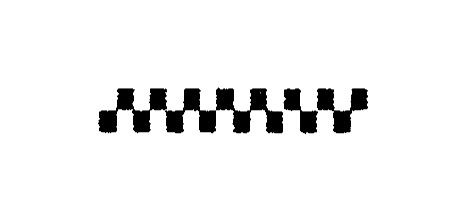
If the compatibility test program gives a printout like that shown, you’re in business.
The COPY program is a hybrid: part BASIC and part machine code. The CLEAR command in line 9110 ensures that the next variable defined (in this case, B$) will be at the beginning of the VARS area of memory, where you’ll know how to find it. Line 9150 and the following DATA lines fill the first 65 characters of B$ with the machine code you will need.
As you may remember, the memory from 16384 to 22527 holds screen display information. The machine code program converts this information into a form that the computer needs for dot-matrix printing, and plugs it into the latter bytes of B$.
The program as shown prints the top 22 lines of the screen, which comprise all of the display except the two “report” lines at the bottom. If you want to LPRINT less than the entire display, you can change line 9290. The width of the print-out can be changed by varying the control character in line 9370, with results as shown in the figure. Note that the height of the print-out (i.e. the rate at which the printer eats paper) does not change, so the shape of the picture will be different.
One caution: be careful that you do not erase the screen drawing when you activate the COPY command (GO TO 9200). One way to avoid this problem would be to SCREEN$ SAVE the picture you want, and then recall it after you have LOADed the COPY program, as prompted in line 20.
2068 screen dump program; MSP-10 printer, Oliger interface
  10 PRINT ''''"        "; FLASH 1;"DO NOT USE RUN!!"; FLASH 0
  20 PRINT '''"Clear the screen, generate the  figure desired, and GO TO 9200"
8900 STOP
9000 REM  SAVE
9010 SAVE /"COPY" LINE 9100
9020 VERIFY /"COPY"
9030 BEEP .3,12: BEEP 1,12
9040 STOP
9100 REM  INITIALIZE
9110 CLEAR : DIM B$(325)
9120 PRINT ''''"        "; FLASH 1;"DO NOT USE RUN!!"; FLASH 0
9130 PRINT ''"     Be with you as soon as"'"      initializing is done"
9140 RESTORE
9150 FOR F=1 TO 65: READ N: LET B$(F)=CHR$ N: NEXT F
9161 DATA  17, 31,118, 14, 32, 33,  0, 64
9162 DATA   0,  6,  4, 62,  0,203,126, 40
9163 DATA   1, 60,  5, 40,  5,203, 39, 36
9164 DATA  24,243, 18, 19, 58,236,117,214
9165 DATA   8, 50,236,117,254, 62, 40,  9
9166 DATA 213, 17,  0,  3,237, 82,209, 24
9167 DATA 216, 13,200,213, 17,255,  2,237
9168 DATA  82,209, 62,126, 50, 52,109, 24
9169 DATA 200
9170 LET /p=o/g: POKE 23300,60: POKE 23301,3
9180 GO TO 1
9200>REM  COPY
9210 LET A=6+PEEK 23627+256*PEEK 23628
9230 LET B=A+65: LET M=INT (B/256): LET L=B-256*M
9240 LET B$(2)=CHR$ L: LET B$(3)=CHR$ M
9250 LET B=A+14: LET M=INT (B/256): LET L=B-256*M
9260 LET B$(30)=CHR$ L: LET B$(31)=CHR$ M
9270 LET B$(35 TO 36)=B$(30 TO 31)
9280 LET B$(62 TO 63)=B$(30 TO 31)
9290 FOR L=1 TO 22
9295 REM  can be varied, to print less lines
9300 IF L<9 THEN LET start=16352+L*32
9310 IF L>8 AND L<17 THEN LET start=18400+32*(L-8)
9320 IF L>16 THEN LET start=20448+32*(L-16)
9330 FOR F=1 TO 2
9340 LET B$(8)=CHR$ INT (start/256)
9350 LET B$(7)=CHR$ (start-256*CODE B$(8))
9360 RANDOMIZE USR A: LET B$(15)=CHR$ 126
9370 LPRINT CHR$ 27;"A";CHR$ 4;CHR$ 27;"K";CHR$ 0;CHR$ 1;B$(66 TO )
9380 REM  "K" for single density; "L" for double density; "Y" for high-speed double density; "Z" for quadruple density
9390 LET start=start+1024
9400 NEXT F
9410 NEXT L
9420 LPRINT CHR$ 27;"A"
9430 BEEP .3,12: BEEP 1,12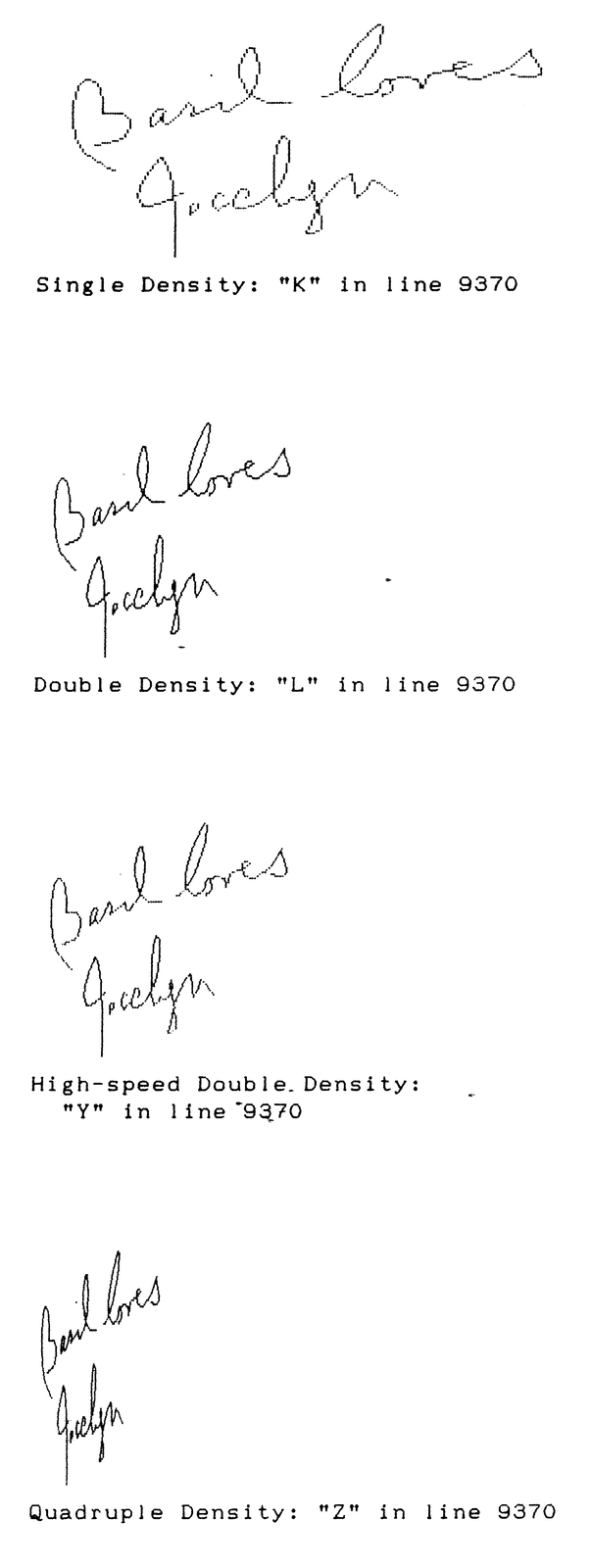
 100 LET /p=o/g: POKE 23300,60: POKE 23301,3
 150 LET A$=""
 200 FOR F=1 TO 5: LET A$=A$+CHR$ 15: NEXT F
 250 FOR F=1 TO 5: LET A$=A$+CHR$ 240: NEXT F
 300 LET A$=A$+A$
 310 LET A$=A$+A$
 320 LET A$=A$+A$
 500 LPRINT CHR$ 27;"L";CHR$ 80;CHR$ 0;A$
Test for printer compatibility should give the following pattern:
Note: Type-in program listings on this website use ZMAKEBAS notation for graphics characters.