
Every business with paid employees has the complicated task of doing its payroll. The program in this article will provide accurate payroll information for up to 35 employees. If the number of employees is greater then 35, the list can be broken down into shorter lists and the results combined where needed.
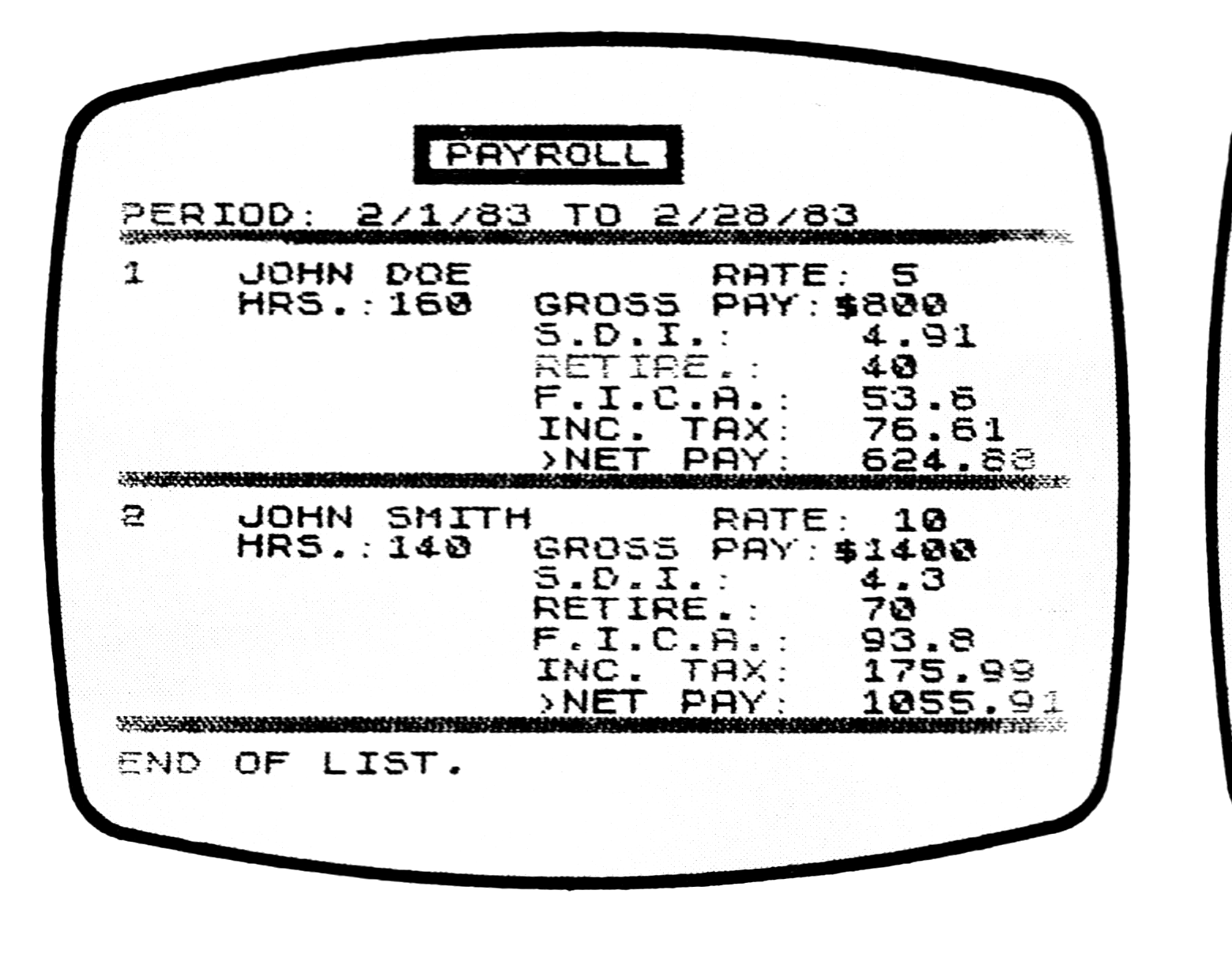
When the program is activated, the names of the employees are typed in and the pertinent employment information is entered. Then for each pay period, the hours worked by each employee are entered. The computer will then provide a detailed payroll list indicating: 1) each employee’s gross pay, 2) itemized deductions withheld, and 3) the employee’s net pay.
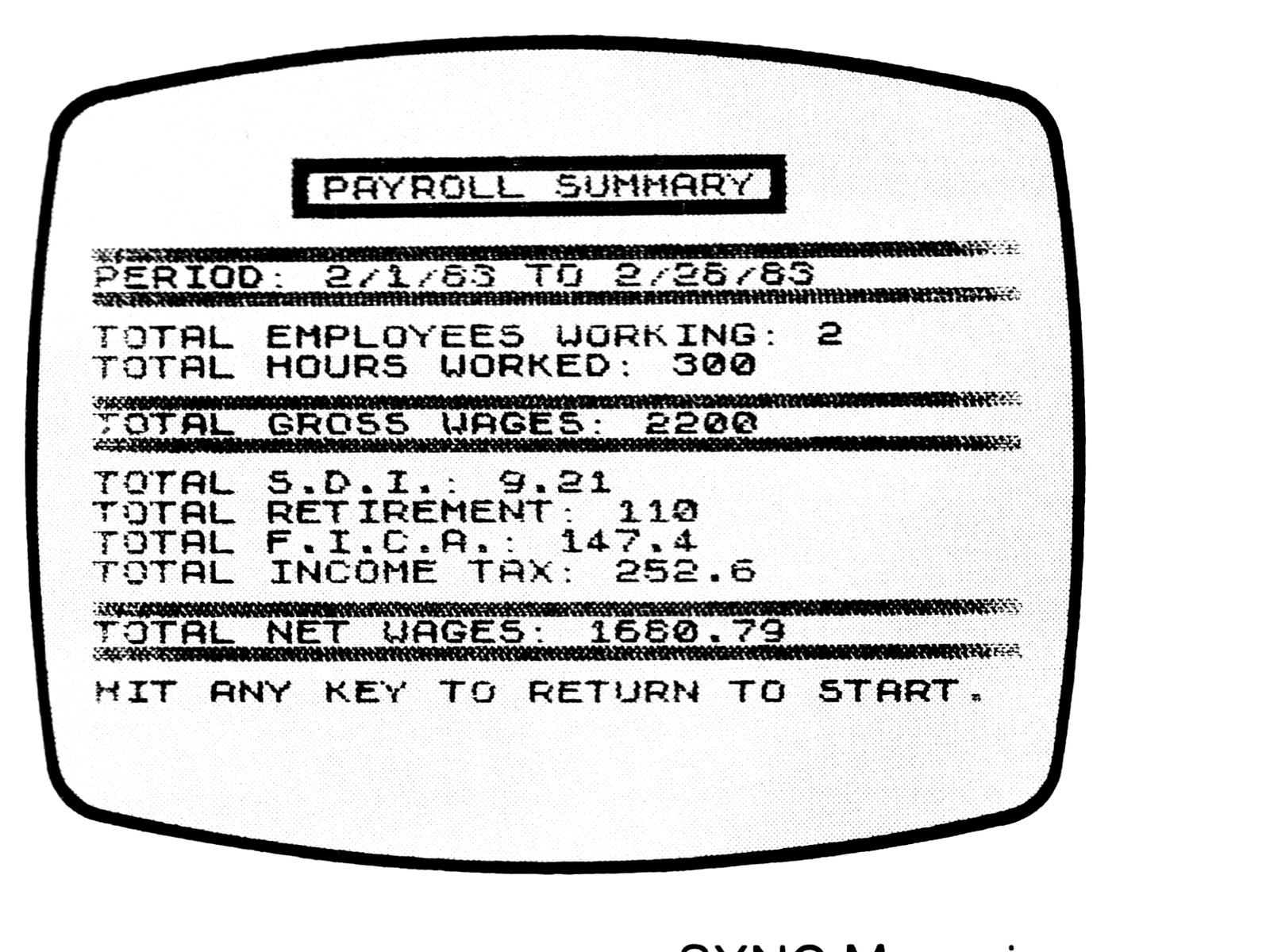
It also provides a payroll summary of total wages, itemized deductions, and net wages, as well as an “employer cost list.” The latter not only lists the gross wages paid to each employee but also enumerates the fringe benefits paid by the employer. This gives the total cost to the employer for each employee for that pay period.
A routine is included for calling up any individual employee’s record and making changes if necessary. New employees may be added without destroying the records of those already listed.
Lines 1000-1300 contain the routine for computing monthly U.S. withholding taxes. The routine listed is for the period ending July 1983 on a monthly payroll basis. You will need to change it when a new withholding tax table becomes effective, or if your payroll period is other than monthly. Circular E of the Internal Revenue Service includes tables for the percentage method of withholding. Refer to it if you need to make any changes. Use the listed routine as the format for your changes.
Multi-line print statements under one list number are purposely entered as such; e.g., lines 720, 900, and 4050. In running an employee’s record, since it can be confusing to have part of the record at the bottom on the screen, enter “CONTinue,” and have the balance at the top of the next screen. By putting the employee’s entire multi-line print statement after one line number, the screen will repeat the entire record on the next screen if it is cut short. (You can accomplish the same thing entering several line numbers with shorter print statements by entering a semi-colon (;) at the end of each line and starting each line with a TAB. However, memory is tight in this program so you might have to eliminate some frills to do it.)
Once you have entered the entire listing, RUN it, and the menu will appear. Enter menu item #9 (Exit Program) and SAVE it on tape. After you have SAVEd it, the menu will appear on the screen again. Enter menu item #10 and your listing 5000-6100 will be on the screen. These lines consist of LET statements for variables relating to employee deductions and benefits provided by employer. (A GOSUB/RETURN loop runs through them when you start a new employee list. They should be changed to fit your requirements. In the program as set up these variables represent the following:
- SDI—State Disability Insurance (amount employee is assessed against each hour worked.)
- IA—Industrial Accident (amount employer is assessed against each hour employee works.
- FICA—Social Security (percentage applied against employee’s gross wage to compute amount of social security he pays. Employer pays the same amount.)
- XMT—Amount Internal Revenue allows for each dependent in computing withholding tax.
- HI—Health Insurance (premium paid by employer for each employee).
- RET—Retirement (percentage of gross salary paid by employer toward an employee’s retirement fund).
- RETX—Retirement (percentage of gross salary deducted from employee toward his retirement fund).
Press C and ENTER to return to menu.
Menu Routines
1) Start New Employee List
This routine will ask you how many employees you have, then prompts you to type in each name (last name first), hourly pay, marital status, number of tax exemptions, and employment status. Employment status: 0—former employee, 1—currently working, 2—has reached maximum social security wages. (2 would not be entered until an employee’s wages reach the maximum as explained below.)
2) See List of Employees
The computer will list each employee and the pertinent information you have entered.
3) Enter Working Hours
The computer will show each employee’s name and hourly wage scale and ask for actual hours worked for each week in month. When you have entered them all, it will show each employee’s gross wage, rate of pay, hours worked, each deduction, and the net pay.
4) See Payroll list
This is the payroll list as described in 3.
5) See/Change Employee Record
You are asked to enter the name of the employee (a few letters of the last name are usually sufficient.) The computer will then print everything you have entered for that employee plus all payroll computations. If you wish to change any of the data for that specific individual, you enter 3 after which you will be asked if you wish to change each datum (Y/N), one by one. If you respond with a Y, you will be asked to input the change. After changes have been made, the corrected employee’s record will be produced.
If you change an employee’s status to 2, you are indicating he has reached the maximum salary on which Social Security needs to be paid. The computer will ask you to enter the amount of the employee’s wages for that month on which social security should be paid.
6) See Employer Costs
This routine will give each employee’s name, gross pay, and all the additional benefits besides wages paid by the employer that month.
7) Add an Employee
This routine first lists current employees, then asks for the name of the employee you wish to add, followed by all the other pertinent information. You end entries by typing RETURN.
8) Look at Payroll Summary
The summary includes the name of the pay period, total employees working, total hours worked, total gross wages, totals of each deduction, and the total net wages.
9) and 10) have already been discussed.
When you up-date the program for your own needs, keep in mind that the program as it is, with present DIM statements, has reserved most of the memory. If you need more memory, you could decrease the number of employees allowed by revising the DIM statements and FOR/NEXT loops. Or you could eliminate some of the frills which are not essential to the basic program.
The search routine (menu item #5) limits the name you enter to seven characters which should be adequate. If you have more than one identical name in your employ, you may want to raise this limit. You will have to free up some more memory as indicated in the preceding paragraph, then change line 1725.
Variables
A$    —Name of employee
F$    —Payroll period
X$    —Graphic line S
Y$    —Graphic lind D
N     —Employee number
H()   —Hourly pay
M()   —Marital status
X()   —Tax exemptions
C()   —Employment status
Q()   —Week 1 hours
R()   —Week 2 hours
S()   —Week 3 hours
T()   —Week 4 hours
U()   —Week 5 hours
P()   —Total hours for each employee
G()   —Gross pay for each employee
W()   —Gross pay less deductions for
       withholding exemptions
D()   —State disability insurance
       withheld
F()   —Social Security withheld
I()   —U.S. withholding tax withheld
J()   —Retirement withheld
Z()   —Maximum FICA wage
       adjustment
SDI   —Percentage for computing
       State Disability Insurance
FICA  —Percentage for computing
       Social Security payment
XMT   —Income tax deduction per
       exemption
HI    —Health insurance premium
       paid by employer
RET   —Percentage used to compute
       employer's share of retirement
       payment
RETX  —Percentage used to compute
       employee's share of retirement
       payment
IA    —Percentage used to compute
       Industrial Accident premium
       paid by employer
L     —Cost per employee
LL    —Total cost of employees
B(1)  —Working variable to compute
       totals of categories
I$()  —Variable used in search
       routine
C$    —Variable used in search
       routine
Working variables: A, J, E, Z, Y, K, M$, V, B$, GM
([gS x32] = 32 graphics on the S key; [gD x32] = 32 graphics on the D key; [g] = a graphic block; [inv …] = inverse characters; [graphic bar xN] = a solid bar of N graphic characters, as printed.)
  10 REM "PAYROLL"
  11 LET X$="[gS x32]"
  12 PRINT TAB 6;"[inv space x20]"
  14 PRINT TAB 6;"[inv space]                  [inv space]"
  15 LET Y$="[gD x32]"
  16 PRINT TAB 6;"[inv space] PAYROLL  RECORDS [inv space]"
  18 PRINT TAB 6;"[inv space]                  [inv space]"
  20 PRINT TAB 6;"[inv space x20]"
  22 PRINT
  24 PRINT "DO YOU WISH TO:"
  28 PRINT "*";TAB 2;"1)START NEW EMPLOYEE LIST?"
  29 PRINT TAB 2;"2)SEE LIST OF EMPLOYEES?"
  30 PRINT "*";TAB 2;"3)ENTER WORKING HOURS?"
  32 PRINT TAB 2;"4)SEE PAYROLL LIST?"
  34 PRINT TAB 2;"5)SEE/CHANGE EMPLOYEE RECORD?"
  36 PRINT TAB 2;"6)SEE EMPLOYER COSTS?"
  38 PRINT TAB 2;"7)ADD AN EMPLOYEE?"
  39 PRINT TAB 2;"8)LOOK AT PAYROLL SUMMARY?"
  40 PRINT TAB 2;"9)EXIT PROGRAM?"
  45 PRINT " 10)CHANGE COMPUTATION VARIABLES"
  46 PRINT
  47 PRINT "ENTER YOUR CHOICE, 1 TO 10."
  48 PRINT AT 20,0;"*CAUTION-""1"" AND ""3"" WILL ERASE PREVIOUS ENTRIES."
  50 INPUT A
  53 IF A=1 THEN GOTO 100
  55 IF A=2 THEN GOTO 300
  60 IF A=3 THEN GOTO 500
  65 IF A=4 THEN GOTO 800
  70 IF A=5 THEN GOTO 1700
  75 IF A=6 THEN GOTO 4000
  80 IF A=7 THEN GOTO 2800
  82 IF A=8 THEN GOTO 3400
  85 IF A=9 THEN GOTO 1500
  87 IF A=10 THEN CLS
  88 IF A=10 THEN LIST 5000
  90 STOP
  95 GOTO 10
 100 CLS
 105 PRINT Y$
 110 PRINT TAB 8;"EMPLOYEE RECORDS"
 115 PRINT X$
 120 GOSUB 5000
 122 LET F$=""
 125 PRINT "HOW MANY EMPLOYEES ARE TO BE      PRINTED?"
 128 DIM Q(35)
 130 DIM A$(35,15)
 132 DIM R(35)
 133 DIM Z(35)
 135 DIM H(35)
 137 DIM S(35)
 140 DIM M(35)
 142 DIM T(35)
 145 DIM X(35)
 147 DIM U(35)
 149 DIM P(35)
 150 DIM C(35)
 151 INPUT N
 152 CLS
 154 PRINT X$
 155 FOR E=1 TO 35
 160 PRINT "NAME: ";
 165 INPUT A$(E)
 170 PRINT TAB 15;A$(E)
 175 PRINT "HOURLY PAY: ";
 180 INPUT H(E)
 185 PRINT TAB 15;H(E)
 190 PRINT "MARITAL STAT: ";
 195 INPUT M(E)
 200 PRINT TAB 15;M(E)
 205 PRINT "TAX EXEMPS: ";
 210 INPUT X(E)
 215 PRINT TAB 15;X(E)
 220 PRINT "EMPL. STATUS: ";
 225 INPUT C(E)
 230 PRINT TAB 15;C(E)
 232 LET J=E
 233 IF J=N THEN GOTO 300
 235 PRINT X$
 240 NEXT E
 300 CLS
 310 PRINT TAB 6;"[graphic bar x18]"
 320 PRINT TAB 6;"[g]EMPLOYEE RECORDS[g]"
 330 PRINT TAB 6;"[graphic bar x18]"
 335 FOR E=1 TO 35
 340 GOSUB 700
 380 IF J=N THEN GOTO 400
 390 NEXT E
 400 PRINT X$
 410 PRINT "END OF FILE."
 420 PRINT
 430 PRINT "HIT ANY KEY TO RETURN TO START."
 440 LET M$=INKEY$
 441 IF M$="" THEN GOTO 440
 445 CLS
 450 GOTO 5
 500 CLS
 505 PRINT Y$
 510 PRINT TAB 10;"WAGE ENTRIES"
 515 PRINT X$
 516 PRINT "TYPE THE PAYROLL PERIOD."
 517 INPUT F$
 518 PRINT "PERIOD: ";F$
 570 FOR E=1 TO 35
 575 IF C(E)=0 THEN LET P(E)=0
 577 IF C(E)=0 THEN GOTO 680
 578 PRINT X$
 580 PRINT E;TAB 4;A$(E);TAB 21;"RATE: ";H(E)
 590 PRINT TAB 7;"WEEK 1 HRS: ";
 595 INPUT Q(E)
 600 PRINT Q(E)
 605 PRINT TAB 7;"WEEK 2 HRS: ";
 610 INPUT R(E)
 615 PRINT R(E)
 620 PRINT TAB 7;"WEEK 3 HRS: ";
 625 INPUT S(E)
 630 PRINT S(E)
 635 PRINT TAB 7;"WEEK 4 HRS: ";
 640 INPUT T(E)
 645 PRINT T(E)
 650 PRINT TAB 7;"WEEK 5 HRS: ";
 655 INPUT U(E)
 660 PRINT U(E)
 667 LET P(E)=Q(E)+R(E)+S(E)+T(E)+U(E)
 670 PRINT TAB 7;"[g]TOTAL:       ";P(E)
 672 LET J=E
 678 IF J=N THEN GOTO 800
 680 NEXT E
 710 PRINT X$
 720 PRINT E;TAB 4;A$(E);TAB 20;"STATUS: ";TAB 29;C(E);TAB 4;"HRLY PAY: ";H(E);TAB 20;"MARITAL: ";M(E);TAB 4;"NO.EXEMPTIONS: ";X(E)
 730 IF C(E)=0 THEN PRINT TAB 8;"[inv FORMER EMPLOYEE]"
 750 LET J=E
 760 RETURN
 800 CLS
 810 PRINT TAB 10;"[graphic box top]"
 820 PRINT TAB 10;"[g] PAYROLL [g]"
 830 PRINT TAB 10;"[graphic box bottom]"
 845 PRINT "PERIOD: ";F$
 848 LET V=0
 850 DIM G(35)
 852 DIM J(35)
 855 DIM D(35)
 860 DIM F(35)
 865 DIM W(35)
 868 DIM I(35)
 870 FOR E=1 TO N
 872 IF C(E)=0 THEN GOTO 960
 875 PRINT X$
 880 LET G(E)=P(E)*H(E)
 885 LET D(E)=INT (100*(P(E)*SDI)+.5)/100
 890 LET F(E)=INT (100*(G(E)*FICA)+.5)/100
 892 IF C(E)=2 THEN LET F(E)=Z(E)
 893 LET J(E)=INT (100*(G(E)*RETX)+.5)/100
 895 LET W(E)=G(E)-(XMT*X(E))
 898 GOSUB 1000
 899 IF V=E THEN RETURN
 900 PRINT E;TAB 4;A$(E);TAB 20;"RATE: ";H(E);TAB 4;"HRS.:";P(E);TAB 14;"GROSS PAY:$";TAB 25;G(E);TAB 14;"S.D.I.: ";TAB 25;D(E);TAB 14;"RETIRE.:";TAB 25;J(E);TAB 14;"F.I.C.A.: ";TAB 25;F(E);TAB 14;"INC. TAX: ";TAB 25;I(E);TAB 14;">NET PAY: ";TAB 25;G(E)-D(E)-J(E)-F(E)-I(E)
 960 NEXT E
 962 PRINT X$
 965 PRINT "END OF LIST."
 970 PRINT "HIT ANY KEY TO RETURN TO START."
 975 LET M$=INKEY$
 978 IF M$="" THEN GOTO 975
 980 CLS
 985 GOTO 5
1005 IF M(E)=1 OR M(E)=3 THEN GOTO 1200
1010 IF W(E)<200 THEN LET I(E)=0
1020 IF W(E)<506 AND W(E)>200 THEN LET I(E)=.12*(W(E)-200)
1030 IF W(E)<998 AND W(E)>506 THEN LET I(E)=36.72+.16*(W(E)-506)
1040 IF W(E)<1545 AND W(E)>998 THEN LET I(E)=115.44+.19*(W(E)-998)
1050 IF W(E)<1967 AND W(E)>1545 THEN LET I(E)=219.37+.24*(W(E)-1545)
1060 IF W(E)<2408 AND W(E)>1967 THEN LET I(E)=320.65+.27*(W(E)-1967)
1070 IF W(E)<2850 AND W(E)>2408 THEN LET I(E)=439.72+.32*(W(E)-2408)
1075 IF W(E)>2850 THEN LET I(E)=581.16+.37*(W(E)-2850)
1080 GOTO 1300
1200 IF W(E)<117 THEN LET I(E)=0
1210 IF W(E)<267 AND W(E)>117 THEN LET I(E)=.12*(W(E)-117)
1220 IF W(E)<742 AND W(E)>267 THEN LET I(E)=18+.16*(W(E)-267)
1230 IF W(E)<1042 AND W(E)>742 THEN LET I(E)=94+.20*(W(E)-742)
1240 IF W(E)<1408 AND W(E)>1042 THEN LET I(E)=154+.24*(W(E)-1042)
1250 IF W(E)<1875 AND W(E)>1408 THEN LET I(E)=241.84+.30*(W(E)-1408)
1260 IF W(E)<2317 AND W(E)>1875 THEN LET I(E)=381.94+.34*(W(E)-1875)
1270 IF W(E)>2317 THEN LET I(E)=532.22+.37*(W(E)-2317)
1300 LET I(E)=INT (100*I(E)+.5)/100
1310 RETURN
1500 CLS
1510 PRINT "YOU HAVE INDICATED YOU WISH TO  EXIT THIS PROGRAM."
1520 PRINT
1530 PRINT "IF YOU HAVE MADE ANY CHANGES--"
1540 PRINT
1550 PRINT "[graphic bar x31]"
1560 PRINT "[g]DO NOT FORGET TO RE-LOAD TAPE[g]"
1570 PRINT "[graphic bar x31]"
1580 PRINT
1590 PRINT "TO SAVE THIS PROGRAM AS CHANGED PREPARE THE TAPE RECORDER, BEGINRECORDING, AND TYPE ""C""."
1600 STOP
1610 SAVE "PAYROL[inv L]"
1620 GOTO 5
1700 CLS
1708 PRINT "TYPE NAME OF EMPLOYEE (LAST NAMEFIRST):"
1710 INPUT C$
1715 CLS
1720 LET K=LEN C$
1725 IF K>7 THEN LET K=7
1730 DIM I$(35,K)
1740 FOR E=1 TO N
1750 LET I$(E)=A$(E)
1755 LET C$=C$( TO K)
1760 IF C$=I$(E) THEN GOTO 1800
1770 NEXT E
1775 PRINT X$
1780 PRINT "NO SUCH NAME. DID YOU SPELL IT  RIGHT?"
1782 PRINT X$
1785 PRINT "TYPE ""1"" TO TRY AGAIN, ""2"" TO   RETURN TO START."
1786 INPUT L
1787 CLS
1788 IF L=1 THEN GOTO 1700
1789 GOTO 5
1800 PRINT X$
1805 PRINT E;TAB 4;A$(E);TAB 20;"STATUS.: ";TAB 29;C(E)
1810 PRINT TAB 4;"HRLY PAY: ";H(E);TAB 20;"MARITAL: ";M(E)
1820 PRINT TAB 4;"NO. EXEMPTIONS: ";X(E)
1825 IF C(E)=0 THEN PRINT TAB 8;"[inv FORMER EMPLOYEE]"
1830 IF C(E)=0 THEN GOTO 1960
1832 PRINT "PERIOD: ";F$
1840 PRINT TAB 7;"WEEK 1 HRS: ";Q(E)
1850 PRINT TAB 7;"WEEK 2 HRS: ";R(E)
1860 PRINT TAB 7;"WEEK 3 HRS: ";S(E)
1870 PRINT TAB 7;"WEEK 4 HRS: ";T(E)
1880 PRINT TAB 7;"WEEK 5 HRS: ";U(E)
1890 PRINT TAB 7;">TOTAL:       ";P(E)
1900 PRINT
1910 PRINT TAB 7;"GROSS PAY:";TAB 18;"$";P(E)*H(E)
1920 PRINT TAB 7;"S.D.I.:";TAB 19;D(E)
1925 PRINT TAB 7;"RETIREMENT:";TAB 19;J(E)
1930 PRINT TAB 7;"F.I.C.A.:";TAB 19;F(E)
1940 PRINT TAB 7;"INC. TAX:";TAB 19;I(E)
1950 PRINT TAB 7;">NET PAY:";TAB 19;G(E)-D(E)-J(E)-F(E)-I(E)
1960 PRINT X$
1970 PRINT "TYPE ""1"" TO LOOK AT ANOTHER"
1980 PRINT "EMPLOYEE RECORD, ""2"" TO RETURN  TO START, ""3"" TO CHANGE DATA."
1990 LET M$=INKEY$
1992 IF M$="" THEN GOTO 1990
1995 CLS
2000 IF M$="1" THEN GOTO 1700
2010 IF M$="3" THEN GOTO 2500
2020 GOTO 5
2500 CLS
2510 PRINT "YOU WISH TO CHANGE DATA ON";TAB 8;A$(E)
2515 PRINT X$
2530 FOR V=E TO E
2552 PRINT "WANT TO CHANGE NAME? (Y/N)"
2555 LET M$=INKEY$
2556 IF M$="" THEN GOTO 2555
2557 IF M$<>"Y" THEN GOTO 2569
2559 CLS
2560 PRINT "NAME: ";
2565 INPUT A$(V)
2567 PRINT A$(V)
2569 PAUSE 50
2570 PRINT "CHANGE EMPLOYMENT STATUS? (Y/N)"
2575 LET M$=INKEY$
2580 IF M$="" THEN GOTO 2575
2585 IF M$<>"Y" THEN GOTO 2594
2588 PRINT TAB 2;"-ENTER EMPLOYMENT STATUS: ";
2590 INPUT C(V)
2591 PRINT C(V)
2593 IF C(V)=2 THEN GOSUB 4500
2594 PAUSE 50
2595 PRINT "CHANGE HOURLY PAY? (Y/N)"
2596 LET M$=INKEY$
2597 IF M$="" THEN GOTO 2596
2598 IF M$<>"Y" THEN GOTO 2604
2599 PRINT TAB 2;"-ENTER HOURLY PAY: ";
2600 INPUT H(V)
2602 PRINT H(V)
2604 PAUSE 50
2605 PRINT "CHANGE MARITAL STATUS? (Y/N)"
2606 LET M$=INKEY$
2607 IF M$="" THEN GOTO 2606
2608 IF M$<>"Y" THEN GOTO 2619
2610 PRINT TAB 2;"-ENTER MARITAL STATUS: ";
2615 INPUT M(V)
2618 PRINT M(V)
2619 PAUSE 50
2620 PRINT "CHANGE TAX EXEMPTIONS? (Y/N)"
2621 LET M$=INKEY$
2622 IF M$="" THEN GOTO 2621
2623 IF M$<>"Y" THEN GOTO 2635
2625 PRINT TAB 2;"-ENTER TAX EXEMPTIONS: ";
2630 INPUT X(V)
2634 PRINT X(V)
2635 PAUSE 50
2636 PRINT "CHANGE HOURS WORKED? (Y/N)"
2637 LET M$=INKEY$
2638 IF M$="" THEN GOTO 2637
2639 IF M$<>"Y" THEN GOTO 2717
2640 PRINT
2641 PRINT "YOU MUST MAKE AN ENTRY FOR EACH WEEK, EVEN IF ""0"","
2642 PRINT TAB 2;"-ENTER WEEK 1 HRS: ";
2645 INPUT Q(V)
2650 PRINT Q(V)
2655 PRINT TAB 2;"-ENTER WEEK 2 HRS: ";
2660 INPUT R(V)
2670 PRINT R(V)
2675 PRINT TAB 2;"-ENTER WEEK 3 HRS: ";
2680 INPUT S(V)
2685 PRINT S(V)
2690 PRINT TAB 2;"-ENTER WEEK 4 HRS: ";
2692 INPUT T(V)
2695 PRINT T(V)
2700 PRINT TAB 2;"-ENTER WEEK 5 HRS: ";
2705 INPUT U(V)
2710 PRINT U(V)
2715 LET P(V)=Q(V)+R(V)+S(V)+T(V)+U(V)
2716 LET P(E)=P(V)
2717 CLS
2718 GOSUB 880
2720 GOTO 1800
2800 CLS
2805 PRINT Y$
2810 PRINT TAB 9;"EMPLOYEE LIST"
2830 FOR E=1 TO 50
2835 GOSUB 700
2880 IF J=N THEN GOTO 2900
2895 NEXT E
2900 PRINT X$
2910 PRINT "WHEN YOU WISH TO END NEW ENTRIESTYPE ""RETURN""."
3000 LET E=E+1
3010 LET N=E
3020 PRINT X$
3030 PRINT E;TAB 4;"NAME: ";
3040 INPUT B$
3045 PRINT B$
3050 LET A$(E)=B$
3060 IF B$="RETURN" THEN GOTO 3200
3070 PRINT TAB 4;"EMPL. STATUS: ";
3075 INPUT C(E)
3080 PRINT C(E)
3085 PRINT TAB 4;"HOURLY PAY: ";
3090 INPUT H(E)
3095 PRINT H(E)
3100 PRINT TAB 4;"MARITAL STATUS: ";
3110 INPUT M(E)
3120 PRINT M(E)
3130 PRINT TAB 4;"TAX EXEMPTIONS: ";
3140 INPUT X(E)
3150 PRINT X(E)
3160 GOTO 3000
3200 LET N=E-1
3205 CLS
3210 GOTO 5
3400 CLS
3410 PRINT TAB 7;"[graphic bar x20]"
3420 PRINT TAB 7;"[g]PAYROLL SUMMARY[g]"
3430 PRINT TAB 7;"[graphic bar x20]"
3440 PRINT Y$
3450 PRINT "PERIOD: ";F$
3460 PRINT X$
3500 DIM B(1)
3505 FOR E=1 TO N
3510 LET B(1)=B(1)+1
3515 IF C(E)=0 THEN LET B(1)=B(1)-1
3520 NEXT E
3530 PRINT "TOTAL EMPLOYEES WORKING: ";B(1)
3540 DIM B(1)
3545 FOR E=1 TO N
3550 IF C(E)=0 THEN GOTO 3570
3560 LET B(1)=B(1)+P(E)
3570 NEXT E
3580 PRINT "TOTAL HOURS WORKED: ";B(1)
3590 DIM B(1)
3600 FOR E=1 TO N
3610 LET B(1)=B(1)+G(E)
3620 NEXT E
3625 PRINT Y$
3630 PRINT "TOTAL GROSS WAGES: ";B(1)
3640 DIM B(1)
3650 FOR E=1 TO N
3660 LET B(1)=B(1)+D(E)
3670 NEXT E
3675 PRINT X$
3680 PRINT "TOTAL S.D.I.: ";B(1)
3681 DIM B(1)
3682 FOR E=1 TO N
3685 LET B(1)=B(1)+J(E)
3687 NEXT E
3688 PRINT "TOTAL RETIREMENT: ";B(1)
3690 DIM B(1)
3700 FOR E=1 TO N
3710 LET B(1)=B(1)+F(E)
3720 NEXT E
3730 PRINT "TOTAL F.I.C.A.: ";B(1)
3740 DIM B(1)
3750 FOR E=1 TO N
3760 LET B(1)=B(1)+I(E)
3770 NEXT E
3780 PRINT "TOTAL INCOME TAX: ";B(1)
3790 DIM B(1)
3800 FOR E=1 TO N
3810 LET B(1)=B(1)+G(E)-D(E)-J(E)-F(E)-I(E)
3820 NEXT E
3825 PRINT Y$
3830 PRINT "TOTAL NET WAGES: ";B(1)
3840 PRINT X$
3900 PRINT "HIT ANY KEY TO RETURN TO START."
3910 LET M$=INKEY$
3915 IF M$="" THEN GOTO 3910
3920 CLS
3930 GOTO 5
4000 CLS
4010 PRINT Y$
4020 PRINT TAB 9;"EMPLOYER COSTS"
4030 LET LL=0
4040 FOR E=1 TO N
4045 IF C(E)=0 THEN GOTO 4090
4048 PRINT X$
4050 PRINT E;TAB 4;A$(E);TAB 4;"GROSS WAGE:";TAB 20;"$";G(E);TAB 4;"FICA";TAB 21;F(E);TAB 4;"IND, ACCIDENT";TAB 21;INT (100*(P(E)*IA)+.5)/100;TAB 4;"HEALTH INS.";TAB 21;HI;TAB 4;"RETIREMENT";TAB 21;INT (100*(G(E)*RET)+.5)/100
4060 LET L=G(E)+F(E)+(P(E)*IA)+HI+(G(E)*RET)
4065 LET L=INT (L*100+.5)/100
4070 LET LL=LL+L
4080 PRINT TAB 4;"[g]TOTAL";TAB 20;"$";L
4085 GOSUB 5050
4090 NEXT E
4100 PRINT Y$
4110 PRINT "TOTAL COSTS:";TAB 20;"$";LL
4120 PRINT X$
4130 PRINT "HIT ANY KEY TO RETURN TO START."
4140 LET M$=INKEY$
4145 IF M$="" THEN GOTO 4140
4150 CLS
4160 GOTO 5
4500 PRINT Y$
4510 PRINT "STATUS 2 INDICATES THAT EMPLOYEEWAGE THIS PERIOD EXCEEDS SOCIAL SECURITY MAXIMUM, ENTER AMOUNT  OF WAGE SUBJECT TO SOC. SEC. FOR";A$(V)
4515 PRINT X$
4520 INPUT GM
4530 LET Z(V)=INT (100*(GM*FICA)+.5)/100
4550 RETURN
5010 LET SDI=.0307
5020 LET IA=.0818
5030 LET FICA=.067
5040 LET XMT=83.33
5050 LET HI=80
5060 LET RET=.07
5070 LET RETX=.05
6000 RETURN
6010 REM ENTER "C" TO RETURN TO MENU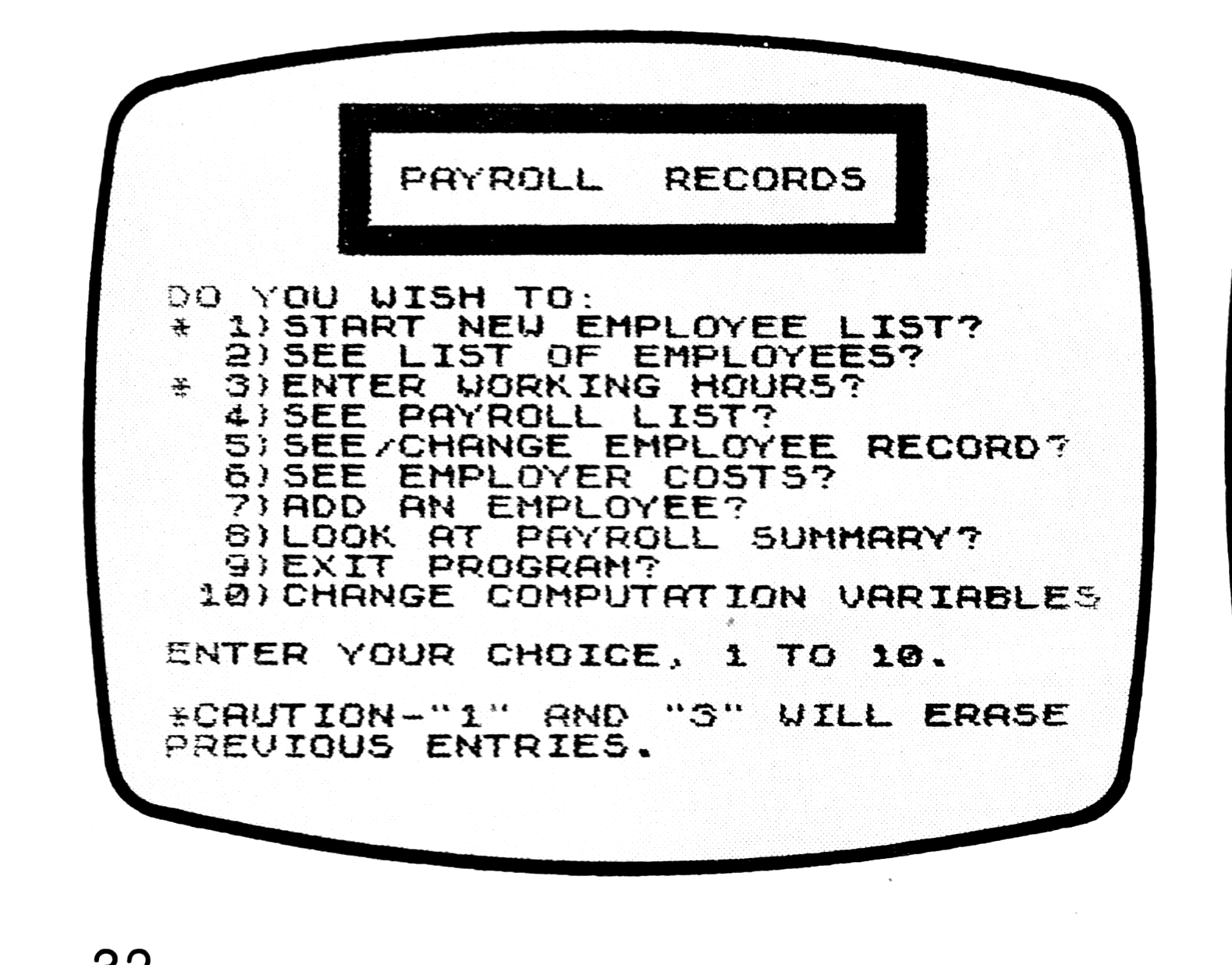
Note: Type-in program listings on this website use ZMAKEBAS notation for graphics characters.