The input signal level is critical when loading a program from cassette tape. Save and Load operations can be done with the computer as it exists: One establishes the correct volume control setting on the tape recorder by trial and error. One then secures the volume control in the correct position with sticky tape, or makes a couple of index marks which allow the recorder to be set properly. If one’s tape recorder batteries age, or if one tries to load a program recorded by someone else, then a new level has to be re-established by trial and error.
An alternative is to use a load monitor to show when a program to be loaded is at the correct level. Initially, I dedicated an oscilloscipe as a load monitor, but this seemed like overkill, particularly in view of the size discrepancy between the ‘scope and the computer. I then added a single LED (light emitting diode) to the tape “ear” input of the computer. The voltage for lighting the LED is just right for loading a program from the cassette tape.
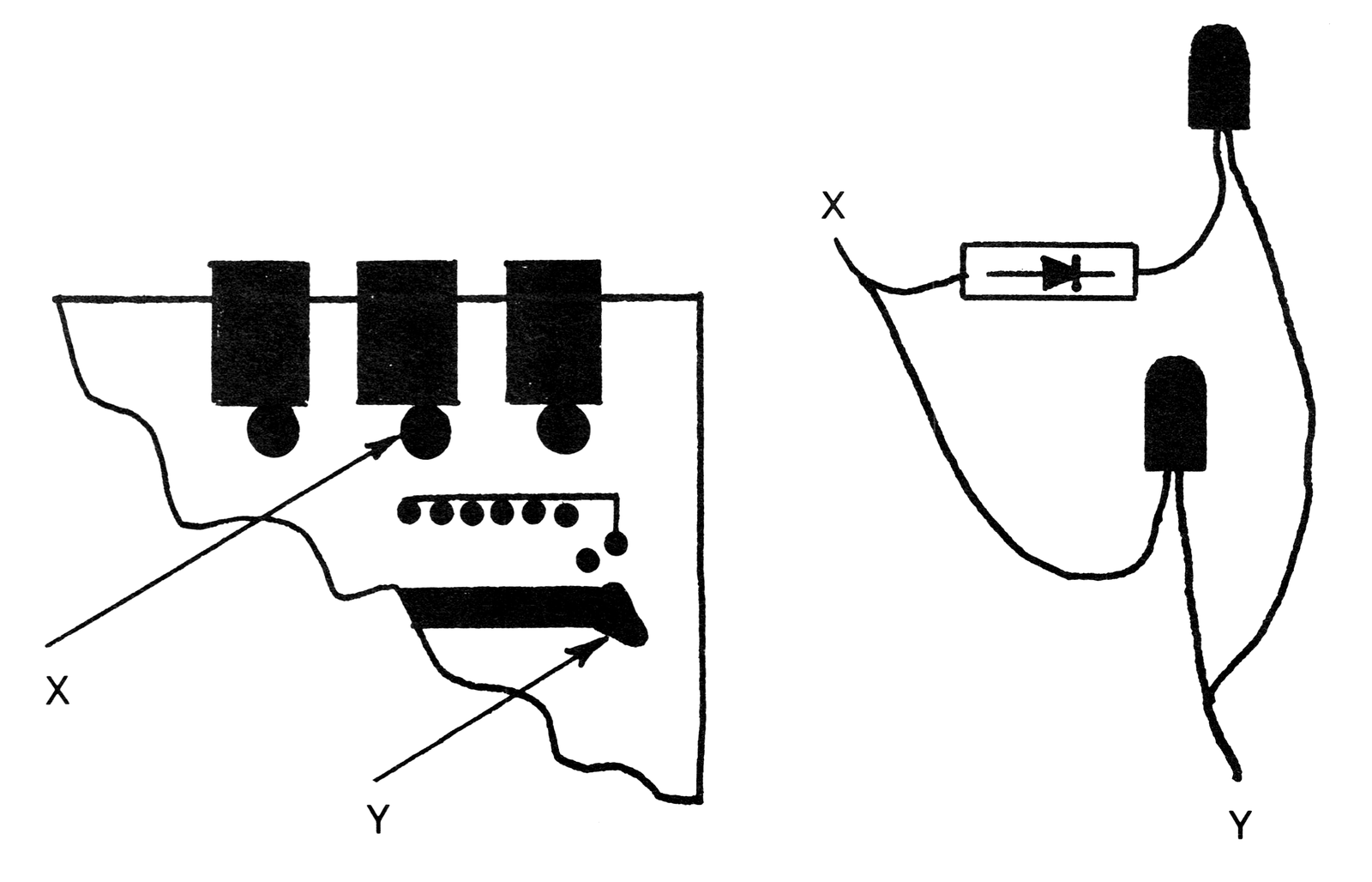
In order to add the LED, it was necessary to get the top off the computer. This was no problem for me because I had already destroyed the plastic rivets in attempting to assemble my Microace, and had substituted small screws. You may want to add the Microace 2K RAM option at a later date, and screws look better than the rivets anyway, so very carefully drill out the five rivets around the outside of the top cover, taking special care not to damage the printed circuit board. Get out your soldering pencil and thin rosin core solder. The LED can be soldered into the printed circuit board from the top if you want to avoid taking out the rivets holding the board to the bottom of the case. The short lead on the LED is attached just below the input (“ear”) jack at the point marked X in the illustration and the long lead attaches at the point marked Y. You will probably have to extend the leads of the LED with fine insulated wire. Drill a hole in the top of the case where the LED will stick through. Use insulating tape on the bare lead wires of the LED and assemble the case.
To minimize any interaction with the input circuit, use small LEDs which draw less current and have less capacitance than the large ones. I found mine, red, about 2mm in diameter, at Radio Shack. Be careful when bending the leads of these little LEDs; any strain on them will break their little red plastic cases.
In use, the LED will just light up when the tape recorded program is coming in at the correct level, and will remain dark or barely flicker when it is too low for the computer to accept.
I used the single LED load monitor for a while, but later added two additional components to make a more elegant monitor. A second LED was added in parallel with the first, with a silicon diode in series with it to drop the voltage slightly. See the wiring diagram in the illustration. The second LED then acts as an over-voltage indicator when it is lit. The 3/4 volt forward conduction voltage drop across the silicon diode makes a fairly precise bracket for the input voltage. Solder the second LED and the silicon diode to the lead extensions of the first LED, not to the printed circuit board.
Setting the correct tape recorder volume level for loading is now simple. Given a taped program recorded at some unknown level, the volume level is increased (while the tape recorder is playing back the recorded program) until the first LED lights up and the second remains dark. Rewind the tape and it should then load successfully.