
The computer as an instructional tool is perhaps nowhere more successful than in conducting arithmetic practice drills. Unlike the typical classroom teacher, the computer never tires and never makes a mistake. It provides arithmetic practice and never forgets to reward a right answer with a smile.
Addition
Enter the program in Listing 1 and then RUN it. This is the basic program. It will generate an addition problem and print it in the upper left hand corner of the screen. The computer then awaits the user’s answer. If the answer is correct, the complete problem with the correct answer is displayed, and the user is rewarded with a smile. After a five second pause a new problem is displayed. If the answer is wrong, the problem is again displayed along with the incorrect answer. The user is again asked the question while a frown is displayed. Entering a letter instead of a number will stop the program.
Listing 1. Addition Practice.
 110 RAND
 120 CLS
 130 LET X=INT (RND*10)
 140 LET Y=INT (RND*10)
 150 PRINT
 160 PRINT X;" + ";Y;" = ?"
 170 INPUT Z
 180 CLS
 190 PRINT
 200 PRINT X;" + ";Y;" = ";Z
 210 FOR N=1 TO 20
 220 PLOT 10*SIN (N*PI/10)+31,10
*COS (N*PI/10)+22
 230 NEXT N
 240 PLOT 26,26
 250 PLOT 36,26
 260 PLOT 31,22
 270 PLOT 31,17
 280 PLOT 30,17
 290 PLOT 32,17
 300 IF Z<>X+Y THEN GOTO 350
 310 PLOT 29,18
 320 PLOT 33,18
 330 PAUSE 250
 340 GOTO 120
 350 PLOT 29,16
 360 PLOT 33,16
 370 PRINT
 380 GOTO 160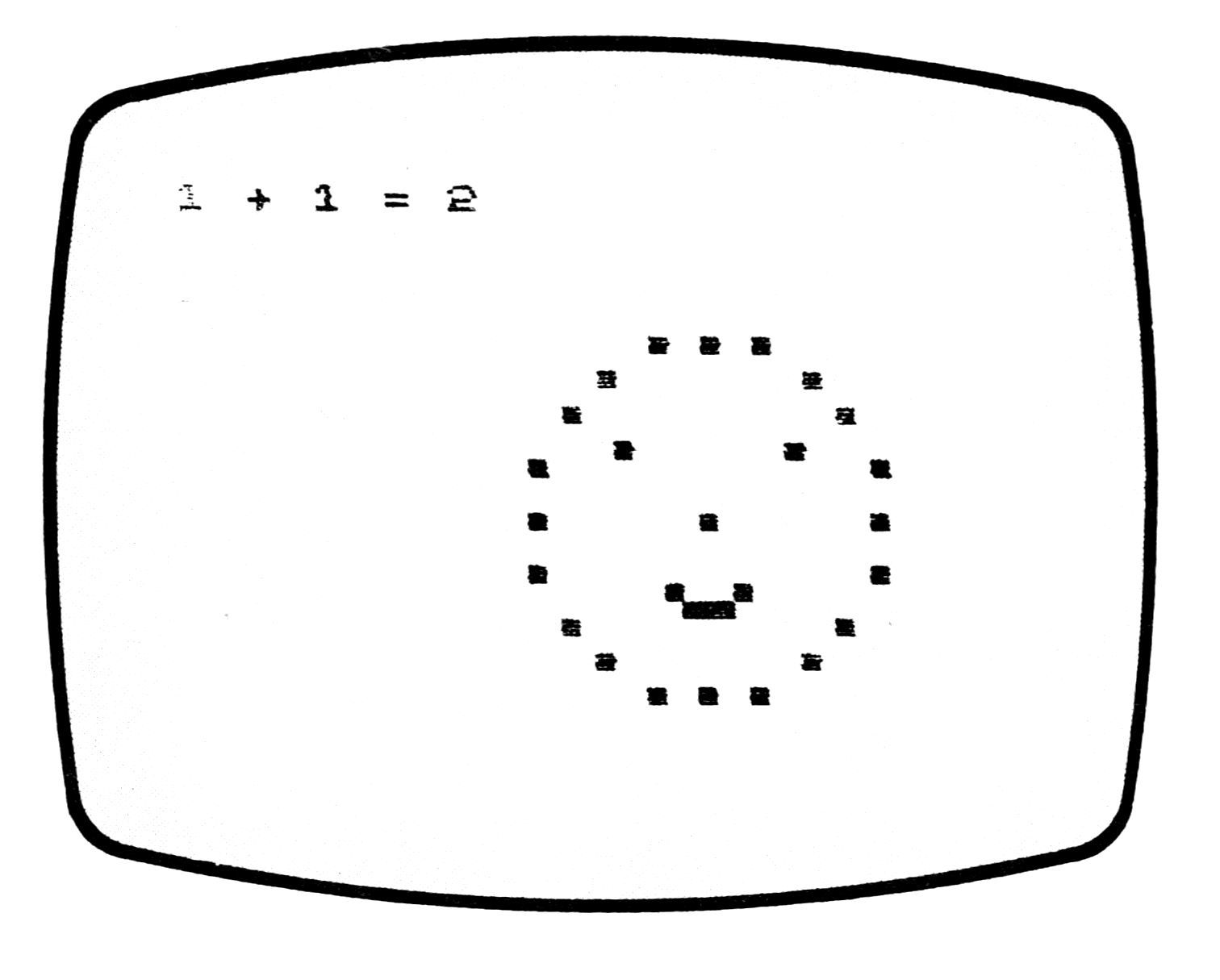
Other Arithmetic Operations
The other arithmetic operations can be done with the following modifications to the program in Listing 1:
Subtraction
140 LET Y=INT(RND*X)
160, 200, 300: Change + to -.
Multiplication
160, 200, 300: Change + to *.
Division
130 LET Y=INT(RND*9)+1
140 LET X=INT(RND*10)*Y
160, 200, 300: Change + to /.
For those who do not need a smile or frown to make the drill more lively, the lines generating the face can be omitted.
Notes
Addition
110: Sets the seed of the random number generator.
130: Sets the range of numbers the random number generator can choose from for one number of the drill problem. To increase the range, increase the number in parentheses. This will give more difficult problems, but a bit more memory may be necessary. If so, delete Lines 150 and 190.
140: Does the same for the other number of the problem.
160: Presents the problem.
170: Inputs the user’s answer.
200: Presents problem with user’s answer.
210-230: Draw face outline.
240-260: Draw eyes and nose.
270-290: Draw part of mouth.
300: Branches to reprint problem and frown for wrong answer.
310-320: Complete the smile.
330: Generates 5 second pause.
340: Goes back to present next problem.
350-360: Complete the frown.
380: Returns to input the user’s next answer.
Subtraction
140: Provides a problem with a non-negative number.
Division
130, 140: Assure that the dividend is evenly divisible.
Listing 2. Addition Practice (4K ROM). # is a space; [gX] is the graphic on key X (underlined in the original).
110 RANDOMISE
120 CLS
130 LET X=RND(10)-1
140 LET Y=RND(10)-1
150 PRINT
160 PRINT X;"#+#";Y;"#=#?"
170 INPUT Z
180 CLS
190 PRINT
200 PRINT X;"#+#";Y;"#=#";Z
210 PRINT
220 PRINT
230 PRINT ,"###[gF]#[gD][gF]"
240 PRINT ,"##[gE]#####[gE]"
250 PRINT ,"#[gE]#######[gE]"
260 PRINT ,"[gD]#[gR]####[gR]##[gD]"
270 PRINT
280 PRINT ,"[gE]####[gE]####[gE]"
290 PRINT ,"[gD]","##[gD]"
300 PRINT ,"####";
310 IF NOT Z=X+Y THEN GO TO 340
320 PRINT CHR$(136);"[gW][gE]"
330 GO TO 370
340 PRINT "[gF][gW]"
350 PRINT ,"#[gE]##[gE]#[gE]##[gE]"
360 REM
370 PRINT ,"#[gE]","#[gE]"
380 PRINT ,"##[gE][gF]#[gD][gF]#[gE]"
390 PRINT
400 IF NOT Z=X+Y THEN GO TO 160
410 INPUT I$
420 RUN
Subtraction
140 LET Y=RND(X+1)-1
160, 200, 310, 400:
  Change the + to -
Multiplication
160, 200, 310, 400:
  Change the + to *
Division
130 LET Y=RND(9)
140 LET X=(RND(10)-1)*Y
160, 200, 310, 400:
  Change the + to /
Note: Type-in program listings on this website use ZMAKEBAS notation for graphics characters.