
Reprinted with permission from QZX
This program will run in as little as 1K of RAM and will allow frequency measurements (to about 15 kHz.) using the ZX81, TS1000 or TS1500. Uses include tuning RTTY tone generators, electronic musical instruments, tone encoders, and for calibrating audio generators. The audio signal is fed to the computer’s earphone jack, and the frequency is displayed to the nearest Hz. on the screen.
The work is done by a 62-byte machine language routine which is stored in a line 1 REM statement (memory locations 4082h to 40BFh). The hexadecimal codes should be loaded with a machine code loader after first entering a REM statement with 62 spaces. Alternatively, the decimal equivalents may be POKEd with a decimal loader loop into these locations (16515 to 16575).
The entry point to the machine language routine is at address 4092h (16530d). Here the value 7055h (corresponding to 6F55 = 28501d; see * below) is loaded into the BC register pair, the value 3F is loaded into D, and HL is initialized to zero. The routine then calls the cassette port sampling loop at 4082-4091h. Each cycle of the loop required an average of 57.015 machine cycles and decrements the BC register pair. When the value in BC reaches zero, exactly 1/2 second has passed and a return is made from the loop. During each loop cycle, input port FE is sampled. If the input is high, 3F is loaded into the accumulator; if it is low, then BF is loaded instead. This value is compared with the previous value which had been stored in register D, and the HL register pair is incremented if a change has occurred. As each audio signal cycle involves two transitions, the count in HL after 1/2 second is equivalent to the number of complete cycles in 1 second.
Upon returning from the loop, the previously displayed frequency is erased by printing 5 spaces at the beginning of the display file. [Not strictly necessary, as the “print contents of HL” routine would over-write the old data. – fn] If the count in HL was zero, the routine returns to BASIC, otherwise the PRINT position is returned to the beginning of the display file, using the ROM “print at” routine at 08F5. Then the contents of HL is printed as a 5 digit decimal integer with suppressed leading zeros, using ROM routines 07E1 (print a digit) and 0AAD (print line number digits for BASIC listings). The screen is blank during the .5 second sampling period, then the frequency is displayed during the PAUSE in line 5. The applied signal voltage should be about 3 or 4 volts (amplification through the cassette recorder’s monitor output may be usable for some signals). Lowest measureable frequency is around 100-200 Hz. and is limited by the computer’s cassette port circuitry.
The accuracy of the frequency count depends on the computer’s clock frequency which is nominally 3.25 MHz. The TS1500 uses a quartz crystal, which is very accurate. However, the ceramic elements in the other models can vary significantly. The initial value of the BC register pair can be changed to compensate for these variations. Measure the clock frequency with a counter or loosely-coupled, well calibrated receiver. Divide the frequency in Hz. by 114.03 and convert to hexadecimal.
* Load the LEAST significant byte into the B register; add 1 to the most significant byte and load into the C register. E.g., for a clock frequency of 3.225 MHz.: 3225000/114.03 = 28282 = 6E7Ah. Change machine code statement at 4092h to 016F7A (LD BC,7A6F).
I have experimented extensively with this program in the interest of optimizing it, and have observed that, as predicted by the sampling theorem, frequencies above one-half the sampling rate (14,250 Hz.) cannot be counted accurately due to sampling errors. Likewise, the program must be run in FAST mode; one could use SLOW and compensate for the difference in sampling rate with a change in the initial value loaded into BC. However, since the sampling period is broken up into small segments occurring at the top and bottom margins of the picture, this results in random sampling errors that make the printed results less accurate.
4082 1002          DJNZ SMPL
4084 0D            DEC C
4085 C8            RET Z
4086 DBFE     SMPL IN A,FE
4088 BA            CP D
4089 2804          JR Z 408F
408B 57            LD D,A
408C 23            INC HL
408D 18F3          JR 4082
408F C0            RET NZ
4090 18F0          JR 4082
4092 017055   INIT LD BC,5570
4095 163F          LD D,3F
4097 210000        LD HL,0000
409A CD8640        CALL SMPL
409D E5            PUSH HL
409E CDF508   CLSC CALL PRAT
40A1 0605          LD B,05
40A3 AF            XOR A
40A4 D7            RST 10H
40A5 10FC          DJNZ 40A3
40A7 E1            POP HL
40A8 7C            LD A,H
40A9 B5            OR L
40AA C8            RET Z
40AB E5       PR00 PUSH HL
40AC 010000        LD BC,0000
40AF CDF508        CALL PRAT
40B2 E1            POP HL
40B3 E5            PUSH HL
40B4 1E00          LD E,00
40B6 01F0D8        LD BC,D8F0
40B9 CDE107        CALL 1OUT
40BC CDAD0A        CALL THOU
40BF C9            RET
40C0 00            NOP
40C1 00            NOP
40C2 00            NOP
40C3 00            NOP
40C4 00            NOP
40C5 00            NOP
40C6 00            NOP
40C7 76            HLT
40C8 76            HLT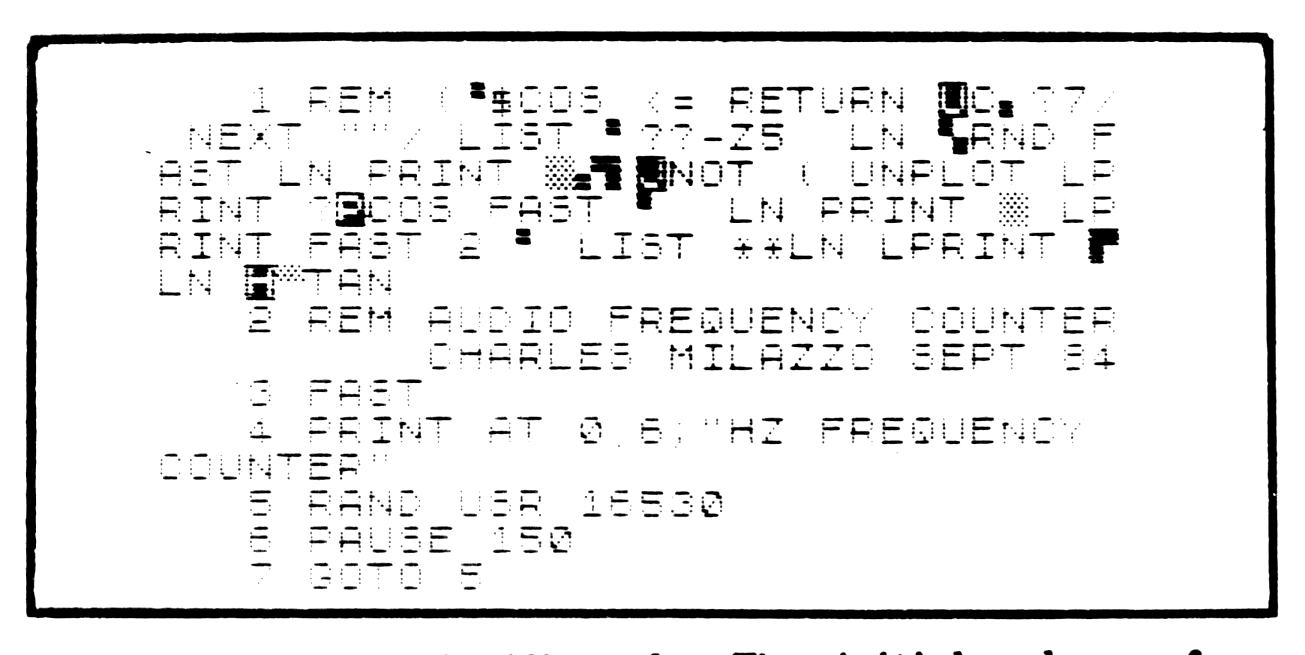
Additional Notes
Routine names: SMPL – sample loop subroutine. INIT – initialization (entry point). CLSC – clear first five spaces on screen. PR00 – restore print position to start of display file. PRHL – print contents of HL.
The PRHL routine is very handy anytime you need to print a two-byte number as a decimal integer, and is a lot faster than floating-point printing. E.g. RAND (non-zero number or BASIC variable) then RAND USR xxxxx where xxxxx starts with LD HL,(4032), then CALL PRHL, then RET. Control print position either from BASIC, or use the ROM routine at 08F5 as in this program. Note the extra PUSH HL in the PRHL routine; this is not an error, it is POPped back off by the ROM routine.
A novel use for the SMPL routine is to sense if the tape recorder is turned on with the tape positioned at the “pre-save buzz”. E.g.
 990 SLOW
1000 PRINT "LOAD NEXT PROGRAM Y/N?"
1010 IF INKEY$="" THEN GOTO 1010
1020 IF INKEY$<>"Y" THEN STOP
1030 CLS
1040 PRINT "PLEASE TURN ON TAPE RECORDER"
1050 IF NOT USR 16518 THEN GOTO 1050
1060 LOAD ""
-fn
Note: Type-in program listings on this website use ZMAKEBAS notation for graphics characters.