
With the popularity of telecommunicating using TS computers, I thought it was about time for a simple, easy to build modem to appear on the scene. Using the circuit shown connected to the Mic jack with the program listed, you too can enjoy telecommunicating over your telephone line. WARNING! There may be rules and regulations governing connections made to telephone lines in your area. Check first.
The Circuit shown can be made from parts that are available locally, and it uses the Mic jack as the I/O port. The transformer matches the impedance of the phone line to the impedance of the computer and provides isolation. The switch allows you to place the circuit “on hook” or “off hook”.
The program must be entered exactly as shown, particularly the REM statement which contains the code required for proper operation. The BEEP command is used for the different tones. The program is bare minimum for printing to the screen and keyboard entry. Because of this, you should load in the program first and become familiar with its operation BEFORE attempting the hardware portion. The USR calls are primarily for keeping track of what is printed where on the screen.
After typing in the program, save it before running so you won’t have to type it in again if the program crashes. Once this is done, enter RUN and you should be greeted with the message: “Super Simple Modem Ver. 1.1 Ready”. With a flashing cursor here on the next line awaiting keyboard or external entry. Press any key to start.
To go online with some of the different modem services available, turn the switch to the off position and connect to the phone lines and plug into the Mic jack as shown. To dial, use a standard phone and dial up a modem service. As soon as they answer, turn on the switch and hang up the phone. You should be online with who you called.
The simplicity and ease of use of this program will award you great pleasures in use. Try it. Show it to your friends. Enter the world of telecommunicating today. What can you lose?
TS2068 Modem Program
   1 REM RTODQ-RHLOKD-LNCDL-UDQ-O-OQD@CX@OQHKENNKR <>**
  10 BORDER 0: POKE 23693,7: CLS : RANDOMIZE USR 26757
  20 LET L=25: LET P=26715: LET C=IN 244
  30 DIM A$(L+1)
  40 GO SUB 1000: PRINT 'A$
  50 LET P=P+L+1: LET L=4
  55 RANDOMIZE USR 26757: DIM A$(L+1)
  60 GO SUB 1000: PRINT ''A$
  70 PRINT ' FLASH 1;" "
  80 PAUSE 0: PRINT AT 6,0; FLASH 0;" "
  90 LET P=P+L+1: LET L=4: DIM A$(L+1): GO SUB 1000: LET Q=14: LET S=.75: LET C=C+4: GO SUB 4000
 100 LET P=P+L+1: LET L=5: DIM A$(L+1): GO SUB 1000: LET Q=21: LET S=.7: LET C=C-2: GO SUB 4000
 150 BEEP .2,20: BEEP .2,5
 160 BEEP .2,20: BEEP .2,5
 200 PAUSE 0: RANDOMIZE USR 26758
 999 STOP
1000 FOR N=0 TO L: LET A$(N+1)=CHR$ ((PEEK (P+N))+1)
1020 NEXT N
1050 RETURN
3999 STOP
4000 LET A=LEN A$
4025 PRINT AT 21,0; INK 0;a$
4030 FOR f=0 TO 8*a-1: FOR n=0 TO 7: IF POINT (f,n)=0 THEN  GO TO 4055
4050 PRINT AT Q-N,F*S; INK C;" "
4055 NEXT N: NEXT F
4060 RETURN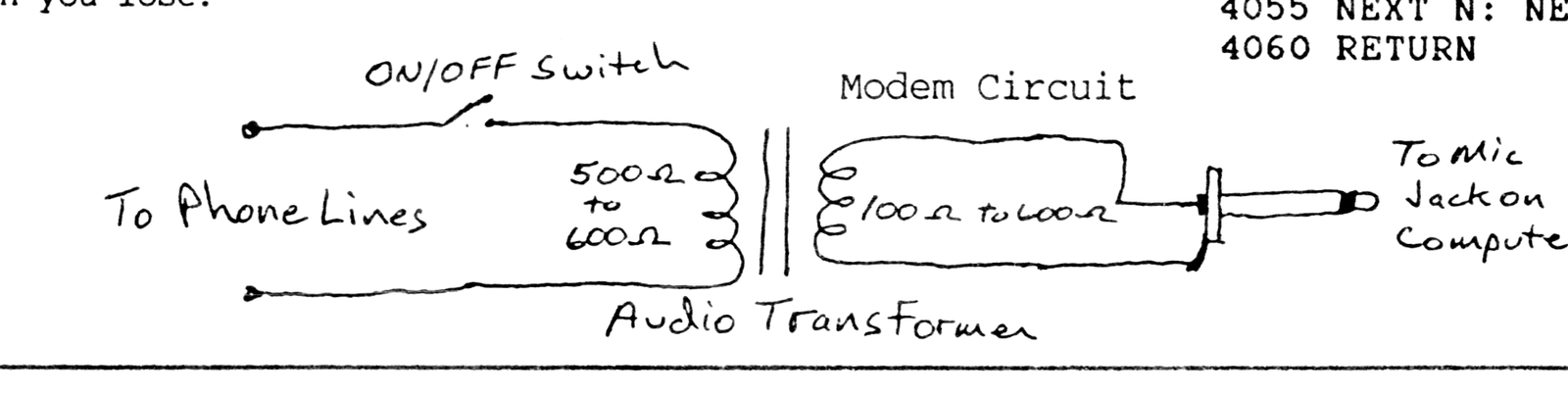
Note: Type-in program listings on this website use ZMAKEBAS notation for graphics characters.