
Authors
Publication
Pub Details
Date
Pages
While there have been reams of information published on various types of interface for the TS2068, the lowly RS-232 port has been almost ignored. This is in spite of the fact that many hardware products contain an RS-232 interface as an “extra”, like the Sinclair Interface One, and the Timex Portugal disk drives In some cases, it’s easy to add an RS-232 port (see Time Designs, Mar/Apr 86 for info on adding one to a Westridge modem.)
Al though such a port has been widely used for printers, TS2068 users have wisely embraced the Centronics standard, instead. It’s also used to connect the modems, but the Westridge plugs directly into the Timex bus, eliminating the need for an RS-232 port there. But there’s still another important use that we’ll describe in this article.
Communication between different brands of computers can be difficult largely because their busses are different. But even 11 they’re identical, there can still be trouble if they’re not designed for communication in the first place. Fortunately, just about every computer has an RS-232 port, and these are perfect to send data between computers that have absolutely nothing else in common!
Why bother? It depends on what type of work you actually de with your computer (or computers in this case). SINCUS wizard Dave Schoenwetter has used a home-made RS-232 port to dump Tasword files into his IBM PC so that they can be run through a spelling checker. Then they’d get sent back. (The file has to be reformatted a bit, since Tasword uses a rather odd layout, but that’s a minor problem.)
Another possible use would occur if you had a modem for only one computer, but would like to download a program for the other one. With this you could transfer the code between machines. Elsewhere in this issue, we’ll be starting a disassembly of the TS2068 ROMs, which is really only practical (at this quality, on an amateur level) because a rough disassembly could be “dumped” to an IBM PC. The resulting file needed patching up on a major scale, but the powerful handling and editing facilities on that machine made that an almost trivial job.
In the examples shown here, we use an Interface One and an IBM PC or compatible, but the ideas are readily converted for other systems. The hardware chosen here is a “natural”, because a number of SINCUS members have one or both of the necessary items. Also, communications is accomplished through a few lines of BASIC.
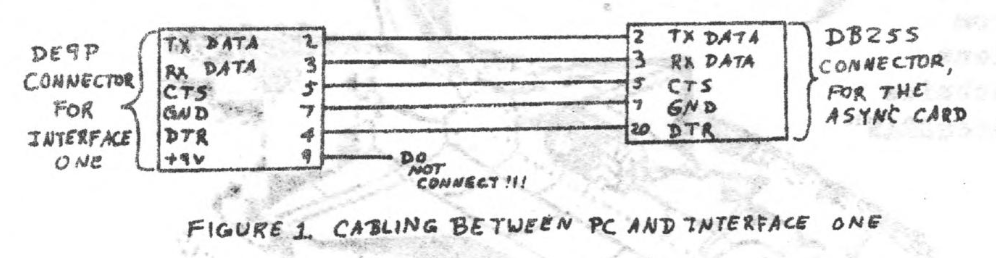
Figure 1 shows the necessary cable wiring from the Interface One to Async card in the PC. The listings shown i have the Async configured as the COM1 port, but this is easily changed, if needed.
Listing 1A
10 OPEN "COM1:300,N,0,1,CD,CS,DS,RS" AS #1
20 INPUT #1,I$
30 PRINT I$
40 CLOSE #1
Listing 1B
10 OPEN $;"b"
20 FORMAT "b";300
30 PRINT #4;"Wes was here"
40 CLOSE #4
Listing 2A
10 OPEN "COM1:300,N,0,1,CD,CS,DS,RS" AS #1
20 INPUT #1,I$
30 PRINT I$
40 CLOSE #1
Listing 2B
10 OPEN $;"b"
20 FORMAT "b";300
30 LIST $4
40 CLOSE #4
Listings 1A and 1B show a simple example of PRINTing a string from the TS2068 to the PC, while 2B and 2C show how to LLIST a BASIC program from the TS2068 to the PC.
Listing 3A
10 OPEN "COM1:300,N,0,1,CD,CS,DS,RS" AS #1
20 PRINT #1,"w"
30 CLOSE #1
Listing 3B
10 OPEN $;"b"
20 FORMAT "b";300
30 INPUT #4;a$: PRINT a$
40 CLOSE #4
Listings 3A and 3B show how to send individual characters from the PC to the TS2608. White the Interface One literature suggests it can receive larger strings, it contains no examples. The book by the British Gurus Ian Logan and Andrew Penne! show only the receiving of individual characters, as well. I’ve been able to do no better than this, and I suspect that this feature in the Interface One is not so well debugged as we’d like. That’s inconvenient, but we can work around it.
Listing 4
100 ON KEY(1) GOSUB 10000
200 KEY(1) ON
1000 INPUT "Name of output file ";N$
1020 OPEN "COM1:9600,N,8,1,CD,CS,DS,RS" AS #1
1040 OPEN N$ FOR OUTPUT AS #2
1050 PRINT #2," ";
1100 LINE INPUT #1,X$
1130 IF LEN (X$)>1 THEN X$=MID$(X$,2,LEN(X$)-1)
1140 PRINT #2,X$
1160 GOTO 1100
10000 CLOSE #2:CLOSE #1:STOP
Listing 4 in the program used to dump a “listing” of the ROM disassembly from the TS2068 into a disk file on the PC. We would first OPEN and FORMAT stream #3, so that normal LPRINTing and LISTing would go to the RS-232 port. We’d then LOAD in the disassembler and a copy of the RDM code, and tell it to send a disassembly to the printer. Of course. there’s another computer in place of the printer, but the disassembler neither knows nor cares.
We’ve given a few specific examples of RS-232 communication here. They’re probably not exactly what you need, but they may get you thinking as to how you may put them to use. The possibilities are great, and it’s really very simple. Give it a try.
Note: Type-in program listings on this website use ZMAKEBAS notation for graphics characters.