
WIDJUP (Bill Pederson, 1120 Merrifield S.E., Grand Rapids, MI 49507) has some interesting facts on PRINTERS and DRIVERS that are applicable to all Computers. His CAD DISKS are for the TS-2068 LKDOS Systems. Write for information.
The WIDJUP Co. graphic printer driver for 9 and 24 pin printers is a very flexible tool. It was designed to do WINDOWS. These windows refer to the printed page, not the screen.
A window can be mapped to the screen in many ways. Some can lead to confusion. If it happens to be a screen dump, it’s easy to forget that it is the printer which is being mapped to the screen–not the opposite. All windows are empty until written to by programs.
Artwork programs write graphics to the screen, or to a file which can be displayed. For computers with lots of memory the files might be printer page images, often compressed, giving the program DESKTOP capability.
Most art and font programs for the TS2068 are screen oriented. That is where mapping becomes important. The printer window can be mapped to the same location that the artwork program uses. The artwork program now appears to be writing to the printer.
When the printer window is small enough to fit on the screen, it is possible to have “What you see is what you get.” More properly, “You can almost see what you are going to get.”
At best, you may still have distortions. WYSIWYG is a catchy phrase, but it is still an idealistic view that can’t be met using any common monitor, unless dedicated for special use.
It is not wrong to want to see what your printed output will be like. That is a valid human engineering goal, though not always necessary. Good programs provide a “PREVIEW” function, often backed up with “FAT BIT” managing editors.
When a printer window is too large to be displayed across the screen, it can be divided into pieces which can. An example is displaying a 960×8 dot printer window on four consecutive screen lines with some space left unused at the end of the fourth line. This is nice for graphic mode word processing.
There are 11 pokes necessary to set up a window and map it to the screen. An application might use many windows, so some way to make this easier is required. One way is to set up an array with the most frequently used windows predefined.
The array j$(20,11) is used in WIDJUP programs. That for CAD#3 is shown below. References to a checkerboard apply to a DEMO for GRAPHONY, a utility for developing windows for applications like DESKTOP.
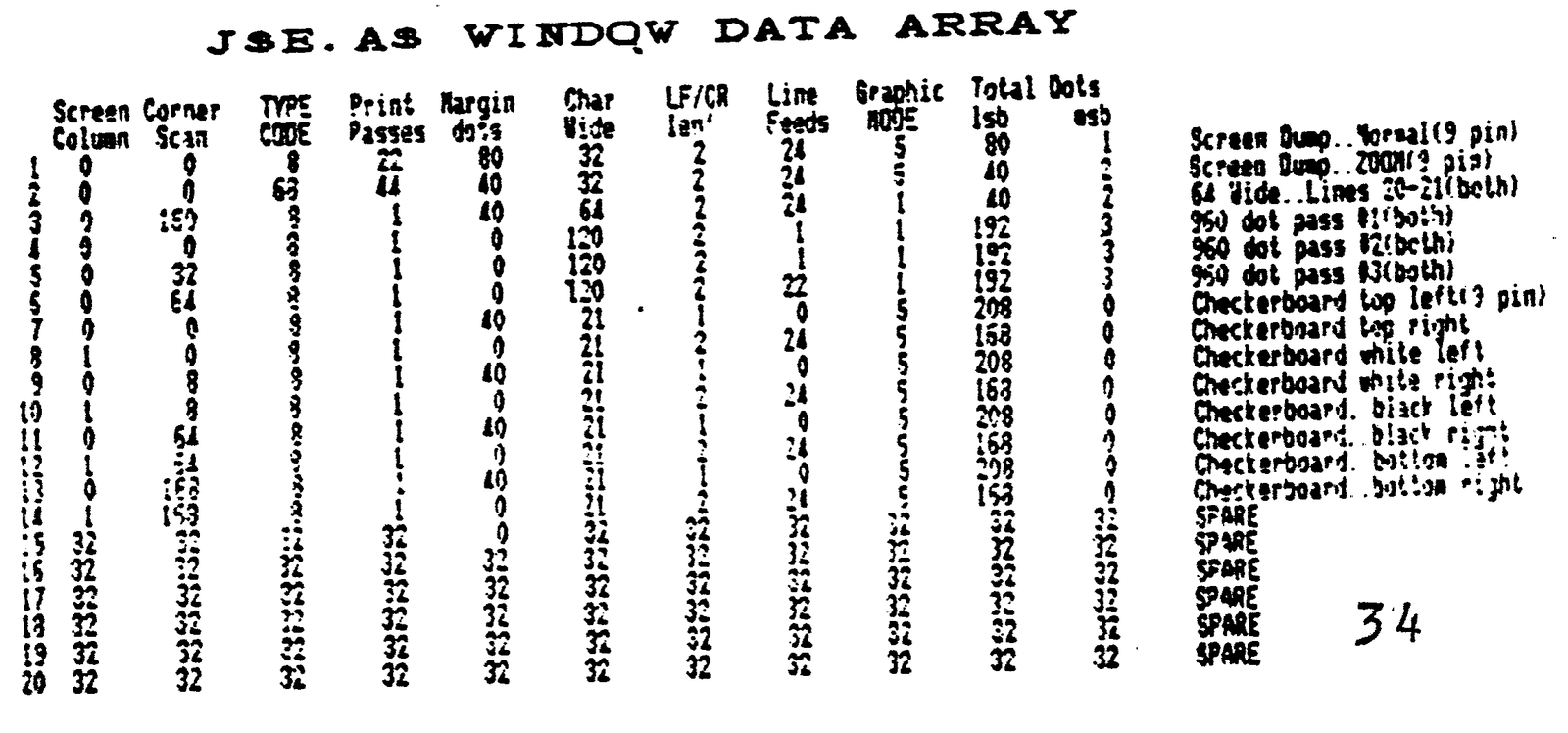
PRINTER WINDOW PARAMETERS
Margin Dots.. These are blank dots which need not be mapped to
              the screen.  They may be margin, column gap, etc.
Chars Wide..  There are eight dots needed per character shown
              on the screen, but each screen dot may be copied to
              the printer a selected number of times.
Total Dots..  The total of margin and multiplied char dots.
LF/CR..       Window termination may require one or both codes
              to allow concatenation, or cause a new line.  This
              parameter specifies the number of codes issued.
Line Feeds..  The number of minimum line feeds to be taken at
              the end of the window.  This can be 0.
Prt Passes..  The number of times a single window is repeated
              to make a larger one.  This is how dumps are done.
Graph MODE..  The printer graphic mode to be used for this
              window.  24 pin printers do not have mode 5, but
              support 24 pin graphics.  These added modes are not
              supported by this driver.
SCREEN PARAMETERS
Scrn Column.. Column 0 to 31 as usual. (Start location)
Scrn Scan..   Scan 0 to 195, from top down. (Start location)
Chars Wide..  From 1 to 120 (less for GORILLA BANANA, more for
              wide carriage printers).  Wrap-around is active.
              Characters printed multiple wide reduce this.
TYPE CODE..   This byte contains width, height and video mode
              specifications.
                BIT 6... Double wide.
                BIT 5... Toggle for D_FILE2.
                BIT 4... 64 wide video mode.
                BIT 3... Single high. (BIT 2 = 0)
                BIT 2... Double high. (BIT 3 = 0)
                BITS 7,1,0... Not used.
Designers of printers cater to wants and needs of users even when those are based on less than full knowledge of how things work. The ideal of WYSIWYG has been one of these. Several of the graphics modes have been provided to achieve this for CRTs and displays of specific types, including TS2068.
The designers also provided for more enlightened users, though not always with compatibility with older methods in mind.
Dot-for-dot square printing is Mode 5 for 9 pin printers, but Mode 0 for many 24 pin printers.
Some displays emulate a printed page. 24 pin printers were the next advancement to obtain letter quality printing in many font styles that people wanted. This expanded graphics performance as well.
This new graphics capacity is only partly compatible with the older printers. As mentioned, Mode 5 was lost (though a NEARLY equivalent mode is available). 9 pin mode is lost as well.
This was acceptable because very few existing printer drivers called for these, and NEARLY was close enough to satisfy most. The impact on existing software was minimal. It is in the area of maximum utilization of graphics that there is little common ground.
Existing programs making maximum use of graphics are generally available only for other computers that use custom drivers.
CAD#2 has a driver for OLIVETTI PR2300 ink jet printer. (1/216″ line feed)
CAD#3 has a driver for EPSON 9 Pin printers and compatibles. (1/216″ line feed)
CAD#4 has a driver for STAR 9 Pin printers and compatibles. (1/144″ line feed)(Being updated)
CAD#5 has a driver for EPSON 24 Pin printers and compatibles. (1/180″ line feed)(Not available yet)
These programs differ because graphic files are unique to each printer, and that requires special routines for generation. Data files, however, are completely transportable between them.
(C)1989,1990 The WIDJUP Co. WJP