
Introduction 1 Jan, 1998 revision
The EZ80 (pronounced “eazy 80”) is an all CMOS Z80 controller with some novel features. The simple design, powerful debugging features and low power (<10 ma) consumption make it suitable for battery powered robotics hand-held and/or educational applications. The EZ80 consists of a CMOS Z80, 32K of battery backed up CMOS RAM, a CMOS 8255 with 24 I/O lines, and five simple 74HC type glue chips. The EZ80 connects to the world via three connectors: the EZiCE port, the EZI/O port and the EZKEY port.
No EPROM?”, you say? The core features of the EZ80 are the BLANK memory and the unique on-board programming hardware which does not need a monitor program in EPROM. This makes the EZ80 similar to some single chip micro-controller chips with on-chip EEPROM programming capability. The programming functions operate on single bytes or blocks of up to 32K bytes. Program code is normally stored in the 0-16K block which is non-volatile and write protected. The read/write data is stored in the 16K-32K block. Actually programming is only a small part of the build-in debugging hardware called the EZiCE port.
During program and hardware development the EZiCE port is connected to a standard IBM PC parallel port. The EZ80 single stepper circuit, when combined with a control decoder and 3-state buffer can transfer opcodes and data between the PC printer port and the Z80 data bus and ultimately the Z80 registers. This method of “stuffing” opcodes on the Z80 data bus is also used to generate random access addressing to program the on board non-volatile memory and perform a range of debugging functions. The EZiCE software so far provides the following menu:
1. FILE          8. BREAKPOINT
2. LOAD          9. RUN
3. SAVE         10. RESET
4. VERIFY       11. SETUP
5. LIST         12. SHELL
6. STEP         13. USER
7. TRACE        14. EXIT
The EZ80 uses a 8255 24-bit parallel interface with four registers corresponding to 3 general purpose 8-bit TTL computable I/O ports and a control register. The 8255 supports the EZI/O port and the EZKEY port.
The EZI/O port emulates a PC printer port to take advantage of the many LPT peripheral projects designed for the PC. Conversely any EZ80 I/O expansion project should be computable with the PC LPT port as well!
The EZKEY port is connected to 8255 Port B and has added hardware to interface directly with a scanned 64 contact keyboard matrix. The 26 pin EZKEY connector is also used for other front panel functions such as the POWER and RESET switches and 5 LEDs.
The EZiCE port is a Direct Memory Access (DMA) interface designed to connect to a PC LPT printer port during programming and debugging. In the RUN mode, the EZiCE HC573 latch has a secondary function as a general purpose TTL level 8-bit input register.
Circuit Overview
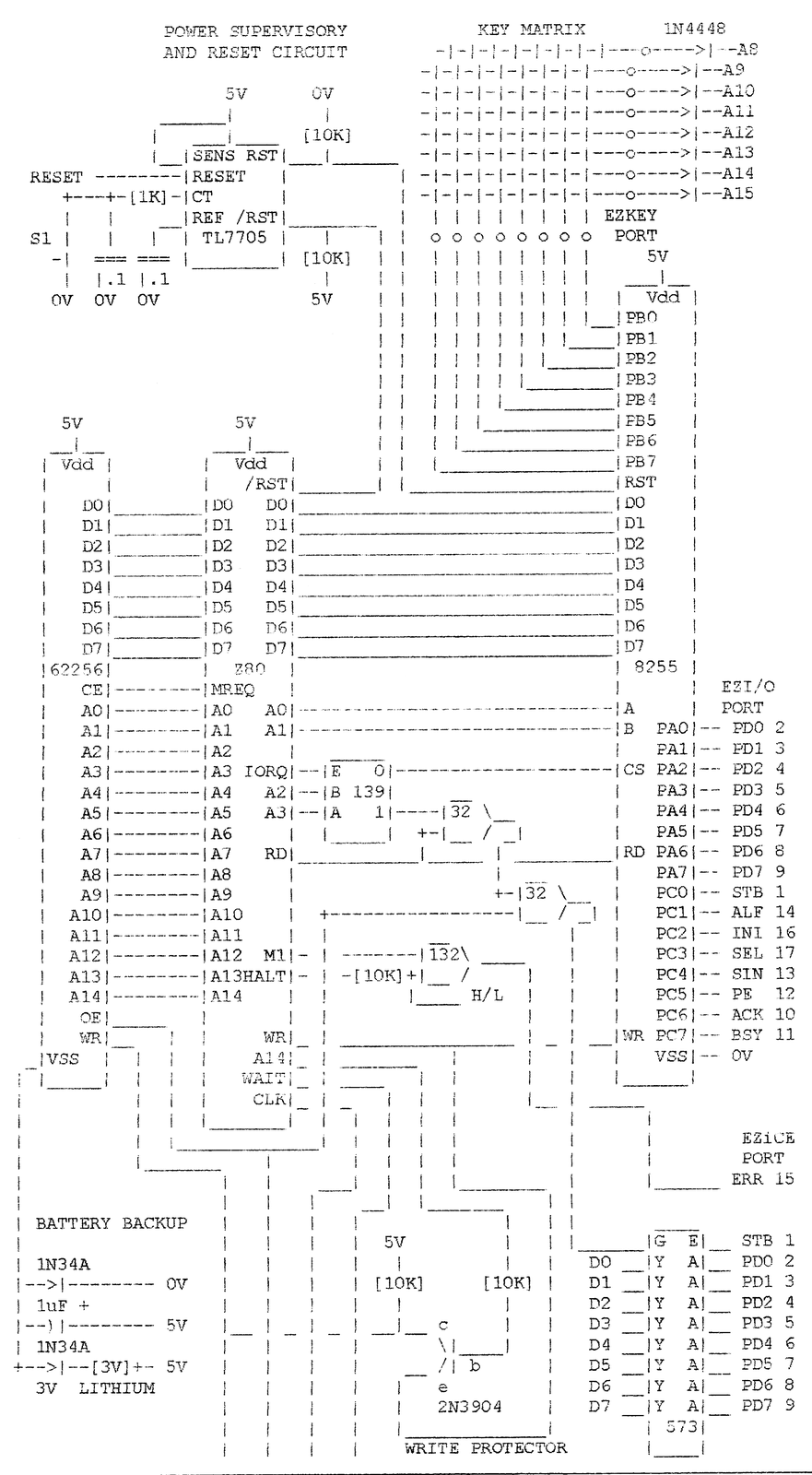
The EZ80 circuit details are shown in the schematic fig 1. The basic design is simply a Z80 connected to a 32K SRAM and some I/O. The simple battery backup for the SRAM is connected to the RAM Vss pin and uses 5V as the common. This has a big advantage over the more conventional designs in that the WR and CE lines are automatically pulled up to Vcc during power down. The RAM is partially write protected providing 16K bytes of write protected memory from 0K-16K and 16K of read/write memory from 16K-32K.
The RESET circuit uses a push button, a decoded reset command and a power supply under-voltage monitor to reset the Z80 and 8255 chips. This prevents undefined Z80 operations during power cycling which could corrupt memory or send spurious signals to the I/O pins.
The basic I/O circuit consists of a 24-bit I/O 8255 PPI chip and an 8-bit tristate buffer which connect the EZ80 to the outside world via the EZI/O port, the EZKEY port and the EZiCE port.
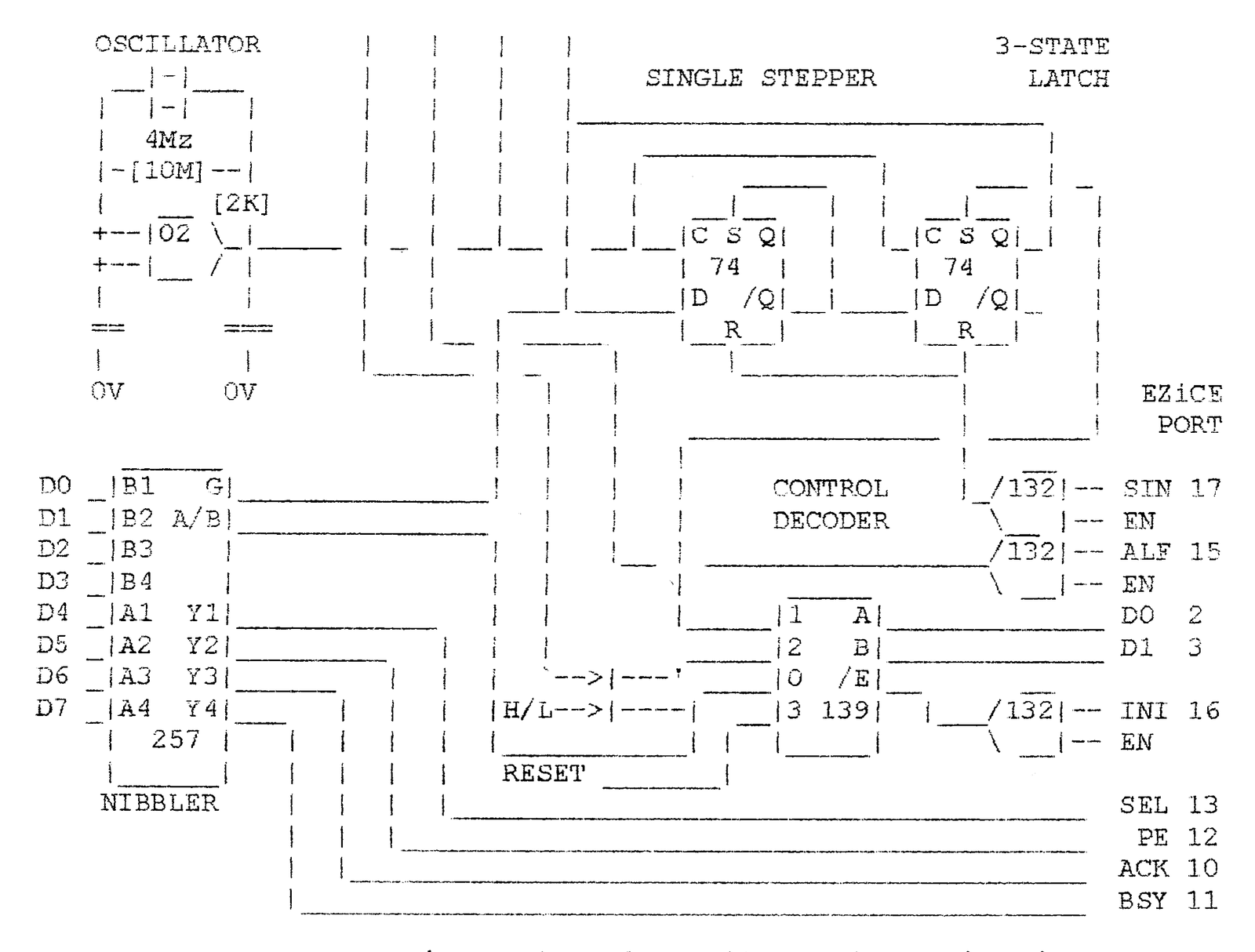
The EZiCE port is a on-board In Circuit Emulation interface used for program and hardware development. A key component is the SINGLE STEPPER circuit to step the CPU one bus cycle at a time. The CPU uses bus cycles to access memory or I/O devices which can be a M1 opcode fetch or any other read or write cycle. The EZiCE PORT uses the PC LPT control lines to override the Z80 IORQ, RD and WR control signals. When these signals are applied in the correct sequence, the EZiCE port provides a kind of direct memory access (DMA) to the EZ80 RAM and Z80 data bus. Data from RAM and CPU bus (and CPU registers) is read in two nibbles to four of LPT status lines. The fifth line (ERR) conveys M1 and HALT.
The EZI/O PORT uses the 8255 Port A and Port C to emulate a true PC type bi-directional printer port.
The EZKEY PORT uses the 8255 Port B and the A8-A15 CPU address line to scan a matrix of up to 64 key contacts.
Z80 Inside
The EZ80 uses a CMOS Z80 CPU for reduced power consumption. Details of the CPU functions can be found in the ZILOG Z80 hand book. The section on bus cycles requires close examination since during “single stepping” each bus cycle is frozen and the data can be examined.
The Z80 is reset both from a switch, a TL7705A supervisory circuit which pulls the reset line low when Vdd falls below 4.75V and reset is also controlled via the EZiCE port. ZX-81 fans will be happy to hear that with minor modifications, the ZX-81 ROM code is compatible with the EZ80 hardware and control programs can be written in ZX-81 BASIC. Without ZX video, the INT and NMI lines are now available on the board for user applications. Future projects will customize the ZX-81 ROM for use with the EZ80 I/O and such add on hardware as a DFILE computable LCD interface.
What makes it tick?
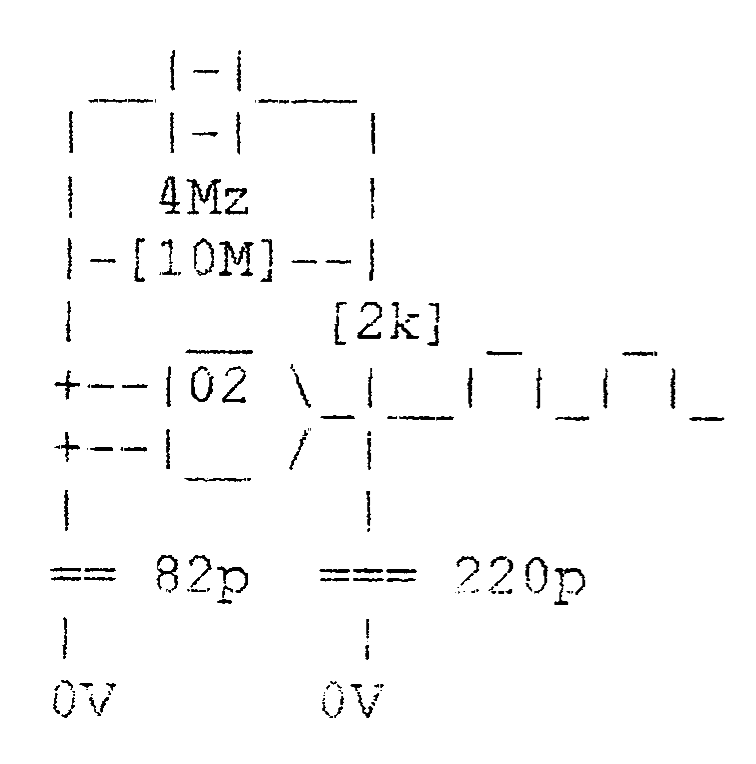
The 4 MHz CPU clock is generated with a text book low power CMOS Pierce oscillator using one section of the 74HC02 NOR gate as an inverter with the crystal in the feedback path.
Lest we forget
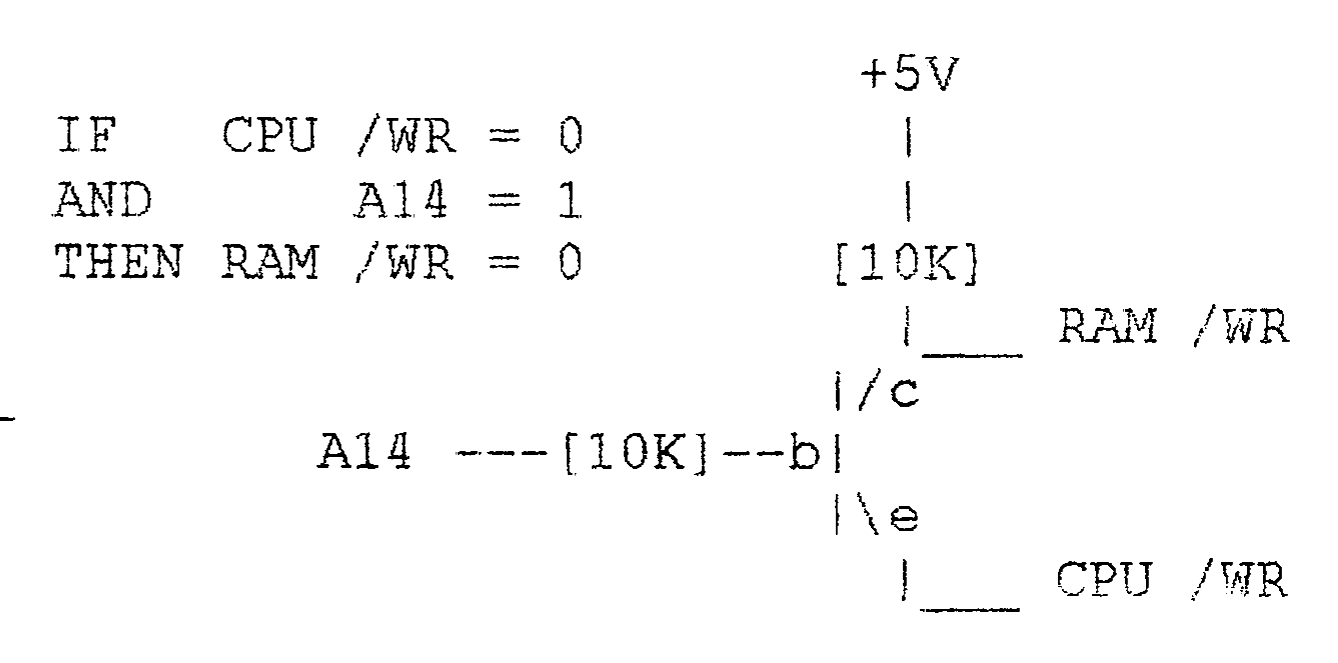
The 62256 RAM chip, which is also low power CMOS, uses a 3V lithium cell for non-volatile program storage. Note the novel use of a common Vdd line and the negative battery connection to the RAM Vss line. This ensures that the RAM CE and WR lines are disabled by automatically switching to Vdd during powerdown. With the simple one chip memory, no address decoding is required for the EZ80. However the WRITE PROTECTOR circuit divides the memory map as follows: 16K of program memory from 0K-16K is write protected during normal program execution and the 16K-32K block is always accessible as read/ write RAM. All memory is read/write accessible in the programming mode.
Boot Strap?
The EZ80 uses a hardware “boot strap” circuit to program the “blank” memory from power up. This is similar to many modem single chip microcontrollers. Ironically, a similar procedure was used in the early days of ROMless computers when programs were entered manually through the front panel switches. That toggling procedure was tedious and only a short “boot strap” program was loaded through the front panel which was just enough to start the paper tape reader to load in the next layer of operating system software. The way a PC initializes it’s BIOS and DOS in successively more complex layers follows a similar sequence but has evolved so that by now the operator’s front panel actions have been reduced to, at most, using in the proverbial three finger salute! In fact a bank of 12 switches and some LEDs could still be used to program the EZ80 but instead we have finally found a useful application for the IBM PC, as a high priced front panel for the EZ80.
EZ Ports Rule, OK!
The EZ80 circuit in Fig 1 shows EZI/O port using a 26 pin male header which matches a standard IDC DB25 connector. With this, the EZ80 can be connected to a standard printer or other PC printer port compatible device. It can also be connected to the PC printer port for high speed bi-directional data transfer. Future EZI/O expansion devices also use this bus for data transfer but will be connected via a 26 pin connector and flat cable. Note the use of pin 26 to distribute +5V to EZI/O expansion devices which can also be powered from a separate external power supply. The EZI/O port is accessed at I/O address 00.
The EZiCE port uses a 74HC541 tristate buffer, a 74HC257 multiplexer, a 74HC02 NOR gate, a 74HC74 D flip flop and a 74HC139 decoder. The 74HC139 is used to decode the PC printer port control lines during programming to control and override various internal EZ80 signals. The 74HC139 control functions and codes are shown in fig 7 for the relevant PC printer port control line states. The LPT control register codes are used to reset, single step and run the Z80 and to control the RAM OE and WR lines. The 74HC541 buffer is connected to the PC printer port data lines which are used to control the EZ80 CPU data bus. The tristate buffer is controlled by the PC to write data from the LPT data lines to the CPU data bus. It is used by the PC to “stuff” opcodes and data to the Z80 register or to write data to the RAM.
The 74HC257 is used to read the memory data in two nibbles to 4 of the PC printer port status lines. The PC LPT ERR status line is connected to the Z80 HALT and M1 lines to monitor and trap Breakpoints and M1 opcode fetch cycles during debugging. In the RUN mode, the EZ programmer port can be read as a general purpose 8-bit input port at I/O address 04.
The EZKEY port is similar to and compatible with the ZX-81 keyboard port.
This keyboard interface connects up to 64 contacts of a matrix keyboard. It uses diode isolated A8-15 lines to scan 8 rows and 8-bit of column data are read on Port B at I/O address 01. In order to use the address lines for scanning the keyboard rows we can use the Z80 IN A,(C) opcode to scan each row while rotating a low-bit through the B register. This opcode uses the C register to address the I/O port on the A0-A7 lines while the B register appears simultaneously on the A8-A15 lines. If fewer keys are required (i.e. 40 keys for ZX-81 emulation), only 5-bits of Port B are needed while the other three-bits (D5-7) can be used for a synchronous serial interface or for a-bit banger UART application.
One Small Step for Man
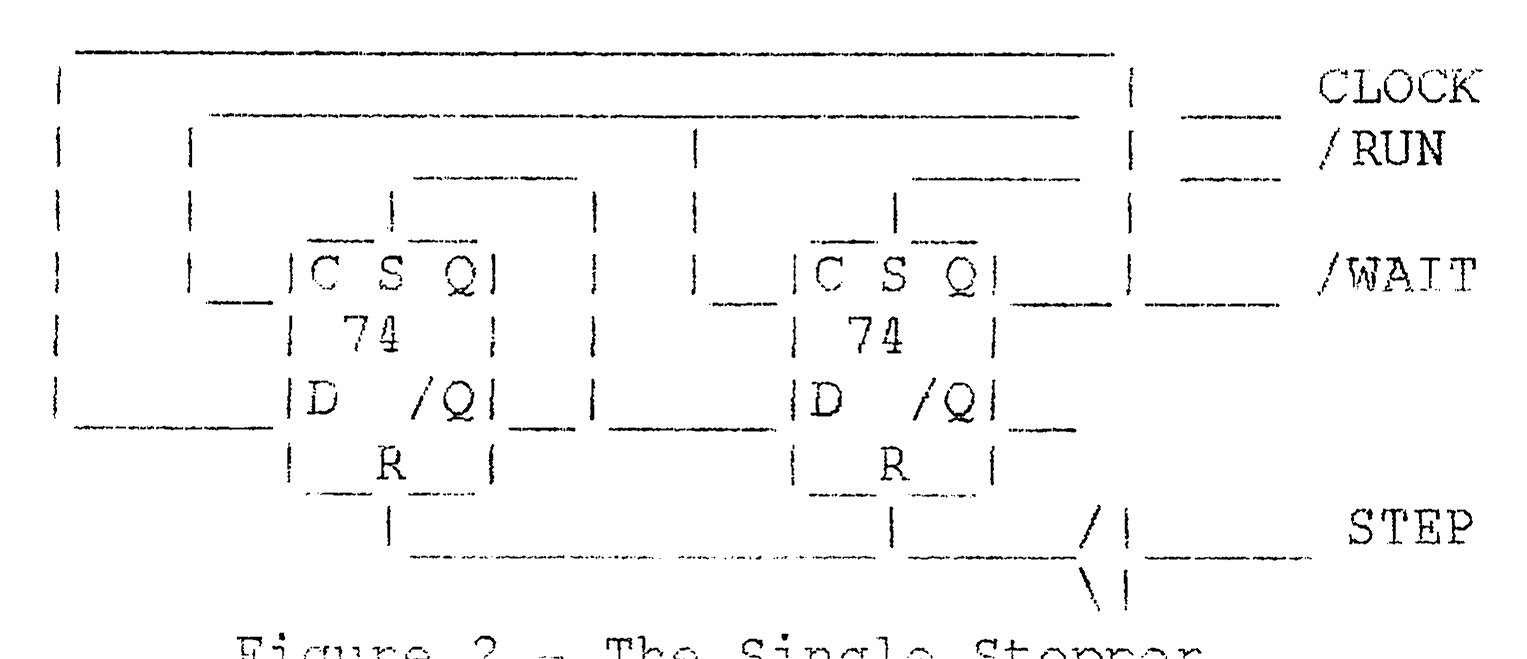
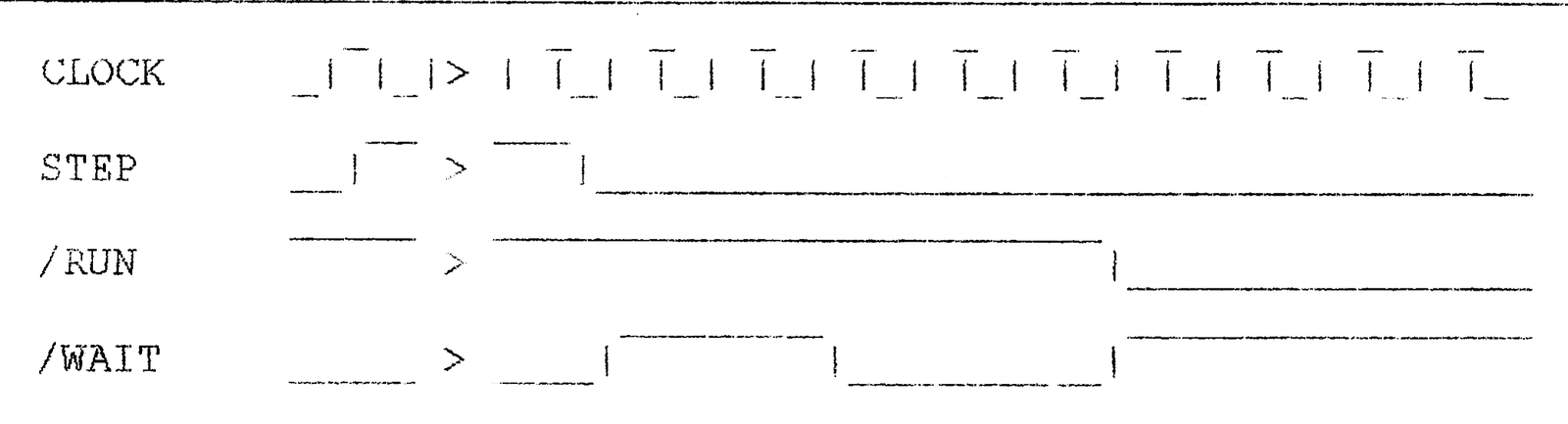
The novel 74HC74 SINGLE STEPPER circuit controls the Z80 WAIT line to single step the Z80 one bus cycle at a time. The WAIT line is normally used to lengthen CPU bus cycles in order to synchronize the CPU bus to devices with slow access time. In the case of the single stepper, the CPU is held in the WAIT state and is advanced one bus cycle at a time by “tugging” the WAIT line with a “step” pulse. When the single stepper is combined with the 74HC541 and the 74HC139 control decoder, the PC can force external OPCODES on the Z80 data bus during each instruction cycle while the RAM OE line is disabled. The RUN signal activates the 74HC74 preset input to force the WAIT line positive and to allow the CPU to run at full speed. The WAIT line is also used to enable the NIBBLER circuit to read the CPU data bus to the LPT status register one nibble at a time. I really like this simple Z80 single stepper circuit which is destined to become a classic ( if it isn’t already). It adapts itself to any CPU clock frequency unlike the usual monostable pulse generator designs. The single stepper timing states are shown in fig 3.
One Giant Leap for Mankind
In the programming mode, the EZiCE software uses combinations of control codes to enable the 74HC541 to place externally generated disabling the RAM Output Enable (OE) line. This can be used to “stuff” opcodes on the CPU data bus. This is such a powerful feature that I have only uncovered the tip of the iceberg of possibilities. For example, the PC software presently stuffs NOPs to the CPU to increment the Z80 program counter (and address lines) to desired starting address but it is just as easy and a lot faster to write a 3 byte jump instruction to load the PC counter. NOPs are still used to STEP through and LIST a block of the memory contents. Ideally, the data read by LIST is automatically disassembled to mnemonics. (This one is on my wish list 🙂 During TRACE, the single stepper simply advances the Z80 to the next bus cycle without forcing data on the CPU bus. The PC can use ERR status line to advance as many bus cycles to get to the next M1 cycle. At each M1 cycle the contents of the Z80 registers can be examined with a couple of POP and PUSH instructions. As you can see this is pretty powerful stuff for such a simple circuit! While single stepping through a program in memory , the PC writes a sequence of opcodes at each M1 cycle which makes the Z80 describe it’s current register state and then restores everything back before executing the next memory instruction.
The current revision of the PC software does not yet have capability to perform this task in a transparent fashion. Any volunteers? The RUN command simply releases the WAIT line and allows the CPU to execute the code in real time from a given starting address. This is useful to check out subroutines, etc. In order to return control to the PC after executing the subroutine or any other code segment we want to be able to insert a break point at the point where the PC takes over. This can be done by inserting a HALT in the code e.g. replacing the RET instruction at the end of the subroutine. The Z80 HALT line is connected to the PC LPT ERR status line ( and the M1 line is disconnected at this time) and when the HALT instruction is executed, the CPU pulls the HALT line low and stops. When HALT is active, the PC dumps the Z80 registers including the Program Counter (PC) and compares the PC to a list of break point addresses and then restores the missing instruction. The current PC software only has a rudimentary version of this installed.
Yippee I/O
The 8255 is a general purpose parallel I/O port. The 8255 defaults to 3 input ports on reset and to configure ports for output, a control word must be written to the control register. Port A and C are used for the EZI/O PORT, a bi-directional PC computable printer port. Port B is used as a 64 contact keyboard interface. The 8255 can also be used in small applications 24-bit TTL parallel I/O. The 8255 uses the A and B pins, connected A0 and A1 to address internal registers. The 8255 chip select is connected to a 74HC139 and is enabled when A2 is low. The 8255 data registers for ports A, B and C and control registers are addressed at 00, 01, 02 and 03 respectively. Note: Port C output-bits can be accessed at two different locations. Port C is accessed at address 02 but in addition, individual Port C-bits can be set or reset by writing data values 00 to 0F to the control register at address 03. Use even data, 02 to 0E, to reset-bits 0 to 7 respectively and odd data 01 to 0F set-bits 0 to 7. In a future article, applications will be presented which will explore all the features of this excellent chip. In the RUN mode the 74HC541 can be used as a general purpose 8-bit input port located at I/O address 04.
The EZI/O port uses 8255 Port A, a true bi-directional data port, for data lines and Port C for the 4 CONTROL and 4 STATUS lines. The EZI/O connector matches the PC LPT pinouts except for the ERR line, and connects via a 26 pin male header using standard PC DB25 connecting cables to standard LPT devices like a printer or PC LPT.
Several EZ80 digital and analog I/O expansion units, which we will design in future articles are, can be connected in parallel to the EZI/O CON which also provides +5V power on pin 26. As a bonus, these I/O expansion units can be used with any IBM PC.
Who Controls the Controller?
Fig 6 shows how PC LPT control lines are used to control access to the EZ80 internal bus. Plugging in the PC cable enables programming mode and the appropriate LPT control codes can be used to read, write, etc. Fig 7 shows the state of the LPT control lines as well as the internal control signals and the control code which is written to the PC LPT control register. This control code value is made up from binary weighted values (shown in brackets in fig 6) but some register-bits are inverted with respect to the control line. Therefore writing a 0 to some control register-bits will result in a 1 state of the control line. The STB (1), ALF (2), and SEL (8)-bits are all inverted but the INI (4) line is true. In fig 7, a plus or minus indicates a true or inverted-bit.
No wonder the odd relationship between the control code and the state of the control lines. Note that WR pulses have to be generated by writing three control codes in sequence. Similarly, writing OPCODES and TRACING bus cycles require a sequence of control codes. I have shown one possible sequence but other sequences which combine stepping and reading the data bus are also possible. It must be remembered that DATA must be stable at certain times and the STB line must be held high while changing the INI and ALF lines to avoid glitching of the decoder outputs. This is important because of the slow rise and fall times of the LPT port signals. Note the SEL line, which activates the single stepper, is conditioned with a Schmidt trigger to avoid double stepping. The INI lines is also used to enable the RAM OE or the 74HC541. When the EZiCE port is disconnected from the PC LPT, the control lines are pulled up and automatically decodes the RUN control signal and thereby enables the EZ80 RUN mode. While in the RUN mode, the 74HC541 can be used as an input port but the control lines must be left disconnected.
Wrap Up
What can I say about the EZ80 that I haven’t already said twice? I was pleasantly surprised to discover a number of new ideas/features just writing the article. That’s always a good indication that there are more features waiting to be uncovered. This project feeds my belief that many interesting things happen at the simple end of the complexity spectrum. This is the nurture phase of the EZ80 project where I look for some support. The simple hardware, elegant design and interesting attributes make the EZ80 “eazy” to use for a variety of applications. Let’s have those ideas, comments, corrections and let’s have some fun! Use the mail server for group discussion but feel free to contact me at: [e-mail address omitted]
Revision History
27 Dec, 1997 – released preliminary design.
1 Jan, 1998 – Added 74HC541, revised control codes, replaced 74HC138 with 74HC139, replaced MC32164 with TL7705, changed I/O addresses, reduced number of passive components, removed run/prog switch, changed port descriptions, refined article layout. THANK YOU! To Clive Sinclair’s “small is beautiful” ZX-81. To all who have commented with helpful criticism and kind remarks. Enjoy. Wilf
Control Decoder
CONTROL          CONTROL <--LPT CONTROL--> LPT  <---EZ80 CONTROL SIGNALS--->
FUNCTION          CODE -STB -ALF +INI -SEL DATA   WAIT  OE  H/L  WR  RST  RUN
READ RAM LOW*      01   0    1    0    1   X       0    0    1    1    1    1
READ RAM HIGH      00   1    1    0    1   X       0    0    0    1    1    1
WRITE MEMORY(1)    07   0    0    1    1   X       0    1    1    1    1    1
WRITE MEMORY(2)    06   1    0    1    1   STABLE  0    1    1    0    1    1
WRITE MEMORY(3)    07   0    0    1    1   STABLE  0    1    1    1    1    1
WRITE OPCODE(1)    03   0    0    0    1   X       0    1    1    1    1    1
WRITE OPCODE(2)    11   0    0    0    0   STABLE  0    1    1    1    1    1
WRITE OPCODE(3)    03   0    0    0    1   STABLE  1*   1    1    1    1    1
TRACE OPCODE(1)    01   0    1    0    1   X       0    0    1    1    1    1
TRACE OPCODE(2)    09   0    1    0    0   X       0    0    1    1    1    1
TRACE OPCODE(3)    01   0    1    0    1   X       1*   0    1    1    1    1
RESET              02   1    0    1    1   X       0    1    1    1    0    1
RUN*               06   1    0    0    1   X       1    1    1    1    1    0
NO FUNCTION RAM    01   0    1    0    1   X       0    0    1    1    1    1
NO FUNCTION I/O    03   0    0    0    1   X       0    1    1    1    1    1
1* = positive pulse for 2 clk periods
LOW* = also reads M1 line on ERR
RUN* = also reads HALT line on ERR

Figure 7 - Control Function Codes
EZ80 Parts List
1  Z80  CMOS                        3  1K 1/4 WATT RESISTOR
1  82C55 PPI                        3  10K 1/4 WATT RESISTOR
1  HM62256 SRAM                    10  .1 uF CERAMIC CAPACITOR
1  74HC02 QUAD 2 INPUT NOR          3  1 uF TANTALUM CAPACITOR
1  74HC14 HEX SCHMITT TRIGGER       1  100 uF 25V CAPACITOR
1  74HC139 DUAL 1 OF 4 DECODER      1  82 pF CERAMIC CAPACITOR
1  74HC257 4 X 2 MULTIPLEXER        1  220 pF CERAMIC CAPACITOR
1  74HC541 OCTAL BUFFER             1  4 MHz CRYSTAL
7  IC SOCKETS (OPTIONAL)            4  1N34A GERMANIUM DIODE
3  26 PIN MALE HEADER (.1)          1  RESET PUSH BUTTON
5  9 X 10K RESISTOR SIP             1  2N3904 TRANSISTOR
2  PC 26 PIN TO DB25 CABLE          1  64 KEY MATRIX KEYBOARD
1  EZ80 PCB                         1  26 FEMALE IDC WITH CABLE
8  1N4448 SMALL SIGNAL DIODE        1  3 VOLT LITHIUM CELL