
ARCHIVE is a powerful database program but there are some little known secrets that can make life easier to every programmer.
ARCHIVE version 2.35 introduced a whole new control characters set which are undocummented in the ARCHIVE reference manual. These characters adds more options to the ARCHIVE PRINT command. A complete list can be found in the ARCHIVE RUN-TIME manual only available from PSION or maybe from a few QL dealer.
We learn that some characters with ASCII code inferior to 32 get special attention from the ARCHIVE screen driver.
Some of these characters have their equivalent in ARCHIVE language, for exemple, take CHR(1), it can be used to set the INK color, the form is CHR(1)+CHR(n) where n is the color number (same number as in SUPERBASIC).
PRINT “This a”+CHR(1)+CHR(2)+”test” is equivalent to PRINT “This a “;ink 2;”test” .
But some of these codes have a more unique effect, let’s see some of them.
CHR(4)+CHR(c)+CHR(r)    is very useful, CHR(c) will be repeated
                        "r" times.
                        If we have PRINT CHR(4)+"*"+chr(80),
                        the character "*" will be displayed 80
                        times on the screen.

CHR(5)                  is an underline switch. Try this:
                        PRINT CHR(5)+"SINCLAIR"+CHR(5)+" QL"

CHR(6)                  moves the cursor to the right
CHR(8)                  moves the cursor to the left

CHR(9)+CHR(c)           Same as SUPERBASIC PRINT TO c,
                        where c is the column number.

CHR(10)                 moves the cursor down
CHR(11)                 moves the cursor up

CHR(12)                 erases the screen like CLS.

CHR(14)                 then you see the cursor flashing

CHR(15)                 then you don't see the cursor flashing

CHR(18)+CHR(n)          is the equivalent to the SUPERBASIC OVER
                        command.
                        n=0 then PRINT with INK on current PAPER
                        n=1 then PRINT with INK with TRANSPARENT
                           paper, it's overprinting.

                        n=2 then PRINT with INK but XOR the data
                           on the screen.

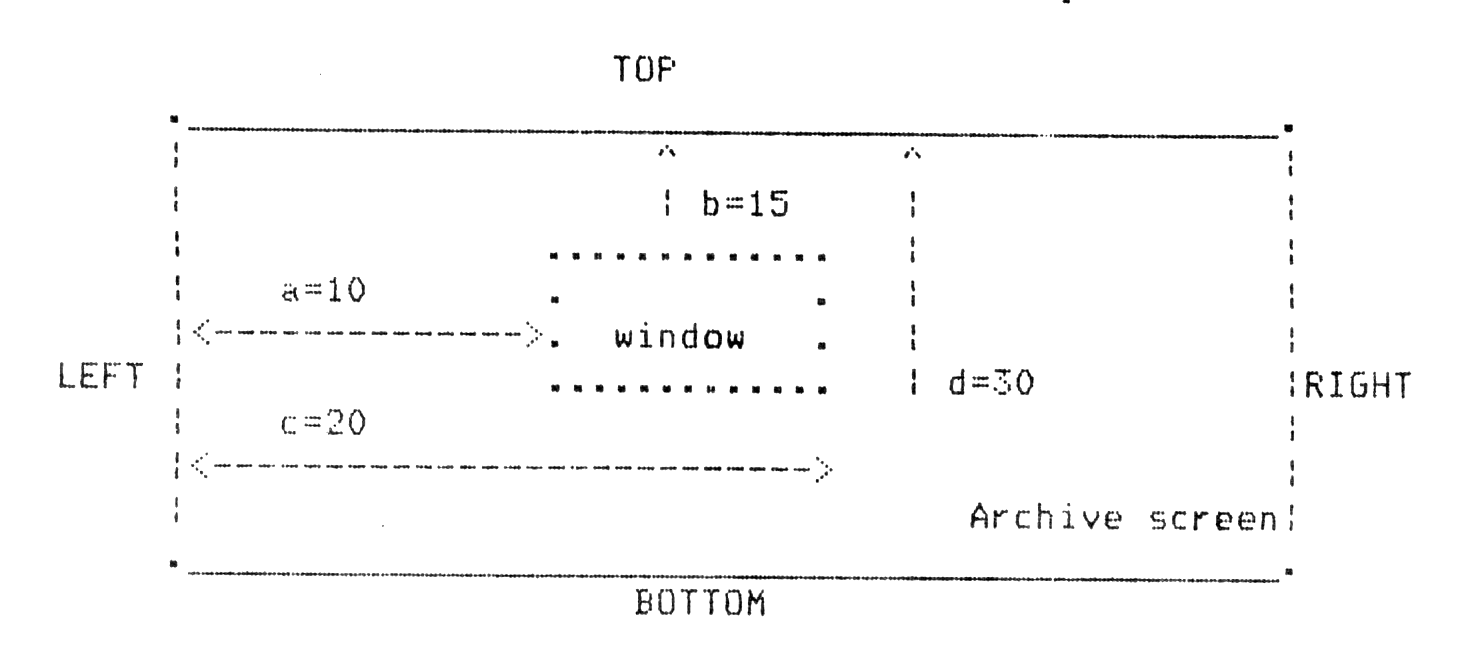
CHR(20)+CHR(a)+CHR(b)   creates a WINDOW.
    +CHR(c)+CHR(d)      The coordinates are in "characters".
                        "a" is the left margin from the left
                        side of the screen.
                        "b" is the top margin from the top of
                        the screen.
                        "c" is the right margin from the left
                        side of the screen.
                        "d" is the bottom margin from the top
                        of the screen.
An exemple will help to understand the ARCHIVE WINDOW creation.
PRINT CHR(20)+CHR(10)+CHR(15)+CHR(20)+CHR(30)
will create the following WINDOW.
There is only one active WINDOW at one time.
The initial ARCHIVE WINDOW is defined with the following parameters: CHR(20)+CHR(0)+CHR(0)+CHR(80)+CHR(25)
CHR(21)+CHR(n)          scrolls up "n" lines.
CHR(22)+CHR(n)          scrolls down "n" lines.
CHR(23)+CHR(n)          scrolls left "c" columns.
CHR(24)+CHR(n)          scrolls right "c" columns.

CHR(26)                 exchanges the PAPER with the INK, it's
                        INVERSE printing.

CHR(27)+CHR(n)          is for special CLS.
                        n=65 , CLS from the cursor position to
                        the end of line.
                        n=66 , CLS from the cursor position to
                        the end of the screen/window.
                        n=67 , STORE the cursor position.
                        n=68 , RESTORE the cursor position.

CHR(30)                 puts the cursor at the position 0,0
                        without erasing the screen.

CHR(31)+CHR(a)+CHR(b)   Same as AT a,b . PRINT at line "a",
                        column "b".
There is more control codes, but these are the most useful ones.
A very useful undocummented feature with the SEDIT command is hidden in ARCHIVE version 2.35.
When designing a screen, ARCHIVE provides some graphic characters to draw boxes. To use them, in SEDIT, do F5 and after press any key between “a” and “k”. When drawing a box, you don’t have to press each time F5 and the right key because SEDIT gives an easy way to repeat the last typed characters, just keep your finger on SHIFT and press a cursor key.
These graphic characters are similar to those found on IBM GRAPHICS compatible printer. Run the following program to print a reference sheet for the 11 new characters with the corresponding ARCHIVE codes. Your printer must be set for the IBM GRAPHICS character set #2, but anyway if your printer do not have the capability to print them, you can still use them in ARCHIVE!
SuperBasic program to print a reference sheet for ARCHIVE graphic characters.
  1 REMark by Real Gagnon  Montreal May 1988
  2 :
 10 OPEN #4,ser1
 20 :
 30 PRINT #4,'.ARCHIVE graphic characters (SEDIT)
 35 PRINT #4,' function key F5 then one of the following keys:'
 37 PRINT #4,CHR$(27);'A';CHR$(18) : REMark set line spacing (opt.)
 40 PRINT #4,'KEY   ','   CHARACTER','   ARCHIVE code'
 45 RESTORE
 47 :
 50 REPeat loop
 60   READ sed,ibm,ql$
 70   PRINT#4, CHR$(sed),,CHR$(ibm),,ql$
 80   IF sed=107:EXIT loop
 90 END REPeat loop
 95 :
100 DATA 97,179,'224' :REMark a
110 DATA 98,180,'225' :REMark b
120 DATA 99,191,'226' :REMark c
130 DATA 100,192,'227':REMark d
140 DATA 101,193,'228':REMark e
150 DATA 102,194,'229':REMark f
160 DATA 103,195,'230':REMark g
170 DATA 104,196,'231':REMark h
180 DATA 105,197,'232':REMark i
190 DATA 106,217,'233':REMark j
200 DATA 107,218,'234':REMark k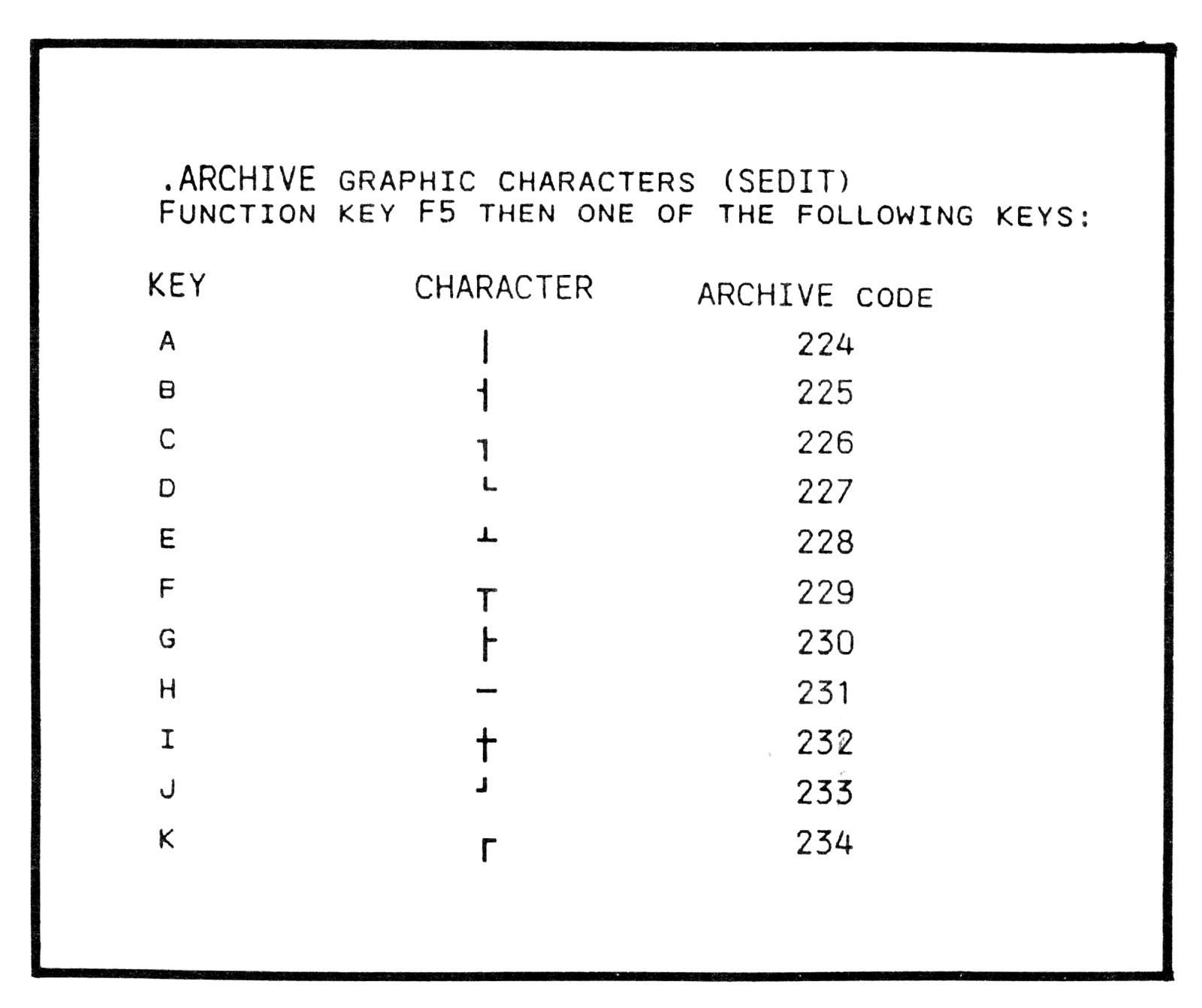
Note: Type-in program listings on this website use ZMAKEBAS notation for graphics characters.