
Before reading too far into this, go grab a newspaper or some other publication that has print laid out in narrow columns. Count the number of letters and blank spaces on several lines. Chances are, you’ll find that each line contains a DIFFERENT number of characters.
This is done with a method called Proportional Printing. It turns out that fat characters like M take take up a whole lot more space than the tiny letter i, so each character is given only as much room as it needs. Not only is this much more pleasing to the eye, it allows a surprising amount of extra text to be squeezed into the same amount of space.
Our TS2068s normally display 32 or 64 (and now 85) columns of text, with each character taking up the same width, no matter what its size. It seems that we should be able to improve this somewhat.
Actually, the job has already been done for us. In the Nov. 1985 issue of YOUR SPECTRUM, in the article “All Out of Proportion”, such a program is given. Unfortunately, it does have a number of defficiences. I’ve corrected as many of these as are practical (though thay can still be annoying at times) and presented it here for your use. Note that the Spectrum program and my perversion of it here are radically different in many ways. If you’ve got the old version, you’ll still have to completely retype it for the TS2068. Still, they do function somewhat alike, and you might find the text of that article to be helpful.
For those who have that original article, the main differences are: 1) the code is modified to run on a TS2068, 2) machine code is initially entered through DATA statements, eliminating the need for a hex loader, 3) the character fonts are MUCH improved, and you don’t have to type in the pixel patterns for each, because my program derives the patterns from the Timex patterns, already in ROM, 4) the code works as in OVER 0, rather than OVER 1, so if you print over a space that already contains text, you won’t get such an awful mess, and 5) the TAB function is also implemented in the proportional mode.
This article contains two programs; type in and RUN the first one. After a long wait, it will SAVE the true proportional printing program to tape. When you reload that one (no waiting required, from here on) you’ll be ready to begin.
It starts out with a little demonstration of proportional printing. This redefines the LPRINT command, so it will conflict with your use of a printer. I haven’t found this to be any bother in the types of programs I’ve used it in. Still, if there’s sufficient interest, it shouldn’t be too hard to produce an add-on program that inserts a “proportional print” channel, and attaches it to an unused stream. This could allow your normal printer to work (in its normal mode) in conjection with proportional printing on the screen. In the mean time, if your printer supports a COPY function, that should work with this program, as is.
In any case, LPRINT now prints to the screen in proportional mode, and PRINT continues to work like it always does, so you can mix BOTH methods in your program at once. However, both maintain their own separate screen locations, so you can easily print to different parts of the screen with each.
For proportional screen positioning, you can use LPRINT AT and LPRINT TAB commands. However, note that the old AT and TAB functions use screen positions that assume all characters are 8 pixels wide. This would never do for proportional printing, so when you use AT or TAB with LPRINT, you specify the X and Y locations in PIXELS, not in characters. This means you can place your characters anywhere you want on the screen, right down to the pixel level. The BASIC program, from lines 3030 on give a reasonable demonstration of how it works.
The YOUR SPECTRUM article also included a font designer program, which is included here, but this is optional. To move the cursor, use the Q, A, O, and P keys. Use M and N to turn a pixel on or off. F keeps the design, D displays a character, U displays the entire character set and S and J save and load the character set. LOAD in a SAVEd character set to the main program with LOAD “” CODE 64208. Once loaded into the proportional print program, you can save the program and fonts together, and never bother with the fonts again.
The proportional printing fonts require one new thing we never worried about before; you have to specify how many pixel wide your character is. To do this, you design your character to touch the right most border of the 8 x 8 character block you’re given. Then, in the top row of pixels, you set each pixel that’s in a valid column for that character. Thus, if your character is to be five pixels wide, simply set the right most 5 pixels in the top row (those won’t be printed on the screen, don’t worry). Don’t forget to include one or more pixels for the spacing between characters! In the “standard” character set, I’ve chosen to have only one pixel width of space between characters, and a “blank space” character is 4 pixels wide. This works fairly nicely, but you can change it to suit your needs.
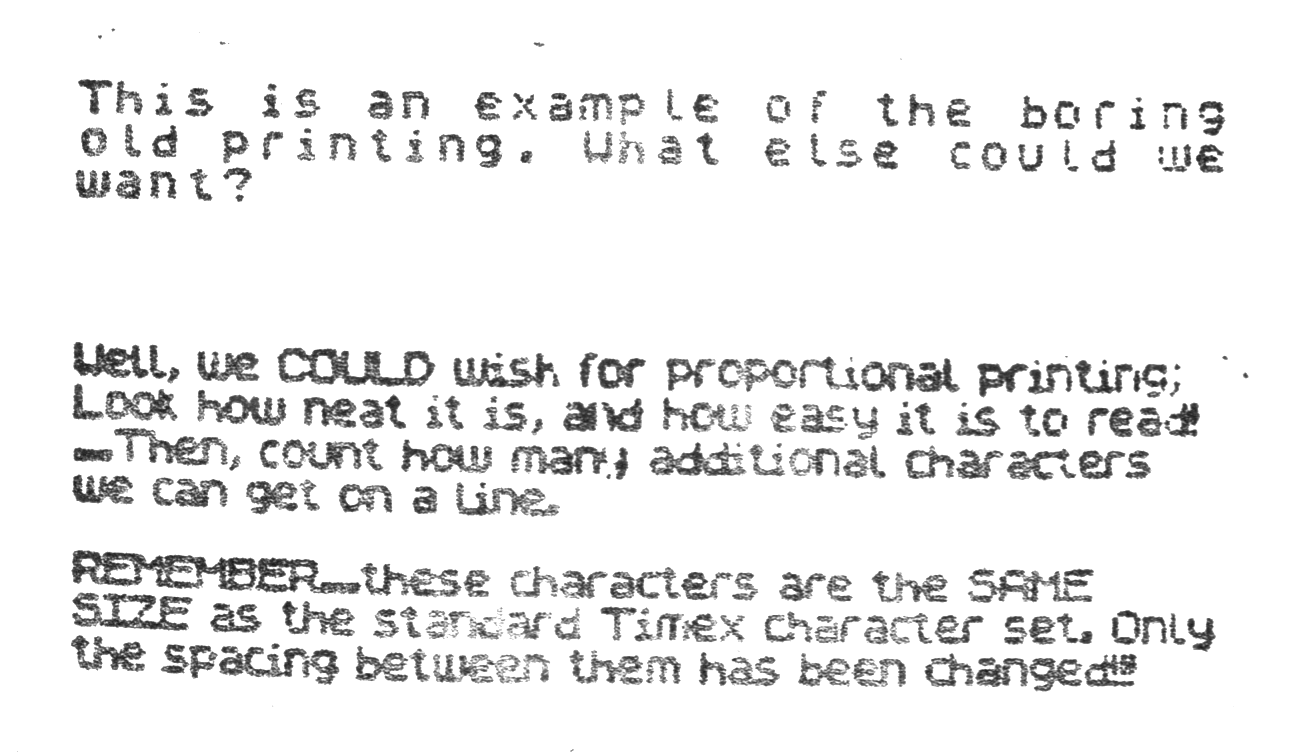
A small sample of proportional printing is included here. Won’t that look nice in your next program?
10 REM Program to perform Proportional Printing.
15 REM An upgraded version of an entry in "YOUR SPECTRUM", Nov 1985
20 REM Changes include - Modified for TS2068, Supports TAB, better fonts, and works as in OVER 0, instead of OVER 1
25 REM When you RUN this program, it will SAVE the actual Proportional Print program to tape
30 REM When THAT program is run, all LPRINT statements will do proportional printing to the screen.
40 REM AT and TAB are supported, but they now refer to pixel positions, instead of character positions.
50 REM It will also be possible to use PRINT, to do non-proportional printing on the screen.
60 GO TO 585
70 REM Subroutine to decode the following Hexadecimal DATA statements
75 READ n$: LET hi=CODE n$(1): LET lo=CODE n$(2)
80 IF hi>57 THEN LET hi=hi-7
85 IF lo>57 THEN LET lo=lo-7
90 LET n=16*hi+lo-816
95 RETURN
100 DATA "21","00","A8","22","E9","FE","2A","4F"
110 DATA "5C","01","0F","00","09","01","DE","FD"
120 DATA "71","23","70","C9","E5","C5","D5","F5"
130 DATA "CD","EA","FD","F1","D1","C1","E1","C9"
140 DATA "F5","3A","F0","FE","FE","00","20","15"
150 DATA "F1","FE","16","20","06","3E","FF","32"
160 DATA "F0","FE","C9","FE","17","20","38","3E"
170 DATA "FD","32","F0","FE","C9","FE","FF","20"
180 DATA "09","F1","32","E9","FE","21","F0","FE"
190 DATA "35","C9","FE","FE","20","0D","F1","47"
200 DATA "3E","A8","90","32","EA","FE","AF","32"
210 DATA "F0","FE","C9","FE","FD","20","0A","F1"
220 DATA "32","E9","FE","3E","FC","32","F0","FE"
230 DATA "C9","F1","AF","32","F0","FE","C9","FE"
240 DATA "0D","20","09","CD","2A","FF","3E","02"
250 DATA "CD","30","12","C9","FE","20","38","04"
260 DATA "FE","80","38","02","3E","3F","26","00"
270 DATA "6F","29","29","29","EB","2A","F4","FE"
280 DATA "19","7E","32","F1","FE","36","00","22"
290 DATA "F2","FE","01","07","00","09","22","EE"
300 DATA "FE","3A","EA","FE","FE","A9","D2","0A"
310 DATA "FF","CD","13","FF","ED","4B","E9","FE"
320 DATA "CD","03","26","32","ED","FE","22","EB"
330 DATA "FE","06","08","C5","2A","EE","FE","7E"
340 DATA "2B","22","EE","FE","6F","3A","F1","FE"
350 DATA "16","FF","5F","4F","3A","ED","FE","FE"
360 DATA "00","28","12","47","26","00","CB","3D"
370 DATA "CB","1C","CB","3B","CB","FB","CB","1A"
380 DATA "A7","10","F3","42","4B","ED","5B","EB"
390 DATA "FE","1A","A1","B5","12","CD","37","FF"
400 DATA "3A","ED","FE","FE","00","28","09","13"
410 DATA "1A","A0","B4","12","CD","37","FF","1B"
420 DATA "2A","EB","FE","CD","F7","FE","22","EB"
430 DATA "FE","C1","10","AF","3A","F1","FE","2A"
440 DATA "F2","FE","77","3A","E9","FE","47","3A"
450 DATA "F6","FE","80","32","E9","FE","C9","00"
460 DATA "A8","00","00","00","00","00","00","00"
470 DATA "00","00","C8","F9","00","F5","7C","25"
480 DATA "E6","07","20","0A","7D","D6","20","6F"
490 DATA "38","04","7C","C6","08","67","F1","C9"
500 DATA "3A","F1","FE","2A","F2","FE","77","CF"
510 DATA "04","06","08","3A","F1","FE","4F","A7"
520 DATA "CB","39","30","03","05","18","F8","78"
530 DATA "32","F6","FE","3A","E9","FE","80","D0"
540 DATA "AF","32","E9","FE","3A","EA","FE","D6"
550 DATA "08","32","EA","FE","C9","E5","F5","7A"
560 DATA "CB","0F","CB","0F","CB","0F","E6","03"
570 DATA "F6","58","67","6B","3A","8D","5C","77"
580 DATA "F1","E1","C9"
585 CLEAR 64199: PRINT AT 10,0;"This Will Take a While...": PRINT "  ...Why not take a break?"
590 REM ***********************
610 FOR j=64970 TO 65356: GO SUB 70: POKE j,n: NEXT j
700 REM ***********************
710 REM Now that the machine code is in, we'll derive the compressed fonts from the standard Timex character set
1000 LET addr=PEEK 23606+256*PEEK 23607+256+8: LET daddr=64208
1010 FOR c=1 TO 95
1020 LET smin=16
1030 FOR x=1 TO 8
1040 LET l=PEEK addr: LET addr=addr+1
1050 IF l<16 THEN LET s=16: GO TO 1090
1060 IF l<32 THEN LET s=8: GO TO 1090
1070 IF l<64 THEN LET s=4: GO TO 1090
1075 IF l<128 THEN LET s=2: GO TO 1090
1080 LET s=1
1090 IF s<smin THEN LET smin=s
1100 NEXT x
1110 LET addr=addr-8
1120 FOR x=1 TO 8
1130 POKE daddr,(PEEK addr)*smin
1140 LET addr=addr+1: LET daddr=daddr+1
1150 NEXT x
1160 LET smin=8: LET daddr=daddr-8
1170 FOR x=1 TO 8
1180 LET s=0: LET r=PEEK daddr: LET daddr=daddr+1: IF r=0 THEN GO TO 1220
1190 IF ABS (r/2-INT (r/2))>.1 THEN GO TO 1210
1200 LET s=s+1: LET r=INT (r/2+.1): GO TO 1190
1210 IF s<smin THEN LET smin=s
1220 NEXT x
1225 IF smin=0 THEN LET smin=1
1226 LET q=2^(smin-1)-1: IF smin=1 THEN LET q=0
1230 POKE daddr-8,q
1240 NEXT c
1250 POKE 64200,15
1260 FOR j=64201 TO 64207: POKE j,0: NEXT j
2000 BEEP .25,1: BEEP .25,15: BEEP .25,1: BEEP .25,15
2010 SAVE CHR$ 253+CHR$ 245+CHR$ 8+"ING"+CHR$ 235+"YOU" LINE 3000
2020 SAVE CHR$ 232+CHR$ 204+CHR$ 227+"THE "+CHR$ 175 CODE 64200,1160
2025 RANDOMIZE USR 64970
2030 GO SUB 8000
2040 STOP
3000 CLEAR 64199: LOAD ""CODE
3010 RANDOMIZE USR 64970
3020 GO SUB 8000
3030 LPRINT
3040 LPRINT "You can now NEW the BASIC portion away;"
3050 LPRINT "This will Turn Off the Proportional printing..."
3060 LPRINT "But you can turn it on again, with"
3070 LPRINT TAB 60;"RANDOMIZE USR 64970"
3080 STOP
8000 CLS : PRINT "This is an example of the boringold printing. What else could wewant?"
8010 LPRINT AT 0,50;"Well, we COULD wish for proportional printing;"
8020 LPRINT "Look how neat it is, and how easy it is to read!"
8030 LPRINT "...Then, count how many additional characters    we can get on a line."
8040 LPRINT
8050 LPRINT "REMEMBER...these characters are the SAME       SIZE as the standard Timex character set. Onlythe spacing between them has been changed!!!"
8060 RETURN
Optional Font Designer Program
10 CLEAR 39999
20 LET ba=40000
100 PRINT AT 2,3;"▒▒▒▒▒▒▒▒▒▒"
110 FOR f=3 TO 10: PRINT AT f,3;"▒OOOOOOOO▒": NEXT f
120 PRINT AT 11,3;"▒▒▒▒▒▒▒▒▒▒"
130 LET a=0: LET b=0
200 OVER 1: PRINT AT a+3,b+4;"▒": PAUSE 2: PRINT AT a+3,b+4;"▒": PAUSE 2: OVER 0
210 LET a=a+(INKEY$="a" AND a<7)-(INKEY$="q" AND a>0)
220 LET b=b+(INKEY$="p" AND b<7)-(INKEY$="o" AND b>0)
230 IF INKEY$="m" THEN PRINT AT a+3,b+4; INVERSE 1;"X": PLOT b+160,(8-a)+151
240 IF INKEY$="n" THEN PRINT AT a+3,b+4;"O": PLOT INVERSE 1;b+160,(8-a)+151
250 IF INKEY$="f" THEN GO TO 300
260 IF INKEY$="d" THEN GO TO 400
270 IF INKEY$="u" THEN GO TO 500
275 IF INKEY$="s" THEN GO TO 1000
280 IF INKEY$="j" THEN GO TO 1020
290 GO TO 200
300 INPUT "Which Character? ";c$
310 IF LEN c$<>1 THEN GO TO 300
320 IF CODE c$<32 OR CODE c$>127 THEN GO TO 300
330 LET c=CODE c$
340 FOR f=0 TO 7
350 POKE (c-32)*8+f+ba,PEEK (16468+(f*256)): NEXT f: RUN
400 INPUT "Which Character? ";c$
410 IF LEN c$<>1 THEN GO TO 400
420 IF CODE c$<32 OR CODE c$>127 THEN GO TO 400
430 POKE 23606,64: POKE 23607,155: PRINT AT 2,20;c$: POKE 23606,0: POKE 23607,60
440 FOR a=0 TO 7: FOR b=0 TO 7
450 IF POINT (b+160,(8-a)+151)=1 THEN PRINT AT a+3,b+4; INVERSE 1;"X": GO TO 470
460 PRINT AT a+3,b+4;"O"
470 NEXT b: NEXT a
480 LET a=0: LET b=0: GO TO 200
500 PRINT AT 15,0;: FOR f=32 TO 127: PRINT BRIGHT 1;CHR$ f;" ";: NEXT f
501 PRINT AT 15,0;" ";: OVER 1: FOR f=32 TO 127: POKE 23606,64: POKE 23607,155: PRINT BRIGHT 1;CHR$ f;: POKE 23606,0: POKE 23607,60: PRINT " ";: NEXT f: OVER 0: POKE 23606,0: POKE 23607,60
510 BEEP .1,1: PAUSE 0: PAUSE 0: RUN
1000 INPUT "File Name? ";f$: SAVE f$CODE 40000,768: RUN
1020 INPUT "File Name? ";f$: LOAD f$CODE 40000,768: RUN
Note: Type-in program listings on this website use ZMAKEBAS notation for graphics characters.