
As soon as you read the title, you will say..”He did WHAT”. Yes, its true…like the early Sinclairs, you can now buy a QL Kit by mail order from A+ COMPUTER RESPONSE in Keene, New Hampshire (and some QL dealers also have them now).
Well, as I am primarily a 2068 buff…I ordered one as a way to dabble in the QL without a major investment. The kit price is $139 plus $7 shipping from A+. I ordered the QL kit on September 25, and it arrived October 8th.
But you say… isn’t this a dirty trick…selling the QL by mail as a $139 kit when they are also expecting the 17 or so QL dealers to sell the assembled QL package at $299 list less what the dealers want to throw in as discounts or added software and accessories? I think not as you have to consider what you DON’T get with the kit. First you will be in the true Atari ST or Amiga “class” as your computer kit comes with absolutely NO SOFTWARE! This is more of a problem than you think, as you can’t run to your local downtown store and buy some. Also while you can buy commercial software from the QL dealers…they don’t offer the four bundled programs that come with the dealer-sold QL (word processor, data base, spread sheet, and graph programs). Since you didn’t get the programs…you don’t get the standard QL documentation either. (The QL kit only comes with parts of the User Guide, and there is no nice binder either. Most of the documentation concerns technical aspects of the QL.) The kit sales might hurt dealer sales of complete QL packages, but you could look at it as an expanded market for the dealers sale of peripherals and software.
If you don’t need the business package…then the QL kit is a great “deal”, for learning SuperBASIC and for typing in programs from tutorials such as in ZX Computing Monthly from England and also TDM.
Well enough said on the ethics of the deal…what is the QL kit like and how hard is it to build? First of all, a kit it is not…it is a knocked down QL out of the case and consists of: a case with keyboard in the top half, two micro-drives, a heat sink, and a single mother-board computer, assembled and apparently tested by A+ (derived from the stickers on the bottom of the case.) Also a bag of screws and miscellaneous parts like covers for the ports not used. The heavy power supply and cord, and TV switch box and lead is also packed in the box. Also supplied are two blank micro cartridges, and two cables; an RGB cable and a serial port cable. (Note: these last two items are not included with pre-assembled QL’s and are an option.)
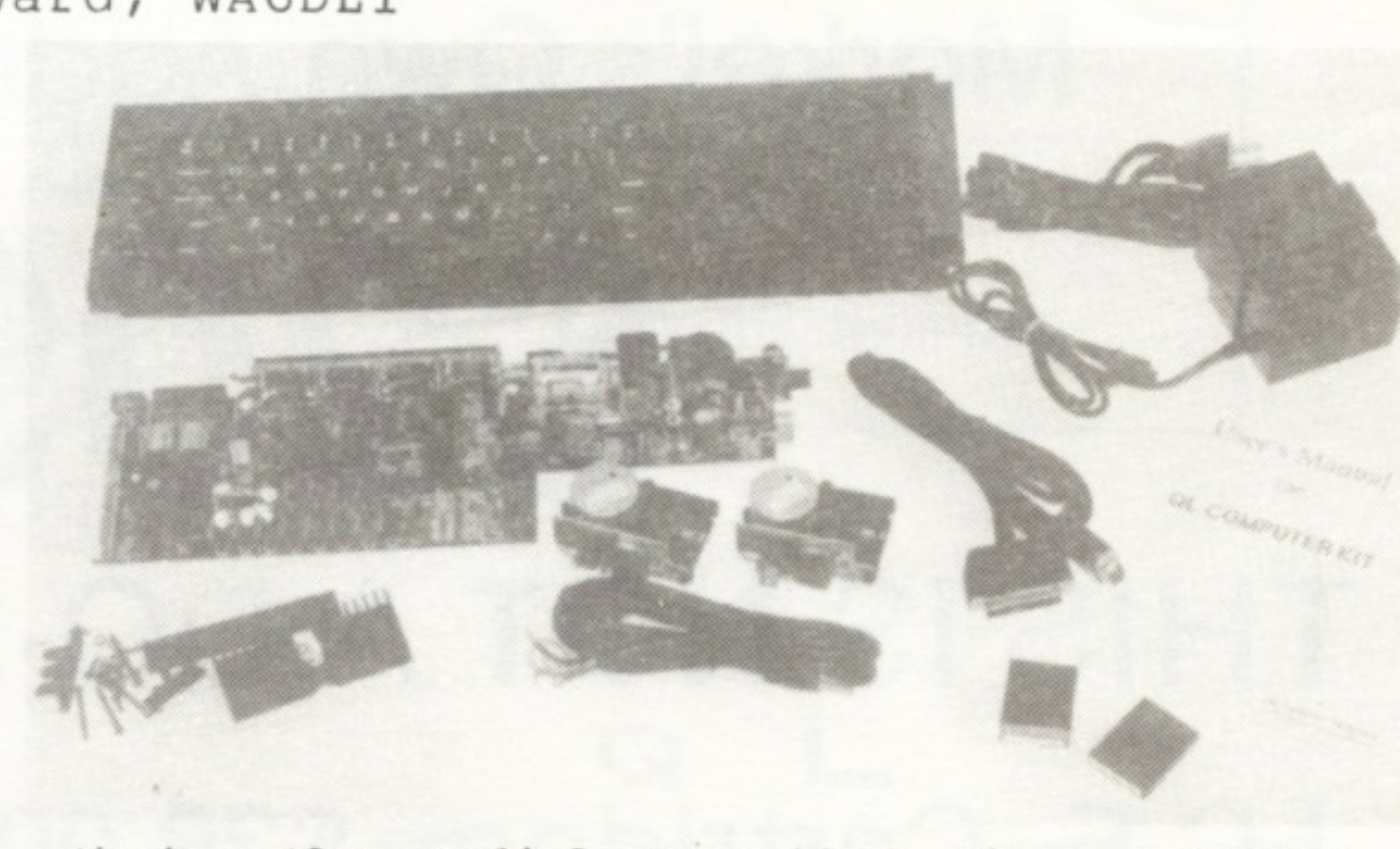
The “Kit” is about as difficult to assemble as the average lawn chair or knocked down hardware you might get at a department store. This doesn’t mean there are not pitfalls (you might be a klutz at reading the directions!). The QL Kit comes with the following documentation: An assembly manual produced by A+ Computer Response, A Beginners Guide to the QL by Sinclair, A Technical Description of the QL by Sinclair. It is all well packaged and the instructions are very good as far as they go. They look like they might have been produced with a QL graphics program.
I had the thing together in no time at all…but I am an old hand at stuffing the Sinclair keyboard ribbons into those slots! This is the most difficult part, along with not dislodging it all when you are plugging the LED wires into their sockets. These wires and the keyboard ribbons are both coming from the top lid of the case and you must do a balancing act to hold the lid at a 45 degree angle while you push the wires into sockets. One slip and you risk ruining the ribbons or may crumple the ribbons while fighting to get the LED wires into their holes and held in until you push down on the socket to lock the wires in place.
The wires for the two Microdrives can only go in the right way if you don’t twist them and you have the drives in the right position as shown in the drawings.
My big trauma came when everything worked fine (keyboard all keys, LED lights, and drives)…but I couldn’t pass the formatting test. Then I read the QL Beginners Guide and found that the formatting command: FORMAT MDV1_ shown in the assembly manual must include the underline symbol as part of the command (or you get the dreaded “not found” report). I thought the “_” was just their way of indicating the following flashing cursor! So my microdrives were OK but my command was incomplete. This needs to be stated in the assembly manual I think…at least it cost me a lot of grief. Oh yes, the TV switch box and cable allowed me to test the QL on a convenient TV set nearby.
A+ Computer Response does offer a phone consultation service for kit problems from 3 to 5 pm Eastern time. I am sure this is for kit assembly and test procedures only…they will not be willing to hold your hand on how to use SuperBASIC and otherwise program your QL…and your phone bill couldn’t stand this either.
When you move from that TV set, you are going to find that Sinclair expected you to purchase the Sinclair RGB Monitor. You won’t be able to use the QL’s monitor mode on most TV’s, but you could on a green or amber hi-res monitor if you know how to connect one up. The QL’s RGB plug (an 8-pin DIN plug) is a rare bird to buy…its not at Radio Shack. I happen to have color monitors in my computer room/ham shack and one is a TI composite and the other is a Comrex CR-6600 RGB. Fortunately, I had been through the RGB cable/plug mess in getting my 2068 onto the RGB monitor.
What is my verdict on the kit? I feel that if you want a “bargain” in a “super computer” (with the understanding of the hassels you will have to go through to hook it up to bargain monitors, ect.), then the QL Kit is a good deal, especially if you want to program in SuperBASIC or other languages. If you want to use ICE (a GEM like desk top format operating system) and the bundled business software, you would be ahead to buy an assembled QL from an authorized dealer. You will be buying other software and peripherals from them anyway, so you might as well get off to a good start by getting the computer from them too.
How do I like my QL? Well, it is great, and I have had fun trying some of the QL programs in ZX Computing. Now…if I just could get color on one of my monitors!
For further information on the QL Kit, contact A+ Computer Response, 69-B Island St., Keene, NH 03431 (603-357-1800).