Users of the Zebra Graphics Tablet will have no doubt noticed the annoying behavior that I will term “Spray”. If you don’t press the stylus against the tablet very firmly, you get a wild spray of dots.
You may have also noticed that the “Spray” tends to be directed towards the center of the tablet. This is because there are a pair of centering resistors which cause tablet readings to return to center when there is no contact with the graphics tablet. The “Spray” phenomena is essentially micro seperations of stylus contact. The duration of these micro seperations is very short but the cursor instantly centers on each seperation event, therefore causing the “Spray”.
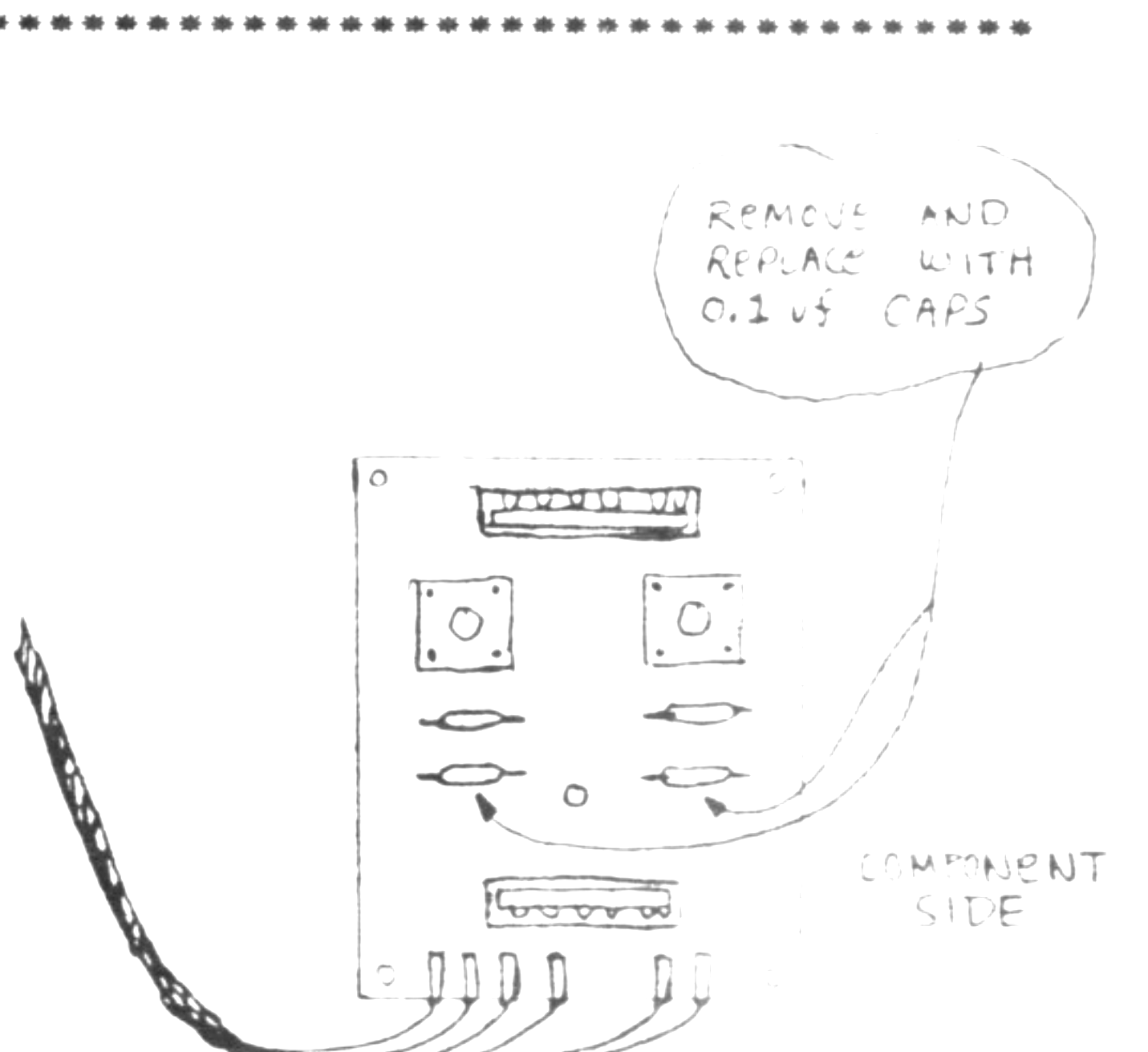
By eliminating the instant centering of the tablet you will be eliminating the “Spray” phenomena. You can do this by removing two resistors and replacing them with 0.1 uf capacitors. To do this follow the instructions below…
1) Place the tablet upside down and remove 7 screws.
2) Carefully separate bottom of tablet from top. Unplug two connections from the pc board inside.
3) Unscrew the pc board from bottom of the tablet.
4) Desolder the two resistors indicated in the diagram.
5) Solder two 0.1 uf ceramic disc capacitors into the vacated resistor locations.
Put your graphics tablet back together (this may be a bit tricky) and try it out. You will notice a signigicant improvement in performance.