
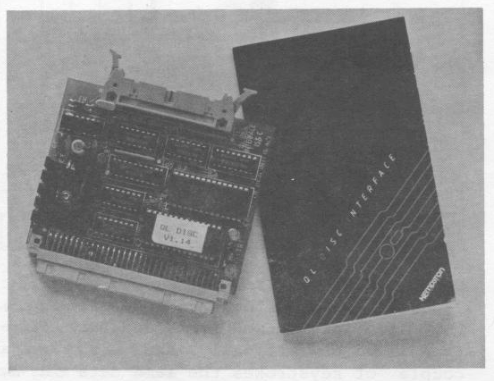
The Sinclair QL comes equipped with two Microdrives. They offer much faster access and reliability ‘as well as convenience) than older cassette tape systems. But Microdrives do have their limits. They provide only about 100K of storage, suffer some reliability problems (tapes, not the drives), and do not project the business image many professional users expect.
For QL users wanting or needing disk drives, the Kempston QL Disk Interface may provide the solution. In addition to its purchase, a single or dual disk drive system must also be purchased with its own power supply. The Shugart standard interface is required. 3”, 3 1/2″, 5 1/4”, and 8” drive systems are all available with the Shugart type interface.
The Kempston Interface board plugs into the bus at the left end of the QL and the disk drive cable (obtain cable from same supplier as disk drive) runs to the disk drive. On power up, the Kempston Disk Interface logo appears first on screen and then the standard QL logo. The board is well made and once installed does not have to be removed from the machine.
QL users know that the Microdrives are accessed by name: mdvl and mdv2. The disk drives may be addressed as flp1 and flpe. In using commercial software that does not expect a disk drive to be connected, but only the Microdrives, “FLP_USE mdv” will allow the software to access the disk when it makes a Microdrive call.
Here at SUM, our QL is connected to a pair of Amdek 3” drives known as Amdisk 3 and available from companies like Ramex and English Micro Connection. Hooking the hardware up was easy.
It took a little longer to figure out how to use the Quill word processor with the disk drives. What is said here about Quill will also be true of the other software that comes with the QL. To configure Quill to work with the Kempston interface and disk drives, two diskettes must first be FORMATted. Then a copy of Quill on Microdrive wafer is put in mdvl or mv2 and the COPY command used to transfer copies of each file on the wafer to diskette. Next, the CONFIG BAS program is LOADed either off the wafer or the diskette. Type “flp_ use mdv” and ENTER. Now type RUN and ENTER to run the configuration file already loaded. Change all “mdvi” references to “flpi” and all “mdv2” references to “flpe” <‘or “flpi” if only one disk drive). Save the new CONFIG SYS file to disk. Now Quill can be loaded and run from disk drive, and files created by Quill will save and load from disk drive.
A number of extra file commands are in the Kempston ROM: STATus, RENAME, TRUNCATE and VIEW are all pretty self-explanatory. Since the QL can use windows, special commands for working in windows are included: WDIR, WSTAT, and WDEL. Various commands for random access saving and accessing of data are also available.
After several weeks of use, SUM’s QL Microdrive has not yet lost. a wafer, but the experience of others shows that it is inevitable. Our disk drives and Kempston interface have also performed admirably, so that now all word processing is done to and from disk at a speed roughly 6 times faster than Microdrive. My belief is that home users of the QL will be happy with the Microdrive units for a long time as long as they keep at least two copies of all software in addition to the originals. Business and “power” users of the QL will want the convenience, safety and flexibility of disk drives. The Kempston unit performs admirably. Other manufacturers have similar units out.