Revox (a manufacturer of “Top-of-the -Line” audio equipment) recently introduced a cassette deck with an RS232 port, allowing control of the unit via a computer. For a mere $1,400.00, this cassette deck could be yours. LIGHT SHOW 2000 will turn the tables on the Revox for about 1/100th of the cost. LS 2000 is a program which will allow your cassette deck (or any other musical source) to control your computer.
LS 2000 will poll the ear port of your TS 2068 and decipher any pulse detected into one of four tonal groups (the shorter the pulse, the higher the note). Depending on the tone detected, a corresponding color pattern will be displayed on the screen. The user has control of the tonal groups, colors, duration of display and the speed at which the tones will be read. This flexibility allows one to “view” the same piece of music in a multitude of ways, or to tailor the program to a certain musical selection. LS 2000 comes with one preset Set-Up to “display” music and provides for four user-defined set-ups.
LS 2000 HOOK-UP
To use LS 2000, some means of providing a musical source to the computer must be used. There are several ways of accomplishing this, some more flexible and preferable than others. The simplest means is to hook up a wire directly from the speaker of a stereo system to the earphone jack of the TS 2068. (IMPORTANT: Do not hook up more than one channel of a stereo system as this may damage the stereo amplifier.) This can be done by running speaker wire from the rear connectors of a speaker (or from the speaker output of your stereo) to your computer. Do not leave the speaker disconnected from the amplifier. A phone jack can be attached to the ends of the speaker wire and plugged directly into the computer’s ear jack. Or alligator clips can be used to make a connection to your computer patch cords. The drawback of this approach is lack of control over the signal going into the computer. If the music is played at a low volume, the signal may be too low. Conversly, “Heavy Metal” from a 200+ watt system at full blast may cause your 2068 to become light dust.
If the tape recorder you use with the 2068 will play through the earphone jack while in record mode, it can be used to feed the sound source into the computer. A similar wire will be needed to plug into the microphone jack of the recorder, as previously discussed. Run a patch cord from the earphone jack of the recorder to the earphone jack of your computer. Place a tape in the recorder and set it to record. If you opt for this method and plan to play your music at medium to high volume, I would suggest placing an attenuater in-line between the microphone input and the speaker wire from the stereo. (An attenuater may be obtained from Radio Shack for $1.99 — Part #274-300. This part has an RCA jack for input and a regular mic/earphone jack for output.) This will help prevent distortion and possible overloading of your recorder. The preferable choice is to use Radio Shack’s mini-amplifier ($11.95 — Part #277-1008). The hook-up is the same as with the tape recorder. This method will allow control of the signal volume going into the computer. Once again, use an attenuater, if the musical source is to be played at any volume. If LS 2000 does not respond to inpute while using the attenuater, the attenuater should be removed. (NOTE: This mini-amplifier can be used to boost the output of computer tapes you may have difficulty loading. It also can be used to amplify BEEP output from your computer.)
A “walkman” type cassette player can also be used to supply music to the computer if it has two headphone jacks. Use one of the jacks to run a patch cord to the computer.
PARTS LISTS
Radio Shack Part #   Description                                Price

42-2370              Patch cord w/RCA phono jack to
                     stripped wire               36 in.         $ 1.69
42-2371                "                "        72 in.         $ 1.89
42-2372                "                "       144 in.         $ 2.19

  NOTE: The above to be used with Radio Shack Attenuater.
  Choose the length to fit your needs. Speaker wire may be
  pig-tailed to stripped ends if needed.

274-300              RCA Phono jack to 1/8" signal
                     reducer (attenuater)                       $ 1.99
274-287              Red 2 conductor 1/8" phone
                     plug (2 per package)                       $ 1.29
277-1008             Mini Audio Amplifier w/speaker             $11.95
USING LS 2000
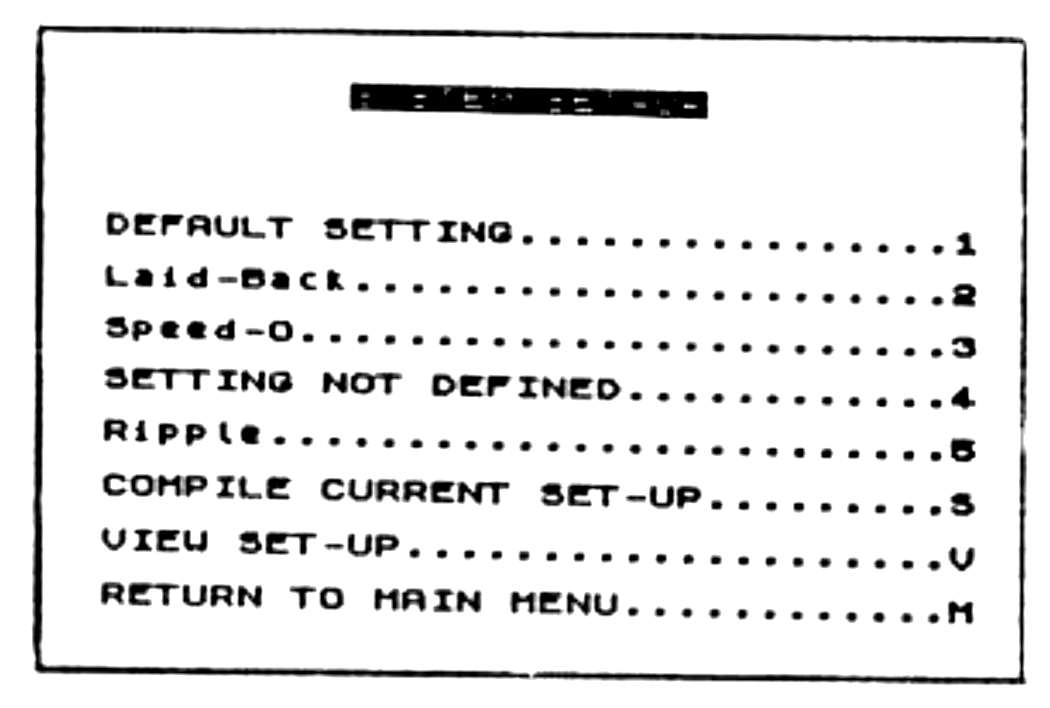
Upon running LS 2000 you will be presented with a main menu (see example 1). “ENTER LIGHT SHOW” (Option 0) will pulse color patterns on the screen based on the input through the ear port. (NOTE: To return to the main menu while in this mode, press the “q” Key.) Option 1, “SYSTEM SET-UP”, will provide a second menu allowing the user to select 1 of 5 permutations of LS 2000 (see example 2). The current set-up is highlighted via BRIGHT. (NOTE: If any of the parameters are changed, no current set-up is shown.) This menu also allows viewing of the parameters for any compiled set-up (Option V). Option S will define a set-up based on the current setting (i.e.; mode, colors, tone, pulse, tempo). The user is prompted to choose a number to be compiled (2-5) and for a name. When this new definition is compiled, it then becomes the current set-up.
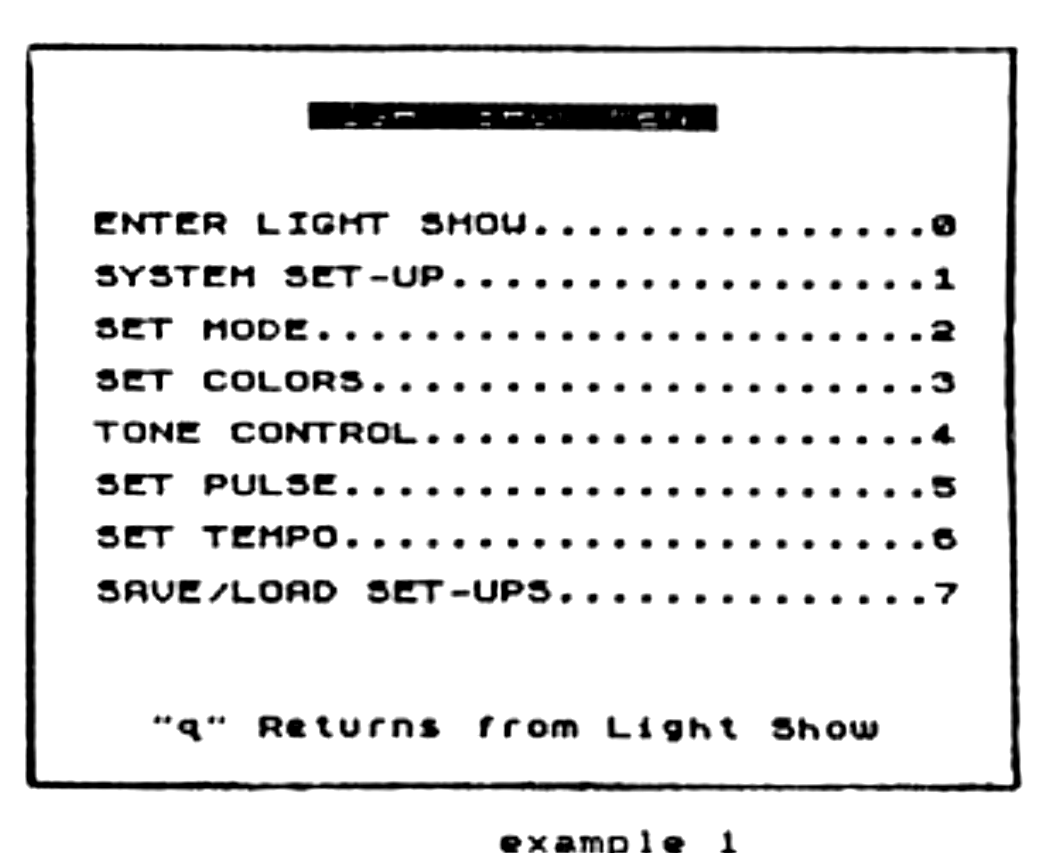
From the main menu, the user can create different set-ups or setting. By changing any of the various options (2-6), LS 2000 can be customized to any musical input or user preference. The best way to learn what each option does is to experiment. After changing an option, one can view the results by “Entering Light Show”. Each setting option is provided with prompts and explanations from within the program. (See Sample Set-ups for examples.) Depending on the type of music or the quality of the input (dynamic range), one may need to retune the tone control. Tone 0 is the highest tone range, Tone 3 the lowest. The number assigned to a tone is the upper limit at which LS 2000 will produce a pulse.
The Save/Load option allows the saving of favorite compiled setting to tape for later retrieval.
SAMPLE SET-UPS
                        Tone Limit             Timing Course/Fine
Name        Mode    #0   #1   #2   #3         Tempo       Pulse

Default      1     240  208  192  160        10/256        1/1
Laid-Back    1     245  208  192  160        10/1         12/256
Speed-O      0     215  208  192  160        2/150         1/1
Pulser       0     215  208  192  170        1/1          10/176
Ripple       1     215  208  192  170        3/100        10/176
BEHIND THE SCENES
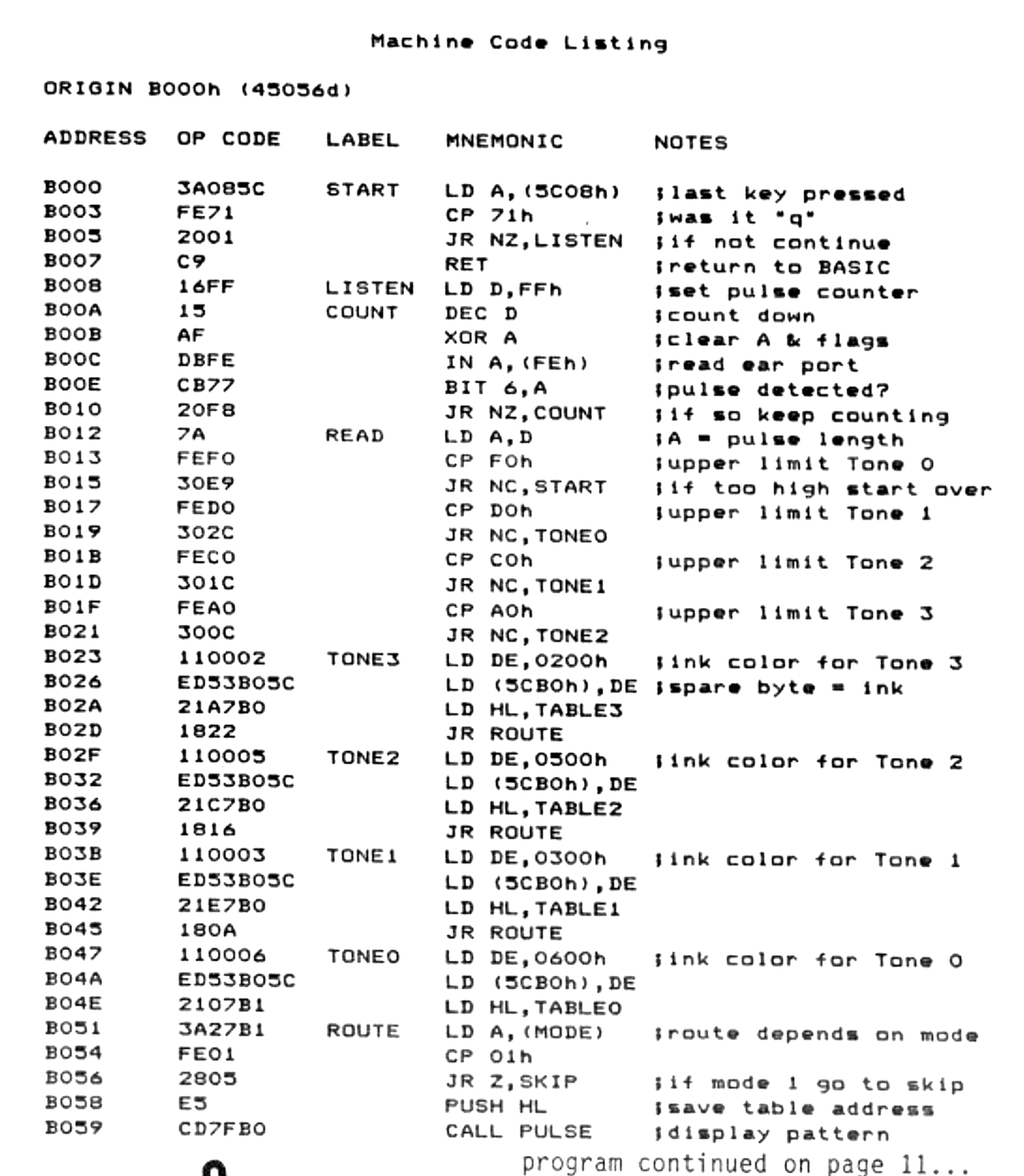
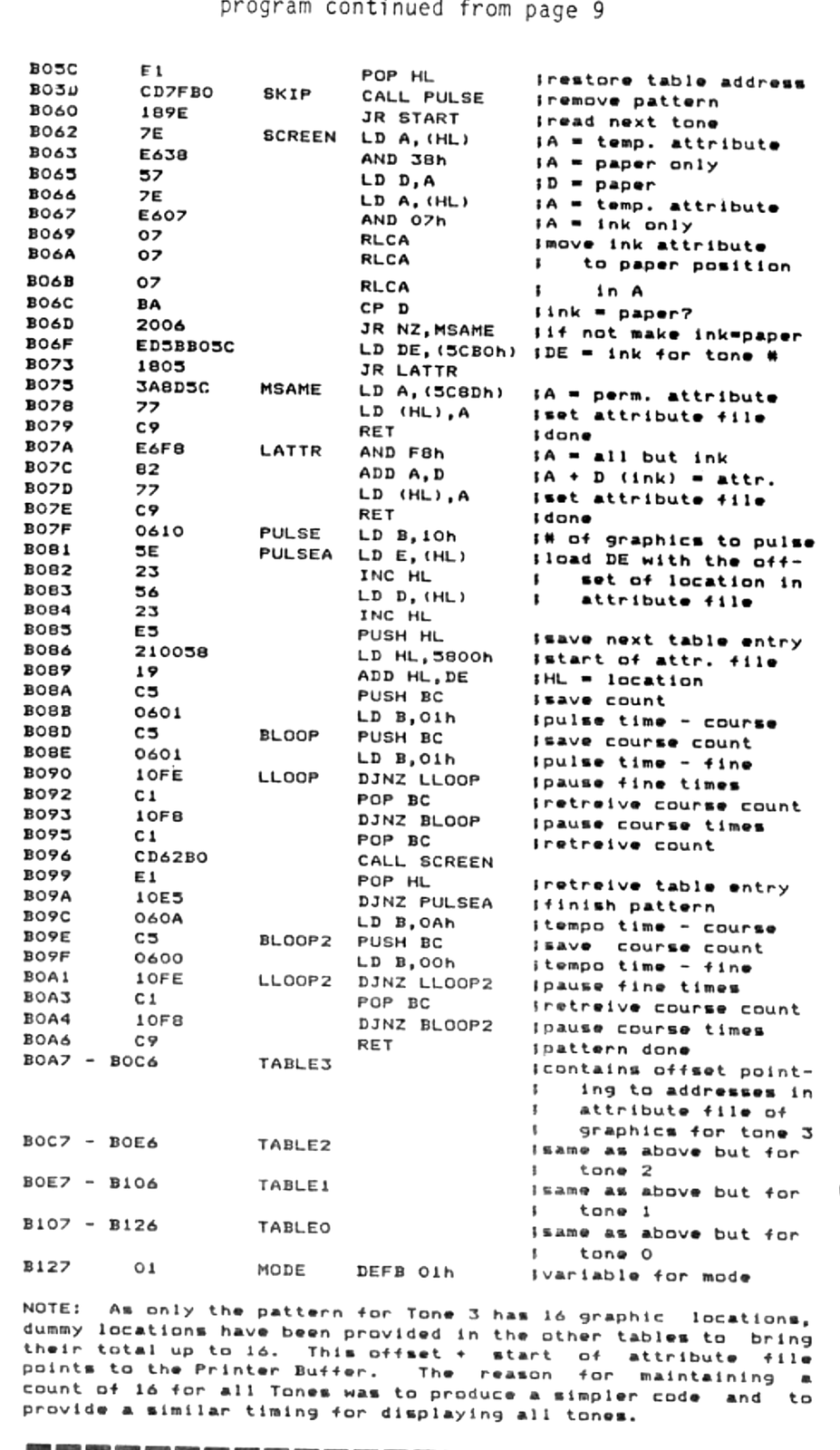
When the TS 2068 is loading a program from tape, it reads through the ear port (port FEh) the signals recorded on the tape. The data needed to send the program is tored in bit 6. If the bit is set (“1”) the frequency of the signal is 1020hz, if it is not set (“0”), the frequency is 2040hz. The frequency is determined by the length of the pulse detected. Port FEh also uses bits 4-0 to poll the keyboard. By sending out this port, BORDER colors can be controlled (bits 2-0) or a BEEP can be triggered through bit 4. When a program is sent to tape, bit 3 of port FEh is used. The threshold of the ear port is 23khz, with the input being 4-10 volts p-p.
KEYING IN THE LISTING
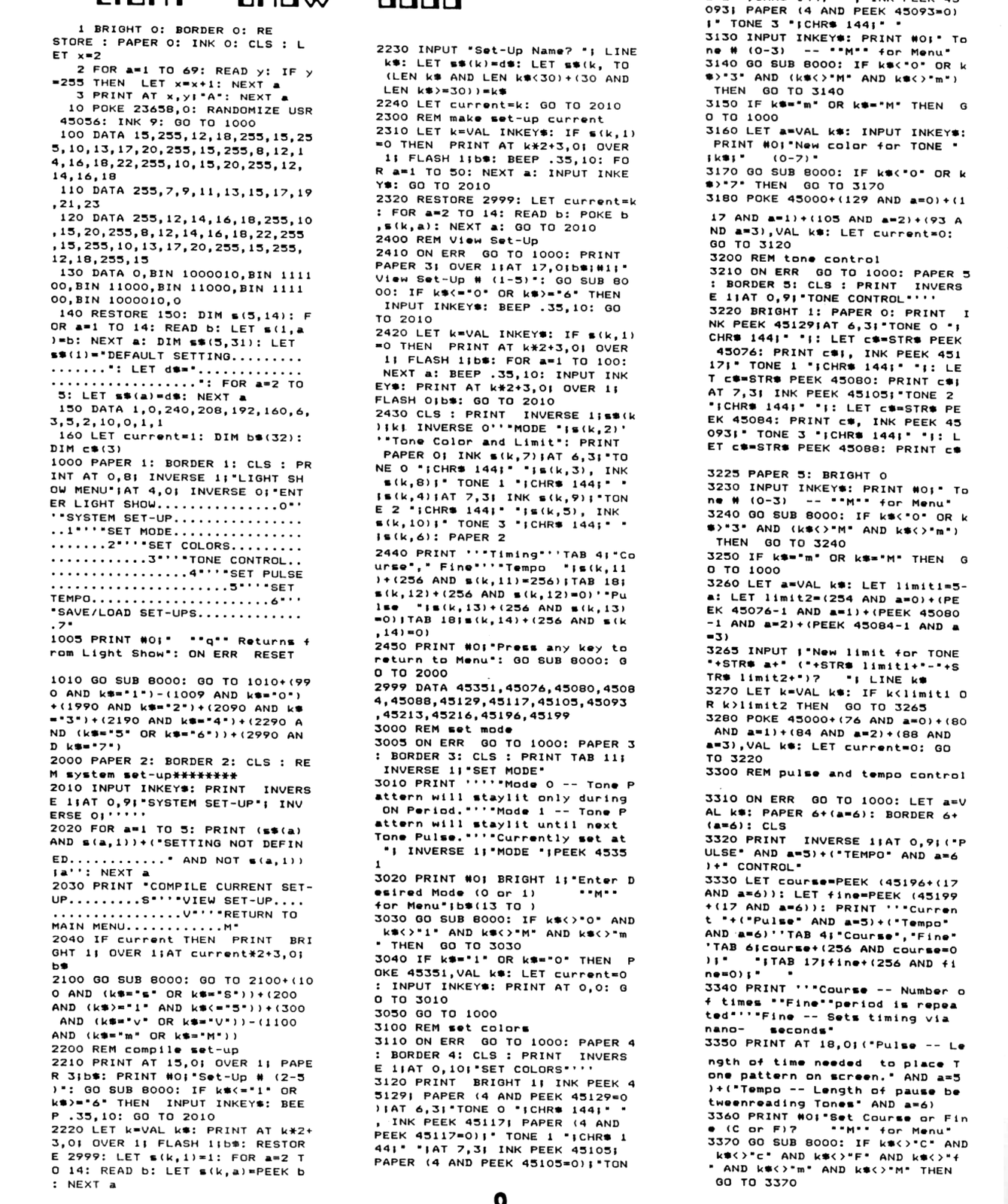
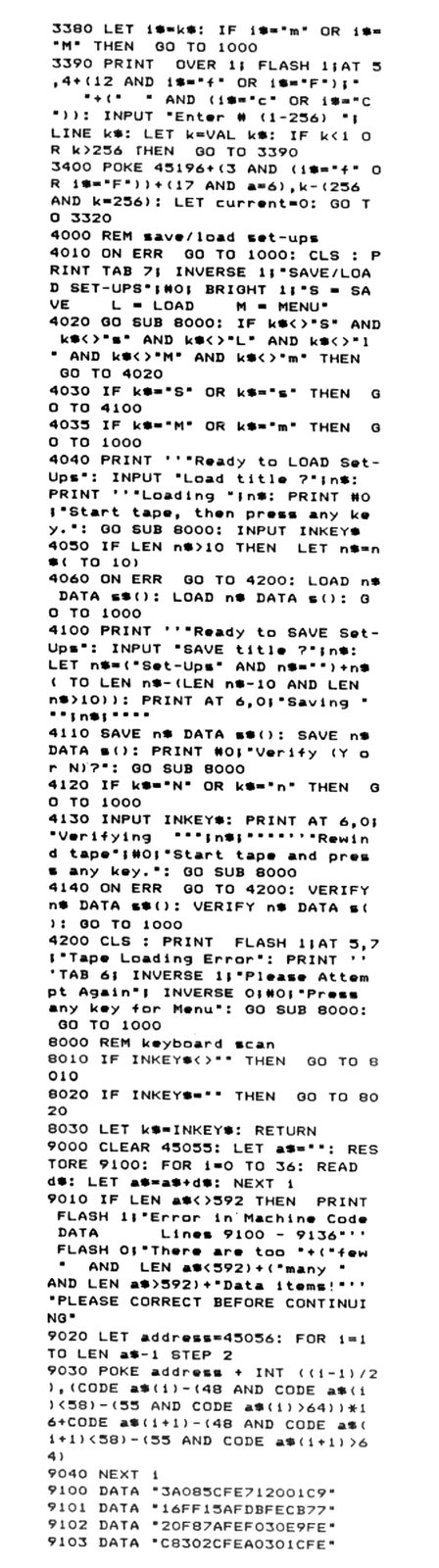
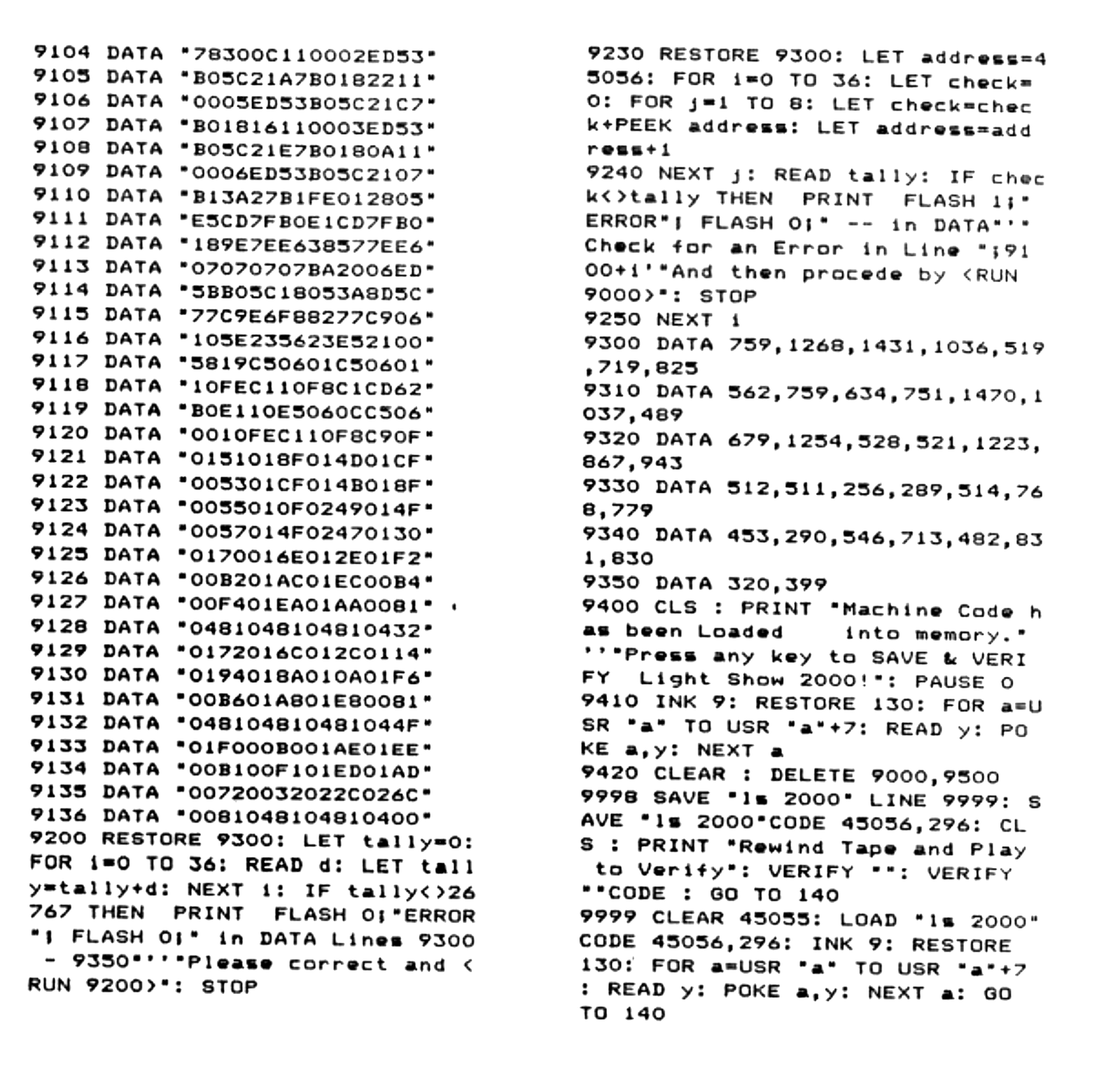
Carefully key in the BASIC listing. After you have typed in the program, SAVE the listing to tape before running the machine code loading routine. To load the machine code portion, ENTER as a direct command [RUN 9000]. This portion of the program will POKE the machine code into its proper address. It also checks for various typing errors and will provide instructions in case an error was detected. After the machine code has been placed in memory, the program will set up the User Graphic “A”, delete this portion of the program from the listing, and prompt you to SAVE & VERIFY the completed program along with the compiled code. After VERIFYing, the program will self-run. Go ahead and try it out. NOTE: In Line 3, the A in quotes is typed via GRAPHIC mode [Caps Shift/9] [A] [Capts Shift/9].
BASIC LISTING
Lines        Notes

1-3          Sets up the screen with the patterns to be "pulsed"
             by LS 2000. NOTE: Even when the screen looks
             blank,the complete pattern is still on the screen,
             as INK has been set the same color as the PAPER.
             The machine code simply sets the ATTRIBUTES to the
             proper INK color. Check this out by changing the
             INK color in Line 1 to "7". Add Line 9 STOP. As
             direct command <GO TO 1>
10           The POKE sets lower case only. This is the USR call
             for the machine code portion of LS 2000.
100-120      Contains data for line/column placement of LS 2000
             graphics.
130          Contains data defining USR Graphic "A". Can be
             redefined to any character or pattern.
140-160      Sets up and defines variables for LS 2000 BASIC
             Line 150 Contains data for Default "Set-Up"
1000-1010    Main Menu
2000-2100    System Set-Up Menu
2200-2240    Compiles current parameters as a defined Set-Up
2300-2320    POKEs parameters into Machine Code as current
             Set-Up. (See Line 2999)
2400-2450    Displays parameters for a compiled Set-Up
2999         Contains addresses of Machine Code which hold
             parameters for current Set-Up
3000-3050    Option 2 -- Set Mode
3100-3170    Option 3 -- Set Colors
3200-3280    Option 4 -- Tone Control
3300-3390    Option 5 -- Pulse Control & Option 6 -- Tempo
             Control. NOTE: This subroutine is shared by both
             Options. Control of Option is decoded by variable
             A: IF 5 THEN Pulse Control, IF 6 THEN Tempo Control
4000-4200    Save/Load Option. Also allows for verification of
             SAVE and LOAD without Breaking the program with a
             ROM Error Report.
8000-8030    Subroutine to skan keyboard for input
9000-9420    Routine to POKE Machine Code into memory
9998-9999    Routines to SAVE and LOAD LS 2000
The author will provide a copy of this program on tape for $4.00 (includes shipping). Please send a check or money order to: Michael E. Carver, 1016 NE Tillamook, Portland, OR 97212. Please specify “Light Show 2000”.