
How often have you looked at those new car interest rates and wondered how much your montly payments would be, but didn’t want to stop and talk to a salesman just yet?
How often have you looked at those dream house sketches and wondered about the size of loan you might get with the payment you could afford?
How many payments would it take if I payed “this” per month instead of “that”?
How much does a 1% or 2% difference in interest make in my monthly payment?
If you’ve ever had these questions (an more), LOAN ANALYZER will help you find these answers. The LOAN ANALYZER can calculate Loan Values, annual interest rate, number of monthly payments, or the monthly payment. Each loan is based on simple, annual interest with no balloon payments. This program is entirely in BASIC. Simply type in the program; RUN 9999 (ENTER) will SAVE the program to tape; RUN (ENTER) will RUN the program.
You will be prompted to INPUT data for four loan variables: Loan Amount, Interest Rate (annual interest rate in %), the Number of Monthly Payments, and the Monthly Payment. Actually, input data for any three items and zero for the one you want calculated and the LOAN ANAYLYZER will calculate the value for you. You then have the option to COPY the screen and save this information by pressing “C”, or press any other key for a new loan. NOTE: this COPY is for the 2040 printer, you can route this to a full size printer by LOADing your customized printer driver code, and substitute the appropriate RANDOMIZE USR command in line 3000.
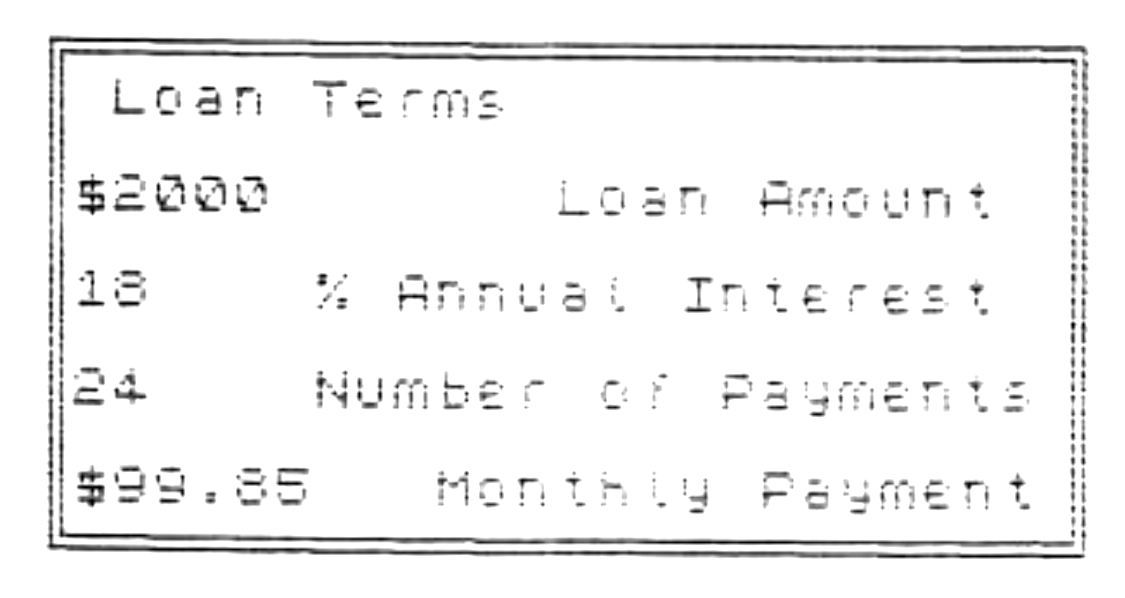
Let’s look at an example: What is the monthly payment for a $2000 loan at 18% annual interest and 2 year term? INPUT the following: 2000 (ENTER) for Loan Amount, 18 (ENTER) for Annual Interest Rate, 24 (ENTER) for a 2 year term (2 times 12). In this case the LOAN ANALYZER will not wait for you to input the last variable as zero, but immediately calculateds a monthly payment of $99.85. You can now press “C” to COPY, or any other key to continue. Try INPUTing zero for the Loan Amount, Annual Interest Rate, and Number of Payments…and LOAN ANALYZER will quickly calculate these for you.
   1 REM     LOAN ANALYZER

   2 REM ***********************
   3 REM by Lemke Software Dev
           S D Lemke    1984
           2144 White Oak
           Wichita, Ks 67207
   4 REM ***********************

  20 BRIGHT 0: PAPER 1: BORDER 1
: INK 7: CLS : PLOT 30,155: DRAW
 200,0: DRAW 0,-80: DRAW -200,0:
 DRAW 0,80: PLOT 28,157: DRAW 20
4,0: DRAW 0,-84: DRAW -204,0: DR
AW 0,84: PRINT AT 3,5;"Loan Term
s"
  30 PRINT AT 5,4;"$------.--  L
oan Amount";AT 7,4;"--.-- % Annu
al Interest";AT 9,4;"----- Numbe
r of Payments";AT 11,4;"$----.--
 Monthly Payment"
  35 PRINT AT 17,1;" Input Data
for any 3 Items.";AT 19,1;"  Pre
ss ""ENTER"" when done.";AT 20,1
;"  Input 0 to Skip an Item."
  40 LET L=0: LET I=0: LET N=0:
LET P=0: FOR c=1 TO 4
  50 IF c=1 THEN  PRINT AT 5,5;
FLASH 1; OVER 1;"         "
  60 IF c=2 THEN  PRINT AT 7,4;
FLASH 1; OVER 1;"     "
  70 IF c=3 THEN  PRINT AT 9,4;
FLASH 1; OVER 1;"     "
  80 IF c=4 THEN  PRINT AT 11,5;
 FLASH 1; OVER 1;"       "
  90 GO TO (190+10*c)
 200 INPUT "Loan Amount: ";L: LE
T L=INT (L*100)/100: LET loan=L:
 PRINT AT 5,5;"         ": PRINT
 AT 5,5;L: GO TO 240
 210 INPUT "Interest Rate: ";i:
LET i=INT (i*100)/100: LET ir=i:
 PRINT AT 7,4;"     ": PRINT AT
7,4;i: GO TO 240
 220 INPUT "Number of Payments:
";n: LET n=INT (n): PRINT AT 9,4
;"     ": PRINT AT 9,4;n: GO TO
240
 230 INPUT "Monthly Payment: ";p
: LET p=INT (p*100)/100: PRINT A
T 11,5;"       ": PRINT AT 11,5;
p
 240 IF L<>0 AND i<>0 AND n<>0 T
HEN  GO TO 250
 245 NEXT c
 250 PRINT AT 17,2;"          ";
 FLASH 1;"Working"; FLASH 0;"
         ";AT 19,2;" ";TAB 29;"
";AT 20,2;" ";TAB 29;" "

 255 IF p=0 AND L<>0 AND i<>0 AN
D n<>0 THEN  GO TO 280
 260 IF L=0 AND p<>0 AND i<>0 AN
D n<>0 THEN  GO TO 1000
 270 IF i=0 AND L<>0 AND p<>0 AN
D n<>0 THEN  GO TO 2000
 275 IF n=0 AND L<>0 AND p<>0 AN
D i<>0 THEN  GO TO 500
 277 GO TO 30
 280 REM
            Calc Payment

 285 LET i=i/1200
 290 LET p=INT (((L*i)/(1-(1+i)↑
(-n))+0.005)*100)/100
 300 LET p=INT (p*100)/100
 310 PRINT AT 11,5;"       ": LE
T P$=STR$ P: PRINT AT 11,5; OVER
 1;P$
 320 GO TO 3000
 500 REM
         Calc No. of Payments

 510 LET i=i/1200: LET n=100: LE
T dn=128
 520 LET P1=INT (((L*I)/(1-(1+I)
↑(-N))+0.005)*100)/100
 525 IF n>1000 THEN  PRINT AT 9,
4; FLASH 1;" Payment is too smal
l!  ": BEEP .1,1: PAUSE 120: LET
 i=ir: LET c=4: PRINT AT 17,12;"
       ": LET n=0: GO SUB 8000:
GO TO 50
 530 IF p1>p THEN  LET n=n+dn: G
O TO 520
 540 LET n=n-dn: LET dn=dn/4: LE
T n=n+dn: IF dn>=0.5 THEN  GO TO
 520
 550 LET n=INT (n+.8): IF n<=480
 THEN  PRINT AT 9,4;"     ": PRI
NT AT 9,4;n: GO TO 3000
 560 PRINT AT 9,4; FLASH 1;" Pay
ment is too small!  ": BEEP .1,1
: PAUSE 120: LET i=ir: LET c=4:
PRINT AT 17,12;"       ": LET n=
0: GO SUB 8000: GO TO 50
1000 REM
                 Calc Loan

1010 LET i=i/1200
1020 LET L=p*(1-(1+i)↑(-n))/i
1030 LET L=INT (L*100)/100
1040 PRINT AT 5,5;"         ": L
ET L$=STR$ L: PRINT AT 5,5; OVER
 1;L$
1050 GO TO 3000
2000 REM
             Calc Interest
2010 LET i=0.010
2020 FOR J=1 TO 80
2030 LET I2=p*(1-(1+i)↑(-n))/L
2040 LET i=(i+I2)/2
2050 NEXT J
2060 LET i=INT (i*120000)/100
2070 LET I$=STR$ I: PRINT AT 7,4
;"     ": PRINT AT 7,4; OVER 1;I
$
2075 LET i=i/1200
2077 IF p<(L/n) THEN  PRINT AT 9
,4; FLASH 1;" Payment is too sma
ll!  ": BEEP .1,1: PAUSE 120: LE
T i=ir: LET c=4: PRINT AT 17,12;
"       ": LET i=0: GO SUB 8000:
 GO TO 50
2080 GO TO 3000
3000 PRINT AT 17,0;"Press ""C""
to COPY, any other key to contin
ue.": PAUSE 0: LET i$=INKEY$: IF
 i$="C" OR i$="c" THEN  COPY : G
O TO 3000
3010 GO TO 20
8000 PLOT 30,155: DRAW 200,0: DR
AW 0,-80: DRAW -200,0: DRAW 0,80
: PLOT 28,157: DRAW 204,0: DRAW
0,-84: DRAW -204,0: DRAW 0,84: P
RINT AT 3,5;"Loan Terms"
8005 PRINT AT 5,4;"$";loan;TAB 1
6;"Loan Amount";AT 7,4;ir;TAB 10
;"% Annual Interest";AT 9,4;n;TA
B 10;"Number of Payments";AT 11,
4;"$";p;TAB 13;"Monthly Payment"
: RETURN
9999 SAVE "Interest" LINE 5
Note: Type-in program listings on this website use ZMAKEBAS notation for graphics characters.