
I am sometimes asked if a computer can do homework. The answer is “Not really,” but there are some ways it can be a real help, especially in the area of math or algebra. The following program uses the functions of the 8K ROM to do this. It is made up of four sub-programs and, with 16K, each may be accessed by pressing the number shown on the screen until the new prompt shows up. If you have 2K RAM, the program should be entered as two separate parts: lines 10-750 excluding 20, and lines 600-890. With 1K, the first three sections (150-270, 300-400, 450-570) will have to be used as three separate programs.
The first routine takes any integer and displays its prime factorization. This has several applications including reducing fractions, finding common denominators, etc. Programs like this are not new, but this one is quite fast and can handle negative numbers.
The second part is similar to the first in that it finds the largest square factor of any integer, which is especially helpful in simplifying problems involving square roots.
In the third program you are asked for the coefficients (a, b, and c) of a quadratic equation in the form ax²+bx+c=0. From this, the equation will be displayed in standard form along with all real roots. For example, if you wanted to find all possible values of x where 2x²-3x-5=0, you would enter 2, -3, -5 and the computer would print: 2X”-3X-5=0, X=2.5 OR X=-1. Test them! (The quotation marks indicate the second power.) Here’s another one: For x²+0x-9=0 you would enter l, 0, -9 and it would return: (X”-9=0, X=3 OR X=-3)
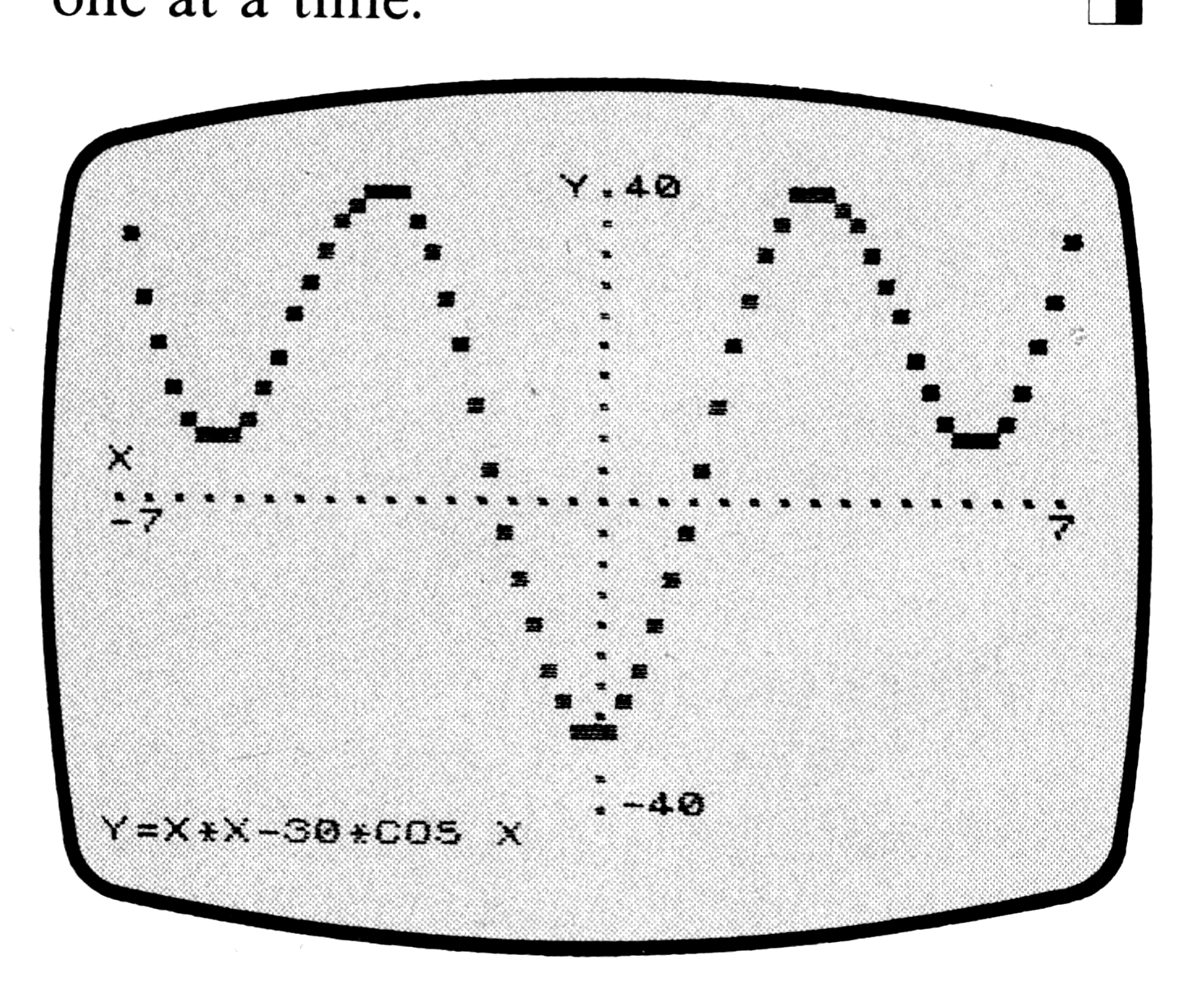
The fourth program is the most impressive. It draws the graph of any function, set of functions, or your own data with modification. First, enter your expression in terms of x; SIN X for example. Then enter any restrictions so the program does not stop with an error. In this case there are none, so press ENTER. Then enter the limit for the x axis (try 3), and then for the y axis (l is the largest value for the SIN function) and watch while the graph is formed (if you are in the SLOW mode.) Try also (X*X-30*COS) no restrictions, x limit 7, y limit 40.
Some expressions do require restrictions, for instance for (SQR X/(X-3)) the restrictions would be (X>=0 AND X<>3). Notice that by using different axis limits you can squeeze or stretch the graph for the best effect. For the true proportions, the ratio of the length of the x axis to the y axis should be 3 to 2.
Now, suppose you wanted to graph the equation (y=±SQR x) After entering the alternate lines 870-920, you could first graph (SQR X, X>=0) (6 and 4 are good limits.) Then, when this is done and the string input appears, enter “-SQR X” and then the restrictions “X>=0” to make the graph complete. To start a new one, press ENTER instead of a new expression.
The other modification, alternate lines 810 and 830, allows you to graph your own set of data. Ignore the request for an expression and enter X>0 as the restriction (if that is where your graph starts). Then let the x limit be the number of data points and let y be their upper limit. Finally, enter your numbers one at a time.
  10 PRINT AT 6,4;"1 - PRIME FACTORS";AT 8,4;"2 - SQUARE FACTOR";AT 10,4;"3 - QUADRATIC EQUATION"
  20 PRINT AT 12,4;"4 - GRAPH PLOTTER"
  30 PAUSE 4E4
  40 CLS
  50 GOTO VAL INKEY$*150
 150 PRINT " INPUT NUMBER TO BE FACTORED"
 160 INPUT A
 170 LET B=2
 180 LET C=A
 190 CLS
 200 FOR B=B TO SQR ABS A
 210 IF A/B=INT (A/B) THEN GOTO 250
 220 NEXT B
 230 PRINT A;"=";C
 240 RUN
 250 PRINT B;"*";
 260 LET A=A/B
 270 GOTO 200
 300 PRINT " INPUT NUMBER TO BE FACTORED"
 310 INPUT A
 320 CLS
 330 FOR B=SGN A TO A/4+SGN A STEP SGN A
 340 LET C=SQR (A/B)
 350 IF INT (C*1E6)/1E6=INT C THEN GOTO 390
 360 NEXT B
 370 PRINT A;"  NO SQUARE FACTORS"
 380 RUN
 390 PRINT "(";C;"*";C;")";"*"+STR$ B AND B<>1;"=";A
 400 RUN
 450 PRINT " INPUT A,B,C FOR AX""+BX+C=0"
 460 INPUT A
 470 PRINT AT 3,7;STR$ A AND A<>1;"X""";
 480 INPUT B
 490 PRINT ("+" AND B>0)+STR$ B+"X" AND B;
 500 INPUT C
 510 PRINT ("+" AND C>0)+STR$ C AND C;"=0"
 520 PRINT
 530 LET D=INT (SQR (B*B-4*A*C)*1E7)/1E7
 540 PRINT "X=";(D-B)/2/A;" OR X=";(-B-D)/2/A
 550 PAUSE 4E4
 560 CLS
 570 RUN
 600 POKE 16389,128
 610 CLS
 620 PRINT "ENTER EXPRESSION FOR Y",,"IN TERMS OF X"
 630 PRINT AT 4,0;"Y=";
 640 INPUT A$
 650 PRINT A$;AT 8,0;"ENTER RESTRICTIONS ON X"
 660 INPUT B$
 670 CLS
 680 PRINT "X AXIS LIMIT?  Y."
 690 FOR X=1 TO 10
 700 PRINT ,".",,"."
 710 NEXT X
 720 PRINT "Y=";A$;"  ";B$;AT 9,0;"X"
 730 FOR X=1 TO 16
 740 PRINT "..";
 750 NEXT X
 760 INPUT W
 770 PRINT -W;TAB 32-LEN STR$ W;W;AT 0,0;"Y";
 780 INPUT Z
 790 PRINT TAB 17;Z;AT 20,17;-Z;AT 0,0;"  "
 800 IF B$="" THEN LET B$="1"
 810 FOR X=-W-W/15 TO W+W/30 STEP W/30
 820 IF NOT VAL B$ THEN GOTO 860
 830 LET Y=VAL A$
 840 IF Y<-Z OR Y>Z+Z/20 THEN GOTO 860
 850 PLOT 30/W*X+32,20/Z*Y+22
 860 NEXT X
 870 PAUSE 4E4
 880 CLS
 890 RUN
Note: Type-in program listings on this website use ZMAKEBAS notation for graphics characters.