
The TS computers have a unique capability to allow more than two dimensions per numeric variable. If you needed 100 numbers to be entered into a program, the following routine would allow this:
10 DIM A(100)
20 FOR N=1 TO 100
30 SCROLL
40 PRINT "ENTER NUMBER ";N
50 INPUT A(N)
60 NEXT N
Let us say that we had ten rooms, each with 10 people in it and we wanted to enter the ages of each of these people. The following routine would allow this:
10 DIM A(10,10)
20 FOR I=1 TO 10
30 FOR J=1 TO 10
40 SCROLL
50 PRINT "ENTER THE AGE FOR
PERSON #";J
60 SCROLL
70 PRINT "IN ROOM #";I;"?"
80 INPUT A(I,J)
90 NEXT J
100 NEXT I
The “I” subscript would represent which room the person was in and the “J” subscript would represent the number of the person.
Situations can occur where more than 2 subscripts are needed. An example might be a company that has offices in a number of countries. These countries may have these offices in a number of cities in each country. There may be a number of offices in each city. Each office will have a number of employees. Each employee is in charge of a certain amount of projects. Each project represents a certain amount of variables – and so on and so on.
On the TS computers, a statement such as DIM A(10,10,10,10,10) is perfectly legal providing you have at least 100K of memory space available. As you can see, the computer can run out of memory quite quickly when multi-dimension techniques are used.
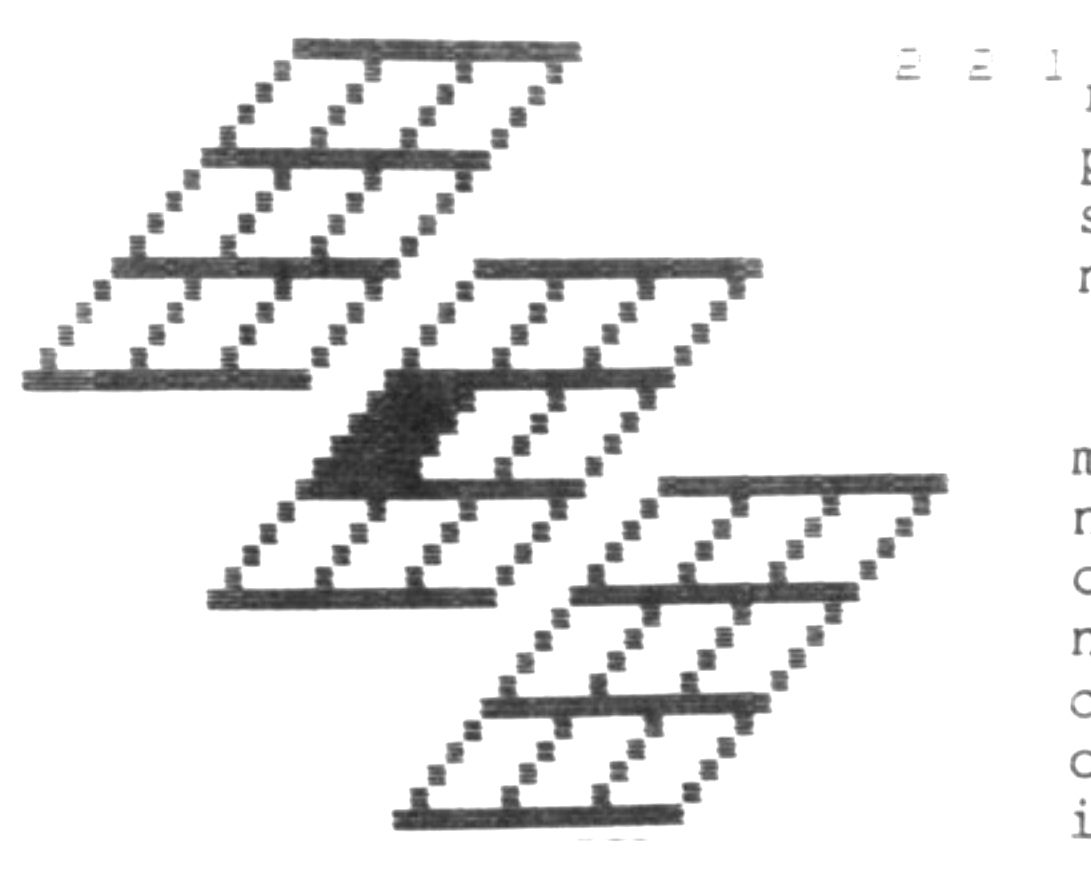
The following 3 programs demonstrate this effect. The first two produce random numbers assigned to a matrix variable. The third, although not using a DIM statement, produces a visual three dimensional grid that allows you to assign co-ordinates with three numbers (each being 1, 2 or 3) and the affected grid location will be darkened.
This last program would make a great base for a 3D Tic Tac Toe game.
VERSION #1
  10 DIM A(5,5,5)
  20 FOR B=1 TO 5
  30 FOR C=1 TO 5
  40 FOR D=1 TO 5
  50 LET A(B,C,D)=RND
  60 SCROLL
  70 PRINT B;" ";C;" ";D;" ";A(B,C,D)
  80 NEXT D
  90 NEXT C
 100 NEXT B
VERSION #2
  10 DIM A(2,2,2,2,2)
  20 FOR B=1 TO 2
  30 FOR C=1 TO 2
  40 FOR D=1 TO 2
  50 FOR E=1 TO 2
  60 FOR F=1 TO 2
  80 LET A(B,C,D,E,F)=RND
  90 SCROLL
 100 PRINT B;" ";C;" ";D;" ";E;" ";F;" ";A(B,C,D,E,F)
 200 NEXT F
 210 NEXT E
 220 NEXT D
 230 NEXT C
 240 NEXT B
VERSION #3
  20 GOSUB 1000
  30 GOSUB 100
  40 LET A=VAL A$
  45 PRINT AT 0,24;A
  50 GOSUB 100
  60 LET B=VAL A$
  65 PRINT AT 0,26;B
  70 GOSUB 100
  80 LET C=VAL A$
  85 PRINT AT 0,28;C
  90 GOSUB 2000
  95 GOTO 20
 100 LET A$=INKEY$
 110 IF CODE A$<29 OR CODE A$>31 THEN GOTO 100
 120 RETURN
1000 FAST
1010 CLS
1020 FOR N=15 TO 30
1030 PLOT N,43
1040 PLOT N-5,38
1050 PLOT N-10,33
1060 PLOT N-15,28
1070 PLOT N+10,33
1080 PLOT N+5,28
1090 PLOT N,23
1100 PLOT N-5,18
1110 PLOT N+20,23
1120 PLOT N+15,18
1130 PLOT N+10,13
1140 PLOT N+5,8
1390 NEXT N
1490 LET J=14
1500 FOR N=42 TO 29 STEP -1
1510 PLOT J,N
1520 PLOT J+5,N
1530 PLOT J+10,N
1540 PLOT J+15,N
1550 PLOT J+10,N-10
1560 PLOT J+15,N-10
1570 PLOT J+20,N-10
1580 PLOT J+25,N-10
1590 PLOT J+20,N-20
1600 PLOT J+25,N-20
1610 PLOT J+30,N-20
1620 PLOT J+35,N-20
1800 LET J=J-1
1890 NEXT N
1900 SLOW
1910 RETURN
2000 LET A$=STR$ A+STR$ B+STR$ C
2010 IF A$="111" THEN LET B$="3913"
2020 IF A$="112" THEN LET B$="3918"
2030 IF A$="113" THEN LET B$="3923"
2040 IF A$="121" THEN LET B$="3408"
2050 IF A$="122" THEN LET B$="3413"
2060 IF A$="123" THEN LET B$="3418"
2070 IF A$="131" THEN LET B$="2903"
2080 IF A$="132" THEN LET B$="2908"
2090 IF A$="133" THEN LET B$="2913"
2100 IF A$="211" THEN LET B$="2923"
2110 IF A$="212" THEN LET B$="2928"
2120 IF A$="213" THEN LET B$="2933"
2130 IF A$="221" THEN LET B$="2418"
2140 IF A$="222" THEN LET B$="2423"
2150 IF A$="223" THEN LET B$="2428"
2160 IF A$="231" THEN LET B$="1913"
2170 IF A$="232" THEN LET B$="1918"
2180 IF A$="233" THEN LET B$="1923"
2190 IF A$="311" THEN LET B$="1933"
2200 IF A$="312" THEN LET B$="1938"
2210 IF A$="313" THEN LET B$="1943"
2220 IF A$="321" THEN LET B$="1428"
2230 IF A$="322" THEN LET B$="1433"
2240 IF A$="323" THEN LET B$="1438"
2250 IF A$="331" THEN LET B$="0923"
2260 IF A$="332" THEN LET B$="0928"
2270 IF A$="333" THEN LET B$="0933"
2400 LET X=VAL B$( TO 2)
2410 LET Y=VAL B$(3 TO 4)
2500 LET Z=-1
2510 FOR I=X TO X+3
2520 FOR J=Y TO Y+3
2530 PLOT J+Z,I
2540 NEXT J
2550 LET Z=Z+1
2560 NEXT I
2998 INPUT A$
2999 RETURN
Note: Type-in program listings on this website use ZMAKEBAS notation for graphics characters.