
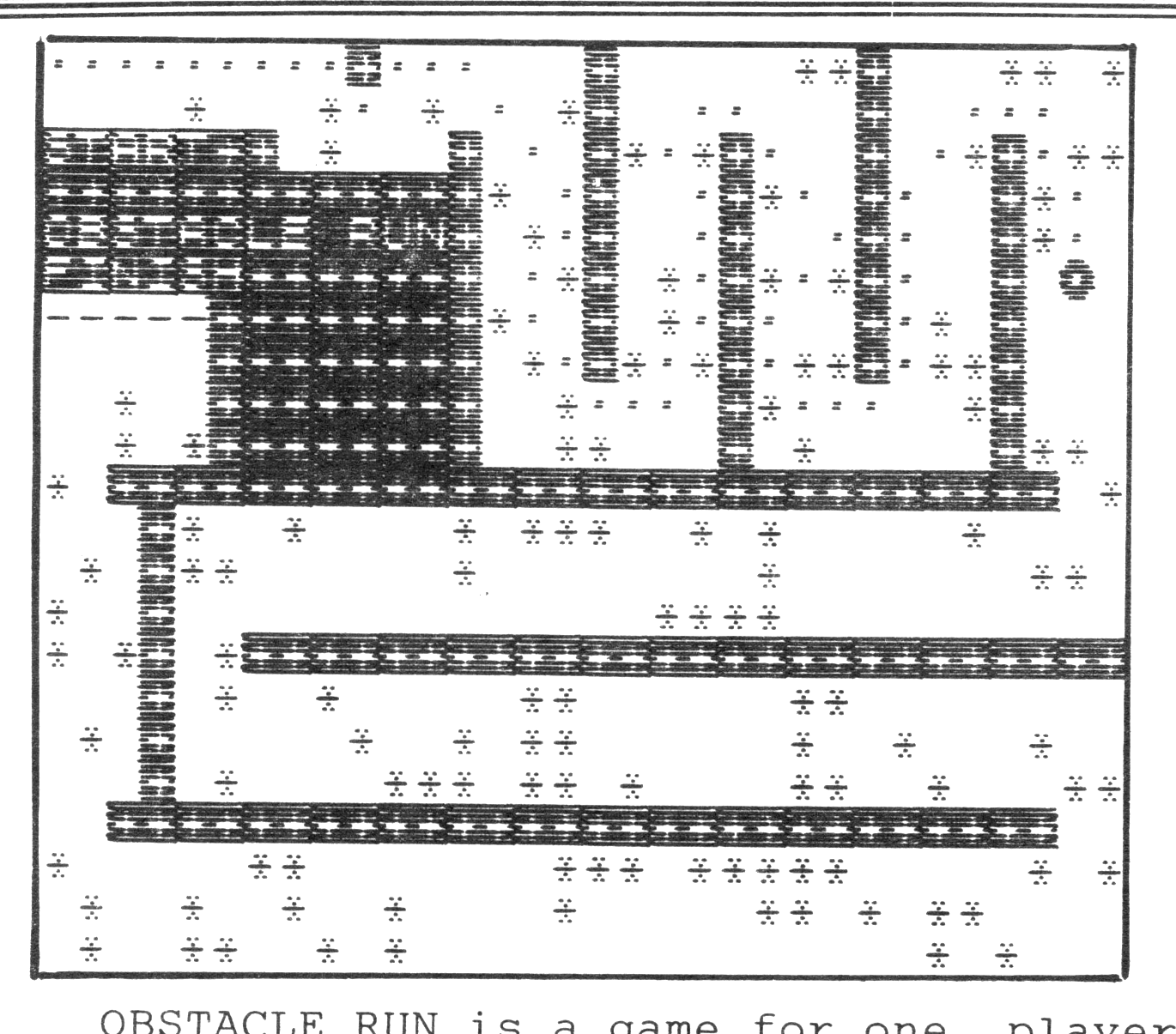
OBSTACLE RUN is a game for one player, or several players by comparing scores. The object is to move your piece, a heavy circle (that initially appears in the upper left corner of the screen), around the serpentine track, to the finish line, as quickly as possible. The piece can be moved in any of eight directions by the cluster of keys in the lower left of the keyboard, the Q,W,E,A, D,Z,X, and C keys.
The score is made up of three weighted elements:
(a) How many steps are taken.
(b) how many obstacles “*” are struck (they cannot always be avoided).
(c) How much time is taken.
The object is to score as low as possible. Timing starts as soon as the player’s piece appears.
This game was devised to illustrate the short-coming of most joysticks. Although the typical joystick can produce diagonal motion, it does so only after a lag caused by moving vertically or horizontally first. This is because diagonal motion results from the closing of two of it’s internal electrical contacts, and they generally do not close simultaneously. Hence the usual joystick gives a vertical or horizontal step before moving the piece diagonally. In this game such a drawback can be disastrous as the game ends by disqualification if any of the barriers are struck, or if the piece goes out of bounds.
Why use diagonal steps? In this game it can mean a much lower score. One diagonal step counts less than a vertical step plus a horizontal step to reach the same block.
This program was written originally as a tutorial for my students in BASIC programming and it contains a number of fine points not normally treated in the manual. For example, the use of a FOR/NEXT loop, in line 80, to effect a delay instead of PAUSE. PAUSE cannot be used in this instance as the play is being timed and both of these functions use the same system address to record time.
Note also the order in which the movement of the player’s piece is monitored. First to detect hitting an obstacle, in line 160. Then stricking a barrier, in line 165. Then going out of bounds, in line 170. And finally, reaching the finish, in line 175. The game can be speeded up by inserting the following:
158 IF SCREEN$ (r,c)= 32 THEN GOTO 200In effect, this says that if the player’s piece moved into a clear space, don’t bother to check out anything else. Just count the step. For those of you who would like to use the same obstacle pattern each time, and thus the same road conditions for several players, add a value to the randomize line, say
5 RANDOMIZE 10Any integer number from 1 to about 65535 should be OK.
   1 REM ** OBSTACLE RUN
                 © by
              Warren Fricke
   2
   5 RANDOMIZE
  15 GO TO 2000
  20 GO TO 700
  30 LET r=0: LET c=0
  40 LET t=1: LET w=0
  50 BEEP .05,2: BEEP .05,9: BEEP .06,20
  60 POKE 23673,0: POKE 23672,0
  70 PRINT AT r,c;CHR$ 144
  80 FOR i=1 TO 10: NEXT i
  90 LET rr=r: LET cc=c
 110 LET s=PEEK 23556
 150 LET r=r+(s=67 OR s=88 OR s=90)-(s=69 OR s=87 OR s=81)
 155 LET c=c+(s=67 OR s=68 OR s=69)-(s=65 OR s=81 OR s=90)
 160 IF SCREEN$ (r,c)=CHR$ 42 THEN GO TO 300
 165 IF SCREEN$ (r,c)=CHR$ 43 THEN GO TO 400
 170 IF r>21 OR r<0 OR c>31 OR c<0 THEN GO TO 500
 175 IF SCREEN$ (r,c)=CHR$ 45 THEN GO TO 600
 200 PRINT AT rr,cc;CHR$ 145 AND (rr<>r OR cc<>c)
 240 LET t=t+1
 250 GO TO 70
 300 PRINT AT rr,cc;CHR$ 145
 305 BEEP .1,10: LET w=w+1
 310 FOR n=1 TO 5
 315 PRINT AT 7,7;"HIT": FOR i=1 TO 2: NEXT i: PRINT AT 7,7;"[illegible]"
 320 NEXT n
 330 GO TO 70
 400 PRINT AT rr,cc;CHR$ 145
 405 BEEP 2,-25: PRINT AT 6,6;"[illegible]";AT 7,6;"[illegible]"; FLASH 1;AT 8,6;"[illegible]";AT 9,8;"[illegible]"
 408 PRINT AT r,c;CHR$ 144
 410 PAUSE 120
 420 PRINT AT 18,3; FLASH 1;"[illegible]"
 430 INPUT z$: CLS : RUN 800
 500 BEEP 1,-20: BEEP 2,-35
 505 PRINT AT 6,7;"[illegible]";AT 7,6;"[illegible]"; FLASH 1;AT 8,6;"[illegible]";AT 9,7;"[illegible]"
 510 GO TO 410
 600 PRINT AT rr,cc;CHR$ 145
 605 LET a=PEEK 23672+256*PEEK 23673
 610 PRINT AT r,c;CHR$ 144
 620 BEEP .05,2: BEEP .05,9: BEEP .06,20
 630 PRINT AT 6,7;"[illegible]";AT 7,7;"[illegible]";AT 8,8;"[illegible]";AT 9,8; FLASH 1;INT (a/60+t+10*w)
 640 GO TO 410
 700 BORDER 1
 705 PRINT AT 6,9;"[illegible]"
 710 PRINT AT 10,2;"The background takes 10 to 15  seconds to generate and print."
 720 PRINT AT 12,3;"Stand by,---and--"
 730 PRINT AT 14,5;"be ready to"
 750 PRINT AT 14,17; FLASH 1;"[illegible]"
 760 PAUSE 480: CLS
 800 BORDER 1
 815 FOR n=1 TO 704
 820 LET q=RND
 825 PRINT INK 2;("*" AND q>.75)+(" " AND q<=.75);
 830 NEXT n
 840 PRINT AT 0,0;"[illegible]"
 845 PRINT AT 3,0;"[illegible]";AT 0,9;"▒"
 850 FOR n=2 TO 29
 855 PRINT AT 10,n;"▒";AT 18,n;"▒"
 860 NEXT n
 865 FOR n=6 TO 31
 870 PRINT AT 14,n;"▒": NEXT n
 880 FOR n=2 TO 9
 885 PRINT AT n,5;"▒";AT n,6;"▒";AT n,12;"▒";AT n,20;"▒";AT n,28;"▒"
 890 NEXT n
 895 FOR n=0 TO 7
 900 PRINT AT n,16;"▒";AT n,24;"▒": NEXT n
 910 PRINT AT 4,0;"[illegible]";AT 5,0;"[illegible]";AT 6,0;"-----"
 920 FOR n=11 TO 17
 930 PRINT AT n,3;"▒": NEXT n
 935 FOR n=5 TO 9
 940 PRINT AT n,7;"[illegible]": NEXT n
 950 GO TO 30
2000 FOR j=USR CHR$ 144 TO USR CHR$ 144+15
2005 READ a: POKE j,a: NEXT j
2010 GO TO 20
2020 DATA 60,126,255,231,231,255,126,60,0,0,0,24,24,0,0,0
Media
Note: Type-in program listings on this website use ZMAKEBAS notation for graphics characters.