
[QL_A_Moving_Box/enhancedrelease]
QLAMBer continues in the tradition of its forerunner, QLUSTer, by extending the selective file management capabilities of the QLUTter program(s) by additionally accessing six SuperTOOLKIT2 keywords [WCOPY, WDELete, SPooL, RENAME / WREName, WSTATus] while reducing its code size to less than that of the original QLUTter program.
QLAMBer 2.*nnn* supports easy sub-directory access.
The SCREEN

The “absolute” number of files on a disk are not indicated. Only the number of files NOT visible on the current screen. If you have more than 76 files on the disk, the number is indicated after the current page number and followed by ‘+ files’. A number greater than zero indicates that another ‘page’ may be accessed.
Serial port output is changed simply by pressing the [ ” ] key when in the ‘Hard-COPY‘ routine.
As with QLUSTer, you move from “standard” functions to TK2_based functions by simply pressing the [ / ] key.
A screen page is “shifted”/changed (if applicable) by simply pressing a [shift] + [cursor] key combination.
If you have more than 76 files in a single directory, then simply press the [shift] key in tandem with the down arrow /[cursor_down] key.
If you want to “page” to flp2_ from flp1_ then simply press the [shift] key in tandem with a right arrow key.
To “page” back to flp1_ from flp2_ then simply press the [shift] key in tandem with the left arrow key.
Using the [ConTRoL] key with the left arrow key will access a different type of device of like numerical value (that is, from flp2_ to ram2_; mdv2_ to flp2_; mdv1_ to flp1_; ram1_ to flp1_; win1_ to flp1_; and, so on).
Sub_DIRectories are accessed when the [ filename ] selected is appended with the ‘ ->’ suffix. When the program encounters an “empty” sub_DIRectory, you will be given the option of DELeting it.
SELECT_DEVICE is used to RETurn to the main directory.
Filenames longer than 32 characters are NOT recognized by the program.
The QLAMBer program’s SELECT_DEVICE also has been modified to use a highlighted moving_box/shaded_bar; and, for those who prefer the traditional single_key selection method, a version with this format is retained as QLAMBer_EXE.
The new ‘SELECT_DEVICE’ option is illustrated below.
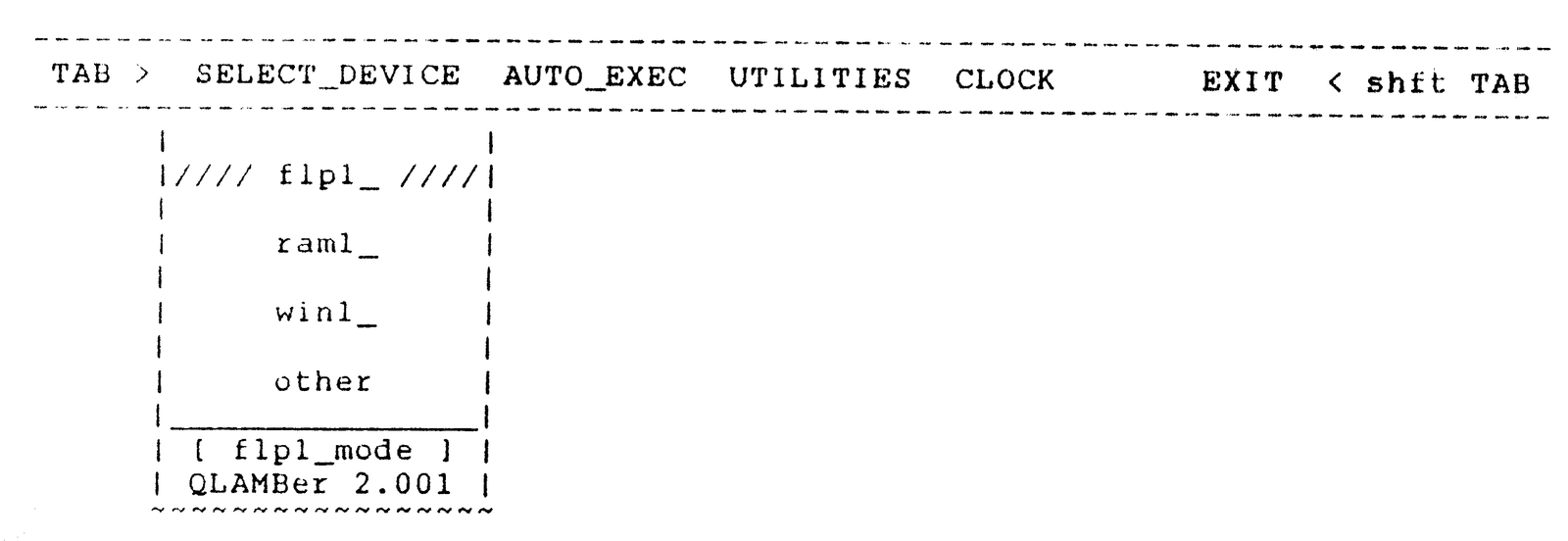
The default medium is “flp1_” and this will be activated if you simply PRESS the ENTER key. If you wish to select another option, then PRESS another letter_key to indicate the storage device which you wish to access (the medium must NOT be write protected).
If you wish to access another type of device other than your floppy drives, then you simply press either the up_cursor/down_cursor key to move the (green) shaded_bar visible within the SELECT_DEVICE box.
To change the drive number (1 to 3) simply press the left_cursor or right_cursor key until the desired numerical value is realized.
For drives 4 and above, use the “other” option.
QLAMBer requires SuperTOOLKIT coding installed via ROM (or, RAM) prior to LOADing.
QLAMBer easily multi-TASKs using either the QRAM environment or within TASKMASTER.
Send comments, questions, or queries to:
Al Feng
914 Rio Vista Circle SW
Albuquerque, NM 87105
U.S.A.
(505) 843-8414
HAPPY TRAILS,
AND COMPUTING, TO YOU …