
A BUSINESS FINANCIAL program by BILL CABLE – looked at by Hugh Howie
The heading may make you think you are listening to a flock of ducks on the local millpond, or a skein of geese on their annual migratory pilgrimage flying high overhead. But really “QLerk” is the name of a program by the renowned New Hampshire programmer, Bill Cable.
Bill has spent a lot of time, a lot of work, on this program, and he has tested it in various businesses in his area. The result is a program that will keep your business records in order, or even just your household finances in order. The only limitation on the uses of this program are what the user places on it himself.
I was lucky in being able to look at version 2.1, but now I have version 3.0, and the improvement is significant. I will not mention the previous version again, as that would serve no useful purpose, and I only mention 2.1 to show that Bill is in a constant phase of updating and improving the system, and that is what it is – it is a system to keep your records up to date.
This would be a good time to mention that the program is vast. It is very complex, very comprehensive. It is going to take the user some time to get to know the ins and outs of it. It is not for the faint hearted, but once you have seen what it can do – you will be impressed.
This is an Archive program, Archive being provided on the program disk, but can also be run using your own Archive. It requires that you have extra memory, a minimum of 512K extra memory would be required. QLerk will run on a 7.5MHz QL, but slowly. The Trump Card much better, the Gold Card being best of all because of its extra speed of operation.
Disk drives are essential, MDV could not possibly hold everything. QLerk will run from two 720 disks. Or, if you have HD or ED drives or a hard drive, it could all be run from the one disk. The options are there for your own configuration.
To start with, there is an excellent manual which contains a wonderful demo taking you through the example setup on the disk, one keypress at a time.
The demo starts off by telling you how to make your first backup of the program disk, and takes you through each and every step to get the demo up and running. You are shown how to use the Menus. How to check what payables are in the system, and how to make payments. How to handle receivables, how to write a cheque, make purchase orders, invoices, get various reports from the system.
Once you have run the demo a couple of times, you will have an excellent idea of how the whole system operates.
The Manual is easy to read and follow. It describes the various Program Modules and what each contains and does.
The whole is menu driven and there are about a dozen and a half of them. Each menu contains about 10 – 12 options, it varies, and each option has its own set of options.
Here is what the Main Menu looks like:-
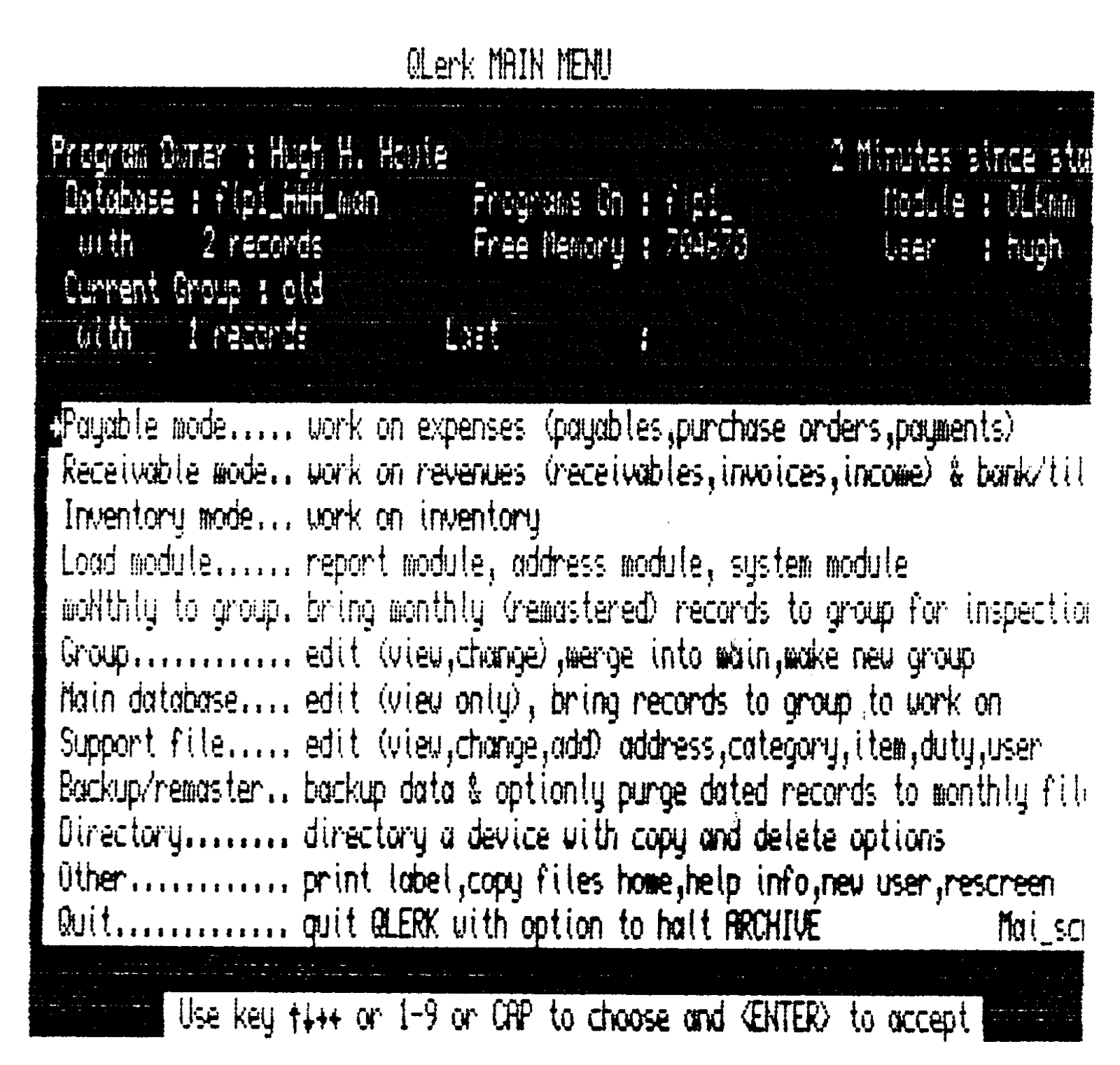
Now to keep track of all those Menus, could be a formidable task, but there is a complete page allocated to each menu. That page starts off with a screen dump of what the menu looks like, just as I did above, and there is an explanation under the dump, telling you what occurs there. This Screen dump method of displaying the menus, means that you can refer to the manual for a particular menu, and see what it does for you. Thus helping you decide whether to go back or forward to complete a task.
The facility on each menu can be selected in a number of ways. You could use the up/down arrow and ENTER, or you could select by the key letter of the facility, or, if you can remember the number of the facility required, you can make the selection by number!
Should you at any time get out of QLerk by pressing ESC by mistake, just type ‘m’ and you will be back into the Main Menu, so all is not lost.
The system is completely inter-active, in that an entry made in one mode, is transferred to all other modes where it is required, so that if a payment is made by cheque, the money is removed from the bank account, the account is reduced accordingly. Where the money went and where it came from, is all recorded automatically. One aspect that Bill mentions in his manual, will show just how interactive the system is. If you were to pay an account by VISA, the account would be paid, and the system would make out a new account showing that you owed VISA that amount.
The system can handle up to five cheque writing accounts at the same time. Plus two or three cash registers.
The cheque is filled out by the printer, and an address label printed ready to be pasted to the envelope. Everything is optional to your own requirements.
Payables, Receivables, Purchase orders, Cheques, Invoices, are all available. Inventory control, Bank Accounts, Cash Registers, Taxes, Duties, Deductions, Cyclical payments / receivables are all taken care of.
You want a hard copy of some aspect of the business? By date? By occurrence? Frequency? How often has someone done business with you this last few weeks? months? You name it, and you will probably find the information is in there somewhere, all you have to do is dig it out, and with those easy-to-use menus, it is not so difficult.
There is a complete Inventory system so that you keep track of everything in stock. Does its own value evaluation for you. Enter Item, Price, and Number, and everything is taken care of.
No matter what you do, it is almost impossible to make an error. For example, when you make some entries, you are asked if you wish the entries to be merged, and you must answer with Y or N, thus you always have the opportunity to make corrections BEFORE the documents are altered or changed.
If you have any questions to ask about this program, why not write to Bill, after all he can answer much better than I can, and he is always willing to help.
His address is:-
Bill Cable
Wood and Wind Computing
RR 3. Box 92
Cornish, NH 03745. USA
Phone (603) 675-2218q