
Yes! You CAN use PC/XT parallel printer ports for INPUT as well as OUTPUT. The source can be your Sinclair printer driver interface such as TASMAN, A&J, AERCO, OLIGER, or a special unit.
Do you have TS1000, Spectrum or TS2068 files on which you might want to use a word processor? Do you have BASIC programs you want to translate and run on the PC? You might want to transfer purely binary data. This might be graphic images, Z80 code, or instructions to a printer-plotter. A simple adaptor and BASIC program makes all this possible.
Because parallel synchronous transmission uses the strobe signal as a clock instead of CENTRONICS format, AERCO and OLIGER interfaces present a minor complication. Because they automatically generate strobe signals, only half a byte can be transferred at a time.
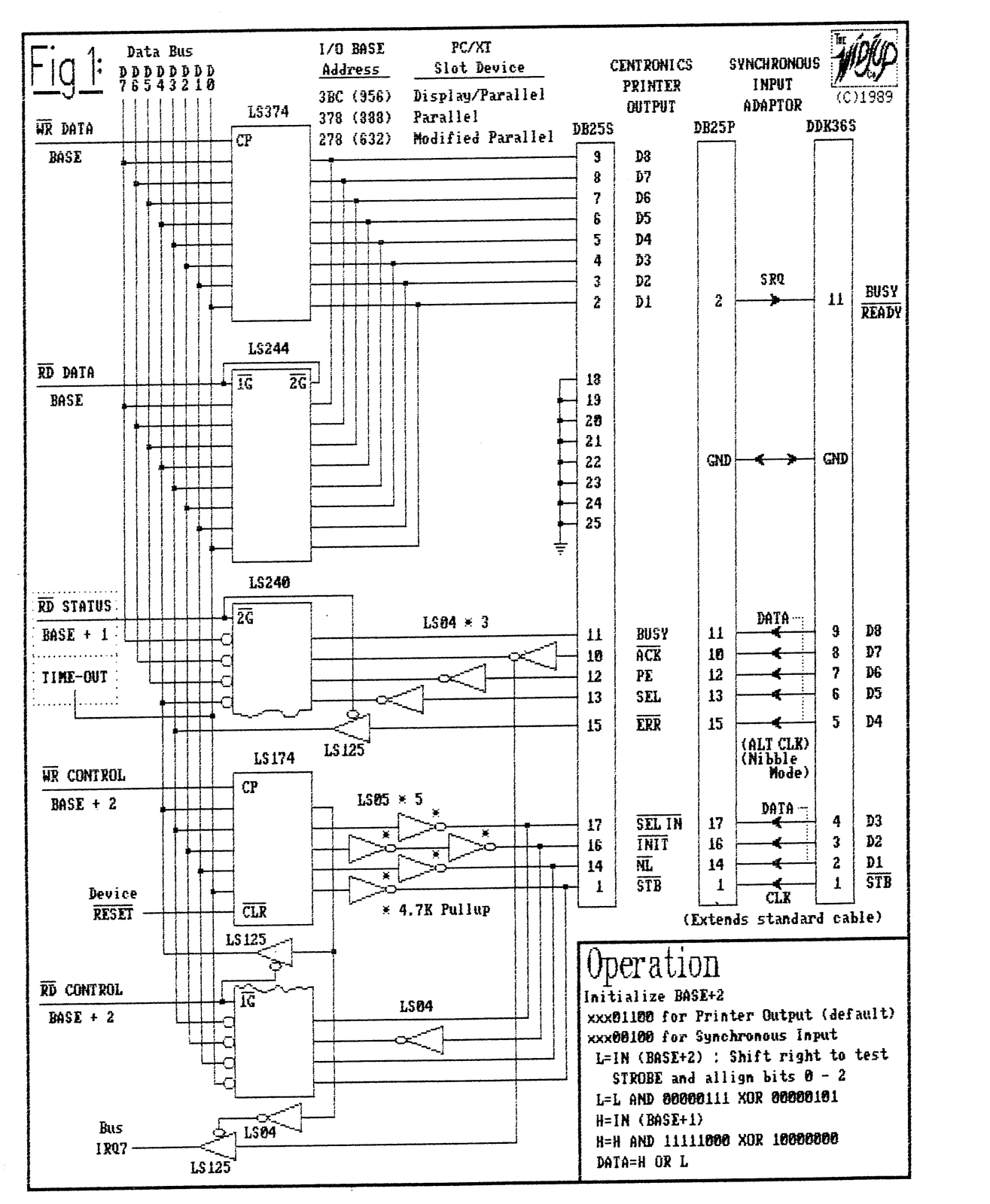
Figure 1 shows the standard printer (LPTn:) ports to be found in IBM and clone adaptor cards. Under MSDOS these ports are initialized and used only to drive compatible printers. A small BASIC program can be used instead of MSDOS to initialize and use these ports for INPUT.
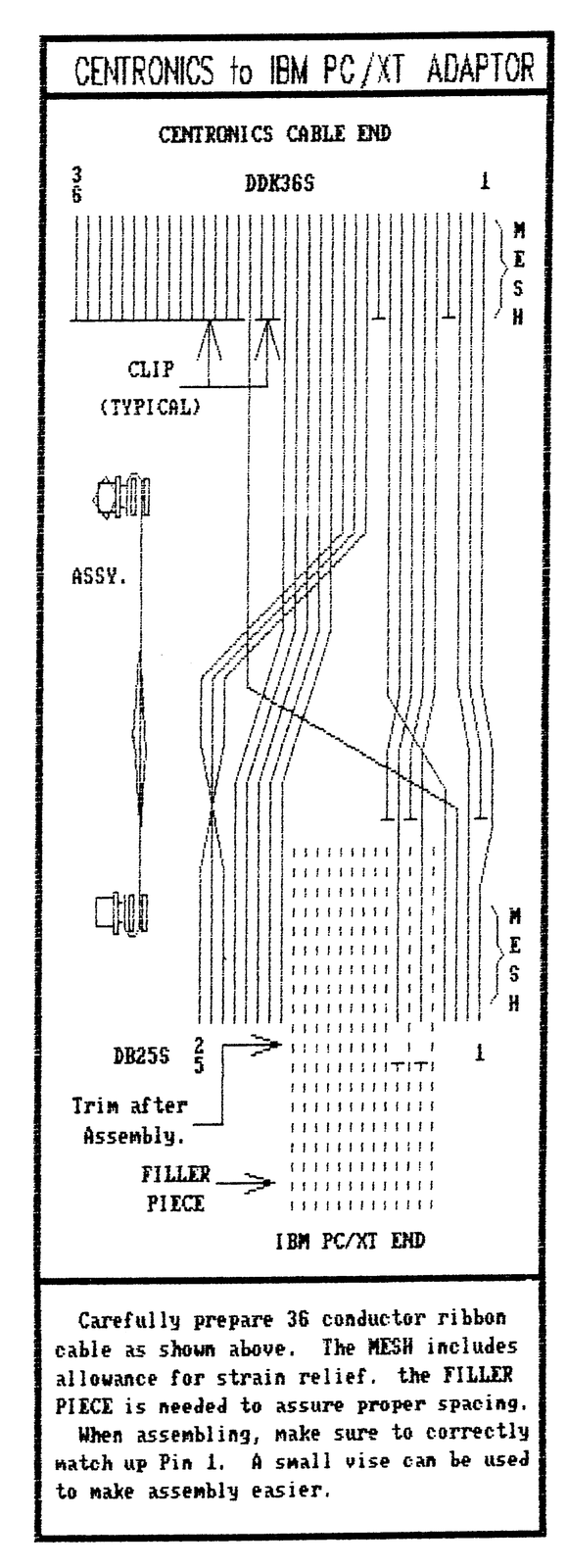
The synchronous input adaptor is easily made using widely available IDC type connectors and ribbon cable. No soldering is required, but make sure that short stubs of cable are used to engage all unused pins.
It attaches to the end of any CENTRONICS printer cable. It provides nine OUTPUT lines to the PC and one INPUT. The ninth OUTPUT line is the clock. The INPUT line is the BUSY signal. The remaining eight OUTPUT lines is an eight bit data bus.
When control of the strobe signal is automatic, D4 is reassigned to be the clock signal and D5-D8 are used for data nibbles. It takes two transfers per byte of data.
In either mode, bytes are transferred raw. This lets you send any kind of data.
A BASIC program is used in each computer. Machine code routines could easily be written to do the same thing, but the average user need not be concerned. Execution is rather slow, but it works quite well.
SINCLAIR PRINTER INTERFACE ADAPTORS
                    TASMAN
                    #1     #2     A&J  AERCO/OLIGER

DATA Port           123    123    66       127
STATUS Port         251    191    65       127
BUSY Bit Value        1      1     4        16
STROBE Port         251    251    65      Auto
STROBE Bit Value      8      8     4      none
STB_ON              247    247     4   Write Data
STB_OFF             255    255     0   Read Status
There is some confusion about identification of TASMAN interface types. According to TASMAN documentation, #1 is type A, #2 is type B. USA has an ambiguous documentation in the literature.
Not all existing commercial interfaces are listed; but if you have the porting data, merely substitute that in one of the routines listed. Note that A&J STROBE port inverts the signal. This might also be true for interfaces not listed.
TS2068/SPECTRUM Transfer Routines
1000 REM   TASMAN #1 CALL with B = Data Byte
1010 LET BB=INP 251: LET X=INT(BB/2): LET X=BB-X-X
1020 IF X THEN GOTO 1020: REM BUSY
1030 OUT 123,B:OUT 251,247: REM Data out,Strobe ON
1040 LET BB=INP 251: LET X=INT(BB/2): LET X=BB-X-X
1050 IF NOT X THEN GOTO 1050: REM Wait for ACK
1060 OUT 251,255: RETURN: REM Strobe OFF
1000 REM TASMAN #2 CALL with B = Data Byte
1010 LET BB=INP 191: LET X=INT(BB/2): LET X=BB-X-X
1020 IF X THEN GOTO 1010: REM BUSY
1030 OUT 123,B: OUT 251,247:REM Data out,Strobe ON
1040 LET BB=INP 191: LET X=INT(BB/2): LET X=BB-X-X
1050 IF NOT X THEN GOTO 1040: REM Wait for ACK
1060 OUT 251,255: RETURN: REM Strobe OFF1000 REM A&J CALL with B = Byte to Transfer
1010 LET BB= INP 65: LET X=INT(BB/64): LET X=BB-
64*X
1020 IF X>3 THEN GOTO 1010: REM BUSY
1030 OUT 66,B: OUT 65,4: REM Data out, Strobe ON
1040 LET BB= INP 65: LET X=INT(BB/64): LET X=BB-
64*X
1050 IF X<4 THEN GOTO 1040: REM Wait for ACK
1060 OUT 65,0: RETURN: REM Strobe OFF1000 REM AERCO/OLIGER CALL with B = Data Byte
1010 LET H=INT(B/16): LET L=B-16*H: REM Make
Nibbles
1020 LET BB= INP 127: LET I=INT(BB/16): LET X=BB-
16*X
1030 IF X>15 THEN GOTO 1020: REM BUSY
1040 OUT 127,16*H+8: REM Msn out, CLOCK HI
1050 LET BB= INP 127: LET I=INT(BB/16): LET X=BB-
16*X
1060 IF X<16 THEN GOTO 1050: REM Wait for ACK
1070 OUT 127,16*H: REM Msn kept, CLOCK LO
1080 LET BB= INP 127: LET I=INT(BB/16): LET X=BB-
16*X
1090 IF X>15 THEN GOTO 1080: REM BUSY
1100 OUT 127,16*L+8: REM Lsn out, CLOCK HI
1110 LET BB= INP 127: LET I=INT(BB/16): LET X=BB-
16*X
1120 IF X<16 THEN GOTO 1110: REM Wait for ACK
1130 OUT 127,16*L: RETURN: REM Lsn kept, CLOCK LOPC/XT Transfer Routines
100 CLS:PRINT:PRINT:PRINT"     DATA TRANSFER FROM
SINCLAIR TO PC/XT"
110 PRINT:INPUT "HOW MANY BYTES? ";COUNT
120 PRINT:INPUT "FILENAME? ";FILE$
130 PRINT:PRINT"BASE = 956 FOR DISPLAY ADAPTER
PRINTER PORT
140 PRINT"BASE = 888 FOR PRIMARY PARALLEL PRINTER
PORT
150 PRINT"BASE = 632 FOR MODIFIED PARALLEL PRINTER
PORT
160 INPUT" ENTER BASE ADDRESS: ";PDATA
170 IF PDATA=0 THEN LET PDATA=888:PRINT"DEFAULT
BASE = 888"
180 LET PSTATUS=PDATA+1:LET PCONTROL=PDATA+2
190 OUT PDATA,1:OUT PCONTROL,4:REM  BUSY,
Initialize CONTROL Port for INPUT
200 DEF SEG 16386:REM Assign buffer in memory
(640K assumed)
210 PRINT" Connect Printer Cable w/ Adaptor, then
CONTINUE (F5).":STOP
220 FOR N=0 TO COUNT-1
230 OUT PDATA,0:REM  READY

235 REM For TASMAN/A&J, full byte transfer
240 L=INP(PCONTROL):STB=L AND 1:IF STB=1 THEN GOTO
190
250 OUT PDATA 1:REM  BUSY
260 L=(L/2) AND 7 XOR 5:H=INP(PSTATUS) AND 247 XOR
128
270 BYTE=H OR L:POKE N,BYTE:REM  Assemble & Store
BYTE
280 LOCATE 21,0:PRINT N,BYTE,:REM  Verification
290 STB=INP(PCONTROL) AND 1:IF STB=0 THEN GOTO
230:REM  Wait for ACK
300 NEXT N:BSAVE FILE$,0,COUNT-1:STOP

235 REM For AERCO/OLIGER, nibble transfer
240 H=INP(PSTATUS):STB=H AND 8:IF STB=8 THEN GOTO
240
250 OUT PDATA 1:REM  BUSY
260 H=H AND 240 XOR 128
270 STB=INP(PSTATUS) AND 8:IF STB=0 THEN GOTO
270:REM  Wait for ACK
280 OUT PDATA,0:REM  READY
290 L=INP(PSTATUS):STB=L AND 8:IF STB=8 THEN GOTO
290
300 OUT PDATA 1:REM  BUSY
310 L=(L AND 240 XOR 128)/16
320 STB=INP(PSTATUS) AND 8:IF STB=0 THEN GOTO
320:REM  Wait for ACK
330 BYTE=H+L:POKE N,BYTE
340 LOCATE 21,0:PRINT N,BYTE,:REM  Verification
350 NEXT N:BSAVE FILE$,0,COUNT-1:STOP
(C)1989 William J. Pedersen
Note: Type-in program listings on this website use ZMAKEBAS notation for graphics characters.