
SOFTWARE LO-RES is a machine-language utility program for the ZX81/TS1000/TS1500, which creates enlarged characters on the screen. This makes it useful for any persons with a visual handicap. Since it also allows fast moving screen displays; it is useful for any number of programs where a flashy screen is desired. You may want to consider using it for title displays, scrolling graphic actions games, “billboard” programs and so on.
Using SW Lo-Res
SW LO-RES is entered with a USR call to 16601. The form will always be:
xxxx LET LR=16601 (optional)
yyyy IF USR LR THEN REM [data string]
SW LO-RES will then process the data string immediately following the REM command. This data string will contain two pieces of information:
1: The characters which are to be printed, and
2: Various “control” characters which will instruct SW LO-RES on how to handle the character string.
The control characters consist of:
<= (shift R) - Scroll up
=> (shift Y) - Scroll down
** (shift H) - Execute a "newline"
<> (shift T) - Change print mode
The <> control character must be followed with the number corresponding to the desired print mode:
<>0 = go into print mode 0
<>1 = go into print mode 1
<>2 = go into print mode 2
<>3 = go into print mode 3
<>5 = this is a special instruction which tells
      SW LO-RES to set the next print position
      to "Home", in other words, the upper
      left-hand corner of the screen. The print
      mode is not changed.
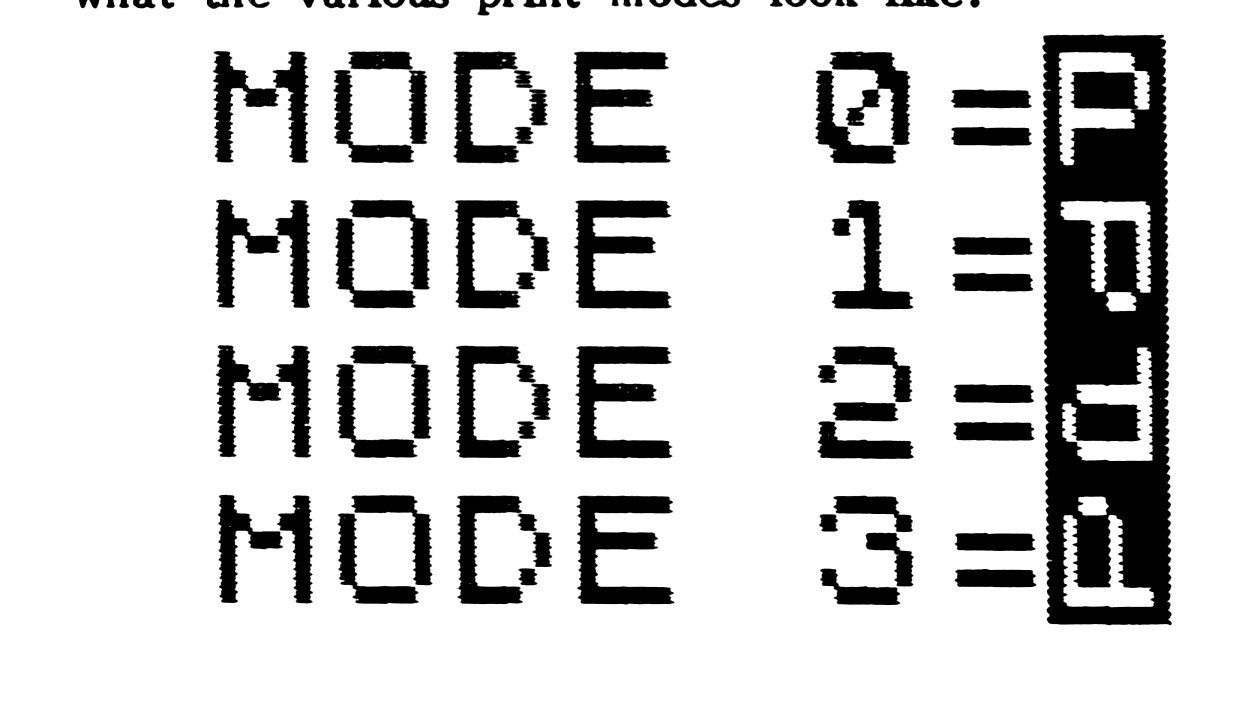
SW LO-RES will always start in print mode 0. Here is what the various print modes look like:
Sample Programs
This is the simplest program possible. with SW LO-RES. It prints an enlarged “P” to the screen in mode 0.
9000 LET LR=16601
9010 IF USR LR THEN REM P
The initial print position can be set by using a PRINT AT statement:
9000 LET LR=16601
9010 PRINT AT 0,5;
9020 IF USR LR THEN REM HELLO**hello
[second “hello” is inverse]
Note that subsequent print positions are controlled by SW LO-RES. Also in this sample, note the new-line character (**) which prints the inverse “hello” on the next line down.
Note how the new-line character works in this sample, since we changed to print mode 1.
9000 LET LR=16601
     PRINT AT 2,10;
9020 IF USR LR THEN REM <>1HELLO**hello
Using the PRINT AT feature can produce some interesting displays. For example,
9000 FOR N=0 TO 28
9010 PRINT AT N-8,18-N;
9020 IF USR LR THEN REM hi ["HI" is inverse]
9030 NEXT N
The scroll speed can be changed by altering the value at address 16594. The lower the value, the faster the scroll.
Lo-Res Screen Copies
Since SW LO-RES uses the entire screen, a COPY routine is provided which will copy all 24 lines of the screen. It is called with a USR to address 16946. A second COPY routine, at address 16950, can be used to copy part of a screen, 1 to 22 lines. The number of lines is determined by the location of the print position; no POKEs are needed. You must simply precede the call with a PRINT AT statement. For example, to copy half a screen:
xxxx PRINT AT 11,0;
yyyy RAND USR 16950
If the control characters are used correctly, very long data strings can be printed, allowing the creation of highly complex displays. Enter and RUN the “DEMO” program to explore some of the possibilities.
Error Conditions
When using SW LO-RES, the following error reports may occur:
REPORT   ERROR CONDITION

M        Improper mode request, in other
         words mode-control <> is not
         followed by 0, 1, 2, 3 or 5

L        Left margin overflow, results
         when trying to print off the
         left side of the screen.

R        Right-margin overflow

B        Bottom-margin overflow

S        String character error. Results
         if a token character is included
         in the data to be printed. (Does
         not include print-control
         tokens.)
Entering the Program
Start by entering the machine-code into a 1 REM statement, at least 445 bytes long. Use your favorite decimal loader to input the values in Table 1, from address 16514 through 16959. Alternately, use an assembler or hex loader to input the mnemonics or hex values of the assembly listing of Listing 1. When complete and checked for errors, POKE 16510,0 to give the REM a line number of zero. SAVE the result to tape, for future incorporation into your own creations. Then enter the BASIC “DEMO” program of Listing 2, and SAVE it to tape separately, using GOTO 9990. This contains quite a few applications tips, and serves as an impressive demonstration of what your machine’s graphic capabilities. (It also contains a little “free advertising” for our favorite Sinclair-specific magazine…)
Have fun with this. Let us know if you find any particularly interesting applications.
Table 1.
118 118 000 135 004 131 002 133
006 129 001 134 005 130 003 132
007 128 042 012 064 035 229 001
132 000 009 001 148 002 209 237
176 014 132 237 066 024 018 042
016 064 043 229 001 132 000 167
237 066 001 148 002 209 237 184
035 229 062 004 001 031 000 112
084 093 019 237 176 035 035 061
032 242 225 034 014 064 001 001
005 011 120 177 032 251 201 175
050 009 064 237 075 022 064 003
003 197 175 050 033 064 010 254
118 032 009 193 042 012 064 035
034 014 064 201 254 219 032 006
205 148 064 193 024 226 254 220
032 005 205 169 064 024 244 254
221 032 025 003 010 254 033 204
238 064 040 013 214 028 056 004
254 004 056 002 207 021 050 009
064 225 024 188 254 216 032 046
042 014 064 017 034 000 126 254
118 035 027 032 249 058 009 064
186 040 004 254 002 032 004 030
099 024 013 123 254 005 048 002
207 020 214 004 095 042 012 064
025 034 014 064 024 165 167 023
023 048 002 207 027 203 071 040
005 050 033 064 203 135 023 022
000 203 018 095 033 000 030 058
009 064 189 025 040 042 017 060
064 213 245 014 001 006 008 229
213 197 126 023 013 032 252 203
027 035 193 016 244 123 209 018
019 012 062 009 185 225 032 229
241 061 040 003 225 024 218 225
014 004 006 004 086 035 094 035
229 175 203 018 023 203 018 023
203 019 023 203 019 023 033 132
064 133 111 126 042 014 064 245
197 229 126 254 118 032 002 207
026 237 075 016 064 167 237 066
056 002 207 010 225 193 058 033
064 254 000 040 005 241 238 128
024 001 241 119 035 034 014 064
016 191 213 017 029 000 025 034
014 064 209 225 013 032 171 017
128 255 042 014 064 058 009 064
185 040 004 254 002 032 007 025
034 014 064 195 253 064 237 075
016 064 229 237 066 225 056 243
030 223 024 235 000 000 000 000
000 000 000 000 000 000 000 000
000 000 000 000 000 000 000 000
022 024 024 007 042 058 064 062
024 149 087 195 107 008
Note: Enter each number working ACROSS. For Example: 118 ENTER 118 ENTER 000 ENTER 135 ENTER 004 etc.
SW LO-RES Listing

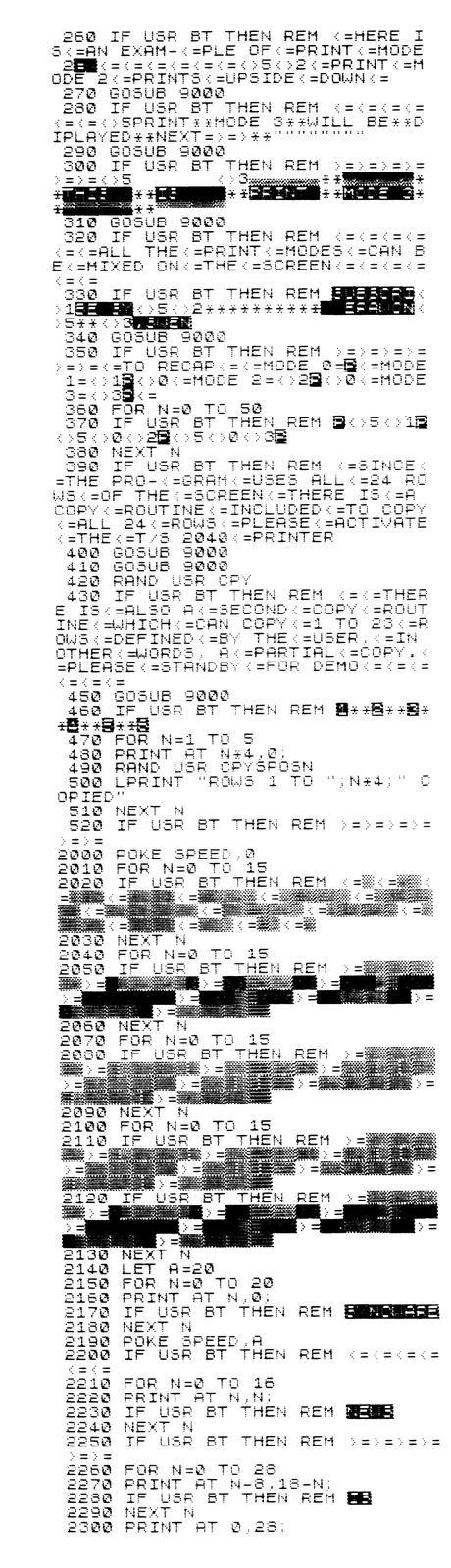
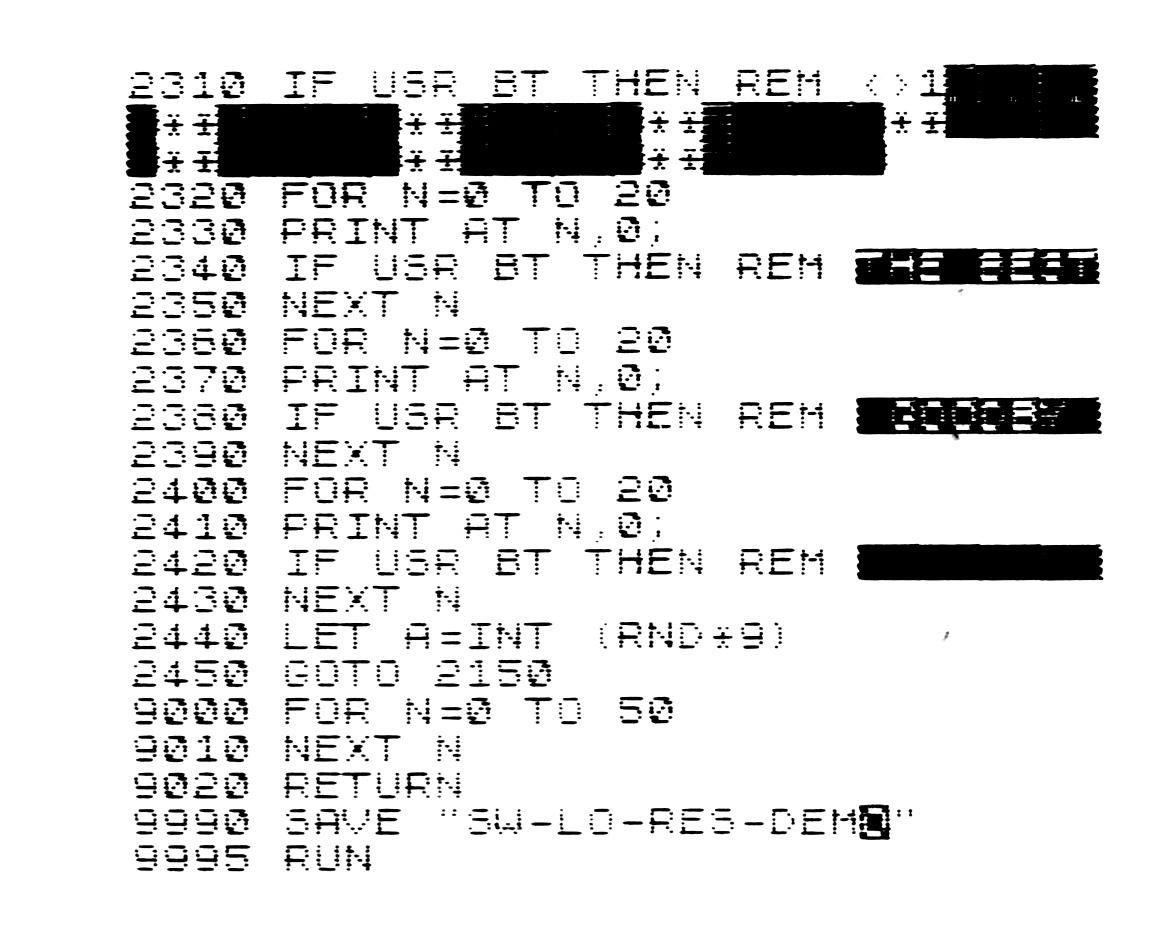
Disassembly Listing 1.
addr HEX NAME     DEC  ADDR CHR$
---------------------------------
4082 76            118 16514 ▒   ;Data table
4083 76            118 16515 ▒   ; containing the
4084 00              0 16516 ▒   ; graphic symbols
4085 87            135 16517 ▒   ; used in
4086 04              4 16518 ▒   ; generating
4087 83            131 16519 ▒   ; the enlarged
4088 02              2 16520 ▒   ; characters
4089 85            133 16521 ▒
408A 06              6 16522 ▒
408B 81            129 16523 ▒
408C 01              1 16524 ▒
408D 86            134 16525 ▒
408E 05              5 16526 ▒
408F 82            130 16527 ▒
4090 03              3 16528 ▒
4091 84            132 16529 ▒
4092 07              7 16530 ▒
4093 80            128 16531 ▒

addr HEXCODE  NAME MNEMONIC
============================
4094 2A0C40   UPSC LD HL.(DFIL)  ;The up-scroll routine
4097 23            INC HL        ;Start of the display file.
4098 E5            PUSH HL       ;Stack it.
4099 018400        LD BC.0084    ;Four rows down.
409C 09            ADD HL.BC     ;Set source.
409D 019402        LD BC.0294    ;Set counter.
40A0 D1            POP DE        ;Set destination
40A1 EDB0          LDIR          ;Move everything up four rows.
40A3 0E84          LD C.84       ;Four rows to clear.
40A5 ED42          SBC HL.BC     ;Set source.
40A7 1812          JR CLER       ;Clear the bottom four rows.
40A9 2A1040   DNSC LD HL.(VARS)  ;The down-scroll routine.
40AC 2B            DEC HL        ;End of the display file.
40AD E5            PUSH HL       ;Stack it.
40AE 018400        LD BC.0084    ;Four rows.
40B1 A7            AND A         ;Clear carry.
40B2 ED42          SBC HL.BC     ;Set source.
40B4 019402        LD BC.0294    ;Set counter.
40B7 D1            POP DE        ;Set destination.
40B8 EDB8          LDDR          ;Move everything down four rows.
40BA 23            INC HL        ;Set source.
40BB E5       CLER PUSH HL       ;Stack the source address.
40BC 3E04          LD A.04       ;Set counter for four rows.
40BE 011F00   CLNX LD BC.001F    ;Set counter, 31 spaces to clear.
40C1 70            LD (HL).B     ;Clear the first space.
40C2 54            LD D.H        ;Set destination.
40C3 5D            LD E.L
40C4 13            INC DE
40C5 EDB0          LDIR          ;Clear the row.
40C7 23            INC HL        ;Set for the next row.
40C8 23            INC HL
40C9 3D            DEC A         ;Decrease the row counter.
40CA 20F2          JR NZ CLNX    ;If not zero then clear next row.
40CC E1            POP HL        ;Restore the source address.
40CD 220E40        LD (DFCP).HL  ;Set the next print position.
40D0 010105        LD BC.0501    ;Loop controlling scroll speed.
40D3 0B       DLAY DEC BC        ;Decrease the counter.
40D4 78            LD A.B        ;Is it zero?
40D5 B1            OR C
40D6 20FB          JR NZ DLAY    ;No, continue countdown.
40D8 C9            RET           ;Yes, return to main program.
40D9 AF       STRT XOR A         ;Reset print mode (PMOD) vbl.
40DA 320940        LD (PMOD).A
40DD ED4B1640      LD BC.(CHAD)  ;Locate the data string.
40E1 03            INC BC        ;Skip REM.
40E2 03       NEXT INC BC        ;Point to next char. in string.
40E3 C5            PUSH BC       ;Stack the string address.
40E4 AF            XOR A         ;Reset the graphics flag.
40E5 322140        LD (GFLG).A
40E8 0A            LD A.(BC)     ;Get the current character.
40E9 FE76          CP 76         ;End of data string?
40EB 2009          JR NZ CTRL    ;No, check for control token.
40ED C1       END- POP BC        ;Yes, reset stack.
40EE 2A0C40   HOME LD HL.(DFIL)  ;Reset print position.
40F1 23            INC HL
40F2 220E40        LD (DFCP).HL
40F5 C9            RET
40F6 FEDB     CTRL CP DB         ;Is it a <= character?
40F8 2006          JR NZ DOWN    ;No, check for down scroll.
40FA CD9440        CALL UPSC     ;Yes, scroll up.
40FD C1       NXCH POP BC        ;Restore the character pointer.
40FE 18E2          JR NEXT       ;Do the next character.
4100 FEDC     DOWN CP DC         ;Is it a => character?
4102 2005          JR NZ MODE    ;No, check for mode character.
4104 CDA940        CALL DNSC     ;Yes, scroll down.
4107 18F4          JR NXCH       ;Do the next character.
4109 FEDD     MODE CP DD         ;Is it a <> character?
410B 2019          JR NZ NULN    ;No, check for a newline character.
410D 03            INC BC        ;Point to the mode code.
410E 0A            LD A.(BC)     ;Get the mode code.
410F FE21          CP 21         ;Is it mode 5?
4111 CCEE40        CALL Z HOME   ;Yes, reset print position to home.
4114 280D          JR Z RSTR     ;Do the next character.
4116 D61C          SUB 1C        ;No, convert code char. into a number.
4118 3804          JR C ER-M     ;If carry then not a proper code.
411A FE04          CP 04         ;Check for proper code.
411C 3802          JR C SV-A     ;If no carry then not a proper code.
411E CF       ER-M RST 08H       ;Error, improper mode code.
411F 15             ERROR M      ;Error code M.
4120 320940   SV-A LD (PMOD).A   ;Set PMOD value.
4123 E1       RSTR POP HL        ;Clear the old character pointer.
4124 18BC          JR NEXT       ;Do the next character.
4126 FED8     NULN CP D8         ;Is it a ** character.
4128 202E          JR NZ SORT    ;No, all control have been tested.
412A 2A0E40        LD HL.(DFCP)  ;Yes, do a newline.
412D 112200        LD DE.0022    ;Determine NL for modes 1 & 3.
4130 7E       PAD- LD A.(HL)
4131 FE76          CP 76
4133 23            INC HL
4134 1B            DEC DE
4135 20F9          JR NZ PAD-
4137 3A0940        LD A.(PMOD)   ;Test for mode 0.
413A BA            CP D          ;Mode 0?
413B 2804          JR Z LINE     ;Yes, do horizontal newline.
413D FE02          CP 02         ;Mode 2?
413F 2004          JR NZ V-NL    ;No, do vertical newline.
4141 1E63     LINE LD E.63       ;Set for horizontal newline.
4143 180D          JR H-NL       ;Do horizontal newline.
4145 7B       V-NL LD A.E        ;Set for vertical newline.
4146 FE05          CP 05         ;Test for enough space in DFILE.
4148 3002          JR NC V-OK    ;If no carry then space available.
414A CF       ER-L RST 08H       ;Error, left margin overflow.
414B 14             ERROR L      ;Report code L.
414C D604     V-OK SUB 04        ;Set for vertical newline.
414E 5F            LD E.A
414F 2A0C40        LD HL.(DFIL)  ;Set the NL print position.
4152 19       H-NL ADD HL.DE
4153 220E40        LD (DFCP).HL
4156 18A5          JR NXCH       ;Do next character.
4158 A7       SORT AND A         ;Clear carry.
4159 17            RLA           ;Test for token character.
415A 17            RLA
415B 3002          JR NC GPHC    ;If no carry then not token.
415D CF       ER-S RST 08H       ;Error, improper string character.
415E 1B             ERROR S      ;Error code S.
415F CB47     GPHC BIT 0.A       ;Test for a graphic character.
4161 2805          JR Z NRML     ;If not set then a normal character.
4163 322140        LD (GFLG).A   ;Set the graphics flag.
4166 CB87          RES 0.A       ;Reset the graphics bit.
4168 17       NRML RLA           ;Character code * 8
4169 1600          LD D.00       ;Reset register D.
416B CB12          RL D          ;Carry to D, set if code > 32
416D 5F            LD E.A        ;DE = chr. code * 8.
416E 21001E        LD HL.1E00    ;Point to bit pattern table.
4171 3A0940        LD A.(PMOD)   ;Test for mode 0.
4174 BD            CP L          ;Mode 0?
4175 19            ADD HL.DE     ;Point to the character pattern.
4176 282A          JR Z MD-0     ;Yes, do mode 0.
4178 113C40        LD DE.PRBF    ;No, point to PRBUFF.
417B D5       ROT- PUSH DE       ;Stack PRBUFF pointer.
417C F5            PUSH AF       ;Stack MODE counter.
417D 0E01          LD C.01       ;Initialize SHIFT counter.
417F 0608     MORE LD B.08       ;Initialize LINE counter.
4181 E5            PUSH HL       ;Stack pattern pointer.
4182 D5            PUSH DE       ;Stack PRBUFF pointer.
4183 C5       TURN PUSH BC       ;Stack SHIFT-LINE counter.
4184 7E            LD A.(HL)     ;Get the bit pattern byte.
4185 17       SHFT RLA           ;Shift bit to carry.
4186 0D            DEC C         ;SHIFT counter 0?
4187 20FC          JR NZ SHFT    ;No, shift more.
4189 CB1B          RR E          ;Yes, carry to bit 7, E.
418B 23            INC HL        ;Increase the pattern pointer.
418C C1            POP BC        ;Restore SHIFT-LINE counter.
418D 10F4          DJNZ TURN     ;Do eight turns.
418F 7B            LD A.E        ;Set to new bit pattern.
4190 D1            POP DE        ;Restore PRBUFF pointer.
4191 12            LD (DE).A     ;Store new pattern.
4192 13            INC DE        ;Increase PRBUFF pointer.
4193 0C            INC C         ;Increase SHIFT counter.
4194 3E09          LD A.09       ;Test for eight lines completed.
4196 B9            CP C
4197 E1            POP HL        ;Restore pattern pointer.
4198 20E5          JR NZ MORE    ;Do eight patterns.
419A F1            POP AF        ;Restore MODE counter.
419B 3D            DEC A         ;Is it zero?
419C 2803          JR Z DONE     ;Yes, then done.
419E E1            POP HL        ;Set new pattern pointer.
419F 18DA          JR ROT-       ;Rotate patterns til MODE counter 0.
41A1 E1       DONE POP HL        ;Point to bit pattern to be printed.
41A2 0E04     MD-0 LD C.04       ;Set row counte.
41A4 0604     2ROW LD B.04       ;Set bit counter.
41A6 56            LD D.(HL)     ;Transfer two pattern bytes to DE.
41A7 23            INC HL
41A8 5E            LD E.(HL)
41A9 23            INC HL        ;Point to next pattern byte.
41AA E5            PUSH HL       ;Stack the pointer.
41AB AF       2BTS XOR A         ;Clear A and carry.
41AC CB12          RL D          ;Determine "PIXEL" value.
41AE 17            RLA
41AF CB12          RL D
41B1 17            RLA
41B2 CB13          RL E
41B4 17            RLA
41B5 CB13          RL E
41B7 17            RLA
41B8 218440        LD HL.TABL    ;Point to data table.
41BB 85            ADD A.L       ;Point to graphic symbol.
41BC 6F            LD L.A
41BD 7E            LD A.(HL)     ;Fetch the graphic symbol.
41BE 2A0E40        LD HL.(DFCP)  ;Point to current print position.
41C1 F5            PUSH AF       ;Stack the graphic symbol.
41C2 C5            PUSH BC       ;Stack the ROW-BITS counter.
41C3 E5            PUSH HL       ;Stack current print position.
41C4 7E            LD A.(HL)     ;Test for row.
41C5 FE76          CP 76         ;Is it newline marker?
41C7 2002          JR NZ BOTM    ;No, test for room at bottom.
41C9 CF       ER-R RST 08H       ;Error, right margin overflow.
41CA 1A             ERROR R      ;Error report R.
41CB ED4B1040 BOTM LD BC.(VARS)  ;Test for room at bottom of DFILE.
41CF A7            AND A         ;Clear carry.
41D0 ED42          SBC HL.BC     ;Print position greater than VARS?
41D2 3802          JR C GOOD     ;If carry then there is enough room.
41D4 CF       ER-B RST 08H       ;Error, bottom overflow.
41D5 0A             ERROR B      ;Error report B.
41D6 E1       GOOD POP HL        ;Restore the current print position.
41D7 C1            POP BC        ;Restore the ROW-BITS counter.
41D8 3A2140        LD A.(GFLG)   ;Test for graphic character.
41DB FE00          CP 00         ;Is G-FLAG set?
41DD 2805          JR Z GZRO     ;No, then print normal character.
41DF F1            POP AF        ;Yes, restore the graphic symbol.
41E0 EE80          XOR 80        ;Invert it.
41E2 1801          JR PRNT       ;Print inverted symbol.
41E4 F1       GZRO POP AF        ;Restore the graphic symbol.
41E5 77       PRNT LD (HL).A     ;Print the symbol.
41E6 23            INC HL        ;Point to the next print position.
41E7 220E40        LD (DFCP).HL  ;Set DF-CP.
41EA 10BF          DJNZ 2BTS     ;Repeat until B is zero.
41EC D5            PUSH DE       ;Stack the pattern bytes.
41ED 111D00        LD DE.001D    ;Set the next print position.
41F0 19            ADD HL.DE
41F1 220E40        LD (DFCP).HL
41F4 D1            POP DE        ;Restore the pattern bytes.
41F5 E1            POP HL        ;Restore the pattern pointer.
41F6 0D            DEC C         ;Decrease row counter.
41F7 20AB          JR NZ 2ROW    ;If not 0 then next 2 rows of pattern.
41F9 1180FF        LD DE.FF80    ;Set print pos. for next enlarged char.
41FC 2A0E40        LD HL.(DFCP)
41FF 3A0940        LD A.(PMOD)   ;Test PMOD value.
4202 B9            CP C          ;Mode 0?
4203 2804          JR Z HSET     ;Yes, set for horizontal char.
4205 FE02          CP 02         ;No, mode 2?
4207 2007          JR NZ VSET    ;No, then set for vertical char.
4209 19       HSET ADD HL.DE     ;Set next horiz. print position.
420A 220E40        LD (DFCP).HL
420D C3FD40   AGIN JP NXCH       ;Do next character.
4210 ED4B1040 VSET LD BC.(VARS)  ;Set next vertical print position.
4214 E5            PUSH HL       ;Stack current print position.
4215 ED42          SBC HL.BC     ;Greater than VARS?
4217 E1            POP HL        ;Restore current print position.
4218 38F3          JR C AGIN     ;No, do next character.
421A 1EDF          LD E.DF       ;Yes, push print position back 1 row.
421C 18EB          JR HSET       ;Do H-SET.
421E 00       NOPS NOP           ;Spare space,
421F 00            NOP           ; for your own
4220 00            NOP           ; additions, etc.
4221 00            NOP           ; 20d bytes
4222 00            NOP           ; total.
4223 00            NOP
4224 00            NOP
4225 00            NOP
4226 00            NOP
4227 00            NOP
4228 00            NOP
4229 00            NOP
422A 00            NOP
422B 00            NOP
422C 00            NOP
422D 00            NOP
422E 00            NOP
422F 00            NOP
4230 00            NOP
4231 00            NOP
4232 1618     CP24 LD D.18       ;Set counter for full screen copy.
4234 1807          JR COPY       ;Copy the full screen.
4236 2A3A40   COPN LD HL.(POSL)  ;Partial copy set by PRINT AT
4239 3E18          LD A.18       ;Set the counter.
423B 95            SUB L
423C 57            LD D.A
423D C36B08   COPY JP COPD       ;Copy the set number of lines.
4240 00            NOP
4241 00            NOP
4242 00            NOP
4243 00            NOP
4244 00            NOP
Note: Type-in program listings on this website use ZMAKEBAS notation for graphics characters.