
It’s Friday the 13th.
The electricity went off and your alarm clock didn’t. Late already, jump out of bed and stub your toe. Gobble your breakfast, but the toast is burnt and the coffee’s cold. Start your car and the battery’s dead.
Some days it just seems like nothing goes your way!
Well, cheer up! There’s an easy way to start off on the right foot with your TIMEX Sinclair Personal Computer. And, the best way to do so is to make sure that your computer has been properly installed.
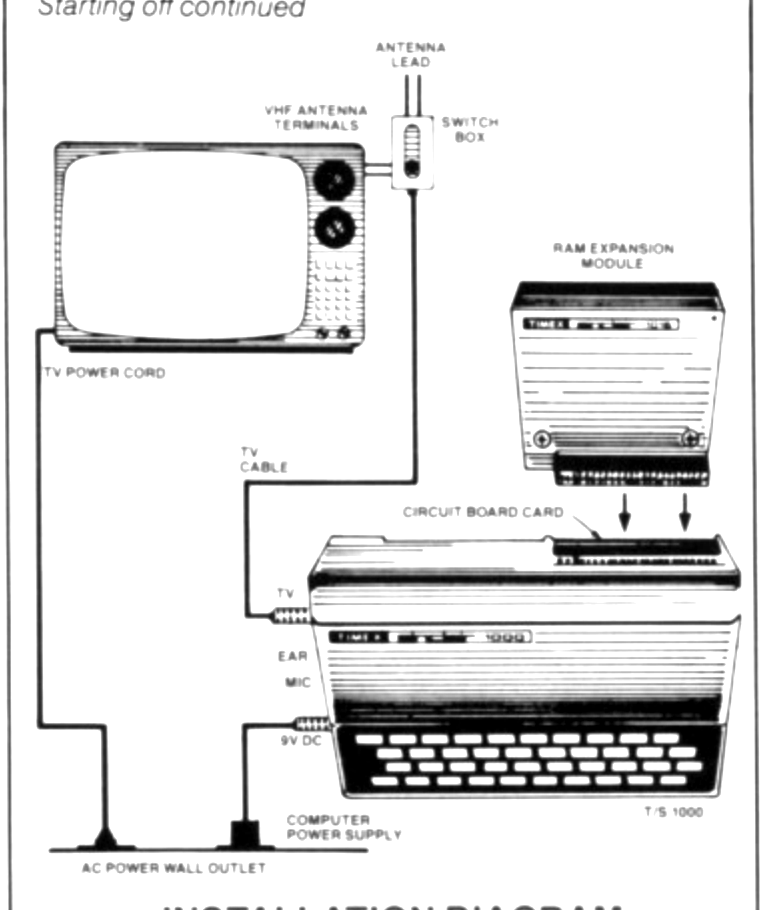
Let’s briefly run through the installation steps. As we go along, you can check to confirm that your computer has been connected properly (the illustrations below will serve as a guide to the proper installation techniques):
1. Place your TIMEX Sinclair Personal Computer next to your television set.
2. Disconnect the antenna leads from the VHF terminals on the rear of your television set and reconnect them to the two screw terminals on the side of the Computer/TV Switch Box.
3. Connect the leads on the Switch Box to the VHF terminals on the rear of your television set.
If your television is equipped with either cable TV or a 75-OHM antenna lead (a round wire ending in a screw terminal), you will need to obtain — from your local electronics store — a UHF/VHF matching transformer to accommodate the Switch Box.
In the event that the cable TV is hard-wired (connected directly into your TV), contact your local cable company for assistance.
4. Set the Switch Box two-position COMPUTER/TV switch to position COMPUTER. (When you don’t want to use the computer and want to watch TV, simply set the switch to position TV.)
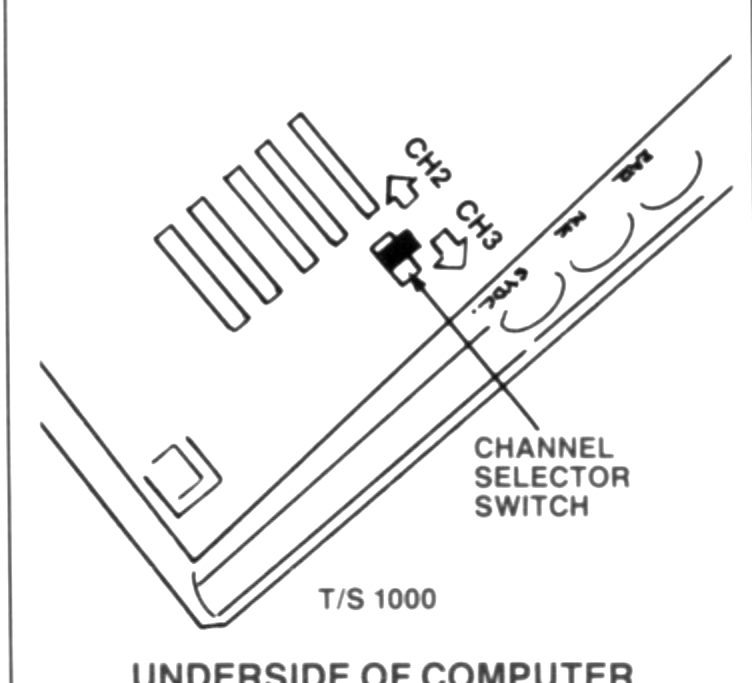
5. Set the VHF Channel Selector on your television, and the channel control switch under your TIMEX Sinclair Computer, to either channel 2 or channel 3 — whichever channel is not used in your area.
(If both channels are used, either channel can be used; it is best to select the channel that provides the best image.)
6. Insert one end of the TV cable into the jack on the COMPUTER/TV Switch Box and the other end into the TV jack on your TIMEX Sinclair Personal Computer.
7. Plug the jack from the computer power supply into the 9V DC jack on the computer. Then plug the power supply into the wall outlet.
8. If installing the RAM Expansion Module, simply (carefully) push the contacts on the RAM Module onto the circuit board at the rear of your computer.
9. Confirm that all connections are tight.
10. Turn your television set ON; the K cursor will display on the bottom of the screen (if it doesn’t, check for loose connections, confirm that both the TV and computer have been set to the same channel, and adjust the vertical control on the TV to insure that the cursor is not “off-screen”).
Follow this easy procedure and you’ll put your best foot forward each and every time!