
System Enclosures and Radio Frequency Interference
In a previous article (SYNC 2:3) we considered a standard keyboard conversion for the MicroAce and Sinclair ZX80/1 computers as a foundation for expansion-oriented systems. Because a keyboard array usually requires an enclosure and the VHF modulator-based display of “American” systems is susceptable to machine-generated radio frequency (RF) interference, a metal enclosure was considered a valuable addition. CPU/system generated RF interference can reach the television via the power line (inadequate power supply filtering) and via direct radiation (inadequate computer or peripheral shielding).
Although one can bypass RF emission problems by directly driving a composite video monitor or by replacing the VHF modulator with a “European-type” UHF unit, good engineering practices and the FCC suggest shielding the system. For settings which require minimized RF emission (e.g., the brain research laboratory in which I work) good practice definitely rules. My mail, some of which has complained about poor video display quality with unshielded, plastic keyboard enclosure kits, indicates that functional RF shielding is probably a necessity for other serious users as well. With a metal enclosure, one does not need to connect added “ground planes” to system 0 volts—the entire chassis becomes a grounded shield.
Because I had a ZX81, I decided to mount my ZX80 “semi-permanently” inside a large aluminium keyboard enclosure (BUD type KB 13202). Some salvaged plastic printed circuit card guides were trimmed and glued to the inside of the enclosure cover, and the bare Sinclair board could fit snugly inside its new housing. A slot was cut in the back of the new enclosure to allow access to the bus edge connector. A small utility box was attached by screws to the back of the main housing, and mini-phone plug extensions were made for power and tape connections.
The enclosure was ‘grounded’ (connected to system 0 volts) at the shield of extension cable from the 9 volt connector on the computer. Inadvertent contact with system ground was avoided by coating external bare metal surfaces with epoxy paint. The enclosure layout left plenty of room inside for future additions, such as a heavy duty power supply, batteries, or additional circuitry. This particular enclosure was also large enough to accommodate a “fully dressed” ZX81, and a mounting bracket could make use of the Sinclair-designed screw holes for accessories on the plastic chassis. The use of the connector box and phone-plug extensions made it possible to add a power switch and indicator, as well as an additional connector for direct video.
The original sense of the conversion was retained because the computer can be rapidly and easily returned to its original case. The keyboard conversion as a unit also became a foundation (less portable!) for expansion of the Sinclair system with emphasis on typing/input convenience and “laboratory grade” peripheral modules. The rest of this article considers two approaches to modules which could be used in such expansion.
Experimenter’s Prototype Module
At this point, I will admit another prejudice—ever since the first 8080 CPU systems were introduced, I have wanted to own a microcomputer “development system.” Over the years, various manufacturers have marketed many different systems configured for experimenting with and designing peripheral hardware. For the most part, however, such systems have been relatively more expensive and “less friendly” than the simultaneously evolving personal computers. The serious computer hobbyist or dedicated “hacker” thus had to buy a costly commercial development system or had to overcome hardware and software limitations of using a “home computer.” When Sinclair introduced the ZX80 and ZX81, it became apparent that they could be used as inexpensive components in such development systems, while retaining their stand-alone capability and “user-friendly” characteristics. Very nearly the “minimum system” described in the Ziloq Z80A Technical Manual, the ZX81 has the particular advantages of: 1) an operating system and Basic which support printer and input/output (I/O) operations; 2) an expansion bus which provides access to all Z80A pin signals; 3) the ability to call machine code routines from Basic; and 4) the fundamental capacity of the Z80A for both controller and mathematical/logical computation operations.
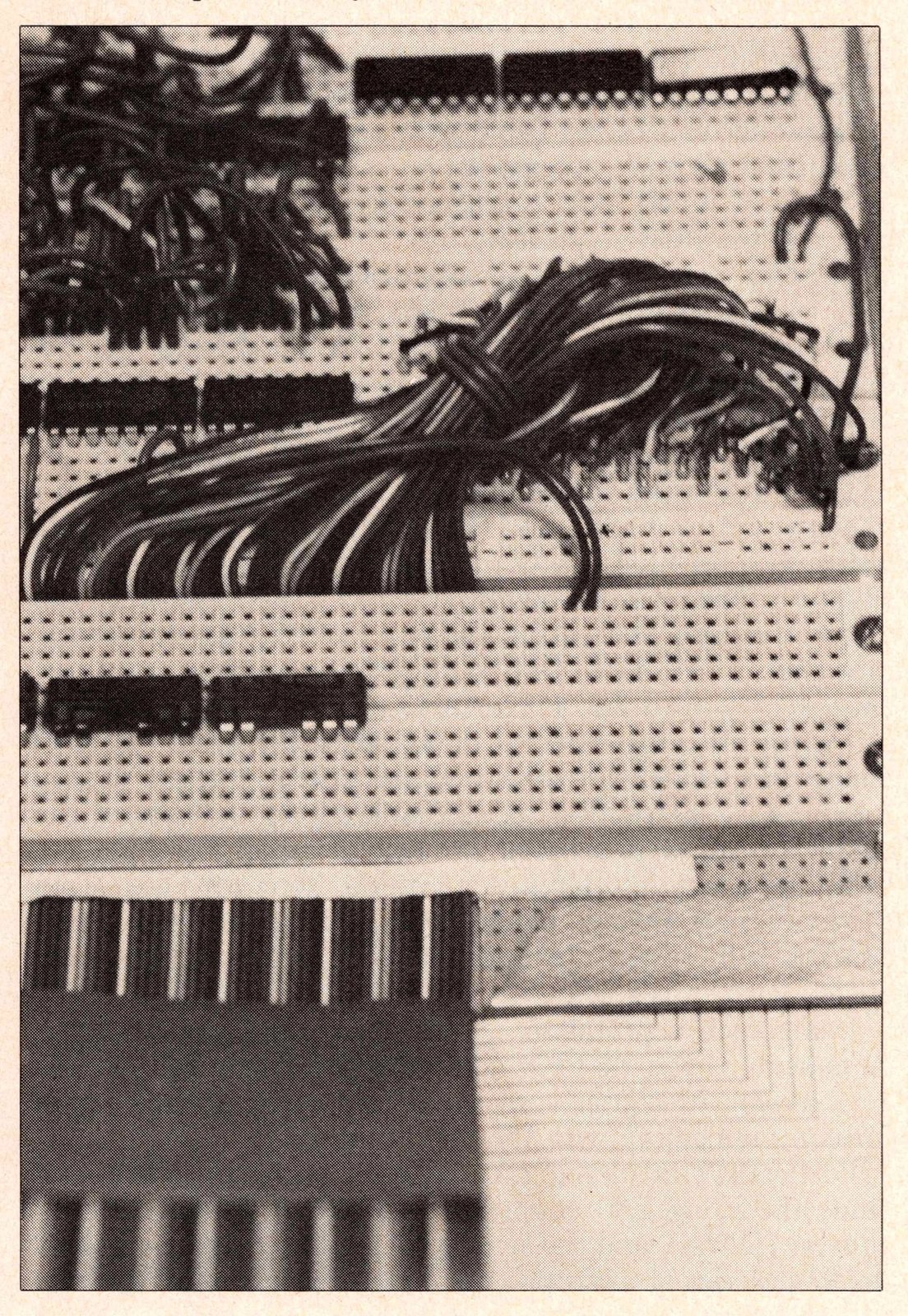
Given the apparent suitability of the ZX80/1, I set out to produce a peripheral which allows the rapid design and development of new hardware. For the electronics experimenter, nothing currently beats 0.1″ dual in-line package (DIP) spacing “proto-board” connectors for speeding assembly of functional circuits, and Figure 3 shows an experimenter’s prototype module based on these components.
I chose some Continental Specialty QT-59S and QT-59B connectors, 1′ of standard 50 conductor “rainbow” ribbon cable, a 50 pin Winchester 0.1″ dual readout PCB edge connector, and some Amphenol 220-P02-100 male miniature connector pins. Other commonly available edge or “proto-board” connectors could have been used. The PCB edge connector was simply cut to 46 pin length, keyed, then press-fitted to one end of the ribbon cable. Individual wires at the other end of the cable were separated, stripped, and terminated with the Amphenol pines (soldered). Continuity and lack of shorts were confirmed for all wires between the pins and the PCB connector.
In order to identify the signal associated with each ribbon cable lead, wire markers were made. A list of ZX bus signals was typed on a sheet of paper, and each signal name was cut out and attached like a flag to the appropriate wire using clear cellophane tape. A wire bracket was glued to the back of the PBC connector to aid in insertion and removal.
The protoboard connectors were mounted on a piece of phenolic circuit board, and the pin end of the ribbon cable was passed between two of the connector strips, as shown in Figure 1. The phenolic board served as a spacer between the connectors and the enclosure in which the assembly was mounted. The L.M.B. OH-743 aluminum cabinet was large enough (7″ x 6″ x 2 3/4″) to enclose the proto-board assembly while allowing external panel space for mounting I/O connectors, switches, indicators, and potentiometers needed for circuit construction. A slot was cut in the side of the cabinet to allow passage of the ribbon cable. For reducing radio frequency interference, a ground (zero volt) lead from the bus was connected to the cabinet. To avoid inadvertent contact with system ground, exposed metal surfaces were coated with epoxy paint.
Using such a protoboard, one can rapidly construct circuits such as the Z80 PIO described by Alger Salt (SYNC 1:4), analog to digital converters, and other devices useful for communicating with the “real world.”
Particularly attractive LSI chips for such experiments include the Zilog Z80 counter/timer (CTC), direct memory address (DMA), and the serial I/O (SIO) circuits, as well as the 82xx series of microprocessor components made by Intel and others.
Power for the experimental circuits can be drawn directly from the 9 and 5 volt bus lines. However, care must be taken not to load down the ZX power supply or regulator. Furthermore, since ZX bus lines are unbuffered, special care must also be taken not to load or to short the other signals. If the device being constructed does not connect too many ICs to each line and the connecting cable is short, little trouble may be experienced. However, the best practice is to buffer the control, data, and address lines. This can be done on the proto-board with 74LS244 or 81LS95 octal tristate noninverting drivers for unidirectional bus signals (e.g., A0-A16) and 74LS245 octal tristate noninverting bus transceivers for bidirectional signals. As an alternative, the prototype module can be used with a buffered bus expansion. (See Figure 3.)
Computer Continuum Buffered Bus Expansion Board
There are now many bus “expanders” available commercially for the ZX80/1, Timex/Sinclair, and MicroAce computers. One can adapt the Sinclair bus to drive S-100 or STD bus compatible devices, or one may opt to use the many accessories configured for the ZX80/1 bus connector. The latter approach has some special merit, because many peripheral manufacturers are following the Sinclair lead in producing simple, inexpensive devices. Perhaps the earliest buffered “mother-board” of this latter type was offered in the U.S.A. by Computer Continuum of San Francisco. In addition to the ZX80/1-type bus connectors, however, the Computer Continuum board has four additional connectors which allow one to use many of the standard perforated prototype board commonly available in stores such as Radio Shack.
The expansion board may be obtained from Computer Continuum as either a bare, printed circuit board or a “complete kit” including sockets and integrated circuits—minus an enclosure. The board is of extremely high quality, with plated-through holes and a durable solder mask. Builders who soldered their own Sinclairs will find the Computer Continuum board extremely easy to work with, due to the uncramped part spacing.
As shown in Figure 2, a nearly complete expansion board has a female, 44 contact, 0.1″ spacing connector for mating with the ZX80/1 card edge, buffering and bus control circuitry, a 5 volt power supply regulator, four standard 44 pin 0.156″ spacing dual readout PC edge connectors, and two spaces/connectors for 50 (48) pin 0.1″ ZX80/1-style connectors or cable headers. The board is set up for a 5 volt 3 amp LM 323K regulator, and it only requires a 9 volt rectified source to provide power for the expansion hardware and the computer. The expansion board contains many jumper-selected options (good show!) to allow such things as using the 9 volt Sinclair power supply, I/O addressing, and bus disabling. The four 0.156″ connectors allow the serious experimenter to use durable prototypes built with readily available wire-wrap or solder-pad experimenter’s boards, while the board also has one connector/edge for “standard” peripherals like the ZX 16K memory. All connectors are buffered, preventing ZX bus loading. An earlier version of this expansion board had the 0.1″ connector solder pads “flipped” left-to-right, inverting the order of the signals as they would normally appear on the ZX80/1 bus edge connectors and requiring some “reverse Polish engineering” to obtain connector compatibility with manufactured peripherals. The current version of the board has “right” 0.1″ connector pad configuration and additional options available for I/O addressing logic.
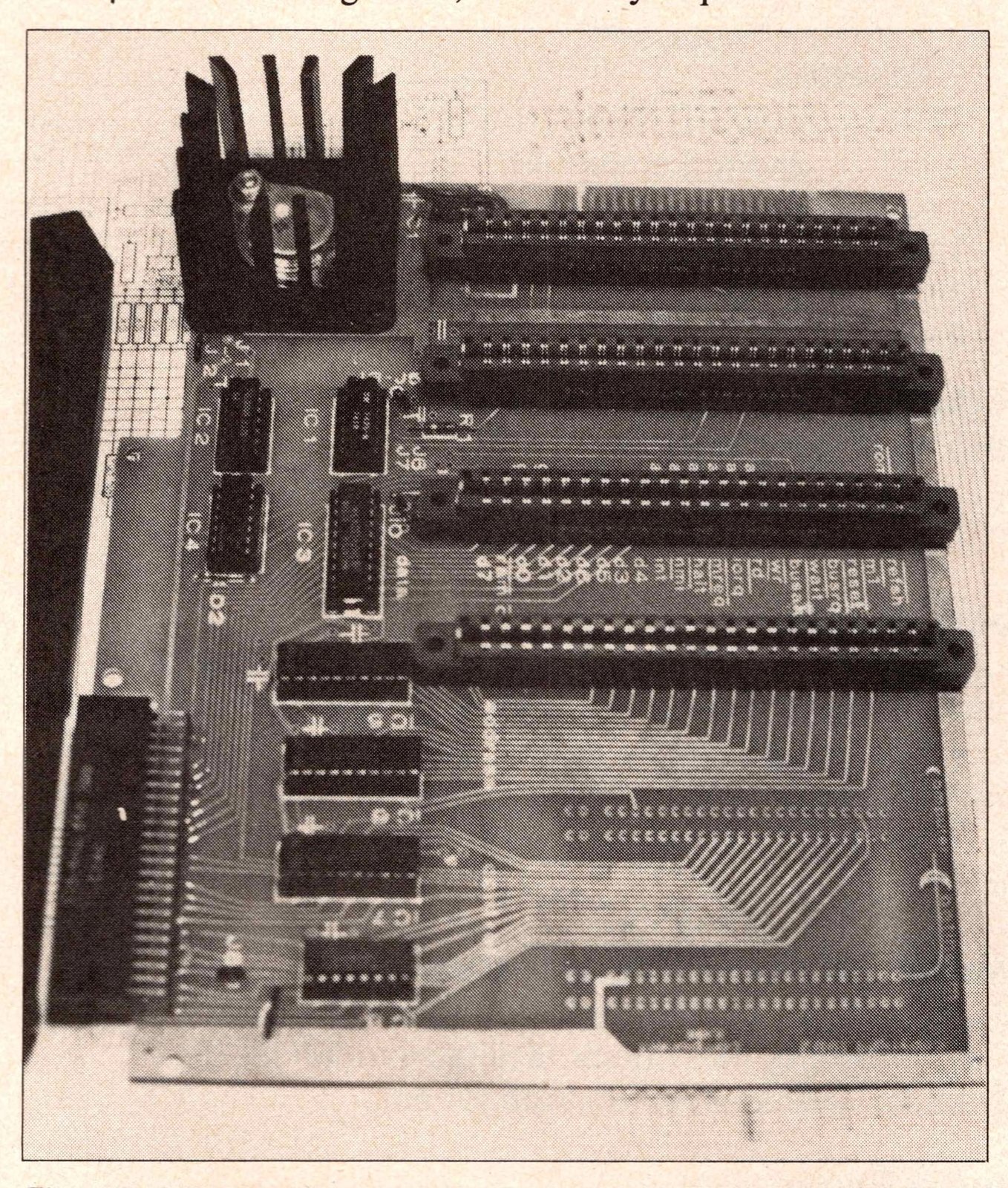
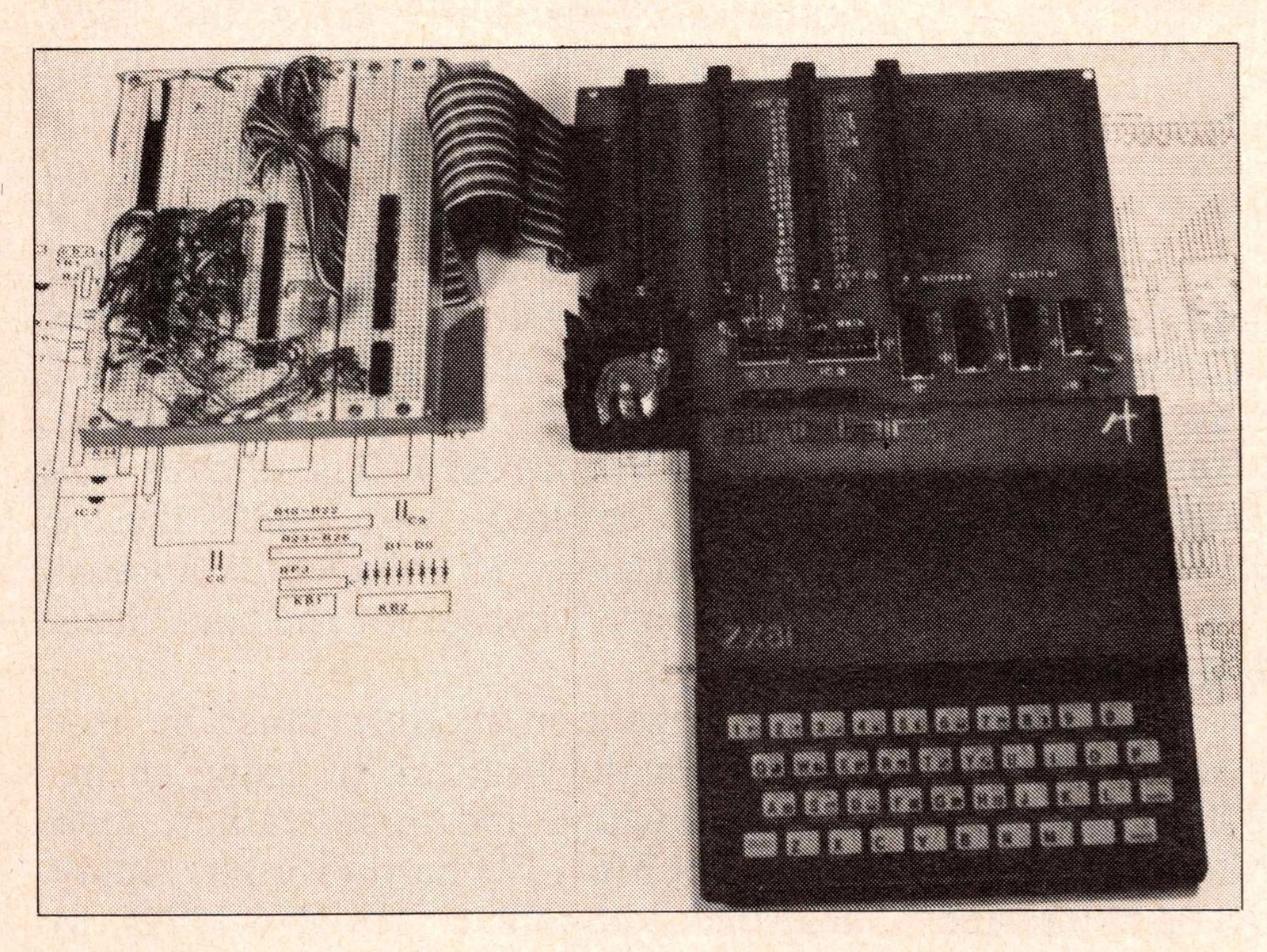
As a whole, I found the Computer Continuum expansion board to be a beautifully executed kit allowing relatively inexpensive yet flexible expansion of the ZX80/1 bus capacity.
Hardware Logic: Permutations and Combinations
SYNC readers can probably come up with many different ways to put together all these system pieces. Focusing on the bus expansion board, several permutations are possible. The Computer Continuum Expansion Board has a flange which allows it to be firmly fixed to a standard ZX81 or T/S 1000 using machine screws threaded into the Sinclair chassis accessory screw holes. Alternatively, a bare ZX81 card may be vertically mounted on the expansion board with the use of a straight-pin 0.1″ connector. In either case, the manufacturer has assumed that the expansion board is not housed in an enclosure.
As discussed above, this can create great video display problems for a system employing a VHF modulator. Computer Continuum currently deals with this issue by recommending that one substitute a UHF modulator or shield the television’s tuner stage. As suggested above, a complementary procedure might be to mount the expansion board in a large aluminum chassis box. This solution sacrifices some flexibility, however, placing some physical limits on the size of PC cards one could use in the accessory slots.
A simpler approach is to construct two aluminum ground plane covers for the top and bottom of the expansion board. The covers can be attached using the screw holes provided on the PCB and connectors. The profile of the expansion board module is kept low, and each peripheral card could be supplied with its own ground plane shielding. With this scheme, one could make use of the mounting flange for a standard ZX81 or T/S 1000.
Connections from the keyboard conversion unit to the expansion board module can be made with a ribbon cable using 0.1″ dual readout male and female connectors (available through Computer Continuum and other sources). The prototyping module and other peripherals could then be attached to the expansion module connector edge. Note that use of an unshielded ribbon cable adds a source of RF emission to the system.
Using the prototype module in conjunction with the expansion board described there has several advantages. THe greatest asset is to be able to build a circuit rapidly on the prototype connectors and then to transfer this circuit to a “hard-wired” soldered or wire wrapped card which can be plugged into the 0.156″ connectors.
In following articles, we will consider the construction of other modules using this system, with the intent of building components for use in educational or laboratory settings. In particular, we will focus on time/frequency and voltage measurements and use of FORTH as a language for control and analysis.