
Introduction
The first three articles in this series have all involved machine code language programming. This article returns to Basic to discuss the PEEK function and the POKE command. Since the 8K ROM is now widely available, both the 4K ROM and the 8K ROM are included in the discussion and program illustrations. Although this is written for the “average” reader, I hope that the information will be useful to the “advanced” reader as well.
The PEEK Function
In the operating manual the PEEK function is described as a function that gives the value of the byte in memory for a given address. The use of the PEEK function is demonstrated in Programs 1 and 2. We suggest that you run the PEEK Demonstrator Program at this point.
 10 PRINT "PEEK DEMONSTRATOR"
 20 PRINT
 30 PRINT "ENTER ADDRESS (0-655
    35)"
 40 INPUT ADDRESS
 50 PRINT
 60 PRINT "LOCATION <";ADDRESS;
    "> CONTAINS:"
 70 PRINT
 80 LET A=PEEK(ADDRESS)
 90 PRINT "DECIMAL#<";A;">"
100 PRINT "HEX#####<";CHR$(A/16
    +28);CHR$((A AND 15)+28);">"
110 IF A=118 THEN GO TO 130
120 PRINT "CHR$####<";CHR$(A);"
    >"
130 PRINT "BINARY##<";
140 LET B=128
150 FOR C=1 TO 8
160 IF A<B THEN GO TO 200
170 LET A=A-B
180 PRINT "1";
190 GO TO 210
200 PRINT "0";
210 LET B=B/2
220 NEXT C
230 PRINT ">"
240 INPUT A$
250 CLS
260 RUN
Program 1: PEEK Demonstrator (4K ROM; 1K RAM)
 10 PRINT "PEEK DEMONSTRATOR"
 20 PRINT
 30 PRINT "ENTER ADDRESS (0-655
    35)"
 40 INPUT ADDRESS
 50 PRINT
 60 PRINT "LOCATION <";ADDRESS;
    "> CONTAINS:"
 70 PRINT
 80 LET A=PEEK ADDRESS
 90 PRINT "DECIMAL#<";A;">"
100 PRINT "HEX#####<";CHR$ INT
    (A/16+28);CHR$ INT (A-INT (A/16)
    *16+28);">"
110 IF A=118 THEN GOTO 130
120 PRINT "CHR$####<";CHR$ A;">
    "
130 PRINT "BINARY##<";
140 LET B=128
150 FOR C=1 TO 8
160 IF A<B THEN GOTO 200
170 LET A=A-B
180 PRINT "1";
190 GOTO 210
200 PRINT "0";
210 LET B=B/2
220 NEXT C
230 PRINT ">"
240 INPUT A$
250 CLS
260 RUN
Program 2: PEEK Demonstrator (8K ROM; 1K RAM)
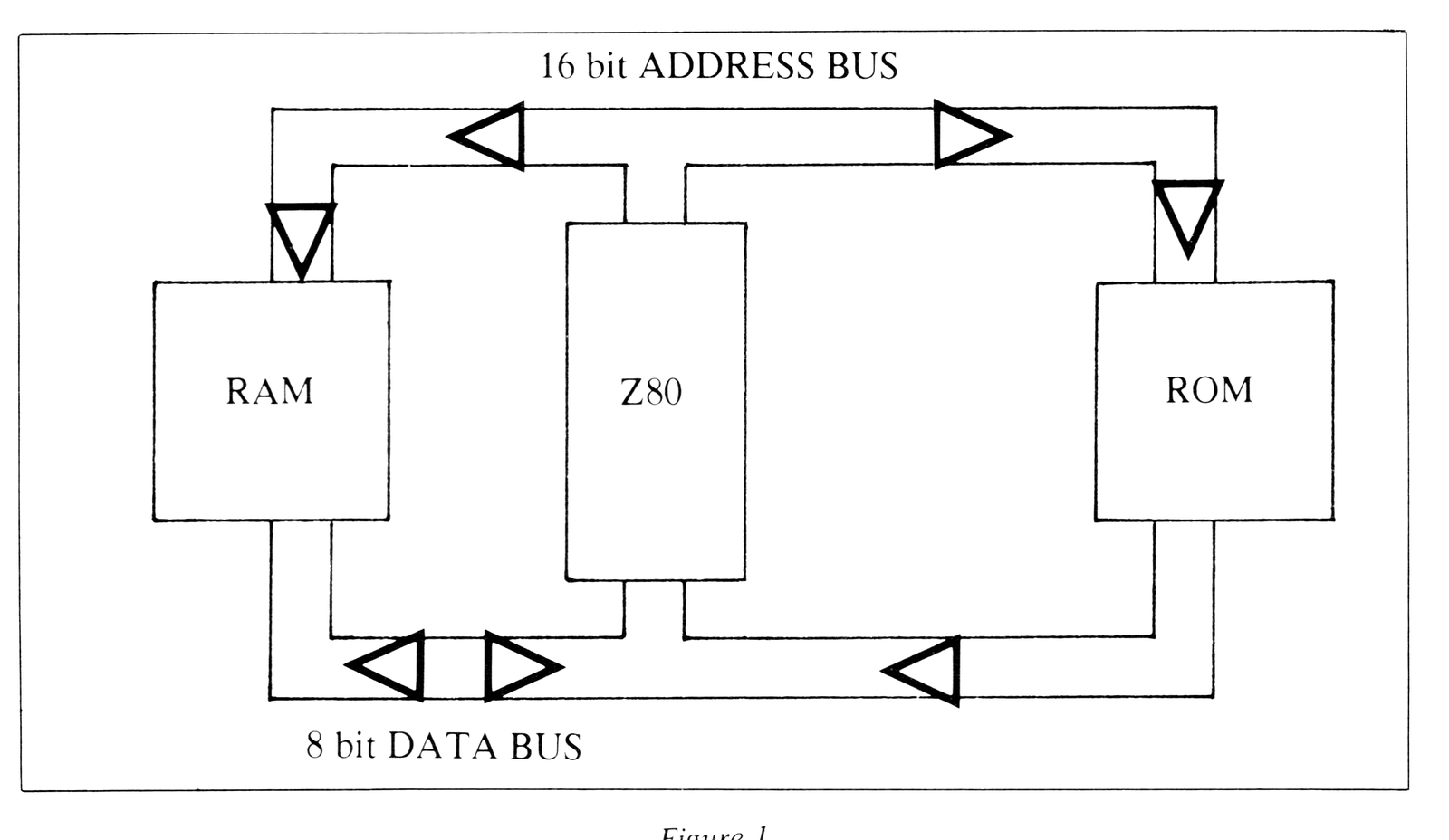
Next we must consider the terms ‘memory’ and ‘address.’ Figure 1 shows a simplified view of how the Z80 (in either a ZX80 or a ZX81) is joined to ‘memory’ by a DATA BUS and an ADDRESS BUS.
The ADDRESS BUS is a track that carries 16 binary signals in parallel from the Z80 microprocessor to the RAM and the ROM. (RAM random accss memory; ROM read only memory.)
Because the ADDRESS BUS of a Z80 system is able to carry 16 binary signals, it is possible to uniquely address 65536 locations in memory.
The addresses for these locations are:
Binary    0000 0000 0000 0000 to 1111 1111 1111 1111
Decimal                     0 to 65535
Hex.                     0000 to FFFF
In the ZX80 and ZX81 systems the operand for the PEEK function must be an address in this range. Most of the locations will give an ‘echo’ of some other location as much of the possible 64K memory is not actually used.
The DATA BUS is a track that carries 8 binary signals in parallel back and forth between the Z80 and the memory. In the case of the ROM, the signals can only pass towards the Z80, whereas in the case of the RAM, the signals can pass in either direction.
Every location in the memory is also capable of holding 8 binary signals and therefore in a Z80 system a ‘byte of data’ can be represented by 8 binary digits which will have the ranges:
Binary    0000 to 1111
Decimal      0 to 255
Hex.        00 to FF
The PEEK function will therefore always return a value in the decimal range 0 to 255.
The Execution of the PEEK Function
Let us now consider how the PEEK function is handled by the Basic interpreter in the 4K and the 8K monitor programs. First, take the case of the execution of the simple program:
4K                   8K
PRINT PEEK(0)        PRINT PEEK 0
This will print the decimal contents of the first location in the memory.
For the 4K program the result will be 33, (LD HL,+dddd); for the 8K, 211. (OUT (+FD),A).
The line scanning part of the Basic interpreter when dealing with this line will execute the PRINT COMMAND ROUTINE since the first token of the line is a PRINT.
In the PRINT COMMAND ROUTINE (4K address: 0972; 8K address: 0ACF) the next character of the Basic line is considered. In the example above the operand for the PRINT command is the expression PEEK(0) or PEEK 0. This expression is then evaluated, and the result of the evaluation is stored as the ‘last value.’
In the 4K interpreter the ‘expression evaluator’ is found at 09E1 (Hex), and the ‘last value’ is the system variable pair 16418 and 16419 (Decimal). If the result is numeric, then this pair of locations will hold a 2’s complement 16 bit number.
In the 8K interpreter the ‘expression evaluator’ is found at 0F52, and the ‘last value’ is the area of memory designated as MEM. A numeric result will always be in the form of a 5 byte floating-point number.
In both cases the evaluation of the operand of the PEEK function is itself a subject of an ‘expression evaluation’ and the forming of a ‘last value.’
Once the ‘last value’ for the expression PEEK(0) or PEEK 0 has been calculated, control returns to the PRINT COMMAND ROUTINE where a call is made to the PRINT LAST VALUE ROUTINE. In the 4K interpreter this routine is at 06F1 (Hex) and the operation of the routine can be demonstrated by using:
RUN USR(1777).This will print the ‘last value’ (in this case 1777 Decimal). In the 8K interpreter the routine is at 15D7 but this cannot be demonstrated easily.
The POKE Command
In the operating manual the POKE command is described as being a command that must be followed by two parameters. The first parameter, which itself can be an expression, must give a ‘last value’ that can be used as an address of a location in the memory. The second parameter, which can also be an expression, must give a ‘last value’ that is in the decimal range 0-255. Execution of the command will write the value of the second parameter into the location addressed by the first parameter.
 10 PRINT "POKE DEMONSTRATOR"
 20 PRINT
 30 PRINT ,"▒▒▒" (3 shift A's)
 40 PRINT ,"▒ ▒" (shift A;
    sp.; shift A)
 50 PRINT ,"▒▒▒" (3 shift A's)
 60 PRINT
 70 PRINT "ENTER A CHARACTER AN
    D NEWLINE,##OR JUST NEWLINE TO S
    TOP"
 80 INPUT A$
 90 IF A$="" THEN STOP
100 POKE PEEK(16396)+PEEK(16397
    )*256+41,CODE(A$)
110 GO TO 80
Program 3: POKE Demonstrator (4K ROM; 1K RAM)
Programs 3 and 4 show values being POKEd into the display file.
10 PRINT "POKE DEMONSTRATOR"
20 PRINT AT 2,8;"▒▒▒" (3 shift A's)
30 PRINT TAB 8;"▒ ▒" (shift A;
   sp.; shift A)
40 PRINT TAB 8;"▒▒▒" (3 shift A's)
50 PRINT AT 6,0;"ENTER A CHARA
   CTER AND NEWLINE,##OR JUST NEWLI
   NE TO STOP"
60 INPUT A$
70 IF A$="" THEN STOP
80 POKE PEEK 16396+PEEK 16397*
   256+41,CODE A$
90 GOTO 60
Program 4: POKE Demonstrator (8K ROM; 1K RAM)
In both programs the center of the box is defined as D-FILE +41. In the 8K ROM program line 80 can be replaced by:
80 PRINT AT 3,9;CHR$ CODE A$which uses the PRINT AT routine at 0918 in the 8K monitor program to calculate the required address.
The Execution of the POKE Command
The syntax for the POKE command is:
POKE (expression) (,) (expression)
and this is checked by referral to the syntax table.
In the 4K ROM the appropriate entry is seen in Listing 1 and in the 8K ROM in Listing 2.
In the 4K ROM the appropriate entry is:
Address  Contents  Comment
07A4     06        The first expression is of type '6'.
07A5     D8        The 'comma'.
07A6     05        The second expression is of type '5'.
07A7     D1        The address of the POKE COMMAND
07A8     09        ROUTINE is 09D1.
In the 8K ROM the appripriate entry is:
Address  Contents  Comment
0C80     06        The first expression is of type '6'.
0C81     1A        The 'comma'.
0C82     06        This time, again type '6'.
0C83     00        No further requirements.
0C84     92        The address of the POKE COMMAND
0C85     0E        routine is 0E92.
In the POKE COMMAND ROUTINEs the actual POKEing is done with the following lines:
     Address   Menmonic
4K:  09DF      LD  (DE),A
8K:  0EA5      LD  (BC),A
Note that in both cases only a single byte is loaded into a memory location.
Here is a simple game that uses the features discussed in the main body of the article.
Pelmanism
This game is usually played with a pack of playing cards. The cards are placed face-down on a table and the player, or players in turn, take two cards and look at them. If the cards are of the same value, then the player scores 1. If the cards are different, then they are replaced.
The game is therefore one of memory. In the programs 5 and 6 below the cards are kept in string C$, and cards that have already been found to be pairs are removed from the string using a POKE operation.
The author would be pleased to see any programs that have been written following the ideas mentioned in this article.
                                    Comment
 10 RANDOMISE                       A good idea.
 20 GO TO 110                       Jump past display.
 30 PRINT "PELMANISM"               Title
 40 PRINT
 50 PRINT "HERE ARE THE CARDS"
 60 PRINT
 70 PRINT C$                        The cards.
 80 PRINT "1.2.3.4.5.6.7.8."        The numbers of the cards.
 90 PRINT
100 RETURN
110 LET C$="? ? ? ? ? ? ? ?"        Eight cards; face-down.
120 DIM A(8)                        Value of cards.
130 LET P=0                         Pair counter initialised.
140 FOR B=38 TO 41                  Will be cards A,B,C & D.
150 FOR C=1 TO 2                    Form a pair.
160 LET D=RND(8)                    A card.
170 IF NOT A(D)=0 THEN GO TO 16     Already assigned?
    0
180 LET A(D)=B                      Assign value to card.
190 NEXT C                          Next of pair.
200 NEXT B                          Next value.
210 GO SUB 30                       PRINT BOARD.
220 GO SUB 370                      INPUT ROUTINE.
230 LET G=F                         Copy number of first.
240 GO SUB 370                      INPUT ROUTINE
250 IF F=G THEN GO TO 230           They were the same!
260 IF NOT A(G)=A(F) THEN GO TO     Are they a pair?
    320
270 LET B=-1+PEEK(16392)+PEEK(1     Find the card in C$,
    6393)*256                       in the variable area.
280 IF PEEK(B+G*2)=0 THEN GO TO     Pair already chosen?
    320
290 POKE B+G*2,0                    Remove the cards from
300 POKE B+F*2,0                    the board.
310 LET P=P+1                       Score the pair.
320 PRINT P;"#PAIRS FOUND, PRES     The status report.
    S N/L"
330 IF P=4 THEN GO TO 420           All over?
340 INPUT A$                        Wait for N/L.
350 CLS
360 GO TO 210                       Back for next try.
370 PRINT "CARD#";                  INPUT ROUTINE
380 INPUT F                         The chosen card, 1-8.
390 IF F<1 OR F>8 THEN GO TO 38     Validity test.
    0
400 PRINT F;"#IS A -#";CHR$(A(F     The value of the card.
    ))
410 RETURN                          Return with card F.
420 CLS
430 PRINT#,"WELL DONE"              The point of success.
Readers who have larger memories might like to increase the number of cards on the board by changing lines 80, 110, 129, 140 (increase 41 to reflect the number of pairs), 160, 330 (number of pairs), and 390.
Program 5: Pelmanism (4K ROM; 1K RAM)
                                    Comment
 10 RAND                            A good idea.
 20 GOTO 80                         Jump past display.
 30 PRINT "PELMANISM"               Title.
 40 PRINT AT 2,0;"HERE ARE THE
    CARDS"
 50 PRINT AT 4,0;C$                 The cards.
 60 PRINT "1.2.3.4.5.6.7.8"         The numbers of the cards.
 70 RETURN
 80 LET C$="? ? ? ? ? ? ? ?"        Eight cards, face-down.
 90 DIM A(8)                        Value of cards.
100 LET P=0                         Pair counter initialised.
110 FOR B=38 TO 41                  Will be cards A,B,C & D.
120 FOR C=1 TO 2                    Form a pair.
130 LET D=INT (RND*8+1)             A card.
140 IF A(D)<>0 THEN GOTO 130        Already assigned?
150 LET A(D)=B                      Assign value to card.
160 NEXT C                          Next of pair.
170 NEXT B                          Next value.
180 GOSUB 30                        PRINT BOARD.
190 GOSUB 340                       INPUT ROUTINE
200 LET G=F                         Copy number of first.
210 GOSUB 350                       INPUT ROUTINE
220 IF F=G THEN GOTO 200            They were the same!
230 IF A(G)<>A(F) THEN GOTO 290     Are they a pair?
240 LET B=1+PEEK 16400+PEEK 164     Find the card in C$,
    01*256                          In the variable area.
250 IF PEEK (B+G*2)=0 THEN GOTO     Pair already chosen?
    290
260 POKE B+G*2,0                    Remove the cards from
270 POKE B+F*2,0                    the board.
280 LET P=P+1                       Score the pair.
290 PRINT P;"#PAIRS FOUND, PRES     The status report.
    S N/L"
300 IF P=4 THEN GOTO 400            ALL OVER?
310 INPUT A$                        Wait for N/L.
320 CLS
330 GOTO 180                        Back for next try.
340 PRINT
350 PRINT "CARD#";                  INPUT ROUTINE
360 INPUT F                         The chosen card, 1-8.
370 IF F<1 OR F>8 THEN GOTO 360     Validity check.
380 PRINT F;"#IS A -#";CHR$ A(F     The value of the card.
    )
390 RETURN                          Return with card F.
400 CLS
410 PRINT TAB 8;"WELL DONE"         The point of success.
Program 6: Pelmanism (8K ROM; over 1K RAM)
Note that in this program the first card is at: “1+PEEK 16400+PEEK 16401*256”