
Through the telescope, Saturn is the beautiful ringed planet that never fails to impress – be it beginner or expert alike. This program does the next best thing and probably represents the most accurate computer simulation of Saturn ever attempted on a home micro. It is possibly superior to many mainframe efforts, with the known exception of NASA’s Planetary Laboratories! [Editor: Remember, though, that this is in 1983!] David Solly.
It features a full screen and solid image, with all hidden lines deleted and the globe and ring system drawn accurately to scale. The user may tilt the planet and ring system at any angle up to 90. If 0 is input, the planet is drawn as viewed directly over its equator with the rings shown edge-on. If 90 is Input, a polar view is presented with the ring system completely encircling the planet. You may select a northern or southern aspect for the tilt. An input of “s” will show the underside of the rings and the equator and visible pole correct for this aspect.
The Sequence of drawing the planet is as follows:
1) Check image size; rescale if tilt > 43
2) Draw globe correcting apparent oblateness for tilt
3) Draw equator correcting apparent oblateness for tilt
4) Draw semi-transparent ring system
5) "Trace" nearest edge of rings across globe according to N/S aspect
6) Draw Cassini Division through ring system: clock-wise for N aspect
7) Delete Cassini Division if "behind" planet
8) Plot visible pole position correcting apparent oblateness for tilt
The program contains an option to copy the completed picture to the ZX printer to Save the image to tape with the Screen$ command. The latter is simplicity itself – it is only necessary to press “p” (for picture) and start the recorder to save the picture you have created. The angle of tilt is automatically saved in the file name; e.g. “sat 23.4” Screen$ and the Spectrum (or T/S 2068) will search and display the appropriate image from off of the tape.
Unlike some uninformed computer presentations of this planet, the globe is not circular (except for the polar view) and so the circle command cannot be used to draw the planet. This oval (or correctly termed oblate spheroid) shape is due to Saturn’s rapid axial rotation in 10h 14m (Saturn’s day), causing the equatorial “bulge” and polar “flattening”. The Spectrum draws the globe and ring system via the plot command, using a rapid ellipse routine. In the case of the globe, the reduction in oblateness, as it is called, from 10 percent to zero (full circle) is applied progressively through the change of tilt from 0 to 90. Similarly, the position of the equator and visible pole are correctly located according to the tilt of the planet and the oblateness as presented.
As seen from Earth, the appearance of the planet is limited to a maximum tilt of 26.73 (i.e. Saturn’s axial tilt to the orbit about the Sun) in both north or south directions, plus or minus 0.49 depending on the relative position of Earth and Saturn in their orbits at the time. Thus, any tilt in excess of 28 will represent a viewpoint other than from Earth!
The rem statements show the general structure of the program, in the case of drawing the globe and rings. It is only necessary to calculate the outline of one quadrant sequentially. Such a routine ensures the drawing is executed rapidly, with the minimum of calculation to slow the program down. In the case of the routine to draw the Cassini Division in the ring system, I have chosen t plot one complete ellipse and you will not how relatively slow, though satisfying, this proves to be.
Because the whole of the above program relies on the ability to draw ellipses rapidly, I have included as an addendum routine the short program called Solid Ellipse. It can easily be incorporated into your program if you wish draw these precise shapes. The variable y is used here to control both the vertical y co-ordinate plot position and the maximum radius of the ellipse (called the semi-major axis). The routine is short enough to “tinker with” and find out precisely how it works, perhaps with your own value in place of y in lines 110 and 120.
This article first appeared in: Popular Computing Weekly. Greenwich, London, England. Sept. 22-28, 1983 by Maurice Gavin
  10 REM The Rings of Saturn ©
  20 LET sc=1: BORDER 0: PAPER 0: INK
6: GO SUB 600
  30 CLS : PRINT "Saturn ©";
  40 INPUT "Tilt (0O to 90O)> ";z
  50 IF z>43 THEN LET sc=.66
  60 INPUT "N or S Tilt (n/s) > ";a$
  70 LET ob=1.1*z/100
  80 LET oe=.89+(.11*ob)
  90 IF a$="s" THEN LET z=-z
 100 PRINT TAB 20;"Tilt=";z;"O"
 110 LET e=1/SIN ((.1+z)/180*PI)
 115 LET p=COS ((.1+z)/180*PI): IF
a$="s" THEN LET p=-p
 120 LET x=255/2: LET y=88
 130 LET r=54*sc: LET h=126*sc
 140 GO SUB 360
 150 REM  draw ring system
 160 FOR f=0 TO 1.58 STEP .01
 170 LET c=INT (SIN f*h)
 180 LET d=INT (COS f*h/e)
 190 PLOT x+c,y+d
 200 DRAW -c/3,-d/3
 210 PLOT x-c,y+d
 220 DRAW c/3,-d/3
 230 PLOT OVER 1;x-c,y-d
 240 DRAW c/3,d/3
 250 DRAW OVER 1;0,1
 260 PLOT OVER 1;x+c,y-d
 270 DRAW -c/3,d/3
 280 DRAW OVER 1;0,1
 290 NEXT f: GO SUB 460
 300 REM menu/COPY/CONT/SCREEN$
 310 PRINT #0;"Press x to COPY, c to
CONTinue"
 320 PRINT #1;TAB 6;"s to SAVE ""sat
";STR$ z;"""": PAUSE 0
 330 IF INKEY$="x" THEN COPY : INPUT
"": GO TO 310
 340 IF INKEY$="s" THEN INPUT "": SAVE
"sat "+STR$ z SCREEN$ : INPUT "": GO TO
310
 350 RUN
 360 REM  draw oblate globe
 370 FOR f=0 TO 1.42 STEP .019
 380 LET a=INT (SIN f*r)
 390 LET b=INT (COS f*r*oe)
 400 PLOT x+a,y+b: DRAW 0,-b*2
 410 PLOT x-a,y+b: DRAW 0,-b*2
 420 NEXT f
 430 REM  draw equator
 440 FOR f=PI*.5 TO PI*1.5 STEP .1:
PLOT OVER 1;x+SIN f*r,y+COS f*r/e: NEXT
f: RETURN
 450 REM  draw Cassini Division
 460 LET cd=2.1
 470 FOR f=0 TO PI*2 STEP .03: PLOT
OVER 1;x+SIN f*r*cd,y+COS f*r*cd/e:
DRAW OVER 1;2,0: NEXT f
 480 REM  delete CD behind globe
 485 IF ABS z>26 THEN GO TO 570
 490 FOR f=0 TO 1.42 STEP .01
 500 LET a=INT (SIN f*r)
 510 LET b=INT (COS f*r*oe)
 520 IF a$="s" THEN LET b=-b
 530 PLOT x+a,y: DRAW 0,b
 540 PLOT x-a,y: DRAW 0,b
 550 NEXT f
 560 REM  plot visible pole
 570 PLOT OVER 1;x,y+r*p*oe
 580 RETURN
 600 REM  create degree sign
 601 POKE USR "o", BIN 00111000
 602 POKE USR "o"+1,BIN 01101100
 603 POKE USR "o"+2,BIN 01101100
 604 POKE USR "o"+3,BIN 00111000
 605 POKE USR "o"+4,0
 606 POKE USR "o"+5,0
 607 POKE USR "o"+6,0
 608 POKE USR "o"+7,0
 609 RETURN
9000 REM  save routine
9010 SAVE "Saturn" LINE 1
5 PRINT "solid ellipse ©"
10 REM by Maurice Gavin
20 INPUT "Tilt ";z: PRINT
"Tilt=";z;CHR$ 130
30 LET e=SIN ((.1+z)/180*PI)
40 LET x=255/2: LET y=175/2
100 FOR f=0 TO PI/2 STEP .012
110 LET a=INT (SIN f*y)
120 LET b=INT (COS f*y*e)
130 PLOT x-a,y+b: DRAW 0,-b*2
140 PLOT x+a,y+b: DRAW 0,-b*2
150 NEXT f
200 OVER 1: PLOT 0,y: DRAW 255,0: PLOT
x,0: DRAW 0,175: OVER 0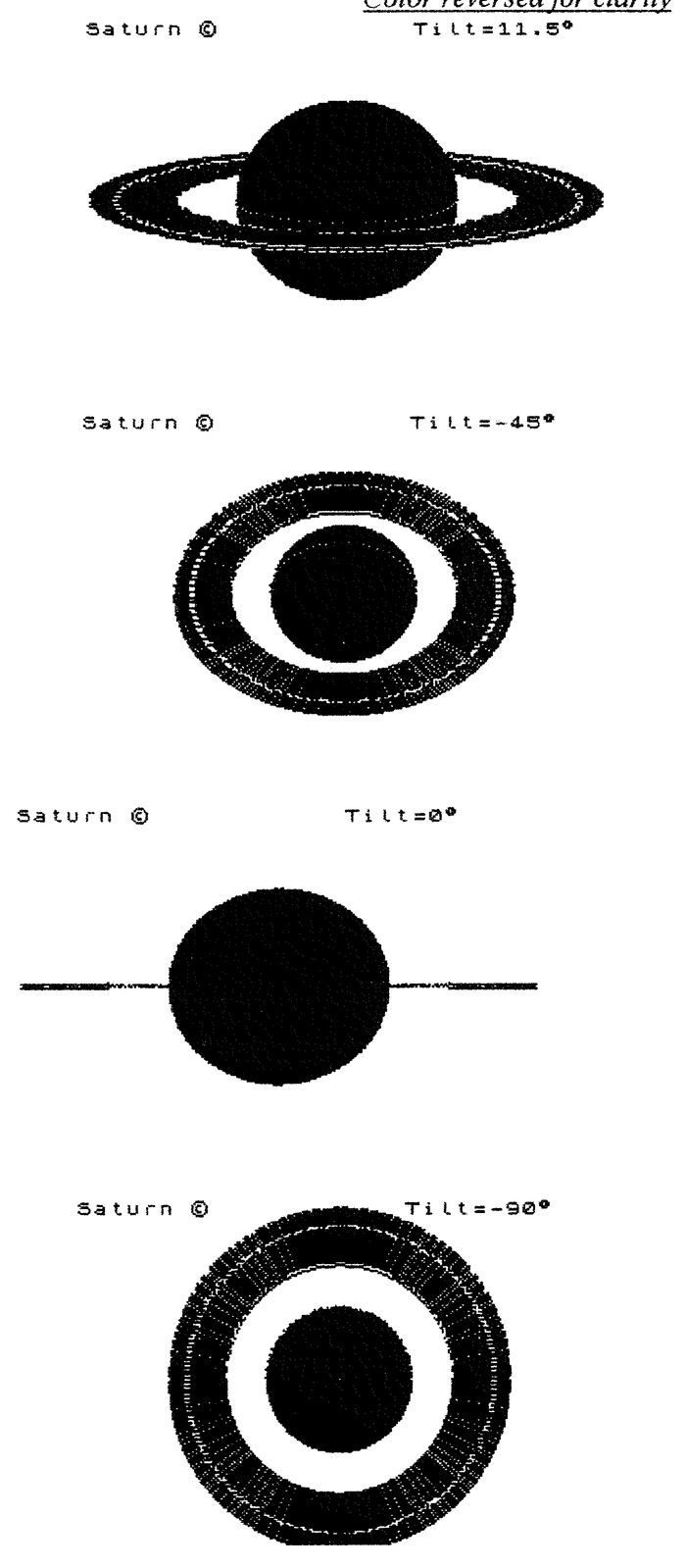
Note: Type-in program listings on this website use ZMAKEBAS notation for graphics characters.