
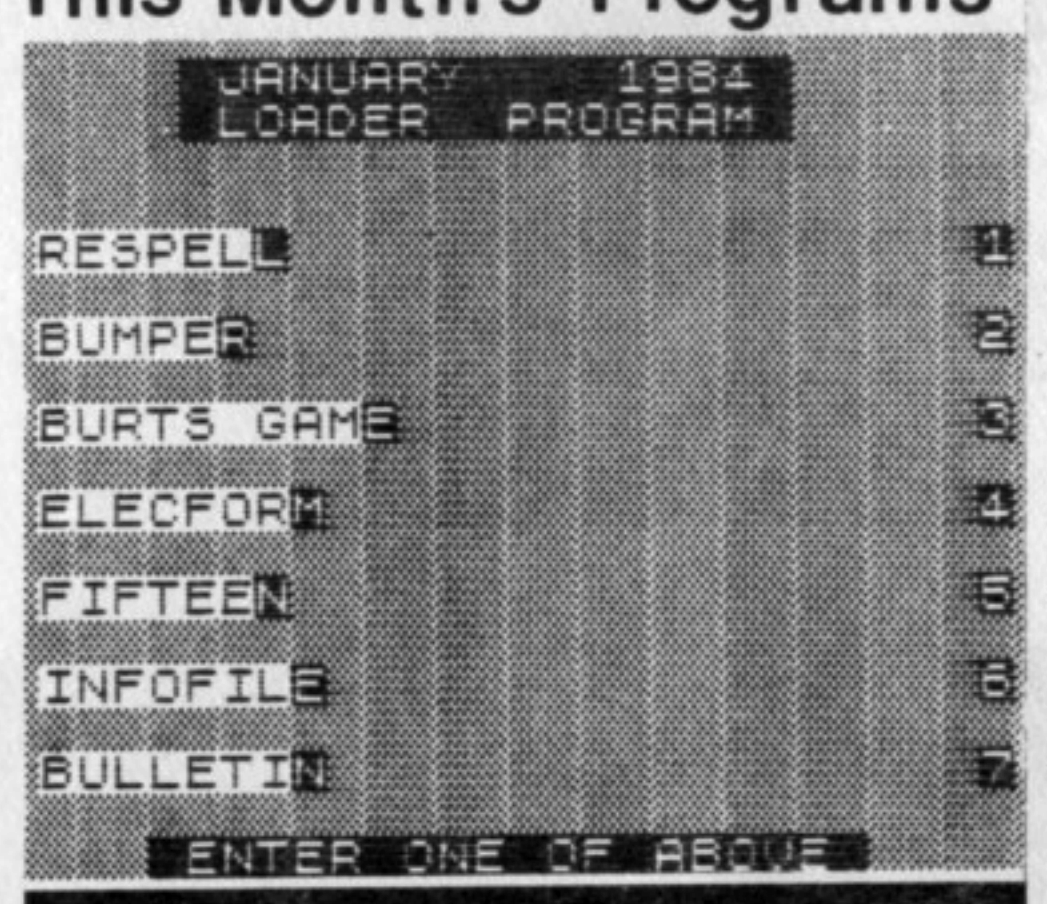
There are 7 programs on this month’s cassette, not counting the LOADER program.
The program names are as they appear on the above menu, which is similar to what will appear on the screen when the LOADER program is running.
Each program is recorded only once on each side of the cassette. The first programs that can be LOADed will be of the small size followed by the larger sized programs. The other side of the cassette is a duplicate of the first side.
For you new subscribers who aren’t familiar with LOADing procedures for cassette programs, follow these directions:
A – Make sure that the volume setting of the recorder is set at about 80 % maximum.
B – If you have a Bass and/or Treble control on the recorder, make sure the Treble is at maximum and the Bass is at minimum.
C – To LOAD the first program, type in LOAD “” and press the ENTER key on the computer. Then press the PLAY button of the recorder. The lead time on the NOV/83 cassette is about 10 seconds until the first program begins.
The time needed to load the LOADER program is 1 minute & 40 seconds. When the program is loaded, a list of this month’s programs will appear automatically.
Shut off the recorder when the LOADER program is loaded. Any of the listed programs can now be loaded into the computer by pressing the appropriate number on the keyboard and then pressing the PLAY key on the recorder. The loader program loads by searching for the name of the program you want and ignoring any of the other programs it may encounter along the way.
If you want to go directly to a program without waiting, we suggest you first find the tape location of the beginning of each of the programs with your recorder counter. This can be done as you go through the programs the first time, noting the tape location on the counter as each one is being loaded.
If you don’t have a counter, approximate the tape position with the fast forward key just before where the program would start, and then LOAD the program with the name of the program using the format LOAD “NAME OF PROGRAM”.
Some of our subscribers have told us that they could not get the programs to load by name but they would load with the double quotes. Others have told us that the loader program wouldn’t load certain programs. Most have told us that all the programs could be loaded either way. Every customer’s cassette is made from the same master tape, so the programs on everyone’s cassettes are identical. We feel it is most probably a problem of volume adjustment or recorder design. We have noticed this situation on some of our recorders.
PROGRAMS (all programs this
month are self-running
– program’s name has inverse
last character if self-running
RT = run time/LT = load time)
There is an approximate 7 to 20 second pause between programs
“RESPELL” LT = :31
Here is a routine that emulates the string search and replace routine used in many word processors. Enter a sentence or paragraph of text and then enter a word you want changed.
Enter what you want the word to be changed to and the new text will be displayed.
“BUMPER” LT = :50
A fascinating game of skill where the player tries to remove all the graphic stars by striking them with his moving squot. The game is over if the squot strikes the border at the edge of the screen.
The game starts after the screen fills with stars by pressing the down-arrow key. The arrow keys control the direction of the squot. A final score is displayed.
“BURTS GAME” LT = 1:25
The game of Baccarat! The game starts with you and the bank having $100,000. $10,000 is the maximum bet. After placing your bet, the computer will deal two cards each to you and the bank. Your cards will be both face up. The bank will have one up and the other down.
The object of the game is to get nine or as close to nine as possible. Aces are counted as 1, Court cards and 10 as 0 and the other number cards as their value. If the total of the cards exceed 9, 10 will be subtracted from their value.
You and the bank have the option to be dealt one aditional card if needed. A draw cycles to the next hand.
The program has a routine that simulates actual cards being removed from the deck so that if you can keep track of the cards dealt, you can determine what cards are left.
“ELECFORM” LT = 2:01
This program will find use for students and electrical engineers. Conversion routines for OHM’s Law, Watts, Reactance, Inductance and Impedance are all included.
“FIFTEEN” LT = 1:28
The old fifteen game most of us have had as a child. Remember the little plastic square with the movable letters?
Use the arrow keys to re-position the letters in forward order. You have the option of
- STRAIGHT – letters in order to be moved one space to the left.
- REVERSE – letters backward
- RANDOM
The computer keeps track of your moves and it may take over 1000 moves to complete the game.
“INFOFILE” LT = 2:09
This is a data-base program designed to store information regarding topics of interest found in magazine articles. Data is entered in three fields per item: publication name, date & page number and the necessary text to describe the article.
Two powerful routines are included – a keyword search to locate the data and a word processor editing routine.
The program puts all the data into a single string. There is no dimensionalizing at all. The keyword search scans the string and pulls out the necessary data block. If the block is incorrect, it will continue the scan and repeat the process.
In the editing mode, only the text has the word processing mode with the text displayed on the screen and a blinking cursor over the first character. The control codes are as follows:
- Shift arrow moves the cursor one space in the arrow’s direction.
- Shift B brings cursor to beginning of text
- Shift N brings cursor to end of text
- Shift Y brings cursor 8 spaces to the right
- Shift I inserts one blank space to the right of the cursor and pushes the remaining text to the right
- Shift D deletes one character to the right of the cursor and pulls all the remaining text to the left
- Shift E returns to the menu
The keyword search mode from the menu allows printout.
“BULLETIN” LT = 2:10 RT = 7:47
Our bi-monthly Bulletin Board Program. “P” will PAUSE the scroll, “B” will move it backward and “F” will move it forward again.