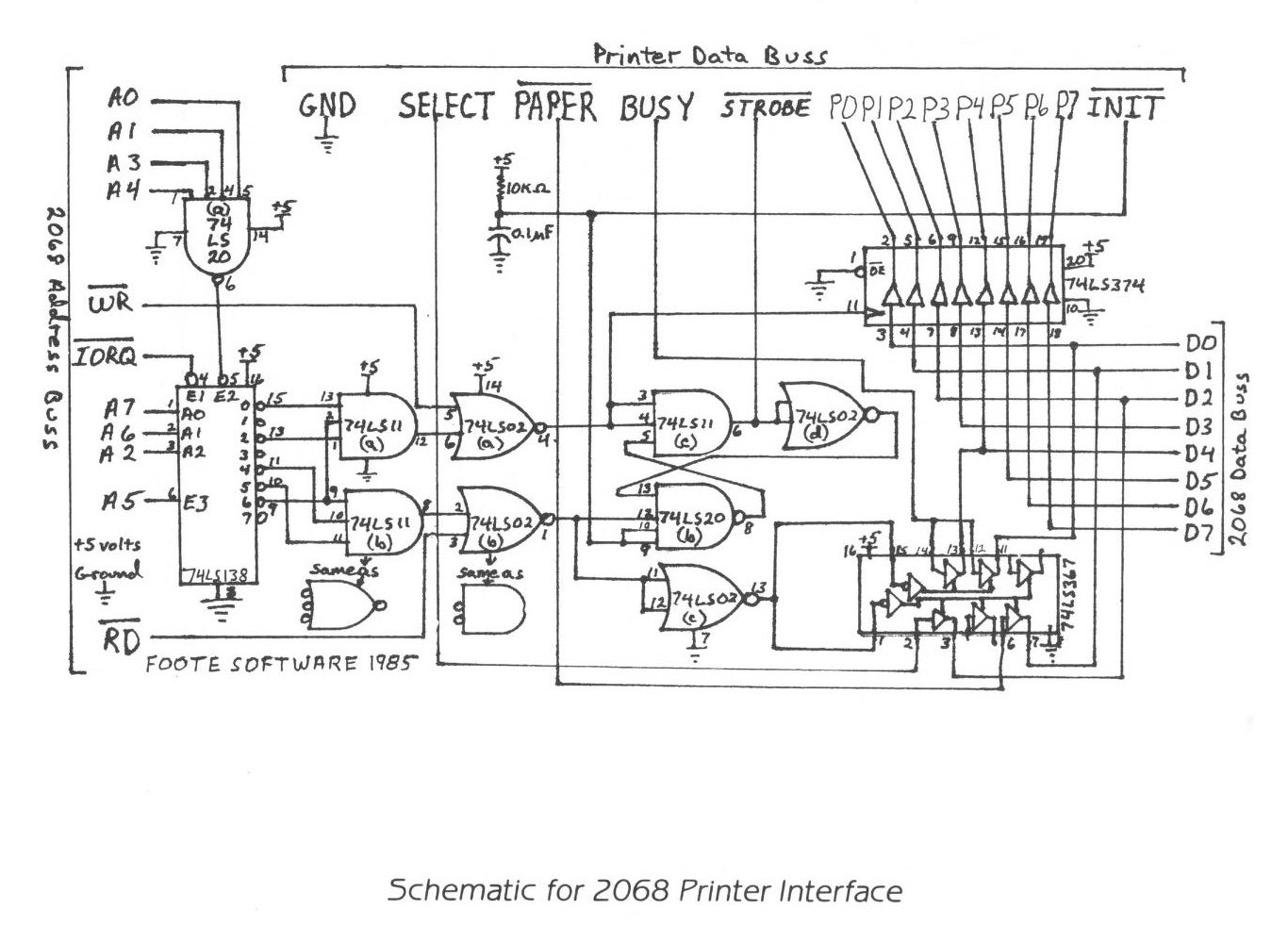
This month I will discuss building a printer interface for the 2068. With all the software out on the market for the 2068, its hard to figure out what’s the best route to take in deciding which printer interface to buy for the best variety of good programs. The interface described here will work with almost all of them – either Spectrum or 2068 type.
Once again, this is a fairly advanced project and should be attempted by only those who have had lots of experience soldering and working with digital circuits.
The two most popular interfaces are the Aerco printer interface from here in the states and the Tasman interface from England. Tasman has two types of interfaces out on the market named type ‘A’ and type ‘B’. The type ‘B’ is the one that is sold now, but there is still alot of the type ‘A’ software out there.
Each type is decoded to a specific I/0 port (0-255) of the computer for both sending data to the printer and receiving the status of the printer (whether its busy or not). The different ports are as follows:
           port
type:        IN    OUT
Aerco       127    127
Tasman 'A'   63    123
Tasman 'B'  191    123
To design a printer interface that will emulate any of these other available interfaces, you need to be able to decode all of these I/O ports.
Address lines AO-A7 are used to select any one of the 256 possible I/O ports. Eight address lines, 2^8=256. To select port 127, all address lines would be logic 1 with the exception of A7 being logic 0.
The address lines are weighted as follows:
128  64   32   16   8   4   2   1
A7   A6   A5   A4  A3  A2  A1  A0
     64 + 32 + 16 + 8 + 4 + 2 + 1 = 127
Hence, port 127 is selected when A0-A6 are logic 1 or true. For the rest of the ports in the table above, you can see that the only address lines that change are A2, A6, and A7 while AO, Al, A3, A4, and A5 all don’t change. With just A2, A6, and A7 changing, the following table can be derived:
AO-A1, A3-A5 are logic 1
   A2 A6 A7    port
0   0  0  0     59
1   0  0  1    187
2   0  1  0    123 <
3   0  1  1    251
4   1  0  0     63 <
5   1  0  1    191 <
6   1  1  0    127 <
7   1  1  1    255
Try adding up the weight of each address and see if you come up with the ports listed above.
Hardware wise, the above table can be implemented by using a 74LS 138 – a 3 to 8 line decoder. This chip also has several enables on it which makes it handy for taking care of other control lines.
The other addresses are ‘NANDed’ together using a 74LS20 4-input NAND gate and tied to one of the enables of the decoder along with /IORQ and A5. The outputs are ‘NORed’ using a 7411 3-input NAND gate and then are ‘ANded’ with their respective WR and RD lines using a 74LS02 NOR gate. These two outputs go into a S-R flip-flop using left over gates which strobes the printer.
The chip count is only six in this project and will allow you to drive a parallel printer using any software that contains the printer driver built in such as TASWORD II, MSCRIPT, MASTERFILE, TEXTWRITER+ 64 and others for either the Aerco or Tasman interfaces.
Next month I will talk about the signals the printer requires and give a circuit board layout.