Authors
Publication
Pub Details
Date
Pages
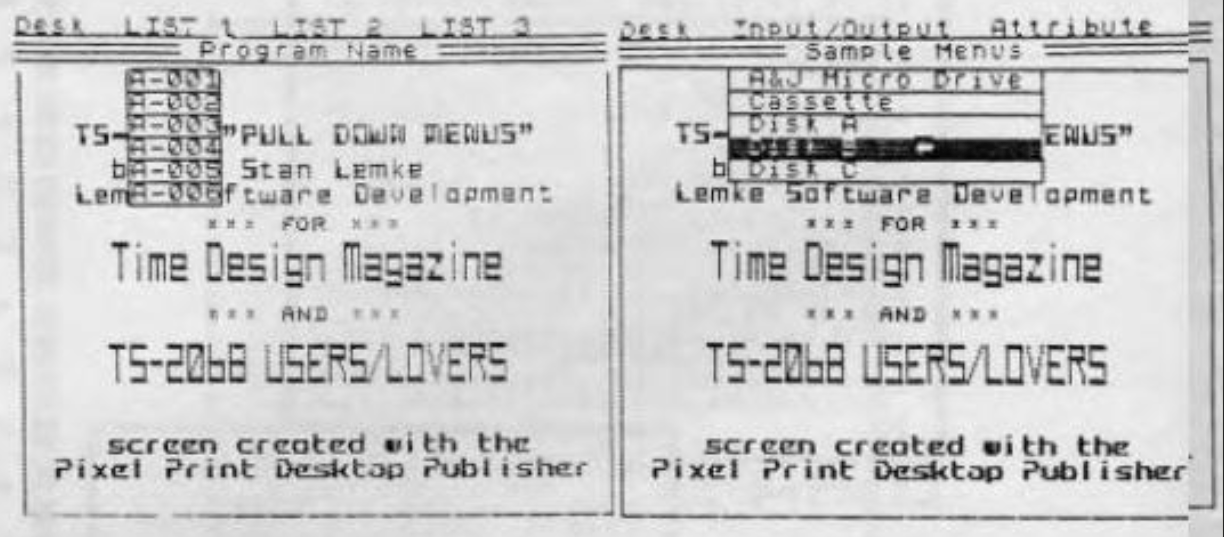
One of the advantages the newer, bigger computers like the ATARI ST and AMIGA have over the TS2068 class of computers is the “User Interface” that their bigger memory and high speed affords them…specifically, such things as a mouse to sweep a cursor around the screen, and a really nice menu structure that “drops down” onto the screen when your cursor touches the menu line, and then magically disappears when you make your selection. This allows your screen to be free of most of the menu until you need it. Even then, by planning your menu layout correctly, you can show just the items the user wants for a specific operation and be able to describe the selections more fully than with the usual short word (at most), or a single letter as is more often the case.
Well, with all these advantages to “drop-down” menus, I decided to see what I could do as far as creating a TS2068 drop-down menu utility. The following program is just that, a general drop-down menu utility that will allow others to create (very easily) the type of menus found on the more expensive computers. It is also a neat little demo program that allows those who have not seen these menus in operation to get a feel of what they are like.
The utility displays 2 lines at the top of the screen, the first has a list of menu (header) topics, the second displays the program title/name. Using the LEFT joystick, the user moves a small arrow UDG sprite around on the screen. When the arrow cursor is placed on any of the menu headers, a set of menu options drops down onto the screen below that menu header. As the cursor is moved over the options, each turns INVERSE VIDEO…and then TRUE VIDEO when the cursor moves off that option. Pressing the fire button activates the selection. Moving the cursor off of the menu options (and pressing FIRE) removes the menu list, and replaces the original screen.
The menu headers and options are defined in DATA statements, in lines 9005 thru 9025. In the demo, when the DESK option is selected, a Copyright message about the program is displayed (see line 9440). This Copyright message can be user-defined…up to 3 lines and 23 characters per line. 3 more menu headers can be placed on the top line. Note: You must be careful designing these headers, as the program places two spaces between the header strings. One of these may be a “null string” (empty, two apostrophies placed side-by-side, indicating no more headers).
Menu selection are defined using DATA statements in lines 9015, 9020, and 9025. Six selections are available for each header, with the option of using null (empty) strings as above, to indicate no more selections.
Let’s take a look at the program listing. The program is set up ready to be compiled with TIMACHINE (from Novelsoft). The program will work just as it is in BASIC too. Program execution begins at line 9000. Lines 9000 to 9090 are program initialization.
Listing A is a copy of the BASIC program in demo form. The TIMACHINE compiler directives are already set up so you can compile the demo. Although the program will work in BASIC, it is S-L-O-W!
Following the program listing is the CK-TYPE output for debugging the program (Listing B..see the May/June ’87 issue of TDM). Listing C is the TIMACHINE output. Listing D is an excerpt from a sample menu that shows how to set up a 2 header menu.
Other Program Notes: Line 9066 contains the bytes for the arrow cursor UDG. Lines 9290 to 9360 perform the cursor movement. Line 9355 contains a PAUSE 4 to control cursor speed.
I hope you enjoy playing with this demo, and maybe someday we’ll see some TS2068 programs using real drop down menus.