
In “spread sheet” programs, one of the most well-known of which is Visi-Calc, we expect to be able to handle budgeting, whether personal or for small businesses, to work out complex mathematical problems, and to have the flexibility to accomplish other tasks such as calculating compound interest tables and recording the answers. Vu-Calc successfully meets these requirements.
Vu-Calc, developed for the Timex/Sinclair 1000 with 16K RAM, displays a table of 36 columns (numbered 01 through 36) and 26 rows (designated A through Z). Each of the 936 boxes can store up to eight characters, alpha or numeric. The screen displays 27 boxes at a time, three columns by nine rows. The “window” to the table scrolls rapidly, however, in any of four directions, allowing easy visual access to the entire table.
The user may input up to 40 formulas with up to 32 characters. Any of the boxes in the table can be used to store the answers. We can include in the formula:
1) The four basic arithmetic operations and exponents.
2) References to any of the boxes in the table, from the very first (upper left) box “A01,” to the last (lower right) box, “Z26.”
3) Constants such as A, B, X, Y, or Z, which can be assigned different values (these are particularly helpful in answering “what if”-type questions).
For any of the formulas, it is possible to generate a series of answers for each of the boxes in a given row or column. The answers can either be “absolute,” i.e., the formula will be repeated with the same box numbers therein, or “relative,” i.e., the box numbers are incremented by 1 as the program progresses to each consecutive box. Thus, if the formula for A02 is “A01+10”, under the “relative” option each box through A36 will contain a value that is 10 greater than the previous box.
When the program is LOADed, the main menu appears and gives the user the options: to begin with an empty table, to continue working with the existing table with the information contained thereon, to save the program on the cassette with the existing table data, or to save the program with no table data.
The program has a number of helpful options, such as repeating formulas already typed in for other boxes, moving the cursor immediately to the first box (A01), and, for those users who have a printer, to print the contents of the screen.
SOFTWARE PROFILE
Name: Vu-Calc
Type: Spreadsheet
System: 8K ROM; 16K RAM
Format: Cassette
Summary: Potentially a valuable tool for many owners of the T/S 1000
Price: $19.95
Manufacturer:
Timex Computer Corporation
Waterbury, CT 06725
Uses for VU-CALC
Vu-Calc is helpful in applications where the user must prepare spread sheets or matrixes which require mathematical operations. Here are some examples:
1) Let’s say that you want to calculate the cost of 15 different items for each of the next 33 years (through the year 2015), assuming an annual inflation rate of 9 percent. We will list the general steps necessary to do this so you can get a clearer picture of how Vu-Calc works:
a) Enter the names of the 15 products in the first column, in boxes C1 through Q1.
b) Enter the year in the second row of the program, putting 1982 in B02, 1983 in B03, and so on, until 2015 in B35.
c) Enter the current cost of each of the items in the second column, in boxes C02 through Q02.
d) For Box C03, enter the formula “C02*1.09”. Use the “relative” option to extend this through C35, effectively compounding the cost for each of the next 33 years at a 9 percent increase.
e) Repeat Step 4 for the 14 other products.
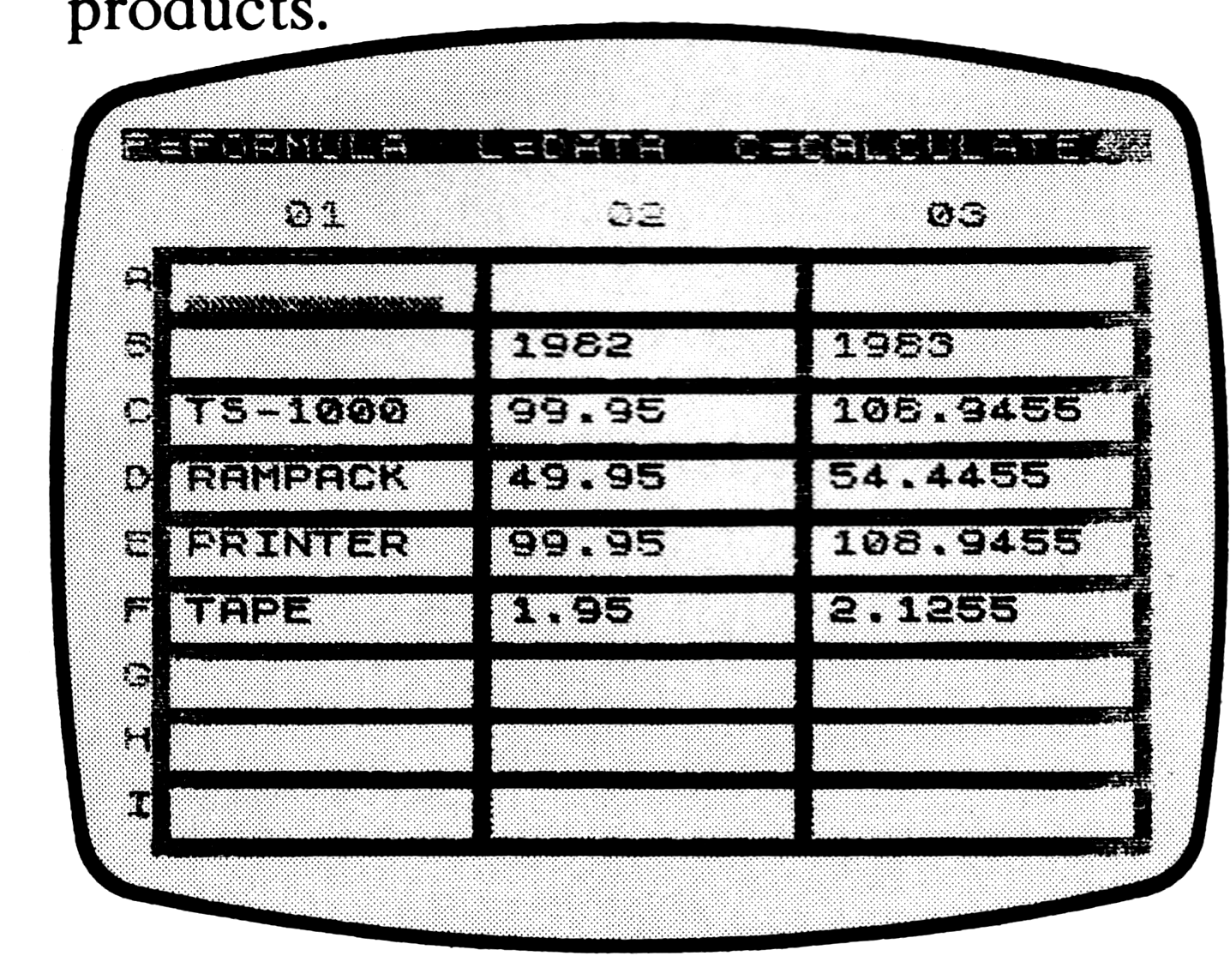

f) Hit “C” and the data will be calculated and posted to the appropriate boxes in the table. See the sample printouts below.
2) Another use for Vu-Calc is keeping track of income and expenses, whether for personal or business use. For example, a dozen or more line items could be kept on each row, identified in the first column by a letter. The other columns could represent months, weeks, or days.
Although the limitation of 32 characters per formula makes it impossible to add 12 months to get annual totals, sub-totals such as quarterly data can be used. These can be added to derive yearly totals.
The formulas can be set up to add horizontally for line item totals and vertically for the period totals.
3) Using a similar format, Vu-Calc could be used for individual budget control. Budgeted amounts for various types of expenditures could be posted to every third column. Then actual information would be entered, as it become available. Formulas could be entered to calculate, for every third column, the amount, for each item, by which the budget was exceeded or (if you are thrift) undercut.
4) We could calculate the value of various investments at varying rates of appreciation or depreciation.
In summary, Vu-Calc is potentially a valuable tool for many owners of the Timex/Sinclair 1000. The uses mentioned here merely scratch the surface. Other jobs to which Vu-Calc may be assigned are limited only by the creativity and imagination of the user.
