
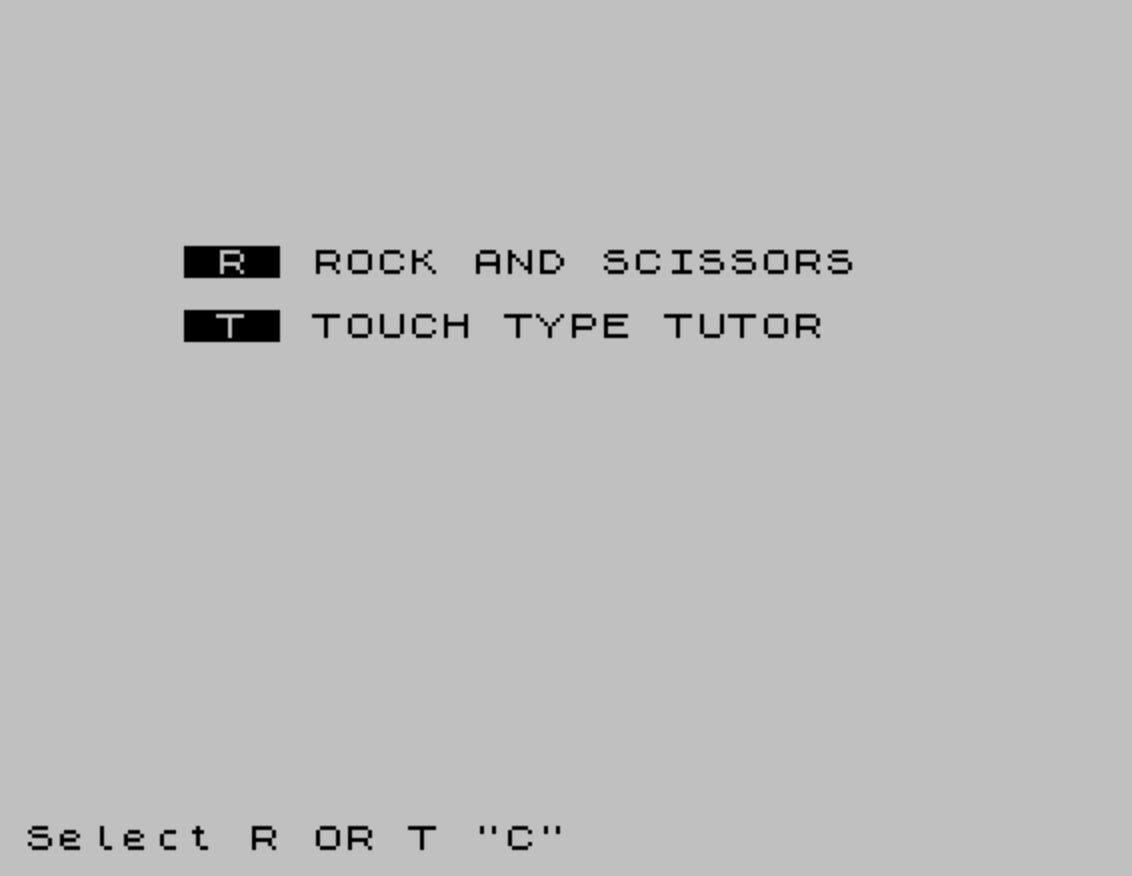
This program packages two games in one: a Rock-Scissors-Paper game played over 10 rounds against the computer, and a keyboard-location tutor that tests the player’s ability to find keys on a QWERTY layout. The Rock-Scissors-Paper game uses INK coloring and FLASH attributes to highlight results, tracking scores for both the player and the computer across rounds. The keyboard tutor stores each key’s character and screen position as a five-character string in a 36-element string array, encoding row and column coordinates directly in the data so a single AT expression can position the flashing letter on screen. A central menu at line 2000 uses POKE 23658,8 to enable the INPUT statement to accept uppercase letters regardless of the keyboard shift state, then routes the player to the chosen game.
Program Structure
The listing is organized into three logical blocks plus a shared menu:
- Lines 30–320 – Rock-Scissors-Paper game (10 rounds, score tracking)
- Lines 1000–1240 – Keyboard location tutor (10 questions, scored)
- Lines 2000–2040 – Main menu and dispatcher, entered on first run (via
SAVE … LINE 2000) and returned to after each game ends
Both games jump to line 2000 when finished. The menu routes back to line 1 (which falls through to line 30, the first real executable line of the RSP game) for option R, or to line 1000 for option T.
Rock-Scissors-Paper Logic
The game runs a FOR a=1 TO 10 loop. The computer’s choice c is generated with INT(RND*3)+1. Win/loss detection at lines 240 and 250 uses compound AND/OR conditions to enumerate all winning combinations. A draw at line 230 and a computer win at line 240 both use GO TO d (where d=260) to skip the player-win check, avoiding double-counting; this is a compact substitute for ELSE.
There is a notable typo at line 230: "It,s a draw!" uses a comma instead of an apostrophe. Additionally, the apostrophe short-print idiom ('" producing a newline before the string) is used consistently throughout both games.
After the 10-round loop, lines 290–310 compare hum and comp with INVERSE 1 set at line 285, so the final result message is displayed in inverse video.
Keyboard Tutor Data Encoding
The tutor’s most interesting feature is its compact data format. Each entry in the 36×5 string array A$ encodes three pieces of information in a single five-character string:
| Position | Content | Example (“A1202”) |
|---|---|---|
A$(B,1) – char 1 | The key character to display | A |
A$(B)(2 TO 3) – chars 2–3 | Screen row (for AT) | 12 → row 12 |
A$(B)(4 TO 5) – chars 4–5 | Screen column (for AT) | 02 → col 2 |
Line 1120 extracts these fields with slice notation and wraps them in VAL() to convert the two-digit substrings to numeric AT coordinates, then prints the letter with FLASH 1; PAPER 6 at the correct keyboard-layout position on screen. This positions each character to visually approximate the QWERTY keyboard layout.
Tutor Control Flow Anomaly
The keyboard tutor has a significant structural bug in its inner loop. The response-detection loop runs at lines 1130–1150; when a keypress is detected (C$<>""), execution jumps to line 1250. However, line 1250 does not exist in the listing. Lines 1190–1210, which contain the scoring logic, are never reached by any code path — the GO TO 1250 statements at lines 1140, 1180, 1200, and 1100 all jump past them. As written, the tutor will always display “YOU TOOK TOO LONG” and never award points, making SCORE permanently zero.
Key BASIC Idioms and Techniques
VAL "INT(RND*36)+1"at line1110— stores an expression as a string to reduce memory footprint, a recognized ZX Spectrum BASIC optimization.POKE 23658,8at line2010— sets FLAGS2 to force uppercase input mode, so theINPUTstatement acceptsRorTwithout the user needing to hold CAPS SHIFT.LET d=260/GO TO dat lines220–230— uses a variable as a branch target, equivalent to a computed GOTO, to share the skip-to-score-display logic between the draw and computer-win branches.- Color attributes (
INK,PAPER,FLASH,BRIGHT) are used inline withinPRINTstatements throughout, with the player’s choice number conveniently reused as an ink color index at line120. DIM A$(36,5)— a two-dimensional string array used as a structured record store, with fixed-width fields acting as a simple flat-file database.
Image Gallery
Source Code
   10 REM rock, scissors, paper
   20 REM © Hartnell, 1982
   30 LET comp=0
   40 LET hum=0
   50 FOR a=1 TO 10
   60 CLS :PRINT INK 2;"Round number ";a
   70 PRINT INK 1;'"1 - Rock"
   80 PRINT INK 2;"2 - Scissors"
   90 PRINT INK 3;"3 - paper"
  100 PRINT INK 6; PAPER 2;'"Enter 1, 2, or 3"
  110 INPUT b
  120 PRINT INK b;'"You picked ";
  130 IF b=1 THEN PRINT "Rock"
  140 IF b=2 THEN PRINT "Scissors"
  150 IF b=3 THEN PRINT "Paper"
  160 PAUSE 50
  170 LET c= INT (RND*3)+1
  180 PRINT INK c;'"I picked ";
  190 IF c=1 THEN PRINT "Rock"
  200 IF c=2 THEN PRINT "Scissors"
  210 IF c=3 THEN PRINT "Paper"
  220 LET d=260
  230 IF b=c THEN PRINT FLASH 1;'"It,s a draw!":GO TO d
  240 IF c=1 AND b=2 OR c=2 AND b=3 OR c=3 AND b=1 THEN PRINT FLASH 1; BRIGHT 1;'"I win!":LET comp=comp+1:GO TO d
  250 IF b=1 AND c=2 OR b=2 AND c=3 OR b=3 AND c=1 THEN PRINT FLASH 1;'"You win!":LET hum=hum+1
  260 PRINT '"Score"''"Me> ";comp; TAB 10;"You> ";hum
  270 PAUSE 300
  280 NEXT a
  285 INVERSE 1
  290 IF hum=comp THEN PRINT ''"That game was a draw!"
  300 IF hum<comp THEN PRINT ''"I won that game!"
  310 IF comp<hum THEN PRINT ''"You won that game!"
  320 GO TO 2000
 1000 REM      KEYBOARD TUTOR
 1010 DIM A$(36,5)
 1020 LET SCORE=0
 1030 FOR A=1 TO 36:READ A$(A):NEXT A
 1040 DATA "10502","20605","30508","40611","50614","60617","70620","80628","90626","00629"
 1050 DATA "A1202","B1517","C1511","D1208","E0908","F1211","G1214","H1217","I0923","J1220"
 1060 DATA "K1223","L1226","M1523","N1520","O0926","P0929","Q0902","R0911","S1205","T0914"
 1070 DATA "U0920","V1514","W0905","X1508","Y0917","Z1505"
 1080 REM    THE TEST
 1090 FOR A=1 TO 10:BEEP .02,-10:CLS
 1100 IF INKEY$ <>"" THEN GO TO 1250
 1110 LET B= VAL "INT (RND*36)+1"
 1120 PRINT FLASH 1; PAPER 6; AT VAL (A$(B)(2 TO 3)), VAL (A$(B)(4 TO ));A$(B,1)
 1130 FOR C=1 TO 100:LET C$= INKEY$
 1140 IF C$ <>"" THEN GO TO 1250
 1150 NEXT C
 1160 PRINT AT 0,0; INK 7; PAPER 4;"YOU TOOK TOO LONG"
 1170 FOR D=1 TO 70:NEXT D:NEXT A
 1180 GO TO 1250
 1190 IF C$=A$(B,1) THEN LET SCORE=SCORE+1:BEEP .25,SCORE*4:PRINT AT 16,0; PAPER 6; INK 2;"WELL DONE. YOUR SCORE IS NOW ";SCORE
 1200 IF C$ <>A$(B,1) THEN PRINT AT 0,0; INK 1; PAPER 6; FLASH 1;"   SORRY, BUT THAT WAS WRONG"; TAB 10;"TRY AGAIN":GO TO 1250
 1210 FOR D=1 TO 100:NEXT D:NEXT A
 1220 CLS :PRINT AT 8,2; PAPER 6; INK 2;"YOUR SCORE WAS ";SCORE;" OUT OF 10"
 1230 IF SCORE>7 THEN PRINT AT 10,7; INK 4; PAPER 7;"CONGRATULATIONS!"
 1240 PAUSE 100
 2000 CLS :PRINT AT 5,5;" R  ROCK AND SCISSORS"'' TAB 5;" T  TOUCH TYPE TUTOR"
 2010 POKE 23658,8:INPUT "Select R OR T ";a$
 2020 IF a$="R" THEN GO TO 1
 2030 IF a$="T" THEN GO TO 1000
 2040 GO TO 2000
 9998 SAVE "2 GAMES" LINE 2000
Note: Type-in program listings on this website use ZMAKEBAS notation for graphics characters.