
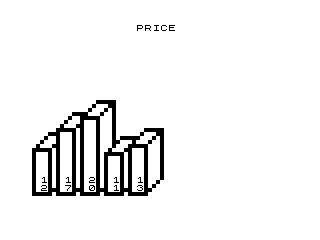
This program draws a bar chart on screen based on user-supplied data values. The user inputs the number of items, each item’s numeric value, and a chart label; the program then renders vertical bars using PLOT and UNPLOT commands, with each bar topped by a diagonal step effect drawn in a FOR X=1 TO 4 loop. Numeric values are printed beneath each bar as two-character strings using STR$ with space-padding for single-digit numbers. The chart label is centred on the top row using INT((32-LEN L$)/2). Bar geometry is computed from array A() with column positions spaced six pixels apart via the P1/P2/P3 assignments.
Program Analysis
Program Structure
The program is divided into two logical sections separated by a subroutine boundary:
- Data input (lines 100–112): Prompts for item count, fills array
A(N), collects a label stringL$, clears the screen, and returns. - Drawing loop (lines 10–60): Iterates over each item, computing pixel column positions and drawing bar outlines, fills, diagonal caps, and numeric labels.
Execution begins at line 1 with GOSUB 100, so input is collected before any drawing takes place. After drawing, line 70 busy-waits for any keypress before halting (or re-running via line 201’s GOTO 1, which also immediately follows the SAVE at line 200).
Bar Geometry
For each bar Y, three column anchors are precomputed:
| Variable | Formula | Role |
|---|---|---|
P1 | Y*6-6 | Left edge of bar |
P2 | Y*6-2 | Right edge of bar (P1+4) |
P3 | Y*6+2 | Right edge of diagonal cap (P2+4) |
Each bar is therefore 4 pixels wide with a 4-pixel diagonal cap offset to the right, and bars are spaced 6 pixels apart. This allows up to approximately 10 bars before the rightmost bar exceeds the 64-pixel display width.
Drawing Techniques
Three separate loops handle different parts of each bar:
- Lines 30–35: Vertical fill — plots the left, right, and right-cap columns pixel by pixel from 1 to
A(Y).UNPLOTcalls onP1+1andP1+2create a hollow interior effect by erasing interior pixels. - Lines 40–44: Horizontal base and top lines — plots the bottom row at Y=1, the top row at Y=
A(Y), and the offset top row at Y=A(Y)+4for the cap. - Lines 50–55: Diagonal cap — draws a 4-pixel staircase from the top of the main bar to the top of the cap column, with an
UNPLOTon the inner diagonal pixel whenX>1to keep the outline clean.
Numeric Label Formatting
Lines 56–58 handle printing the bar height beneath each bar. STR$ A(Y) converts the numeric value to a string. If the value is less than 10 (single digit), a leading space is prepended so the label always occupies exactly two characters. These two characters are then printed across two rows using PRINT AT 19 and AT 20, positioned at column Y*3-2.
Key BASIC Idioms
- Centred title:
INT((32-LEN L$)/2)is a standard idiom for horizontally centring a string on a 32-column display, used at both lines 61 and 111. - Busy-wait for keypress: Line 70 loops on
INKEY$=""until any key is pressed, a common pattern for pause-before-exit. - AT-based screen clearing: Line 102 prints a blank-padded string at the prompt row rather than issuing a full
CLS, preserving screen content above. - DIM after INPUT:
DIM A(N)at line 103 uses the just-entered value ofNto size the array dynamically.
Potential Issues and Anomalies
- The
UNPLOT P1+2,Zon line 31 erases a pixel that was never plotted (onlyP1andP2=P1+4are drawn in that loop), so it has no visible effect unless a previous bar happened to occupy that column — this appears to be a minor logic error or leftover from an earlier version. - With bars spaced 6 pixels apart and starting at column 0, bar
Y=11would placeP2at pixel column 62, which is still within the 64-pixel width, but taller bars may overwrite the label row at line 19/20 ifA(Y)approaches the display height (44 pixels on a ZX81). - The two-character label split (
N$(1)andN$(2)) assumes values up to 99; values of 100 or more would produce a three-characterSTR$result, but the code only prints two characters — truncating the tens digit silently. - Line 201 (
GOTO 1) is only reachable afterSAVEat line 200, making it effectively a post-save restart rather than part of the normal run path.
Image Gallery
Source Code
   1 GOSUB 100
  10 FOR Y=1 TO N
  11 LET P1=Y*6-6
  12 LET P2=Y*6-2
  13 LET P3=Y*6+2
  20 FOR Z=1 TO A(Y)
  30 PLOT P1,Z
  31 UNPLOT P1+2,Z
  32 PLOT P2,Z
  33 PLOT P3,Z+4
  34 UNPLOT P1+1,Z
  35 NEXT Z
  40 FOR X=P1 TO P2
  41 PLOT X,1
  42 PLOT X,A(Y)
  43 PLOT X+4,A(Y)+4
  44 NEXT X
  50 FOR X=1 TO 4
  51 PLOT P1+X-1,A(Y)+X-1
  52 PLOT P2+X-1,A(Y)+X-1
  53 PLOT P2+X-1,X
  54 IF X>1 THEN UNPLOT P1+X,A(Y)+X-1
  55 NEXT X
  56 LET N$=STR$ A(Y)
  57 IF A(Y)<10 THEN LET N$=" "+N$
  58 PRINT AT 19,Y*3-2;N$(1);AT 20,Y*3-2;N$(2)
  60 NEXT Y
  61 PRINT AT 0,INT ((32-LEN L$)/2);L$
  70 IF INKEY$="" THEN GOTO 70
 100 PRINT AT 21,0;"HOW MANY ITEMS?"
 101 INPUT N
 102 PRINT AT 21,0;"ITEM:          "
 103 DIM A(N)
 104 FOR X=1 TO N
 105 PRINT AT 21,5;X
 106 INPUT A(X)
 107 NEXT X
 108 PRINT AT 21,0;"LABEL?"
 109 INPUT L$
 110 CLS
 111 PRINT AT 0,INT ((32-LEN L$)/2);L$
 112 RETURN
 200 SAVE "1009%6"
 201 GOTO 1
Note: Type-in program listings on this website use ZMAKEBAS notation for graphics characters.