
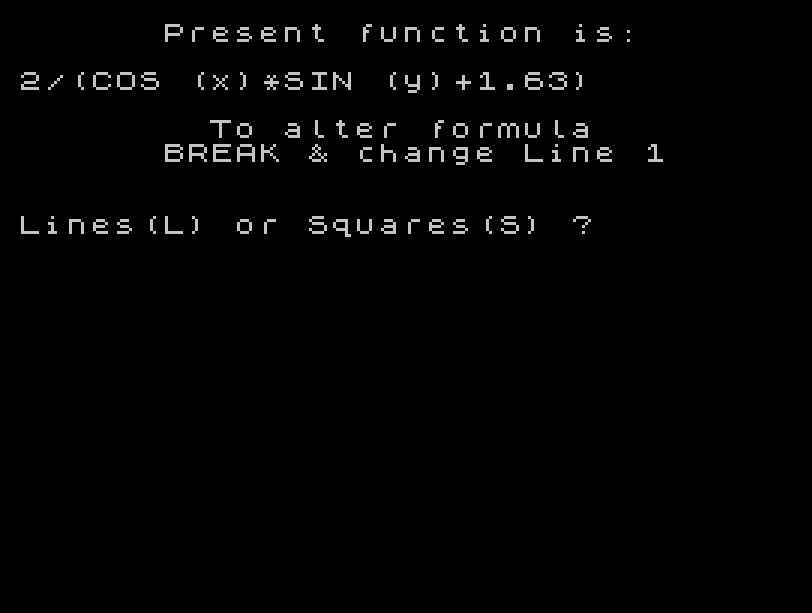
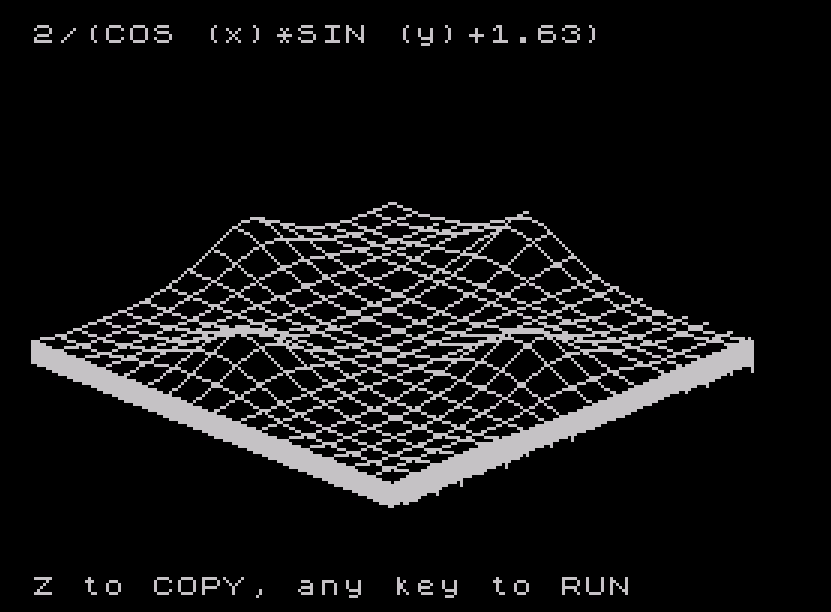
Renders a three-dimensional wireframe surface plot of a user-definable mathematical function on a ZX Spectrum-compatible system. The program uses an isometric projection with scaling constants (v1=15, v2=6, v3=50) to map a two-variable function across an 8×8 grid, drawing either grid squares or parallel lines depending on user selection. A notable technique appears in the subroutine at lines 500–540, which reads the text of line 10’s DEF FN statement directly from memory using PEEK and the system variable at address 23635/23636, skipping over 6-byte floating-point number literals (token 14) to reconstruct the formula as a display string. The function defined in line 10 (2/(COS(x)×SIN(y)+1.63)) can be altered by breaking into the program and editing that line, with the displayed formula updating automatically. Optional side-inking fills the visible edges of the 3D surface after the main grid is drawn.
Program Structure
The program is organized into a linear flow with one subroutine and a self-restart loop:
- Lines 10: DEF FN definition — the user-editable mathematical function.
- Lines 20–100: Initialization and user interface — border/paper/ink setup, mode selection (lines vs. squares), density input, and parallel-lines-only option.
- Lines 110–220: First pass — plots the surface along constant-y slices (x varies in inner loop).
- Lines 230–340: Second pass — plots along constant-x slices (y varies in inner loop) for the grid or square mode.
- Lines 350–460: Optional side inking — draws the right edge (x=8, y varies) and front edge (y=0, x varies) with vertical drops to the base plane.
- Lines 470–490: Display overlay of the formula, copy option, then
RUNto restart. - Lines 500–540: Subroutine — extracts the text of line 10’s DEF FN from memory into
z$. - Line 550: SAVE command for program persistence.
Projection and Scaling
The isometric-style projection maps the 3D point (x, y, FN a(x,y)) to screen coordinates using three constants set at line 110:
v1=15— horizontal scale factor; screen x =(x+y)*v1v2=6— vertical scale factor applied to the z (function) and y-x offsetv3=50— vertical screen offset (baseline lift)
The screen y coordinate formula is ((y-x+2+FN a(x,y))*v2)+v3, combining the diagonal perspective tilt (y−x) with the surface height. This gives a classic oblique cabinet-style projection without trigonometric rotation.
Drawing Modes
The user selects between two rendering modes via l$:
| Mode | Variable | Behavior |
|---|---|---|
| Lines | l$="l" | Continuous DRAW along each row/column; parallel lines only option available via a$ |
| Squares | l$="s" | PLOTs at integer grid intersections only, with DRAWs in between to form a grid; step in x is sq=de |
In squares mode (lines 150–170 and 290–310), the program uses IF x=INT(x) and IF y=INT(y) to detect integer grid nodes and lift the pen, creating a grid of rectangles rather than a solid mesh.
Self-Reading Subroutine (Lines 500–540)
This is the most technically interesting section. The subroutine reconstructs the text of line 10 as a string for display without any hard-coded copy of the formula. It works as follows:
- Line 500 reads system variables at addresses 23635 and 23636 (PROG — the address of the start of the BASIC program area), then adds 24 to skip past the line number (2 bytes), line length (2 bytes), and the
DEF FN a(x,y)=token sequence to reach the function body. (The offset of 24 is hand-tuned for this specific line structure.) - Line 520 checks for token value 14 (the embedded floating-point number literal that follows any numeric token in Spectrum BASIC). When found, it skips 6 bytes (1 token byte + 5 float bytes) to jump over the number and continue reading text.
- Line 530 appends each non-13 byte as
CHR$toz$until a newline (CHR$ 13) ends the line.
The result is that editing line 10’s DEF FN and re-running automatically updates the on-screen formula label with no other changes needed.
Vertical Edge Drop
At line 210, after completing each x-sweep for a given y, the program executes DRAW 0,-v2*FN a(x,y). This draws a short vertical line downward at the end of each row, simulating the edge of the surface dropping to the base. A similar drop appears at line 280 and lines 410/450 for the side-inking pass.
Key BASIC Idioms
- INKEY$ polling loops (lines 60, 100, 370): tight loops waiting for specific key presses, a standard interactive input idiom.
- Coordinate tracking variables
p,q,j,k: store the previous screen coordinate so DRAW can compute the relative offset from the last point — necessary since DRAW takes relative, not absolute, displacements. RUNat line 490: restarts the program from line 10, re-reading the (possibly edited) DEF FN, acting as a persistent loop with formula update capability.- COPY at line 480: triggers a printer dump of the screen if the user presses ‘z’, useful for obtaining hardcopy output.
Potential Anomalies
- The PEEK offset of 24 at line 500 is fragile — it is calibrated specifically for the token length of line 10 as written. Changing the function name or argument names would shift this offset and corrupt
z$. - In squares mode, the inner x-loop uses
sq=de(user density) as the step, but the integer-detection logicIF x=INT(x)relies on x hitting exact integer values. Ifdedoes not evenly divide 1 (e.g., 0.3), floating-point rounding may prevent x from equaling an integer, causing PLOT lifts to be missed and producing continuous lines instead of a grid. - At line 350,
LET x=8sets x after the loop at line 250–340 has finished, but this value of x is only used conceptually for side inking at line 390 (where x=8 is hardcoded via the for-loop variable). The assignment is effectively unused sincexis immediately overwritten by the FOR at line 390.
Image Gallery
Source Code
   10 DEF FN a(x,y)=2/(COS (x)*SIN (y)+1.63)
   20 BORDER 0: PAPER 0: INK 7: CLS
   30 LET sq=.333333
   40 GO SUB 500: PRINT "      Present function is:"''z$
   50 PRINT '"        To alter formula"'"      BREAK & change Line 1"'''"Lines(L) or Squares(S) ?"
   60 LET l$=INKEY$: IF l$<>"l" AND l$<>"s" THEN GO TO 60
   70 PRINT '"Density ? (ie. .5)": INPUT de
   80 IF l$="s" THEN LET sq=de: GO TO 110
   90 PRINT '"Parallel Lines Only ? (y/n)"
  100 LET a$=INKEY$: IF a$<>"y" AND a$<>"n" THEN GO TO 100
  110 CLS : LET v1=15: LET v2=6: LET v3=50
  120 FOR y=0 TO 8 STEP de
  130 FOR x=0 TO 8 STEP sq
  140 IF x=0 THEN PLOT v1*(x+y),((y-x+2+FN a(x,y))*v2)+v3: GO TO 190
  150 IF l$="l" THEN GO TO 180
  160 IF x=1 THEN PLOT (x+y)*v1,((y-x+2+FN a(x,y))*v2)+v3: GO TO 190
  170 IF x=INT (x) THEN PLOT (x+y)*v1,((y-x+2+FN a(x,y))*v2)+v3: GO TO 190
  180 DRAW ((x+y)*v1)-p,((y-x+2+FN a(x,y))*v2)+v3-q
  190 LET p=v1*(x+y): LET q=((y-x+2+FN a(x,y))*v2)+v3
  200 NEXT x
  210 DRAW 0,-v2*FN a(x,y)
  220 NEXT y
  230 IF l$="s" THEN GO TO 250
  240 IF a$="y" THEN GO TO 350
  250 FOR x=0 TO 8 STEP de
  260 PLOT x*v1,(-v2*x+12)+v3
  270 FOR y=0 TO 8 STEP sq
  280 IF y=0 THEN LET s=x*v1: LET d=(-v2*x+12)+v3: PLOT s,d: DRAW 0,(v2*(y-x+2+FN a(x,y)))+v3-d: PLOT v1*(x+y),(v2*(y-x+2+FN a(x,y)))+v3: GO TO 330
  290 IF l$="l" THEN GO TO 320
  300 IF y=1 THEN PLOT (v1*(x+y)),(v2*(y-x+2+FN a(x,y)))+v3: GO TO 330
  310 IF y=INT (y) THEN PLOT (v1*(x+y)),(v2*(y-x+2+FN a(x,y)))+v3: GO TO 330
  320 DRAW (v1*(y+x))-j,(v2*(y-x+2+FN a(x,y)))+v3-k
  330 LET j=v1*(y+x): LET k=(v2*(y-x+2+FN a(x,y)))+v3
  340 NEXT y: NEXT x
  350 LET x=8
  360 INPUT "Ink Sides ? (y/n)";r$
  370 IF r$<>"y" AND r$<>"n" THEN GO TO 360
  380 IF r$="n" THEN GO TO 470
  390 FOR y=0 TO 8 STEP .05
  400 PLOT (x+y)*v1,((y-x+2+FN a(x,y))*v2)+v3
  410 DRAW 0,-(v2*FN a(x,y))
  420 NEXT y
  430 LET y=0: FOR x=y TO 8 STEP .05
  440 PLOT x*v1,(-v2*x+12)+v3
  450 LET d=(-v2*x+12)+v3: DRAW 0,(v2*(y-x+2+FN a(x,y)))+v3-d
  460 NEXT x
  470 PRINT OVER 1;AT 0,0;z$
  480 PRINT #1;"Z to COPY, any key to RUN": PAUSE 0: IF INKEY$="z" THEN COPY
  490 RUN
  500 LET z=PEEK 23635+256*PEEK 23636+24
  510 LET z$=""
  520 IF PEEK z=14 THEN LET z=z+6: GO TO 520
  530 IF PEEK z<>13 THEN LET z$=z$+CHR$ PEEK z: LET z=z+1: GO TO 520
  540 RETURN
  550 SAVE /"3-D Funct." LINE 10: BEEP .4,15
Note: Type-in program listings on this website use ZMAKEBAS notation for graphics characters.