
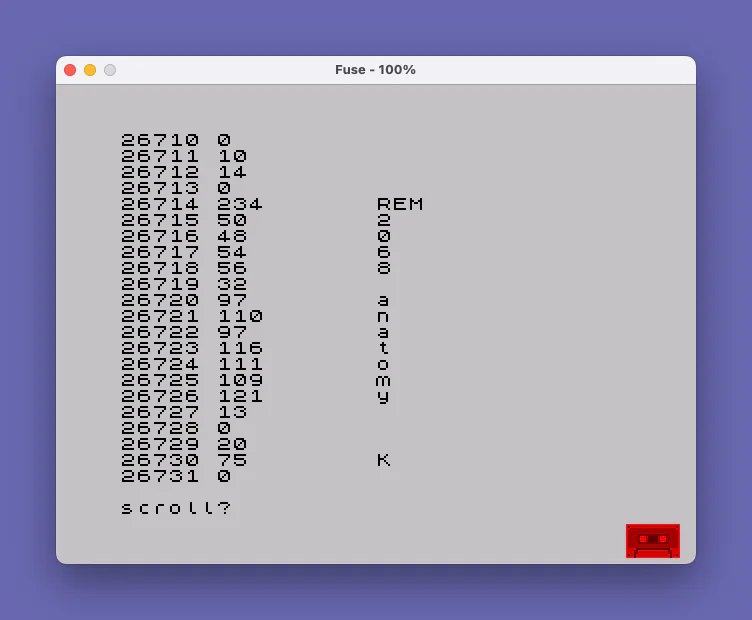
This program dumps the contents of a TS2068 BASIC program area to the screen, printing each byte’s address, decimal value, and — where the byte represents a printable character (value greater than 31) — its character representation. It iterates from the start of the BASIC program area, whose address is held in system variables at addresses 23635–23636 (PROG), up to the end, whose address is stored at 23627–23628 (VARS, marking the boundary). The loop uses PEEK on the system variables to calculate the 16-bit start and end addresses via the standard low-byte + 256 × high-byte formula. The technique gives hobbyists a way to inspect the raw token and data bytes that make up a BASIC program file, including keyword tokens and line-length fields.
Program Analysis
Program Structure
The program is a straightforward five-line memory dumper. A FOR/NEXT loop at lines 20–50 walks through every byte of the resident BASIC program area, and line 30 prints the diagnostic information for each byte. Lines 10 and 100 are REM statements providing a title and a source attribution (SYNC magazine, March 1984).
System Variable Usage
The loop bounds are derived entirely from system variables using PEEK:
PEEK 23635 + 256*PEEK 23636— reconstructs the 16-bit value of PROG, the address of the first byte of the BASIC program in memory.PEEK 23627 + 256*PEEK 23628— reconstructs the 16-bit value of VARS, the address of the variables area, which immediately follows the program area and therefore serves as the exclusive upper bound.
Both addresses are stored in RAM in the conventional little-endian format (low byte first, high byte second), so the formula low + 256 * high is the standard idiom for reading a two-byte system variable.
Output Format
For each byte address x, line 30 prints three fields separated by spaces:
- The decimal address (
x). - The decimal byte value (
PEEK x). - The corresponding character (
CHR$ PEEK x), but only ifPEEK x > 31— i.e., the byte is in the printable/token range and not a control code.
The trailing comma after the first two PRINT items on line 30 suppresses a newline, keeping all three fields on the same row. Line 40 then emits a bare PRINT to advance to the next line before the loop increments.
Key BASIC Idioms
- 16-bit address reconstruction:
PEEK lo + 256 * PEEK hiis the canonical way to read a two-byte pointer from system variables in BASIC. - Conditional inline print: The
IF PEEK x > 31 THEN PRINT CHR$ PEEK x;on the same line as the unconditional print items is a space-saving single-line conditional common in short utility programs. - Semicolon vs. comma: Semicolons are used throughout to suppress spacing between printed items, giving compact columnar output.
Notable Techniques and Observations
Because BASIC keyword tokens are single bytes with values above 127, many of them will pass the > 31 test and attempt to display via CHR$. On screen this will render the keyword glyph (or a graphics character) rather than the token’s ASCII mnemonic — which is technically correct behavior but means the character column is more useful for identifying embedded string literals and variable names than for reading keyword tokens. The decimal value column remains unambiguous for all bytes.
The loop visits the program’s own bytes as it runs, meaning the dump includes this very program’s tokens — a self-referential property that makes it a useful illustration of how BASIC source is stored as tokenized bytes rather than plain ASCII text.
Potential Anomalies
The upper bound uses VARS as the loop’s TO value, but FOR x = start TO end is inclusive on both ends. The byte at address VARS is actually the first byte of the variables area, not the last byte of the program. This means the dump includes one extra byte beyond the true end of the program. In practice this is a minor off-by-one that typically reveals the 0x80 sentinel byte that marks the start of the variables area, so it is informative rather than harmful.
Image Gallery
Source Code
   10 REM 2068 anatomy
   20 FOR x=PEEK 23635+256*PEEK 23636 TO PEEK 23627+256*PEEK 23628
   30 PRINT x;" ";PEEK x,: IF PEEK x>31 THEN PRINT CHR$ PEEK x;
   40 PRINT
   50 NEXT x
  100 REM  Program File -  See SYNC March 84
Note: Type-in program listings on this website use ZMAKEBAS notation for graphics characters.