
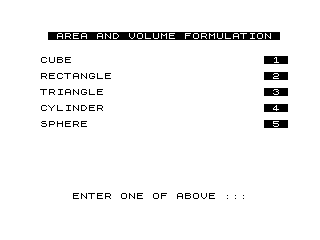
Menu-driven geometry reference tool that calculates surface area and volume for five solid shapes: cube, rectangular block (labelled “rectangle”), triangle/prism, cylinder, and sphere. The user selects a shape by pressing keys 1–5, and the program uses a computed GOTO (`GOTO VAL Y$*1000`) to jump directly to the appropriate calculation routine at lines 1000, 2000, 3000, 4000, or 5000. The triangle section applies Heron’s formula to derive the altitude and then the area, and also outputs prism volumes for each of the three sides as the length. The program makes extensive use of inverse-video text (the `%X` sequences) for menu highlighting and prompts, and uses `FAST`/`SLOW` mode switching around input sections for display speed control on the ZX81.
Program Analysis
Program Structure
The program is organized as a top-level menu at lines 100–330, followed by five independent calculation routines, a shared exit/restart block at lines 9000–9020, and save/stop utilities at 9997–9999.
| Line range | Purpose |
|---|---|
| 0 | Program title line (FAST/display artifact, not executed) |
| 100–290 | Main menu display |
| 300–350 | Key input and validation loop |
| 1000–1060 | Cube: surface area and volume |
| 2000–2150 | Rectangular block: surface area and volume |
| 3000–3940 | Triangle/prism: Heron’s formula, area, three prism volumes, invalid input trap |
| 4000–4080 | Cylinder: surface area and volume using PI |
| 5000–5060 | Sphere: surface area and volume using PI |
| 9000–9020 | Shared “press RETURN” pause and restart |
| 9997–9999 | STOP, SAVE, and loop-back utilities |
Key BASIC Idioms
- Computed GOTO: Line 350 uses
GOTO VAL Y$*1000to dispatch to the correct routine based on the digit key pressed (1–5 → lines 1000–5000). This is a classic ZX81 memory-saving technique, avoiding a chain ofIFstatements. - Input validation via character codes: Line 320 checks
CODE Y$<29 OR CODE Y$>33. On the ZX81, the character codes for digits 1–5 are 29–33, so this neatly accepts only valid menu choices without string comparison. - FAST/SLOW switching:
FASTis used during screen drawing (lines 100, 330) andSLOWbeforeINPUTstatements (lines 290, 1005, 2005, 3005, 4005, 5010) to ensure stable video during user interaction. - PAUSE 40000 as keypress wait: Lines 3920 and 9010 use
PAUSE 40000(approximately 40 seconds) as a long pause to hold the display, functioning as an effective “press any key” wait. - Inverse video with
%X: Menu labels, prompts, and result headings use inverse-video characters extensively for visual emphasis.
Geometry Calculations
| Shape | Surface Area Formula | Volume Formula |
|---|---|---|
| Cube | 6·S² | S³ |
| Block | 2·S1·S2 + 2·S2·S3 + 2·S1·S3 | S1·S2·S3 |
| Triangle (area only) | Heron’s formula → AR | AR·S1, AR·S2, AR·S3 (three prism depths) |
| Cylinder | 2·π·R² + 2·π·R·L | π·R²·L |
| Sphere | 4·π·R² | (4·π·R³)/3 |
Triangle Routine and Heron’s Formula
Lines 3070–3130 implement a two-step derivation. First, the semi-perimeter is computed: S=(S1+S2+S3)/2. A validity check at line 3080 (IF S<=S1) catches degenerate cases where the longest side equals or exceeds the semi-perimeter (i.e., triangle inequality violation), jumping to the error handler at line 3900.
The altitude Y3 is derived from Heron’s formula rearranged to give the height relative to side S1. Line 3110 then applies ATN to compute an angle, though this value (A) is computed but never used in any subsequent output — it appears to be a vestigial calculation left over from an earlier version of the code that may have displayed the angle.
The area AR = (S1·Y3)/2 (base × height / 2) is then used to print both the triangle area and three prism volumes (AR multiplied by each side as the prism depth). This is a creative extension beyond the other shapes.
Notable Techniques and Anomalies
- Unused variable: Variable
A(the arctangent calculation at lines 3100–3110) is assigned but never printed or used further. This is a harmless dead-code remnant. - Mislabelled shape: The menu calls option 2 “RECTANGLE” but the routine calculates a rectangular block (cuboid), correctly prompting for three distinct side lengths.
- Triangle label inconsistency: The menu labels option 3 “TRIANGLE” but the output section also prints prism volumes, making it implicitly a triangular prism calculator as well.
- Line 300 double-print trick: The prompt at line 300 is printed twice in succession — first in inverse video, then immediately overwritten in normal video at the same
ATposition. This creates a normal-video prompt while avoiding aCLSthat would clear the menu. - Exponentiation notation: The program uses
**for exponentiation throughout, standard ZX81 BASIC.
Image Gallery
Source Code
   0  % % %A%R%V%O%L%F%O%R%M% %                    % %W%R%I%T%T%E%N% % %B%Y%                    % % %G%E%N%E% %B%U%Z%A% %
 100 FAST
 110 CLS
 120 PRINT AT 1,2;"% %A%R%E%A% %A%N%D% %V%O%L%U%M%E% %F%O%R%M%U%L%A%T%I%O%N% "
 130 PRINT AT 4,1;"CUBE";TAB 29;"% %1% "
 140 PRINT AT 6,1;"RECTANGLE";TAB 29;"% %2% "
 150 PRINT AT 8,1;"TRIANGLE";TAB 29;"% %3% "
 160 PRINT AT 10,1;"CYLINDER";TAB 29;"% %4% "
 170 PRINT AT 12,1;"SPHERE";TAB 29;"% %5% "
 290 SLOW
 300 PRINT AT 21,4;"% %E%N%T%E%R% %O%N%E% %O%F% %A%B%O%V%E% %:%:%:% ";AT 21,4;" ENTER ONE OF ABOVE ::: "
 310 LET Y$=INKEY$
 320 IF CODE Y$<29 OR CODE Y$>33 THEN GOTO 300
 330 FAST
 340 CLS
 350 GOTO VAL Y$*1000
 1000 PRINT ,,"% %W%H%A%T% %I%S% %T%H%E% %L%E%N%G%T%H% %O%F% %A% %S%I%D%E%?% "
 1005 SLOW
 1010 INPUT S
 1020 PRINT AT 10,0;"A CUBE WITH A SIDE OF ::"
 1030 PRINT S;" UNITS :::"
 1040 PRINT ,,,,"SURFACE AREA = ";6*S**2;" UNITS"
 1050 PRINT ,,"VOLUME        = ";S**3;" UNITS"
 1060 GOTO 9000
 2000 PRINT ,,"% %W%H%A%T% %I%S% %T%H%E% %L%E%N%G%T%H% %O%F% %A% %S%I%D%E% %1%?"
 2005 SLOW
 2010 INPUT S1
 2020 PRINT ,,"% %W%H%A%T% %I%S% %T%H%E% %L%E%N%G%T%H% %O%F% %A% %S%I%D%E% %2%?"
 2030 INPUT S2
 2040 PRINT ,,"% %W%H%A%T% %I%S% %T%H%E% %L%E%N%G%T%H% %O%F% %A% %S%I%D%E% %3%?"
 2050 INPUT S3
 2100 PRINT AT 10,0;"A BLOCK WITH SIDES OF ::"
 2110 PRINT S1;", ";S2;" AND ";S3;" UNITS"
 2120 PRINT ,,"HAS A SURFACE AREA OF"
 2130 PRINT 2*S1*S2+2*S2*S3+2*S1*S3;" UNITS AND"
 2140 PRINT ,,"A VOLUME OF ";S1*S2*S3;" UNITS"
 2150 GOTO 9000
 3000 PRINT ,,"% %W%H%A%T% %I%S% %T%H%E% %L%E%N%G%T%H% %O%F% %A% %S%I%D%E% %1%?"
 3005 SLOW
 3010 INPUT S1
 3020 PRINT ,,"% %W%H%A%T% %I%S% %T%H%E% %L%E%N%G%T%H% %O%F% %A% %S%I%D%E% %2%?"
 3030 INPUT S2
 3040 PRINT ,,"% %W%H%A%T% %I%S% %T%H%E% %L%E%N%G%T%H% %O%F% %A% %S%I%D%E% %3%?"
 3050 INPUT S3
 3060 FAST
 3070 LET S=(S1+S2+S3)/2
 3080 IF S<=S1 THEN GOTO 3900
 3090 LET Y3=2*(((S*(S-S2))*(S-S1)*(S-S3))**.5)/S1
 3100 LET A=Y3/S2
 3110 LET A=ATN (A/(-A*A+1)**.5)
 3130 LET AR=(S1*Y3)/2
 3200 PRINT AT 8,0;"A TRIANGLE WITH SIDES OF ::"
 3210 PRINT S1;", ";S2;" AND ";S3;" UNITS"
 3220 PRINT ,,"HAS A SURFACE AREA OF"
 3300 PRINT ,,"% %A%R%E%A% %=% ",AR;" UNITS"
 3310 PRINT ,,"%P%R%I%S%M% %V%O%L%U%M%E% %S%1% %=% ";AR*S1
 3320 PRINT ,,"%P%R%I%S%M% %V%O%L%U%M%E% %S%2% %=% ";AR*S2
 3330 PRINT ,,"%P%R%I%S%M% %V%O%L%U%M%E% %S%3% %=% ";AR*S3
 3800 GOTO 9000
 3900 CLS
 3910 PRINT ,,"% %N%O%T% %A% %T%R%I%A%N%G%L%E% %-% %T%R%Y% %A%G%A%I%N% %:%:% "
 3920 PAUSE 40000
 3930 CLS
 3940 GOTO 3000
 4000 PRINT ,,"% %W%H%A%T% %I%S% %T%H%E% %R%A%D%I%U%S% %O%F% %T%H%E% % % % % % % %C%Y%L%I%N%D%E%R%?"
 4005 SLOW
 4010 INPUT R
 4020 PRINT ,,"% %W%H%A%T% %I%S% %T%H%E% %L%E%N%G%T%H% %O%F% %T%H%E% % % % % % % %C%Y%L%I%N%D%E%R%?"
 4030 INPUT L
 4040 PRINT ,,"A CYLINDER WITH A RADIUS OF"
 4050 PRINT R;" UNITS AND A LENGTH OF ";L
 4060 PRINT ,,"% %S%U%R%F%A%C%E% %A%R%E%A% %=%  ";2*(PI*R**2)+2*PI*R*L
 4070 PRINT ,,"% %V%O%L%U%M%E% %=%  ";L*(PI*R**2)
 4080 GOTO 9000
 5000 PRINT ,,"% %W%H%A%T% %I%S% %T%H%E% %R%A%D%I%U%S% %O%F% %T%H%E% % % % % % % %S%P%H%E%R%E%?"
 5010 SLOW
 5020 INPUT R
 5030 PRINT ,,"A SPHERE WITH A RADIUS OF"
 5040 PRINT R;" UNITS :::"
 5050 PRINT ,,"% %S%U%R%F%A%C%E% %A%R%E%A% %=%  ";4*R**2*PI
 5060 PRINT ,,"% %V%O%L%U%M%E% %=%  ";(4*R**3*PI)/3
 9000 PRINT AT 21,0;"% %P%R%E%S%S% %R%E%T%U%R%N% %T%O% %C%O%N%T%I%N%U%E% %:%:%:% "
 9010 PAUSE 40000
 9020 GOTO 100
 9997 STOP
 9998 SAVE "ARVOLFOR%M"
 9999 GOTO 100
Note: Type-in program listings on this website use ZMAKEBAS notation for graphics characters.