
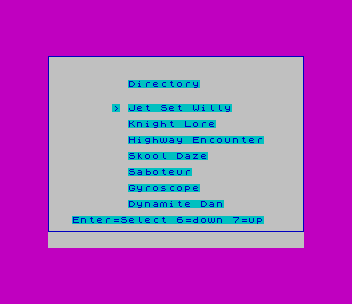
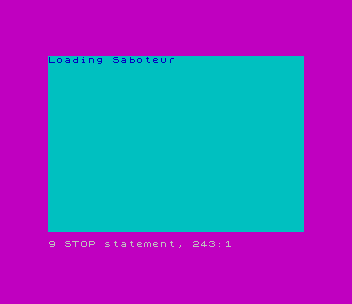
A cursor menu for a disk of seven games: the titles come from DATA in line 30, 6 and 7 move the pointer, and ENTER jumps to the chosen entry (GO TO r/6*100, which lands on lines 100, 133, 167 and so on). Each entry prints “Loading …” and holds a REM where you put your own disk load and SCREEN$ commands. The titles printed are Spectrum games.
Lines 2000-2020 save it as a Larken LKDOS autoload program: they POKE a 9-byte routine at 23296 that calls the Larken AUTOSTART, and OPEN #4,”dd”. That part needs the Larken disk system (on a stock TS2068 GO TO 2000 resets the computer); the menu itself runs on a stock TS2068.
Published in Sinc-Link January-February 1988 (Autoload Menu).
Image Gallery
Source Code
1 BRIGHT 0: BORDER 3: PAPER 5: INK 1
2 DRAW 255,0: DRAW 0,175: DRAW -255,0: DRAW 0,-175:
3 PRINT AT 3,10;"Directory"
10 FOR n=6 TO 18 STEP 2
11 REM line 10 is amount of programs on disk>=7
15 READ a$
20 PRINT AT n,10;a$
25 NEXT n
26 PRINT AT 20,3;"Enter=Select 6=down 7=up"
30 DATA "Jet Set Willy","Knight Lore","Highway Encounter","Skool Daze","Saboteur","Gyroscope","Dynamite Dan"
31 REM line 30 is name of programs. Change titles for different games.
32 REM maximum amount is 7
50 LET r=6
55 PRINT AT r,8;">"
60 IF INKEY$="" THEN  GO TO 60
65 LET m$=INKEY$: LET pr=r
70 IF m$=CHR$ 13 THEN  GO TO r/6*100
75 IF m$="6" THEN  LET r=r+2
80 IF m$="7" THEN  LET r=r-2
85 IF r<6 OR r>18 THEN  PAUSE 8: PRINT AT pr,8;" ": GO TO 50
90 PAUSE 8: PRINT AT pr,8;" ": GO TO 55
100 CLS : PRINT "Loading Jet Set Willy"
105 REM Disk Command + Screen$ Command
120 STOP
133 CLS : PRINT "Loading Knight Lore"
138 REM Disk Command + Screen$ Command
143 STOP
167 CLS : PRINT "Loading Highway Encounter"
170 REM Disk Command + Screen$ Command
175 STOP
200 CLS : PRINT "Loading Skool Daze"
205 REM Disk Command + Screen$ Command
220 STOP
233 CLS : PRINT "Loading Saboteur"
238 REM Disk Command + Screen$ Command
243 STOP
267 CLS : PRINT "Loading Gyroscope"
271  REM Disk Command + Screen$ Command
276 STOP
300 CLS : PRINT "Loading Dynamite Dan"
305 REM Disk Command + Screen$ Command
310 STOP
1998 STOP
1999 REM Autoload Save
2000 CLEAR 32000: RESTORE 2050: FOR n=23296 TO 23304: READ a: POKE n,a: NEXT n
2010 RANDOMIZE USR 23296
2020 RANDOMIZE USR 100: OPEN #4,"dd": GO TO 1
2050 DATA 205,102,0,62,3,0,211,244,201
2060 REM Run only when the directory has the proper load commands
Note: Type-in program listings on this website use ZMAKEBAS notation for graphics characters.