
A demonstration of the musical capabilities of the 2068 onboard sound chip, using all three channels with a rather nice rendition of “And I Love Her”.
This program plays a musical arrangement of “And I Love Her” by The Beatles, using the AY-3-8912 sound chip via the SOUND command. The arrangement drives two melodic channels (A and B) simultaneously using 16-bit frequency values split across two bytes each, read in groups of four from a large DATA block. The program supports two tempo settings selected by keypresses [1] or [2], adjusting four independent pause durations (T1–T4) to control note timing. A status display drawn with PLOT/DRAW outlines a bar chart-style area and prints channel activity labels, updating dynamically as the song progresses through its 100-iteration loop. The program concludes by looping back to line 30 (which does not exist, effectively restarting) after a final pause.
Program Structure
The program is divided into several clear phases:
- Lines 10–25: REM headers and initial tempo variable.
- Lines 100–520: Title screen with FLASH prompt and initial pause.
- Lines 600–698: Main UI screen — song info panel, status area drawn with PLOT/DRAW, and tempo key selection loop.
- Lines 699–900: Playback engine — a
FOR Z=1 TO 100loop that reads four note quads per iteration and issues fourSOUNDcommands interleaved with pauses. - Lines 1097–1172: DATA statements encoding note frequencies.
- Lines 1500–1600: End-of-song handler — pauses, resets tempo, and jumps back to line 30.
- Line 9998: SAVE command with autostart.
SOUND Command Usage
The TS2068’s SOUND keyword directly programs the AY-3-8912 chip registers. Each call passes a semicolon-separated list of register/value pairs. The program uses two tone channels (A and B) simultaneously:
| Registers | Purpose |
|---|---|
| 2, 3 | Channel A tone period (low/high bytes) |
| 4, 5 | Channel B tone period (low/high bytes) |
| 7 | Mixer control (49 = 0b00110001, enables tones A+B, noise off) |
| 8, 9, 10 | Amplitude for channels A, B, C |
| 6 | Noise period |
| 12, 13 | Envelope period and shape |
| 0, 1 | Channel C tone period (used in beats 2–4 for cymbal/noise effect) |
Frequency values in the DATA are 16-bit AY tone periods stored as two successive bytes (low byte, high byte). For example, 186,0 gives period 186, and 23,1 gives period 23+256=279. Channels C is repurposed for a noise/cymbal effect in the second, third, and fourth beat positions of each bar (register 7 value 49 enables tones A and B while leaving noise mixing dependent on register 6 settings).
Data Encoding
Each READ in the playback loop fetches four values: A1,B1,A2,B2 — the low and high bytes for channels A and B respectively. The four beats per loop iteration correspond to four such quads, making each pass through the FOR Z loop equivalent to one bar of music. Data lines 1097–1099 and part of 1100 are all zeros (silence/intro padding), followed by the melodic content beginning partway through line 1100.
The terminal sentinel is 9999,9999,9999,9999 at line 1172, detected by the guards at lines 752, 816, 831, and 859.
Tempo Selection
Two tempo presets are available, set by the keypress loop at lines 670–680:
| Key | T1 | T2 | T3 | T4 |
|---|---|---|---|---|
| [1] Slow | 15 | 15 | 16 | 16 |
| [2] Fast | 5 | 5 | 5 | 5 |
The four pause variables allow asymmetric beat weighting; in slow mode, beats 3 and 4 are slightly longer (16 vs 15 fiftieths of a second), introducing a subtle swing feel.
Status Display
A rudimentary channel activity display is drawn on screen using PLOT/DRAW to create a rectangular outline at lines 650–651, with vertical dividers separating three channel zones. The labels “USED” are printed at specific Z values:
Z=1(line 741): Channel A label appears unconditionally before the loop.Z=9: Channel B “USED” printed.Z=29: Channel C “USED” printed.Z=87: Channel C label cleared.Z=88: Channel C “USED” re-printed.Z=89: Both B and C labels cleared.
These thresholds correspond roughly to structural sections of the song (verse, chorus, bridge entries and exits).
Key BASIC Idioms and Techniques
RESTORE 1097before the loop ensures DATA is always read from the beginning of the music block regardless of any prior READ activity.- The end-of-song jump at line 1600 uses
GO TO 30, which does not exist in the program. On the TS2068 this will cause a “line not found” error unless the interpreter rounds up to the next valid line; this is a likely bug — the author may have intendedGO TO 25orGO TO 100to restart cleanly. S1=15andS2=15(line 739) are passed as amplitude values to registers 9 and 10 in eachSOUNDcall, keeping channel volumes fixed throughout.- The initial
PAUSE TEMPOat line 500 uses the variable set at line 25, giving a 500/50 = 10 second title screen hold before the FLASH “READY” prompt. - Line 677 prints a copyright notice using the
©character (RESET keyword token, but used here inside a string literal for the © symbol). - The SAVE at line 9998 uses
LINE 1for autostart from the very first line.
Image Gallery
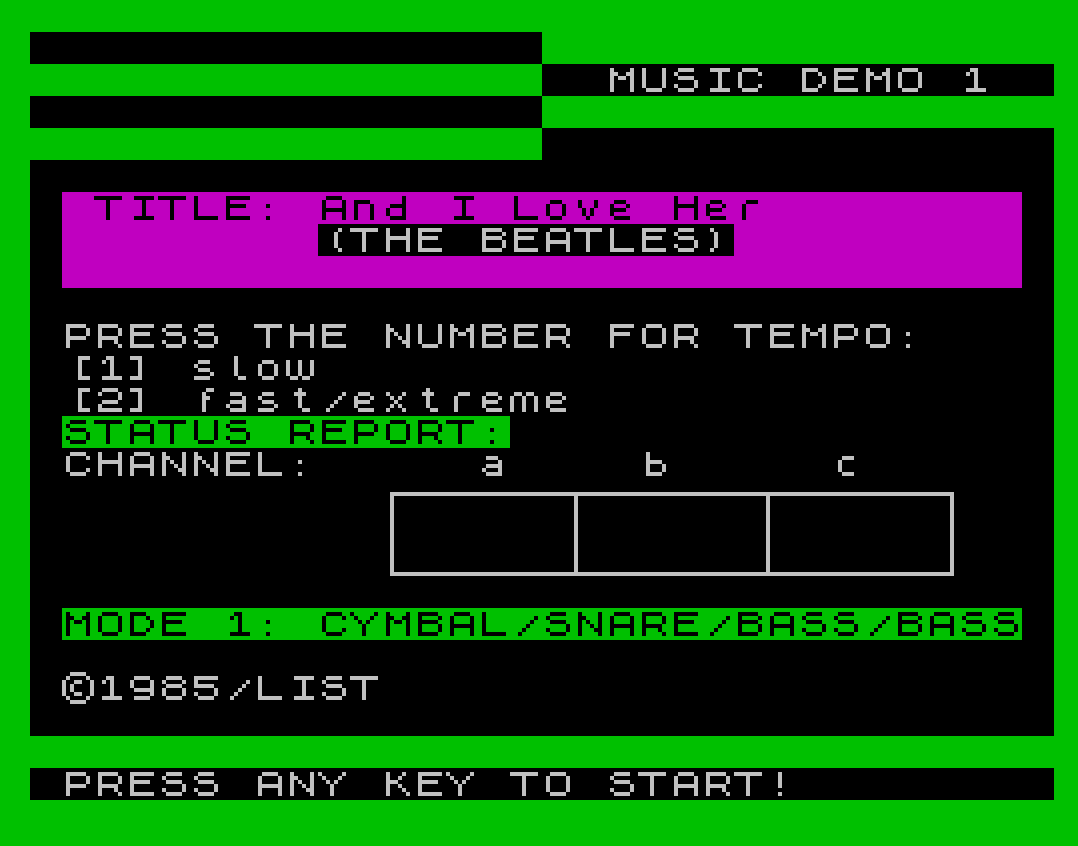
Source Code
   10 REM TS2068 SINGING MODE I
   15 REM THE BEATLES
   20 REM BY GARIN GANIS
   25 LET TEMPO=500
  100 BORDER 4: PAPER 4: INK 0: CLS
  110 PRINT AT 4,2;"******************************"
  120 PRINT AT 6,6;"TS2068 MUSIC DEMO I:"
  130 PRINT AT 8,6;"TO START:";AT 10,6;"1. CHOOSE THE TEMPO BY";TAB 6;"   PUSHING [1] OR [2].";TAB 6;"2. PRESS ANY KEY TO PLAY."
  140 PRINT AT 18,2;"******************************"
  500 PAUSE TEMPO
  510 PRINT AT 15,5; FLASH 1;"READY"; FLASH 0
  520 PAUSE 200
  600 CLS : BORDER 4: PAPER 0: INK 7: CLS
  610 REM PRINT AT 0,16; PAPER 4;"                                "
  612 PRINT AT 0,16; PAPER 4;"                                "
  614 PRINT AT 1,18;"MUSIC DEMO 1"
  618 PRINT AT 2,16; PAPER 4;"                                "
  620 PRINT AT 5,1; PAPER 3;"                              "
  621 PRINT AT 6,1; PAPER 3;"                              "
  622 PRINT AT 7,1; PAPER 3;"                              "
  624 PRINT AT 5,2; INK 0; PAPER 3;"TITLE: And I Love Her"
  625 PRINT AT 6,9;"(THE BEATLES)"
  626 PRINT #1;AT 1,0; PAPER 0; INK 7;" PRESS ANY KEY TO START!        "
  630 PRINT AT 9,1;"PRESS THE NUMBER FOR TEMPO:"
  631 PRINT AT 10,1;"[1] slow"
  632 PRINT AT 11,1;"[2] fast/extreme"
  640 PRINT AT 12,1; PAPER 4; INK 0;"STATUS REPORT:"
  645 PRINT AT 13,1;"CHANNEL:";AT 13,14;"a";AT 13,19;"b";AT 13,25;"c"
  650 PLOT 90,60: DRAW 140,0: DRAW 0,-20: DRAW -140,0: DRAW 0,20
  651 PLOT 136,60: DRAW 0,-20: PLOT 184,60: DRAW 0,-20
  670 IF INKEY$="1" THEN PRINT AT 10,2; FLASH 1;"1"; FLASH 0: LET T1=15: LET T2=15: LET T3=16: LET T4=16: GO TO 0699
  671 IF INKEY$="2" THEN PRINT AT 11,2; FLASH 1;"2"; FLASH 0: LET T1=5: LET T2=5: LET T3=5: LET T4=5: GO TO 0699
  675 PRINT AT 18,1; INK 0; PAPER 4;"MODE 1: CYMBAL/SNARE/BASS/BASS"
  677 PRINT AT 20,1;"©1985/LIST"
  680 GO TO 670
  699 PAUSE 0
  739 LET S1=15: LET S2=15
  740 RESTORE 1097: PAUSE 100
  741 PRINT AT 15,12;"USED"
  745 FOR Z=1 TO 100
  746 IF Z=9 THEN PRINT AT 15,18;"USED"
  747 IF Z=29 THEN PRINT AT 15,24;"USED"
  748 IF Z=87 THEN PRINT AT 15,24;"    "
  749 IF Z=88 THEN PRINT AT 15,24;"USED"
  750 IF Z=89 THEN PRINT AT 15,18;"    ";AT 15,24;"    "
  751 READ A1,B1,A2,B2
  752 IF A1=9999 OR B1=9999 THEN PRINT AT 15,12;"    ": GO TO 1500
  800 SOUND 7,49;6,0;12,13;13,1;8,16;9,S1;2,A1;3,B1;10,S2;4,A2;5,B2
  810 PAUSE T1
  815 READ C1,D1,C2,D2
  816 IF C1=9999 OR D1=9999 THEN PRINT AT 15,12;"    ": GO TO 1500
  820 SOUND 7,49;8,16;6,5;12,5;13,0;0,100;1,6;9,S1;2,C1;3,D1;10,S2;4,C2;5,D2
  825 PAUSE T2
  830 READ E1,F1,E2,F2
  831 IF E1=9999 OR F1=9999 THEN PRINT AT 15,12;"    ": GO TO 1500
  840 SOUND 7,49;8,16;6,31;12,6;13,0;0,255;1,0;9,S1;2,E1;3,F1;10,S2;4,E2;5,F2
  845 PAUSE T3
  858 READ G1,H1,G2,H2
  859 IF G1=9999 OR H1=9999 THEN PRINT AT 15,12;"    ": GO TO 1500
  860 SOUND 7,49;8,16;6,31;12,6;13,0;0,255;1,0;9,S1;2,G1;3,H1;10,S2;4,G2;5,H2
  865 PAUSE T4
  900 NEXT Z
 1097 DATA 0,0,0,0,0,0,0,0,0,0,0,0,0,0,0,0,0,0,0,0,0,0,0,0,0,0,0,0,0,0,0,0
 1098 DATA 0,0,0,0,0,0,0,0,0,0,0,0,0,0,0,0,0,0,0,0,0,0,0,0,0,0,0,0,0,0,0,0
 1099 DATA 0,0,0,0,0,0,0,0,0,0,0,0,0,0,0,0,0,0,0,0,0,0,0,0,0,0,0,0,0,0,0,0
 1100 DATA 0,0,0,0,0,0,0,0,0,0,0,0,0,0,0,0,0,0,0,0,0,0,0,0,0,0,0,0,0,0,0,0,0,0,0,0,186,0,0,0,186,0,0,0,165,0,0,0,165,0,0,0,156,0,0,0,156,0,0,0,110,0,0,0,110,0,0,0,124,0,0,0,104,0,0,0,104,0,0,0,104,0,0,0,104,0,0,0,104,0,0,0,104,0,0,0,104,0,0,0
 1110 DATA 186,0,0,0,186,0,0,0,165,0,0,0,165,0,0,0,156,0,0,0,156,0,0,0,110,0,0,0,110,0,0,0,124,0,0,0,124,0,0,0,124,0,0,0,124,0,0,0,124,0,0,0,124,0,0,0,124,0,0,0
 1120 DATA 0,0,0,0,186,0,0,0,186,0,0,0,165,0,0,0,165,0,0,0,156,0,0,0,156,0,0,0,110,0,0,0,110,0,0,0,124,0,0,0,104,0,0,0,104,0,0,0,104,0,0,0,104,0,0,0,104,0,0,0,104,0,0,0,104,0,0,0
 1130 DATA 104,0,0,0,104,0,0,0,124,0,0,0,124,0,0,0,156,0,0,0,156,0,0,0,165,0,0,0,165,0,0,0,165,0,0,0,186,0,0,0,186,0,0,0
 1140 DATA 23,1,0,0,248,0,0,0,23,1,0,0,248,0,0,0,248,0,0,0,248,0,0,0,165,0,0,0,165,0,0,0,165,0,0,0,165,0,0,0,165,0,0,0,165,0,0,0,165,0,0,0,165,0,0,0,165,0,0,0
 1150 DATA 139,0,0,0,165,0,0,0,186,0,0,0,209,0,0,0,186,0,0,0,186,0,0,0
 1151 DATA 186,0,248,0,186,0,57,1,165,0,221,0,165,0,57,1,156,0,248,0,156,0,75,1,110,0,241,1,110,0,162,1,124,0,75,1,104,0,162,1,104,0,57,1,104,0,162,1,104,0,75,1,104,0,162,1,104,0,241,1,104,0,162,1
 1152 DATA 186,0,248,0,186,0,57,1,165,0,221,0,165,0,57,1,156,0,248,0,156,0,75,1,110,0,241,1,110,0,162,1,124,0,75,1,124,0,162,1,124,0,57,1,124,0,162,1,124,0,75,1,124,0,162,1,124,0,241,1
 1153 DATA 0,0,57,1,186,0,248,0,186,0,57,1,165,0,221,0,165,0,57,1,156,0,248,0,156,0,75,1,110,0,241,1,110,0,162,1,124,0,75,1,104,0,162,1,104,0,46,2,104,0,162,1,104,0,116,1,104,0,162,1,104,0,114,2,104,0,241,1
 1154 DATA 104,0,46,2,104,0,241,1,124,0,162,1,124,0,241,1,156,0,46,2,156,0,241,1,165,0,46,2,165,0,186,1,165,0,241,1,186,0,186,1,186,0,46,2
 1155 DATA 23,1,186,1,248,0,241,1,23,1,186,1,248,0,162,1,248,0,75,1,248,0,116,1,165,0,75,1,165,0,23,1,165,0,75,1,165,0,116,1,165,0,75,1,165,0,162,1,165,0,75,1,165,0,116,1,165,0,75,1,165,0,23,1,165,0,75,1,165,0,116,1,0,0,75,1
 1156 DATA 248,0,241,1,248,0,162,1,165,0,75,1,165,0,162,1,165,0,241,1,165,0,162,1,165,0,75,1,165,0,162,1,139,0,186,1,139,0,75,1,139,0,23,1,139,0,75,1,139,0,186,1,139,0,75,1,139,0,23,1,139,0,75,1
 1157 DATA 165,0,241,1,165,0,162,1,110,0,75,1,110,0,162,1,139,0,241,1,139,0,162,1,165,0,75,1,165,0,162,1,139,0,186,1,139,0,75,1,139,0,23,1,139,0,75,1,139,0,248,0,139,0,75,1,139,0,23,1,139,0,75,1
 1158 DATA 165,0,241,1,165,0,162,1,110,0,75,1,110,0,162,1,139,0,241,1,139,0,162,1,165,0,75,1,165,0,162,1,139,0,186,1,139,0,75,1,139,0,23,1,139,0,75,1,165,0,186,1,165,0,75,1,139,0,23,1,139,0,75,1
 1159 DATA 165,0,241,1,165,0,116,1,156,0,57,1,165,0,116,1,186,0,241,1,186,0,116,1,186,0,57,1,186,0,116,1,209,0,46,2,209,0,186,1,209,0,116,1,209,0,186,1,221,0,46,2,221,0,186,1,221,0,116,1,221,0,186,1
 1160 DATA 0,0,116,1,0,0,57,1,186,0,248,0,186,0,57,1,165,0,221,0,165,0,57,1,156,0,248,0,156,0,75,1,110,0,241,1,110,0,162,1,124,0,75,1,104,0,162,1,104,0,57,1,104,0,162,1,104,0,75,1,104,0,162,1,104,0,241,1,104,0,162,1
 1162 DATA 186,0,248,0,186,0,57,1,165,0,221,0,165,0,57,1,156,0,248,0,156,0,75,1,110,0,241,1,110,0,162,1,124,0,75,1,124,0,162,1,124,0,57,1,124,0,162,1,124,0,75,1,124,0,162,1,124,0,241,1
 1163 DATA 0,0,57,1,186,0,248,0,186,0,57,1,165,0,221,0,165,0,57,1,156,0,248,0,156,0,75,1,110,0,241,1,110,0,162,1,124,0,75,1,104,0,162,1,104,0,46,2,104,0,162,1,104,0,116,1,104,0,162,1,104,0,114,2,104,0,241,1
 1164 DATA 104,0,46,2,104,0,241,1,124,0,162,1,124,0,241,1,156,0,46,2,156,0,241,1,165,0,46,2,165,0,186,1,165,0,241,1,186,0,186,1,186,0,46,2
 1165 DATA 23,1,186,1,248,0,241,1,23,1,186,1,248,0,162,1,248,0,75,1,248,0,116,1,165,0,75,1,165,0,23,1,165,0,75,1,165,0,116,1,165,0,75,1,165,0,162,1,165,0,75,1,165,0,116,1,165,0,75,1,165,0,23,1,165,0,75,1,165,0,116,1,165,0,75,1
 1166 DATA 209,0,162,1,209,0,75,1,209,0,116,1,209,0,75,1,209,0,23,1,209,0,75,1,209,0,116,1,209,0,75,1
 1167 DATA 209,0,0,0,209,0,0,0,209,0,0,0,209,0,0,0,209,0,0,0,0,0,0,0
 1168 DATA 186,0,186,0,165,0,165,0,209,0,209,0,162,1,162,1,23,1,23,1
 1169 DATA 0,0,0,0,0,0,0,0,0,0,0,0,0,0,0,0
 1170 DATA 0,0,0,0,0,0,0,0,0,0,0,0,0,0,0,0,0,0,0,0,0,0,0,0
 1172 DATA 9999,9999,9999,9999
 1500 PAUSE 400
 1600 LET TEMPO=100: GO TO 30
 9998 SAVE "BEATLES" LINE 1
Note: Type-in program listings on this website use ZMAKEBAS notation for graphics characters.