
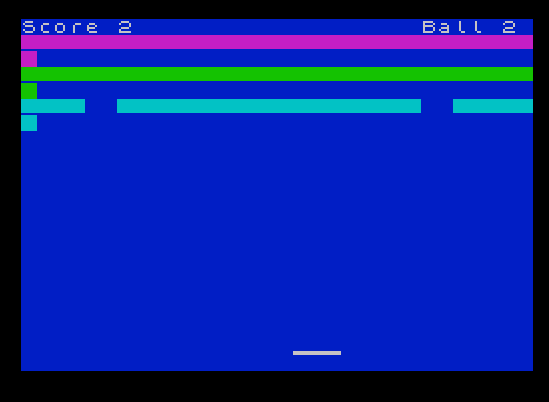
This is a Breakout-style paddle-and-ball game where the player deflects a bouncing ball to destroy rows of colored bricks, controlled via the 5 and 8 keys. The playing field consists of three rows of underscore characters rendered with INK and INVERSE attributes, and brick destruction is detected using SCREEN$ to read character data back from the display. Two UDGs are defined at runtime: UDG “a” is a filled circle (the ball sprite) and UDG “b” provides a flat base graphic. Ball speed is configurable at startup via a 1–10 scale that feeds a FOR/NEXT delay loop, and the game tracks lives (balls) with a limit of 10 before triggering Game Over. A brick count variable drives level resets, and the score increments each time a brick is hit.
Program Analysis
Program Structure
The program is organized into a main game loop plus several subroutines at high line numbers, a common convention for keeping initialization and setup code separate from the action loop.
| Lines | Purpose |
|---|---|
| 10–13 | Title screen and wait for keypress |
| 20–130 | Main game loop (paddle, ball, collision) |
| 1000–1030 | Ball-lost handler: reposition ball, increment ball counter |
| 2000–2020 | Game Over screen and restart |
| 7000–7030 | Draw brick rows (three INK/INVERSE rows) |
| 8000–8990 | Initialize all game variables and get speed input |
| 9000–9040 | Load UDG data via READ/POKE loop |
UDG Definitions
Subroutine 9000 defines two UDGs by POKEing 8-byte patterns into the UDG memory area starting at USR "a". UDG “a” encodes a filled circle (bytes 60,126,255,255,255,255,126,60), used as the ball sprite. UDG “b” encodes a flat two-pixel-high line (bytes 0,0,0,0,0,0,255,255), which likely serves as part of the paddle visual. The ball is printed with INK 6 (yellow) for visibility.
Collision Detection via SCREEN$
Rather than maintaining coordinate arrays for the bricks, the program uses SCREEN$ at line 90 to test whether the character at the ball’s current position is "_" (the underscore character used to represent a brick). This is a classic memory-saving technique: the display itself acts as the game state. A separate test at line 100 checks for an empty string from SCREEN$, which occurs when the ball hits the paddle area (a graphic character not representable as a printable character), triggering a vertical direction reversal.
Brick Counting and Level Reset
Variable count tracks how many bricks have been destroyed. At line 95, when count reaches 32+s (the total brick count adjusted by the speed parameter), the level resets by jumping to line 35 to redraw the bricks. The expression LET s=s-(s+1) evaluates to s = -1 regardless of the prior value of s, which appears to be a bug — it seems intended to preserve or modify the speed value but instead always sets s to -1, making subsequent delay loops run for a negative count (which in Sinclair BASIC effectively executes zero iterations, resulting in maximum speed on the next level).
Paddle Movement and Speed Delay
Paddle position v is updated at line 50 using a compact Boolean arithmetic idiom: v = v + 2*(INKEY$="8" AND v<27) - 2*(INKEY$="5" AND v>0). The speed control variable s is used in a FOR a=1 TO s: NEXT a busy-wait loop at lines 50 and 55, providing an adjustable frame delay. A value of 1 gives fast gameplay; 10 gives a slow pace. This delay loop appears in two locations, adding a delay both during paddle input polling and unconditionally at line 55.
Ball Reset and Life Tracking
When the ball passes row 20 (below the paddle), line 110 calls subroutine 1000. This routine blanks the ball, resets its vertical position to row 20, assigns a random horizontal starting column, and resets vertical direction to -1 (moving upward). Variable b tracks the number of balls used; at line 115, when b=10 the game ends.
Brick Rendering
Subroutine 7000 draws three rows of underscores using a FOR loop with INK a+2 (cycling through ink colors 3, 4, and 5) and INVERSE 1, creating visually distinct colored brick rows. The underscore character is printed 32 times per row to fill the screen width.
Notable Bugs and Anomalies
- Line 50 contains a dead conditional:
IF INKEY$="5" AND v<0can never be true sincevis bounded tov>0by the movement expression earlier on the same line. The body of this conditional (printing and scoring) therefore never executes. - The expression
LET s=s-(s+1)always yields-1, not a speed adjustment relative to the prior level, likely a coding error. - The
SCREEN$check at line 100 for""(empty string) is intended to detect the paddle, but an empty return fromSCREEN$occurs for any graphic/UDG cell — this may cause spurious direction reversals when the ball passes over its own sprite position. - At line 2020, restarting the game with
GO TO 30skips subroutine 9000 (UDG loading), which is harmless since the UDGs remain in memory, but it also skips the variable initialization in subroutine 8000, meaning score and ball count are not reset — the player must rely on subroutine 8000 being called via line 30’sGO SUB 8000. Checking line 30 confirmsGO SUB 8000is called, so this is fine.
Image Gallery
Source Code
   10 REM demolition
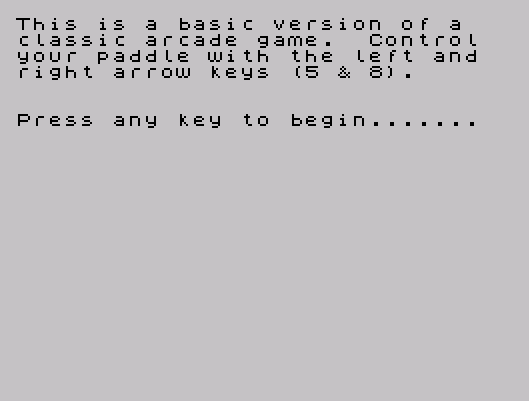
   11 PRINT "This is a basic version of a    classic arcade game.  Control   your paddle with the left and   right arrow keys (5 & 8)."
   12 PRINT : PRINT : PRINT "Press any key to begin......."
   13 IF INKEY$="" THEN GO TO 13:
   14 CLS
   20 GO SUB 9000
   30 GO SUB 8000
   35 GO SUB 7000
   40 PRINT AT 20,v;"  \b\b\b  "
   50 LET v=v+2*(INKEY$="8" AND v<27)-2*(INKEY$="5" AND v>0): IF INKEY$="5" AND v<0 THEN PRINT AT 20,1;"\b\b\b  ": PRINT AT 0,0;"Score ";sc: FOR a=1 TO s: NEXT a
   55 PRINT AT 0,0;"Score ";sc: FOR a=1 TO s: NEXT a
   60 PRINT AT e,f;"  "
   70 LET e=e+c: IF e<2 THEN LET c=-c: BEEP .008,20
   80 LET f=f+d: IF f<1 OR f>30 THEN LET d=-d: BEEP .008,10
   90 IF SCREEN$ (e,f)="_" THEN LET sc=sc+1: LET c=-c: BEEP .008,15
   95 IF SCREEN$ (e,f)="_" THEN LET count=count+1: IF count=(32+s) THEN LET count=0: LET s=s-(s+1): GO TO 35
  100 IF SCREEN$ (e,f)="" THEN LET c=-c: BEEP .008,15
  110 PRINT AT e,f; INK 6;"\a": IF e>20 THEN LET b=b+1: GO SUB 1000
  115 IF b=10 THEN GO TO 2000
  130 GO TO 40
  990 STOP
 1000 PRINT AT e,f;" "
 1010 LET e=20: LET f=INT (RND*16)+10: LET c=-1
 1020 PRINT AT 0,25;"Ball ";b
 1030 RETURN
 2000 PRINT AT 10,12;"Game Over"
 2010 PRINT "             You scored  ";sc
 2020 INPUT "Press enter to play again "; LINE a$: GO TO 30
 7000 PRINT AT 0,0;"Score 0";AT 0,25;"Ball ";b: FOR a=1 TO 3
 7010 PRINT INK a+2; INVERSE 1;"________________________________ "
 7020 NEXT a
 7030 RETURN
 8000 BORDER 0: PAPER 1: INK 7: CLS
 8010 LET v=15
 8020 LET c=-1: LET d=1
 8030 LET sc=0
 8040 LET e=20: LET f=INT (RND*15)+10
 8050 LET b=1
 8060 INPUT "What speed 1=Fast, 10=Very Slow ";s
 8070 LET count=0
 8990 RETURN
 9000 FOR a=USR "a" TO USR "b"+7
 9010 READ user: POKE a,user
 9020 NEXT a: RETURN
 9030 DATA 60,126,255,255,255,255,126,60
 9040 DATA 0,0,0,0,0,0,255,255
Note: Type-in program listings on this website use ZMAKEBAS notation for graphics characters.