
Byte Mapped Scroll is a machine code utility that enables smooth, byte-aligned scrolling of arbitrary rectangular regions of the TS2068/ZX screen. The program POKEs 232 bytes of Z80 machine code above RAMTOP (starting at address 65135) and provides routines for scrolling up or down, with or without wrap-around, accessed via RANDOMIZE USR calls. Users can interactively define the scroll region by specifying top line, bottom line, left column, and right column coordinates, then test the scroll behavior and optionally SAVE the machine code block for use in their own programs. The code block occupies addresses 65135–65366, and the BASIC shell patches key parameter addresses (such as 65139, 65140, 65158, 65187, 65288, 65337, 65345, 65354, and 65362) with the computed scroll region geometry before execution. A built-in demonstration section shows three scroll modes using PLOT/DRAW graphics and repeated PRINT output.
Program Structure
The program is organized into several functional segments:
- Lines 1–6: Setup — clears memory above address 65134, displays a loading message, and calls the machine code loader subroutine at line 1000.
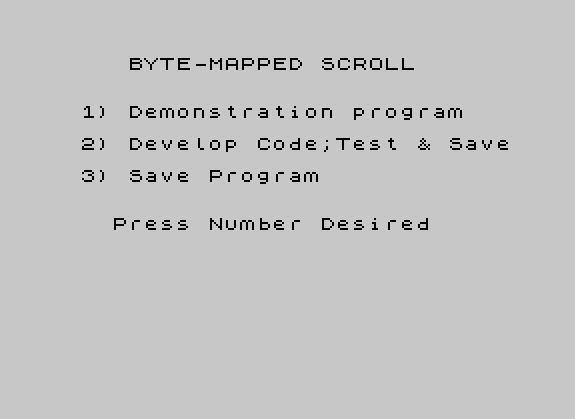
- Line 10–12: Main menu — offers Demonstration, Develop/Test/Save, or Save Program options.
- Lines 14–50: Interactive scroll region definition and code-usage instructions.
- Lines 100–114: Subroutine to accept and validate scroll region parameters (top, bottom, left, right), then POKE the computed values into the machine code.
- Lines 1000–1016: Machine code loader — READs DATA bytes and POKEs them into RAM above RAMTOP (65135–65366).
- Lines 1008–1014: DATA statements containing the Z80 machine code bytes.
- Line 1016: DATA containing five target addresses used during parameter patching in line 108.
- Lines 9100–9116: Demonstration #1 — scroll up with wrap-around, using PLOT/DRAW graphics.
- Lines 9200–9209: Demonstration #2 — interactive up/down scroll without wrap, controlled by arrow keys (6 and 7).
- Lines 9300–9314: Demonstration #3 / test scroll subroutine used also from line 28.
- Line 9999: Saves the BASIC program with auto-run.
Machine Code Layout
The machine code block is POKEd into addresses 65135–65366. Lines 1002–1006 load it in two passes with an intentional zero-fill gap:
- 65135–65217: First DATA block (83 bytes, loaded by line 1002).
- 65218–65281: Zero-filled region (64 bytes, line 1004) — likely used as workspace or padding.
- 65282–65366: Second DATA block (85 bytes, loaded by line 1006).
The four USR entry points exposed to the user are:
| Address | Function |
|---|---|
65203 | Initialize wrap-around (called before scroll loop starts) |
65138 | Wrap-around terminator (called after scroll loop) |
65333 | Scroll up one step |
65350 | Scroll down one step |
65135 | Non-wrap terminator / stop condition |
Parameter Patching
Rather than passing parameters through registers, the BASIC code directly patches addresses inside the machine code block before calling it. Line 108 uses a RESTORE 1016 and a FOR/READ/POKE loop to write the bottom-line value (b-1) into five separate addresses within the code. Lines 110–112 compute and POKE additional parameters:
65158and65187: column count (cl), controlling loop width.65345and65354: top line + 1 (y+1), controlling loop top boundary.65139,65140,65287,65288: high and low bytes of the starting screen address (co = 256*(y+1)+x).
The screen coordinate system used here is non-standard: lines are numbered 0–175 from bottom to top and columns 0–31 left to right. Line 108 converts the user-supplied column values by computing X = X + 8 and A = A + 1 - (X/8) to produce byte-aligned offsets.
Notable BASIC Idioms and Techniques
- PAUSE 0 / INKEY$ pattern: Used extensively (lines 10, 28, 48, 9116, 9313) for efficient keypress waiting without blocking indefinitely.
- CODE z$ comparison: Lines 20 and 24 use
CODE z$=121(ASCII ‘y’) instead ofz$="y", a common idiom for case-sensitive single-character input testing. - POKE 23617,236: In line 100, this POKEs the system variable that controls the input line editor, likely setting a custom prompt width or suppressing the lower-screen input area scrolling.
- RESTORE with a specific line: Line 108 uses
RESTORE 1016to re-read only the address DATA on line 1016, separately from the machine code DATA on lines 1008–1014. - Variable reuse for USR addresses: Variables
s,w, andzhold USR entry-point addresses selected based on scroll direction and wrap mode, avoiding hard-coded calls throughout the test loop. - RANDOMIZE USR 2217: Line 50 calls address 2217 before the SAVE — this is a well-known technique to invoke the ROM tape-save header routine directly.
Scroll Region Geometry
Line 110 computes cl = INT(a AND a <= (256-x)/8). This expression uses a Boolean result (0 or 1) as an arithmetic value: if a fits within the available byte width given the column offset, cl equals a; otherwise it is 0. This is an attempt at a clamping guard, though the logic is somewhat fragile — if a exceeds the bound, cl silently becomes 0 rather than clamping to the maximum legal value.
Demonstration Mode
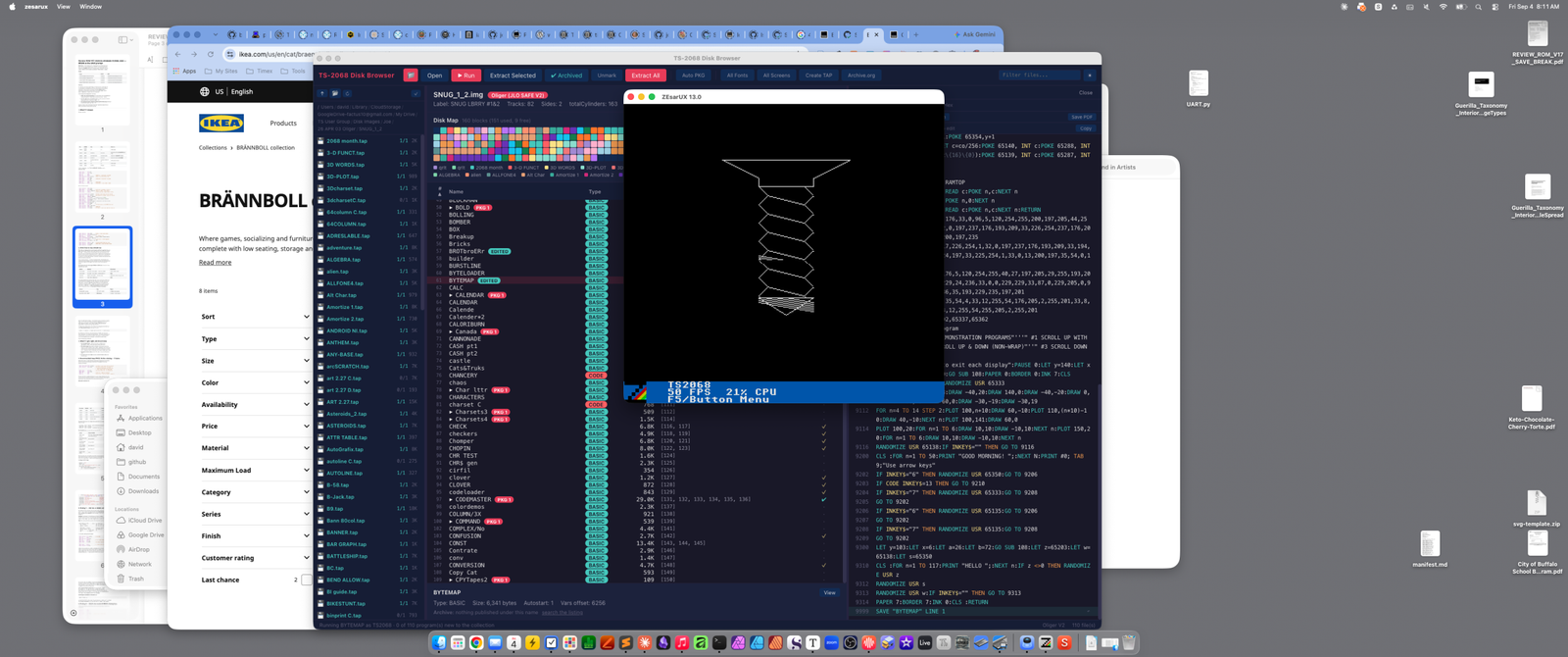
The three demonstration programs illustrate the scroll routines in action. Demo #1 (lines 9105–9116) sets a scroll region covering most of the screen, draws a geometric pattern with PLOT/DRAW, and then loops on RANDOMIZE USR 65138 (wrap-around scroll) until a key is pressed. Demo #2 (lines 9200–9209) fills the screen with repeated text and allows the user to scroll up or down interactively using keys "7" and "6" respectively, testing for ENTER (CODE 13) to exit. Demo #3 / the test subroutine (lines 9300–9314) is also called from line 28 during the develop-and-test workflow.
Potential Issues
- Line 9200 prints the loop variable as
N(uppercase) inNEXT Nbut defines it asn(lowercase) in the FOR — on most Sinclair BASICs these are treated as the same variable, so this is not a functional bug. - The column-clamping logic in line 110 (described above) may produce a zero column count if parameters are near boundary values, causing silent failure rather than an error.
- Line 12 re-reads INKEY$ after PAUSE 0 has already consumed the keypress in line 10; if the user releases the key before line 12 is reached, the condition will be false and the program will fall through to the development path even if
"3"was pressed. This is a minor timing-dependent bug.
Image Gallery
Source Code
    1 REM "BYTE-MAPPED SCROLL" BY          C.Vernon Tidwell
    5 REM Entered by John Leary for LIST. Taken from T-S Horizons magazine for July/Aug '85
    6 CLEAR 65134:PRINT AT 10,11;"ONE MOMENT":RESTORE :GO SUB 1000:CLS
   10 PRINT ''' TAB 7;"BYTE-MAPPED SCROLL"''' TAB 4;"1) Demonstration program"'' TAB 4;"2) Develop Code;Test & Save"'' TAB 4;"3) Save Program"''' TAB 6;"Press Number Desired":PAUSE 0:IF INKEY$ <>"2" AND INKEY$ <>"3" THEN GO SUB 9100:GO TO 10
   12 IF INKEY$="3" THEN GO TO 9999
   14 CLS :PRINT "   Define The Block To Scroll"''"Enter the top line, bottom line,left column, and right column;"'
   15 PRINT "then indicate whether this blockis to scroll up or down and alsowhether it is to wrap-around forcontinuous scrolling."
   16 PRINT '"The lines are numbered from 0 to175 (from bottom to top).  The  columns are numbered from 0 to  31 (left to right)."'':GO SUB 100
   18 PRINT '''"YES or NO: INPUT y or n"
   20 LET z$="":INPUT "SCROLL UP: ";z$:IF CODE z$=121 THEN LET s=65333:PRINT AT 18,0;"SCROLL UP":GO TO 24
   22 PRINT AT 18,0;"SCROLL DOWN":LET S=65350
   24 LET z$="":INPUT "WRAP-AROUND: ";z$:IF CODE z$=121 THEN LET w=65138:LET z=65203:PRINT AT 19,0;"WRAP-AROUND":GO TO 28
   26 PRINT AT 19,0;"NON-WRAP":LET W=65135:LET z=0
   28 PRINT AT 21,0;"  PRESS ANY KEY TO TEST SCROLL":PRINT #0;"WHEN DONE WITH TEST, PRESS ENTER":PAUSE 0:GO SUB 9310
   30 PRINT "NOTE:  Save code & reload with      CLEAR 65134: LOAD """"CODE    Access this code with lines suchas the following or use examplesin the demonstration. The USR   values can vary; jot them down  for reference."
   32 PRINT :IF w=65138 THEN PRINT "9994 RANDOMIZE USR 65203"
   34 IF S=65333 THEN PRINT "9995 RANDOMIZE USR 65333"
   36 IF S=65350 THEN PRINT "9995 RANDOMIZE USR 65350"
   38 PRINT "9996 Your program to scroll goes here"
   40 IF w=65138 THEN PRINT "9997 RANDOMIZE USR 65138"
   42 IF w=65135 THEN PRINT "9997 RANDOMIZE USR 65135"
   44 PRINT "9999 IF INKEY$ = """" THEN GO TO 9997"
   46 PRINT AT 18,0;"1) SAVE ""CODE""CODE 65135,232"''"2) Return to program menu"
   48 PRINT #0; TAB 5;"PRESS 1 OR 2 AS DESIRED":PAUSE 0:IF CODE INKEY$=50 THEN CLS :GO TO 10
   50 RANDOMIZE USR 2217:SAVE "CODE"CODE 65135,232:BEEP .1,30:GO TO 48
  100 POKE 23617,236:INPUT "ENTER TOP LINE = ";Y:IF Y <=175 AND Y >=0 THEN PRINT "TOP LINE = ";Y:GO TO 102
  101 BEEP .2,10:GO TO 100
  102 INPUT "ENTER BOTTOM LINE = ";B:IF B <=Y AND B >=0 AND B <=175 THEN PRINT "BOTTOM LINE = ";B:GO TO 104
  103 BEEP .2,10:GO TO 102
  104 INPUT "ENTER LEFT COLUMN = ";X:IF X >=0 AND X <=31 THEN PRINT "LEFT COLUMN = ";X:GO TO 106
  105 BEEP .2,10:GO TO 104
  106 INPUT "ENTER RIGHT COLUMN = ";A:IF A >=0 AND A >=X AND A <=31 THEN PRINT "RIGHT COLUMN = ";A:GO TO 108
  107 BEEP .2,10:GO TO 106
  108 RESTORE 1016:LET X=X+8:LET A=A+1-(X/8):FOR n=1 TO 5:READ c:POKE c,b-1:NEXT n
  110 LET cl= INT (a AND a <=(256-x)/8):POKE 65158,cl:POKE 65187,cl\{16}\{0}:POKE 65345,y+1:POKE 65354,y+1
  112 LET co=256*(y+1)+x:LET c=co/256:POKE 65140, INT c:POKE 65288, INT c:LET c=256*(c- INT c\{16}\{0}):POKE 65139, INT c:POKE 65287, INT c
  114 RETURN
 1000 REM POKE MC TO ABOVE RAMTOP
 1002 FOR n=65135 TO 65217:READ c:POKE n,c:NEXT n
 1004 FOR n=65218 TO 65281:POKE n,0:NEXT n
 1006 FOR n=65282 TO 65366:READ c:POKE n,c:NEXT n:RETURN
 1008 DATA 205,179,254,1,0,176,33,0,96,5,120,254,255,200,197,205,44,255,229,17,194,254,1,32,0,197,237,176,193,209,33,226,254,237,176,209,193,5,120,254,255,200,197,235
 1010 DATA 205,44,255,229,17,226,254,1,32,0,197,237,176,193,209,33,194,254,237,176,225,193,24,197,33,225,254,1,33,0,13,200,197,35,54,0,193,24,247
 1012 DATA 1,0,96,197,1,0,176,5,120,254,255,40,27,197,205,29,255,193,209,235,115,35,114,35,229,24,236,33,0,0,229,229,33,87,0,229,205,0,98,201,193,201,94,35,86,35,193,229,235,197,201
 1014 DATA 33,8,255,54,255,35,54,4,33,12,255,54,176,205,2,255,201,33,8,255,54,176,35,54,5,33,12,255,54,255,205,2,255,201
 1016 DATA 65147,65175,65292,65337,65362
 9100 REM Demonstration Program
 9101 CLS :PRINT AT 5,5;"DEMONSTRATION PROGRAMS"'''" #1 SCROLL UP WITH WRAPAROUND"''" #2 SCROLL UP & DOWN (NON-WRAP)"''" #3 SCROLL DOWN WITH WRAPAROUND"
 9105 PRINT '"Press enter to exit each display":PAUSE 0:LET y=140:LET x=12:LET a=20:LET b=20:GO SUB 108:PAPER 0:BORDER 0:INK 7:CLS
 9110 RANDOMIZE USR 65203:RANDOMIZE USR 65333
 9111 PLOT 100,142:DRAW 0,8:DRAW -40,20:DRAW 140,0:DRAW -40,-20:DRAW 0,-8:PLOT 100,19:DRAW 60,0:DRAW -30,-19:DRAW -30,19
 9112 FOR n=4 TO 14 STEP 2:PLOT 100,n+10:DRAW 60,-10:PLOT 110,(n*10)-10:DRAW 40,-10:NEXT n:PLOT 100,141:DRAW 60,0
 9114 PLOT 100,20:FOR n=1 TO 6:DRAW 10,10:DRAW -10,10:NEXT n:PLOT 150,20:FOR n=1 TO 6:DRAW 10,10:DRAW -10,10:NEXT n
 9116 RANDOMIZE USR 65138:IF INKEY$="" THEN GO TO 9116
 9200 CLS :FOR n=1 TO 50:PRINT "GOOD MORNING! ";:NEXT N:PRINT #0; TAB 9;"Use arrow keys"
 9202 IF INKEY$="6" THEN RANDOMIZE USR 65350:GO TO 9206
 9203 IF CODE INKEY$=13 THEN GO TO 9210
 9204 IF INKEY$="7" THEN RANDOMIZE USR 65333:GO TO 9208
 9205 GO TO 9202
 9206 IF INKEY$="6" THEN RANDOMIZE USR 65135:GO TO 9206
 9207 GO TO 9202
 9208 IF INKEY$="7" THEN RANDOMIZE USR 65135:GO TO 9208
 9209 GO TO 9202
 9300 LET y=103:LET x=6:LET a=26:LET b=72:GO SUB 108:LET z=65203:LET w=65138:LET s=65350
 9310 CLS :FOR n=1 TO 117:PRINT "HELLO ";:NEXT n:IF z <>0 THEN RANDOMIZE USR z
 9312 RANDOMIZE USR s
 9313 RANDOMIZE USR w:IF INKEY$="" THEN GO TO 9313
 9314 PAPER 7:BORDER 7:INK 0:CLS :RETURN
 9999 SAVE "BYTEMAP" LINE 1
Note: Type-in program listings on this website use ZMAKEBAS notation for graphics characters.