
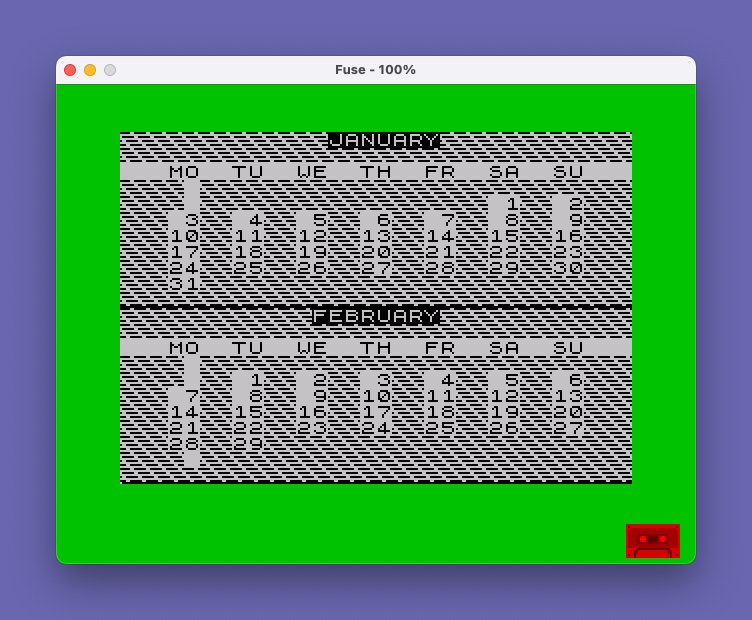
This program generates and displays a calendar for any year between 1901 and 2000, printing two months per screen using color-coded borders and inverse-video month name headers. It defines a custom UDG character (character “A”) via POKE to USR “A” through USR “A”+7, loading pixel data 249,0,126,0,159,0,231,0 to create a decorative graphic used as a border element. The day-of-week calculation uses the formula 365*(AA-1901)+INT((AA-1901)/4)+Z+D1, reduced modulo 7, to determine which column each date falls in, including basic leap year handling by setting L(2)=29 when AA/4=INT(AA/4). An optional printer copy via LPRINT is supported, triggered by a Y/N keypress loop before rendering begins.
Program Analysis
Program Structure
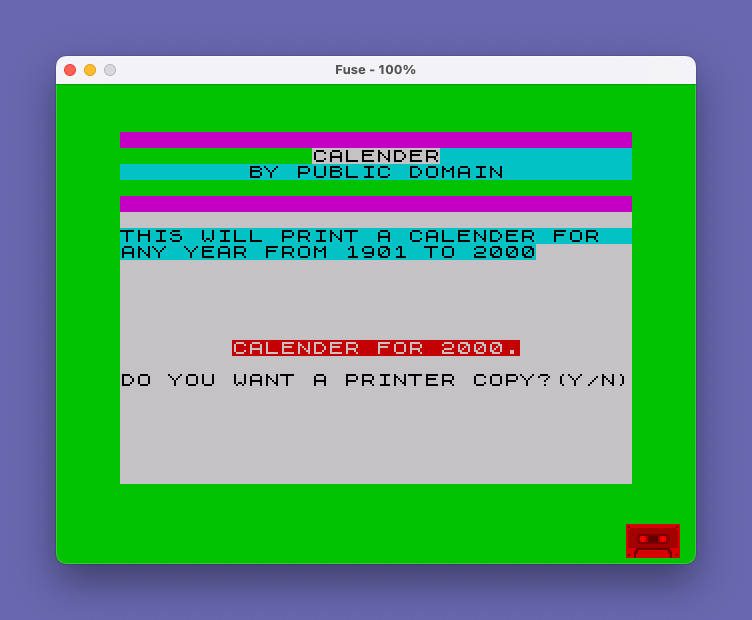
The program is organized into distinct phases: initialization and UDG setup (lines 10–20), title screen and user input (lines 30–90), printer option selection (lines 80–100), and the main calendar rendering loop (lines 110–230). Two months are displayed per screen, with the user pressing ENTER to advance through the year six screens at a time.
- Lines 10–20: UDG setup, array dimensioning, and DATA loading for month names, name lengths, and days-per-month.
- Lines 30–60: Title/splash screen with color formatting and year input with validation.
- Lines 70–100: Display confirmation and optional printer copy selection via polling loop.
- Lines 110–230: Main rendering: leap year check, two-month display loop with DRAW lines and AT-positioned day numbers, COPY if printing, wait for ENTER, loop until month 12.
UDG Definition
Line 10 uses a FOR loop from USR "A" to USR "A"+7, POKEing the eight bytes 249,0,126,0,159,0,231,0 into memory to define UDG “A”. The resulting character is used extensively as a decorative border tile throughout the display, referenced as \a in the PRINT statements.
Month Data and Arrays
Line 50 contains a single large DATA statement holding all twelve month names with their character lengths, followed by the days-per-month values. These are READ into M$(12,9), M(12), and L(12) respectively in line 20. The month name length stored in M(X) is used to center the name on screen: AT X*11, 16-M(MA)/2.
Day-of-Week Calculation
The core calendar algorithm is in lines 170–180. For each day Z of month MA, the formula computes:
D = 365*(AA-1901) + INT((AA-1901)/4) + Z + D1— cumulative day count from 1901, whereD1is the offset for days elapsed in prior months.D = D - 7*INT(D/7) + 1— reduces to a 1–7 day-of-week value.- Column position is then
D*4-1, and a new rowNis incremented whenD=7(Sunday, end of week).
The offset D1 is recomputed after each month by summing L(X) for all prior months (line 190), ensuring correct carry-over of the weekday between months.
Leap Year Handling
Line 110 sets L(2)=29 if AA/4 = INT(AA/4). This is a simple divisibility-by-4 test, which is accurate for the supported range of 1901–2000 since no century year within that range (1900, 2100) is included. The year 2000 is technically a leap year and would be handled correctly; 1900 is excluded by the input validation.
Screen Layout and Graphics
Two months are rendered per screen using a FOR Y=0 TO 1 loop (line 160–190). A horizontal dividing line is drawn with DRAW 255,0 and PLOT 0,88: DRAW 255,0 to separate the two month panels. The UDG “A” character forms decorative rows at the top and sides of each month panel via long strings of \a characters in PRINT statements.
Printer Support
Lines 80–100 implement a polling loop to detect a Y or N keypress, setting P=1 for printer output. When P=1, line 200 issues a COPY command to print the screen, and after month 12, extra line feeds are sent via LPRINT '''''. The printer header in line 100 also uses the UDG “A” character, so the printer must support the custom character if it is to render correctly.
Notable Techniques and Idioms
- Leading space for single-digit days:
(" " AND Z<10)in line 190 — a Sinclair BASIC idiom using the string-AND operator for conditional formatting. - The
PAPER,INK,FLASH,OVER, andINVERSEattributes are used inline within PRINT statements for color emphasis without changing global attributes. - Line 60 uses
PRINT AT 8,0; FLASH 1; OVER 1with spaces to flash-erase an error message before re-prompting. POKE 23658,8in line 10 sets the system variable FLAGS2 to enable CAPS LOCK, ensuring uppercase INPUT.
Bugs and Anomalies
| Line | Issue |
|---|---|
| 110 | L(2) is never reset to 28 between runs if the user re-enters a year without restarting. A non-leap year entered after a leap year would still show February with 29 days. |
| 120–150 | The FOR X=0 TO 1 loop in line 120 shares the variable X with other loops; however, MA is incremented inside and then decremented at line 160, which correctly restores it for the rendering pass. |
| 200 | Line 200 reads IF MA=13 THEN LPRINT ''''' — this condition is only true after the final screen (months 11–12), so the trailing line feeds are only sent once, which is correct but could be confusing. |
| Title | The program consistently spells “CALENDER” rather than “CALENDAR” in both screen output and LPRINT output. |
Image Gallery
Source Code
    1 REM "\a"GRAPHICS-A
   10 BORDER 4: PAPER 7: INK 9: POKE 23658,8: FOR X=USR "A" TO USR "A"+7: READ A: POKE X,A: NEXT X: DATA 249,0,126,0,159,0,231,0
   20 DIM L(12): DIM M(12): DIM M$(12,9): FOR X=1 TO 12: READ M$(X),M(X): NEXT X: FOR X=1 TO 12: READ L(X): NEXT X
   30 CLS : BEEP .5,0: BEEP .25,5: BEEP .25,10: PRINT PAPER 3,, PAPER 4;TAB 12; PAPER 7;"CALENDER"; PAPER 4; PAPER 5;TAB 8;"BY PUBLIC DOMAIN", PAPER 4,, PAPER 3,,
   40 PRINT '' PAPER 5;"THIS WILL PRINT A CALENDER FOR  ANY YEAR FROM 1901 TO 2000"
   50 DATA "JANUARY",7,"FEBRUARY",8,"MARCH",5,"APRIL",5,"MAY",3,"JUNE",4,"JULY",4,"AUGUST",6,"SEPTEMBER",9,"OCTOBER",7,"NOVEMBER",8,"DECEMBER",8,31,28,31,30,31,30,31,31,30,31,30,31
   60 INPUT "WHICH YEAR DO YOU WANT?";AA: IF AA>2000 OR AA<1901 THEN PRINT AT 8,0; FLASH 1; OVER 1;"             ": BEEP 1,-30: GO TO 60
   70 PRINT AT 8,0; OVER 1; PAPER 5;AT 13,7; PAPER 2;"CALENDER FOR ";AA;"."'': PRINT "DO YOU WANT A PRINTER COPY?(Y/N)"
   80 LET P=0: IF INKEY$="N" THEN GO TO 110
   90 IF INKEY$<>"Y" THEN GO TO 80
  100 LET P=1: LPRINT "       CALENDER FOR  ";AA''"\a\a\a\a\a\a\a\a\a\a\a\a\a\a\a\a\a\a\a\a\a\a\a\a\a\a\a\a\a\a\a\a"
  110 LET MA=1: LET D1=0: IF AA/4=INT (AA/4) THEN LET L(2)=29
  120 CLS : FOR X=0 TO 1: PRINT "\a\a\a\a\a\a\a\a\a\a\a\a\a\a\a\a\a\a\a\a\a\a\a\a\a\a\a\a\a\a\a\a\a\a\a\a\a\a\a\a\a\a\a\a\a\a\a\a\a\a\a\a\a\a\a\a\a\a\a\a\a\a\a\a\a"
  130 PRINT AT X*11,16-M(MA)/2; INVERSE 1;M$(MA, TO M(MA))
  140 PRINT '"   MO  TU  WE  TH  FR  SA  SU"
  150 FOR Y=1 TO 7: PRINT "\a\a\a\a \a\a\a\a\a\a\a\a\a\a\a\a\a\a\a\a\a\a\a\a\a\a\a\a\a\a\a": NEXT Y: PRINT "\a\a\a\a\a\a\a\a\a\a\a\a\a\a\a\a\a\a\a\a\a\a\a\a\a\a\a\a\a\a\a\a": LET MA=MA+1: NEXT X
  160 DRAW 255,0: PLOT 0,88: DRAW 255,0: LET MA=MA-2: FOR Y=0 TO 1: LET N=0
  170 FOR Z=1 TO L(MA): LET D=365*(AA-1901)+INT ((AA-1901)/4)+Z+D1
  180 LET D=D-7*INT (D/7)+1: LET U=4+Y*11+N: IF D=7 THEN LET N=N+1
  190 PRINT AT U,D*4-1;(" " AND Z<10);Z: NEXT Z: LET MA=MA+1: LET D1=0: FOR X=1 TO MA-1: LET D1=D1+L(X): NEXT X: NEXT Y
  200 IF P=1 THEN COPY : IF MA=13 THEN LPRINT '''''
  220 IF INKEY$<>CHR$ 13 THEN GO TO 220
  230 IF MA<12 THEN GO TO 120
Note: Type-in program listings on this website use ZMAKEBAS notation for graphics characters.