
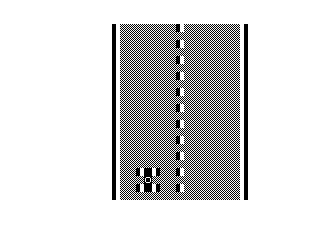
This is a simple arcade-style driving game. The program uses INKEY$ polling on keys “8” and “5” to move the car left and right, updating position variable A accordingly. The display is built entirely from block graphic characters (the filled █ and mixed ▌ patterns) rendered via PRINT AT statements. The program stores a base horizontal offset in variable B (set to 11 at line 11) and computes the display position as B+A. The USR 16514 call in the PRINT AT statements reads a system variable to determine the current screen row, a technique used to position output dynamically.
Program Analysis
Program Structure
The program is split into an initialisation section and a main loop. Lines 11–12 set up starting values for B (base column offset = 11) and A (player displacement = 0), then line 13 jumps into the game loop at line 3. Lines 3–9 form the core loop: the playfield is redrawn (lines 3–4), the player input is read and position updated (line 7), the player sprite is drawn (line 8), and control loops back to line 3 (line 9).
Execution Flow
- Line 10:
SAVE "1009%0"— tape-saving line (skipped during normal run). - Lines 11–12: Initialise
B=11,A=0. - Line 13:
GOTO 3— enter main loop. - Lines 3–4: Draw two rows of the static playfield using block graphics.
- Line 7: Update
Abased on INKEY$ (“8” moves right, “5” moves left). - Line 8: Draw the player sprite at row 20 and rows 17–18 relative to
B+A. - Line 9:
GOTO 3— repeat.
USR 16514 Technique
Both playfield PRINT AT statements use AT USR 16514, 10 as the row argument. On the ZX81/TS1000, address 16514 is the system variable DF_SZ (lower display file size), which normally holds the value 2. This means the PRINT AT row resolves to 2, placing the playfield graphics near the top of the screen. This is a compact way to reference a small constant without using a numeric literal, saving a few bytes in the tokenised program.
Block Graphics and Sprite Construction
All visual elements are built from ZX81 block graphic characters. The playfield lines (3 and 4) use \: (▌) for edges and \## (█) for filled interior blocks, forming a bordered corridor. The player sprite (line 8) is drawn across three rows:
- Row 20, columns
B+A: five solid blocks (\##\##\##\##\##) — the base/paddle. - Row 17, columns
B+A: a pattern\##\: % \ :\##mixing solid and half-block graphics with a space — the upper part of the player object. - Row 18, column
B+1+A:\##%O\##— middle section using inverse-O between two solid blocks.
Input Handling
Line 7 uses a common ZX81 idiom for single-key movement without a branch:
LET A=A+(INKEY$="8")-(INKEY$="5")
On the ZX81, a Boolean comparison returns 1 (true) or 0 (false), so pressing “8” increments A and pressing “5” decrements it. Note that INKEY$ is evaluated twice per iteration; there is no debounce or speed limiting, so holding a key causes rapid movement.
Notable Anomalies and Observations
- Line 1 is a
REMstatement containing what appears to be garbled/encoded data — likely loader or auto-run bootstrap code embedded in the REM, a well-known ZX81 technique for storing machine code or metadata. - There is no boundary check on
A, so the player sprite can be moved off-screen to negative columns or beyond column 31, which will cause a BASIC error or wrap depending on the runtime. - The main loop redraws the entire playfield every iteration without a
CLS, relying on overwriting previous sprite positions. This can leave screen artefacts if the sprite moves rapidly, since old sprite positions are only cleared when the new PRINT AT overwrites exactly the same cells. - Line 10 (
SAVE) sits between the initialisation lines but is never reached during normal execution because the program starts at line 11 via auto-run and the loop never passes through line 10.
Image Gallery
Source Code
   1 REM E£RND)CHR$ \ '; FOR E£RND\' %P\ '\,, GOSUB %S\'  47Q ( CLS TAN
   3 PRINT AT USR 16514,10;"\: \##\##\##\##\##\##\##\: \##\##\##\##\##\##\##\ :"
   4 PRINT AT USR 16514,10;"\: \##\##\##\##\##\##\##\##\##\##\##\##\##\##\##\ :"
   7 LET A=A+(INKEY$="8")-(INKEY$="5")
   8 PRINT AT 20,B+A;"\##\##\##\##\##";AT 17,B+A;"\##\: % \ :\##";AT 18,B+1+A;"\##%O\##"
   9 GOTO 3
  10 SAVE "1009%0"
  11 LET B=11
  12 LET A=0
  13 GOTO 3
Note: Type-in program listings on this website use ZMAKEBAS notation for graphics characters.