
A sales recorder for a small shop. Enter your tax rate as a decimal, and C1 if you have a TS printer to get a printed copy too. For each item enter the price and whether it is taxable; the program lists the item number, price, tax and price plus tax. Enter 0 as the price to end the customer’s list and get a subtotal, then answer Y for another customer or N for the end-of-day totals: the number of customers and items, the total price, the tax and the grand total.
As written it records up to 50 customers, with up to 50 items each. The article explains how to use a fixed tax rate and which lines to delete if you have no printer. As printed, line 360 has TAB 3 where its printer copy has TAB 8, so the end-of-day heading wraps on screen. The author’s address in line 2 is left out of the download.
Published in Syntax December 1983 (Cash Register).
Image Gallery
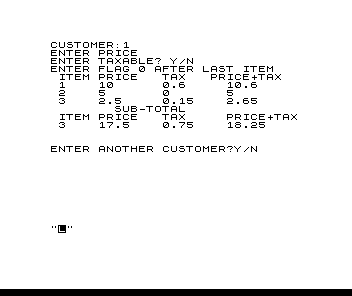
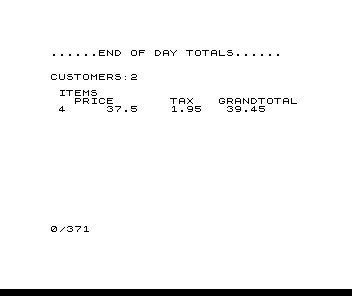
Source Code
   1 REM NAME "CASH REG."
   2 REM BY**ARTHUR FIELD,[address omitted]
   6 REM **C=CUSTOMER
   7 REM **I=ITEM
   8 REM **I1=(SUB-TOTAL ITEM)
   9 REM **P=PRICE
  10 REM **P1=(SUB-TOTAL PRICE)
  11 REM **P2=(END-OF-DAY TOTAL PRICE
  12 REM **T=TAX
  13 REM **T1=(SUB-TOTAL TAX)
  14 REM **T1=(END-OF-DAY TOTAL TAX
  15 REM **T5=TAX RATE YOU ENTER
  16 REM **C$=INPUT TP INDICATE USE OF PRINTER
  17 REM **C1=INPUT FOR C$ TO KEY  LPRINT STATEMENTS
  20 PRINT "<ENTER> TAX RATE FOR YOUR STATE OR CITY"
  25 INPUT T5
  35 LET I1=0
  40 LET C=0
  45 LET I=0
  50 LET P1=0
  55 LET P2=0
  60 LET T1=0
  61 LET T2=0
  62 LET T2=0
  63 CLS
  64 PRINT "IF YOU WISH PRINT-OUT  FOR CUST. <ENTER>C1"
  65 INPUT C$
  66 CLS
  71 LET C=C+1
  72 PRINT "CUSTOMER:";C
  73 IF C$="C1" THEN LPRINT "CUSTOMER:";C
  75 PRINT "ENTER PRICE"
  80 PRINT "ENTER TAXABLE? Y/N"
  85 PRINT "ENTER FLAG 0 AFTER LAST ITEM"
  87 PRINT TAB 1;"ITEM";TAB 6;"PRICE";TAB 14;"TAX";TAB 20;"PRICE+TAX"
  88 IF C$="C1" THEN LPRINT TAB 1;"ITEM";TAB 6;"PRICE";TAB 14;"TAX";TAB 20;"PRICE+TAX"
  90 FOR X=1 TO 50
  92 LET T=T5
  95 INPUT P
 100 IF P=0 THEN GOTO 175
 110 LET P1=P+P1
 120 LET I=I+1
 130 INPUT A$
 140 IF A$="Y" THEN GOTO 160
 150 IF A$="N" THEN GOTO 162
 160 LET T1=P*T+T1
 161 GOTO 165
 162 LET T=0
 165 PRINT TAB 1;I;TAB 6;P;TAB 14;INT ((T*P)*100+.5)/100;TAB 22;INT ((T*P+P)*100+.5)/100
 166 IF C$="C1" THEN LPRINT TAB 1;I;TAB 6;P;TAB 14;INT ((T*P)*100+.5)/100;TAB 22;INT ((T*P+P)*100+.5)/100
 170 NEXT X
 175 PRINT "        SUB-TOTAL"
 176 IF C$="C1" THEN LPRINT "         SUB-TOTAL"
 180 PRINT TAB 1;"ITEM";TAB 6;"PRICE";TAB 14;"TAX";TAB 22;"PRICE+TAX"
 181 IF C$="C1" THEN LPRINT TAB 1;"ITEM";TAB 6;"PRICE";TAB 14;"TAX";TAB 22;"PRICE+TAX"
 190 FOR X=1 TO 50
 210 PRINT TAB 1;I;TAB 6;P1;TAB 14;INT (T1*100+.5)/100;TAB 22;INT ((P1+T1)*100+.5)/100
 211 IF C$="C1" THEN LPRINT TAB 1;I;TAB 6;P1;TAB 14;INT (T1*100+.5)/100;TAB 22;INT ((P1+T1)*100+.5)/100
 220 PRINT
 230 PRINT
 232 LET I1=I+I1
 235 LET P2=P1+P2
 236 LET T2=T1+T2
 240 PRINT "ENTER ANOTHER CUSTOMER?Y/N"
 242 LET I=0
 245 LET P1=0
 247 LET T1=0
 250 INPUT B$
 251 IF B$="Y" THEN LPRINT
 252 IF B$="Y" THEN LPRINT
 253 IF B$="Y" THEN LPRINT
 254 IF B$="Y" THEN LPRINT
 260 IF B$="Y" THEN GOTO 66
 270 IF B$="N" THEN GOTO 290
 280 NEXT X
 290 CLS
 300 PRINT
 310 PRINT "......END OF DAY TOTALS......"
 311 IF C$="C1" THEN LPRINT "......END OF DAY TOTALS......"
 320 PRINT
 330 PRINT
 340 PRINT "CUSTOMERS:";C
 341 IF C$="C1" THEN LPRINT "CUSTOMERS:";C
 350 PRINT
 360 PRINT TAB 1;"ITEMS";TAB 3;"PRICE";TAB 15;"TAX";TAB 21;"GRANDTOTAL"
 361 IF C$="C1" THEN LPRINT TAB 1;"ITEMS";TAB 8;"PRICE";TAB 15;"TAX";TAB 21;"GRAND TOTAL"
 370 IF C$="C1" THEN LPRINT TAB 1;I1;TAB 7;P2;TAB 15;INT (T2*100+.5)/100;TAB 22;INT ((P2+T2)*100+.5)/100
 371 PRINT TAB 1;I1;TAB 7;P2;TAB 15;INT (T2*100+.5)/100;TAB 22;INT ((P2+T2)*100+.5)/100
Note: Type-in program listings on this website use ZMAKEBAS notation for graphics characters.